Team workload management for support: how to balance the queue without burning anyone out
Ticket count hides real workload. Here's how to measure effort instead of count, route with capacity in mind, and stop burning out your best agents.


Look closely at most support teams, and you'll find that workload isn't shared evenly. A couple of agents quietly absorb the hardest tickets, the trickiest customers, and the overflow when things get busy, while the queue's design funnels more to them precisely because they're good at clearing it.
This is the workload problem specific to support, and generic workload-management advice doesn't address it. Most guides on the topic are about project teams: assigning tasks, tracking capacity across a sprint, and balancing a backlog of planned work. A support queue is different — it's a live, unpredictable stream of conversations arriving in real time, where "balance" means making sure no agent is drowning while another sits idle, right now, and where imbalance doesn't just slow delivery, it burns out your best people.
This guide is about workload management for that reality: how to see where load actually sits, balance it without creating new problems, and keep the distribution fair as volume swings.
TL;DR
- Gather your team around one hub: without a proper shared inbox setup, support workload management is a growing pain.
- Let AI absorb volume first: routine tickets shouldn't reach a human at all; this is what protects agents during spikes
- Measure load by effort, not ticket count: a 30-second reply and an hour-long complaint aren't the same unit of work
- Route with workload awareness: assignment should factor in current capacity, not just skill match
- Make the queue visible to the whole team: so rebalancing doesn't depend on a manager noticing in real time
Why is the support workload different?
Support workload has properties that generic task management doesn't account for, and they're the reason project-management approaches transfer poorly.
- It arrives in real time and unpredictably. You don't plan a support queue the way you plan a sprint. Volume spikes without warning (Bug, seasonnal promotion, outage, etc.) and balance has to be maintained continuously, not set at the start of a cycle. A workload model built for planned work can't handle a stream of unplanned work.
- Not all tickets are equal. One conversation might take thirty seconds; another, an escalating complaint, might consume an hour. Counting open conversations per agent — the obvious measure — hides this completely. An agent with three brutal tickets may be far more loaded than one with eight easy ones. Real workload is about effort, not count.
- Imbalance compounds into burnout and attrition. When load concentrates on your strongest agents, the cost isn't just their stress — it's the turnover that follows, and the institutional knowledge that walks out with them. Then their share redistributes onto a smaller team, accelerating the same cycle. Unmanaged support workload is a burnout engine, and burnout is expensive: it degrades the quality of every interaction those overloaded agents handle on the way out.
The throughline: support workload management is about continuously balancing effort across a live queue, not allocating tasks across a plan. That reframing changes what you measure and how you fix it.
How to balance support workload
Think of a support queue like a hospital emergency department. Patients don't arrive on a schedule, triage isn't based on who arrived first, and the most experienced doctors aren't automatically assigned to every case because that would grind them to a halt within hours.
Instead, load is distributed by acuity and capacity, continuously, in real time. That's the operating model support teams need to build toward.
Step 1: Let AI absorb the load before it reaches a human
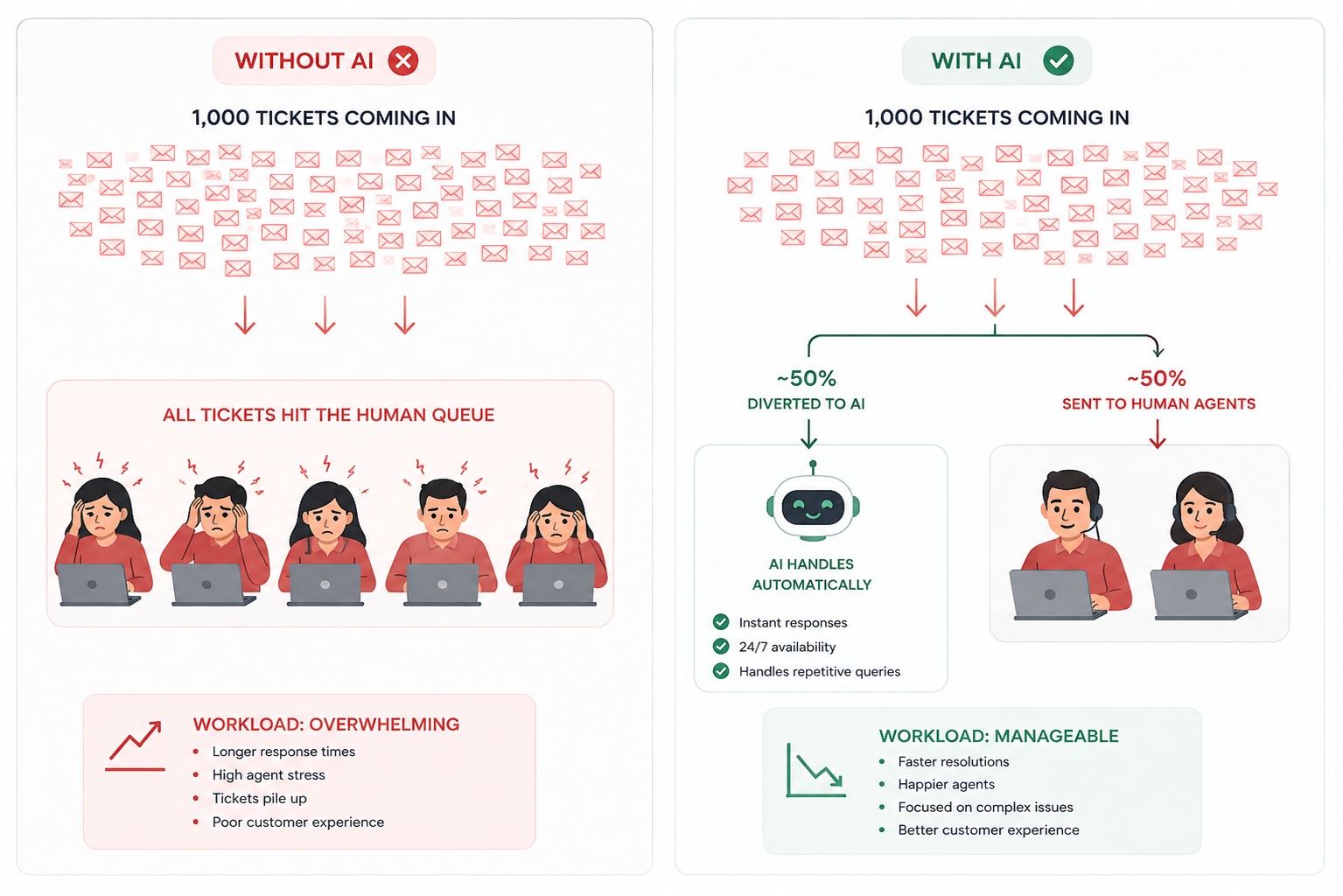
Before you balance workload across agents, decide how much workload should reach agents at all. This is the highest-leverage move in this guide, and it happens upstream of everything else.
Picture 1,000 tickets landing in the queue today. A large share of that volume, FAQs, repetitive requests, routine status checks, doesn't need a human's judgment to resolve. If all 1,000 of those tickets land directly on your human team, you already have a workload-balancing problem, no matter how well you route or measure what comes next. You haven't fixed the imbalance; you've just moved it downstream.
AI as the first line of defense changes the shape of the problem before it reaches your team. It absorbs the routine share of volume automatically, so 1,000 tickets in the queue become a much smaller number of tickets that actually need a person, tickets carrying real complexity, ambiguity, or emotional weight, the kind of work your best agents are suited for.
This is also where spike protection lives. Human-led Tier 1 support averages $22 per ticket, compared to approximately $1.84 for AI-driven interactions, which means the routine conversations that flood the queue during a surge are also the cheapest and easiest to remove from human load entirely. An agent already at capacity during normal volume hits a genuine crisis when a surge lands directly on their queue. An AI layer absorbing that surge is what keeps a spike from becoming a burnout event.
Step 2: Measure load by effort, not just count
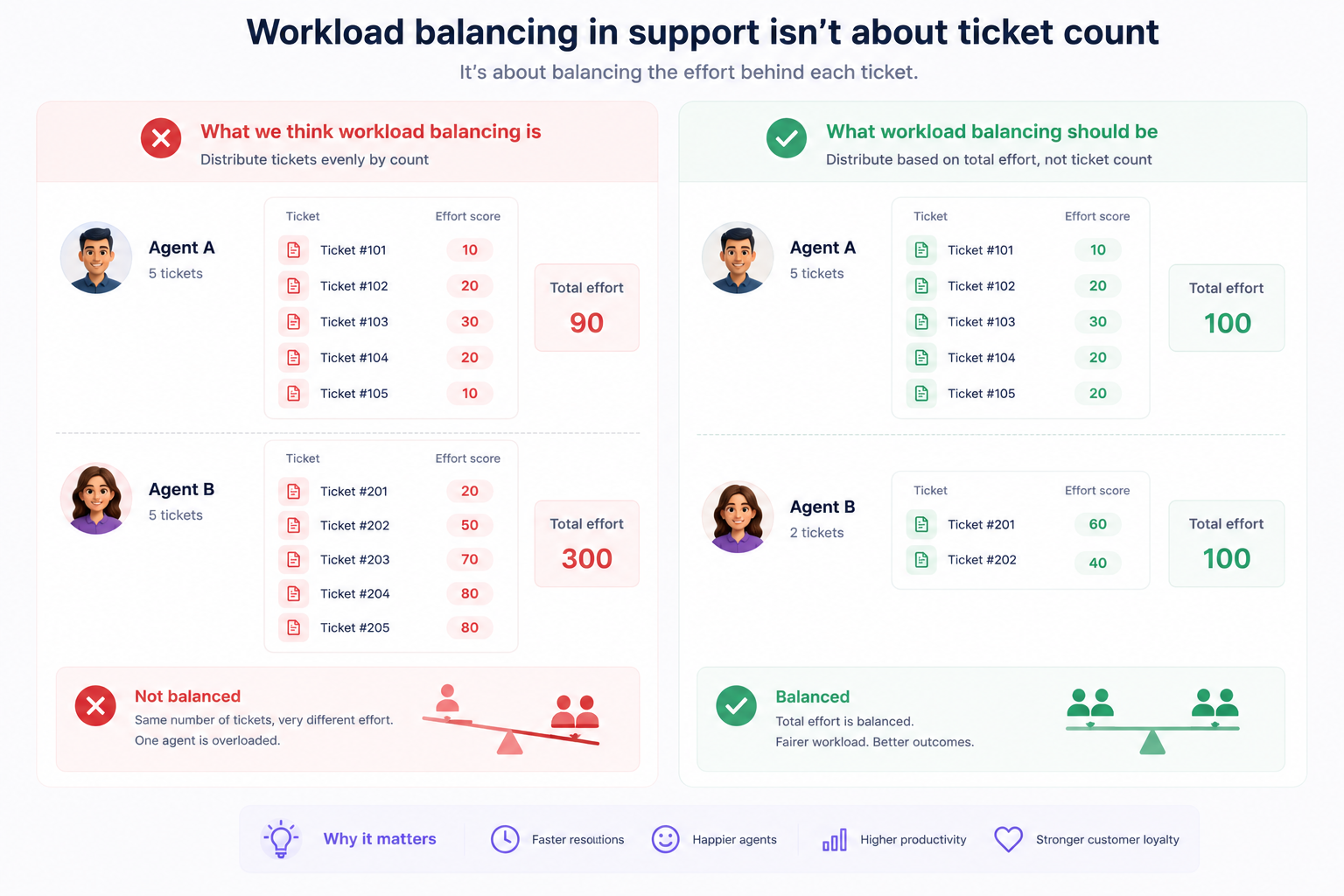
Move beyond open-conversations-per-agent. The actual workload each agent is carrying is determined by the complexity and intensity of their conversations. A queue that looks balanced by count can be wildly unbalanced by effort, and optimizing the count while ignoring the effort just relocates the imbalance somewhere you can't see it.
Workload analysis answers specific questions that ticket count alone cannot: Are some agents consistently overloaded while others are idle? Is the conversation mix shifting in ways the assignment model hasn't accounted for? Every imbalance has a cost; either wasted capacity or degraded output from agents who are stretched past their limit. The teams that catch burnout early are the ones watching effort distribution, not just volume distribution.
Step 3: Give agents AI tools that makes them more efficient
AI absorbing tickets before they reach a human only solves half the workload equation. The tickets that do reach an agent still carry effort, and how much effort depends on how fast that agent can find the right answer.
Crisp AI Assistant for customer support teams is the internal assistant your team can open from the Inbox sidebar. It's meant for agents, not customers, helping them ask questions, understand policies, or draft better replies while keeping the final send under human control. It searches across your private and public data sources in seconds and delivers the right answer in context, which means an agent handling a complex billing dispute isn't also burning ten minutes digging through docs and past conversations to find the one policy detail that matters.
This is what actually moves the effort number from Step 2: two agents can carry the same ticket count, but the one spending half their time on lookups is carrying more real load than the count shows.
Hugo Virtual Support Agent helps operators understand customer requests, use available context, summarize conversations, draft better answers, and prepare handovers, all inside the same conversation, so the lookup tax disappears without anyone getting reassigned.
Step 3: Route with workload awareness built in
This is where workload management and routing meet.
If routing ignores load, it recreates the imbalance with every assignment; if it accounts for load, balance maintains itself as conversations arrive, and keeping qualified agents able to resolve on first contact protects first-contact resolution, which Gartner found cuts repeat calls by up to 40%, escalations by 50%, and channel switching by 54%.
Step 4: Make the queue visible to everyone
Give the whole team, not just the manager, a shared view of the queue, so load-balancing isn't a single point of failure. When only the manager can see and redistribute work, balancing stalls whenever they're in a meeting, handling an escalation, or simply not watching. A shared, visible queue lets the team self-level.
Workload imbalances often remain invisible until they've already caused problems. Making distribution visible and quantifiable is what allows operations to fix the highest-impact problems first. Visibility for one person is a bottleneck. Visibility for everyone is a release valve. Agents can see where the pressure is building and shift toward it without waiting for a manager to intervene.
Signs that workload is balanced
You'll know the system is working when your strongest agents stop being your most loaded ones, and when volume spikes stop producing burnout events. The specific numbers that confirm distribution is functioning:
- AI containment rate, and whether it's rising. This is the share of total volume resolved without human involvement. A flat or falling containment rate means more raw volume is reaching agents regardless of how well you route or measure it downstream, it's the clearest signal that Step 1 is or isn't doing its job.
- Escalation accuracy. Of what AI hands off to a human, how much of it genuinely needed a person versus could have been resolved automatically? Low accuracy means your first line of defense is either over-escalating routine work or under-escalating complex work, both of which reintroduce imbalance further down the chain.
- Agent utilization rate staying between 60–80%. If utilization is too high, burnout is around the corner. Too low, and capacity is being wasted. The healthy range is the sustainable middle: agents active enough to be productive, not stretched thin enough to degrade quality and start disengaging. Utilization consistently above 85% across your best agents is a burnout signal, not a productivity signal.
- Tickets-per-agent variance staying narrow. A large difference in tickets per agent reveals that workload isn't balanced, some agents are overwhelmed and losing quality, while others are underutilized. Even distribution by count isn't sufficient (see Step 1), but a wide variance in count is still a signal that the assignment model isn't functioning. Watch both count and effort distribution together.
- Voluntary turnover among senior agents declining. Over 60% of departing agents cite stress as the primary reason for leaving. When your most experienced people stop leaving, it's the most direct evidence that load concentration has been addressed. This metric lags: it takes months to show up, but it's the most consequential one on the list.
- CSAT holding steady or rising during volume spikes. If CSAT drops every time volume increases, overloaded agents are degrading quality under pressure. If it holds, the spike protection is working: AI is absorbing the routine, humans are staying at manageable load, and the quality of harder interactions doesn't collapse because bandwidth is preserved.
Workload Management in Crisp
Hugo, Crisp's AI Agent, sits in front of the queue and is built to autonomously handle a large share of incoming conversations, performing real actions through your integrations within rules you define, only escalating what actually needs a person. When Hugo does hand off, it doesn't just dump the conversation into an unowned queue: it lets the customer know a human is taking over and routes the conversation to your human-dedicated inboxes, and that escalation triggers your normal operator routing rules as usual for the rest of your conversations.
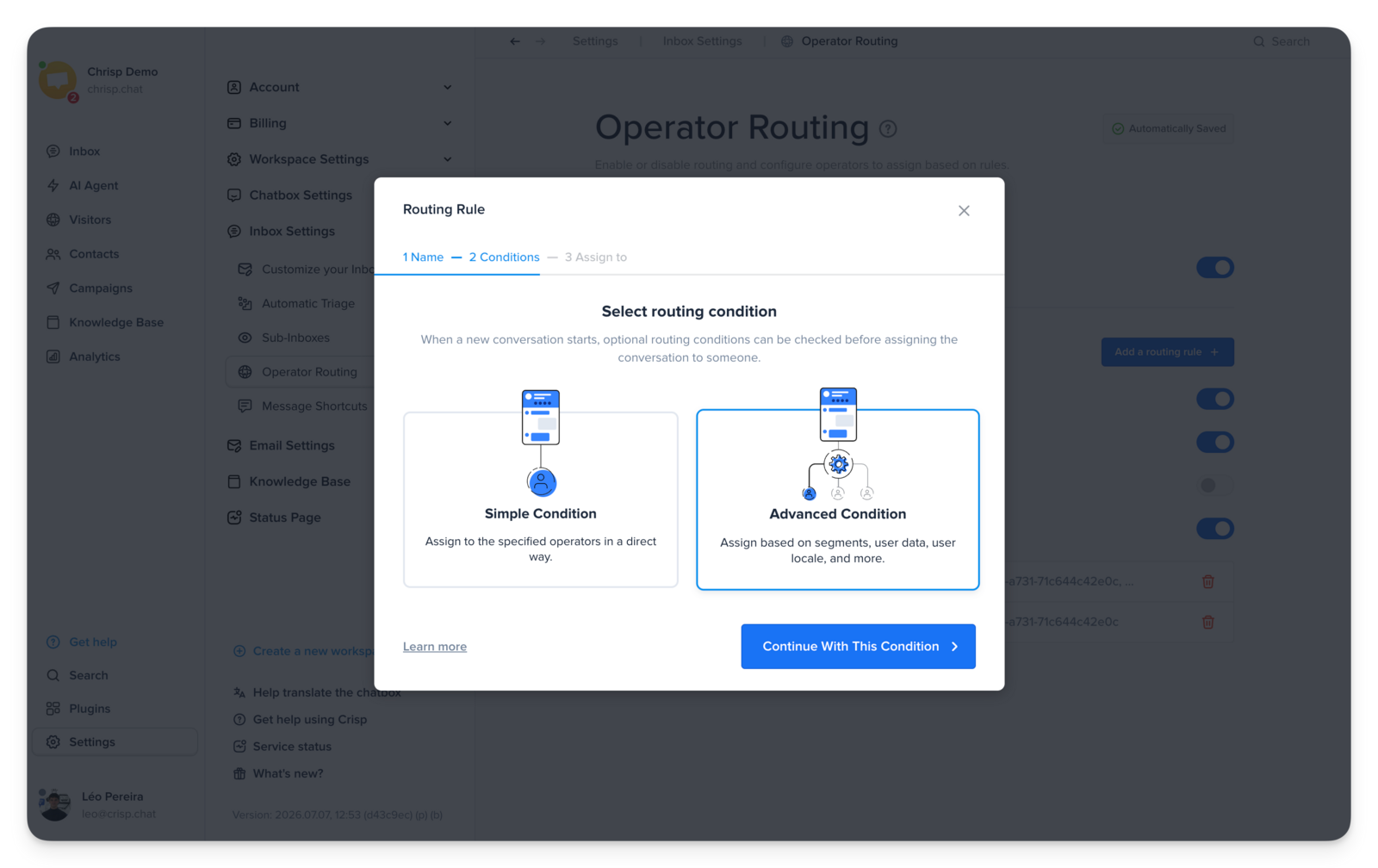
For what's left, Crisp doesn't leave distribution to chance. When several agents are eligible for a conversation, Crisp uses a routing distribution algorithm designed to balance conversations more evenly across eligible operators and rules rather than assigning randomly, and it specifically accounts for operators who belong to several overlapping rules, agents going offline and coming back online during the day, and teams working fragmented or split shifts.
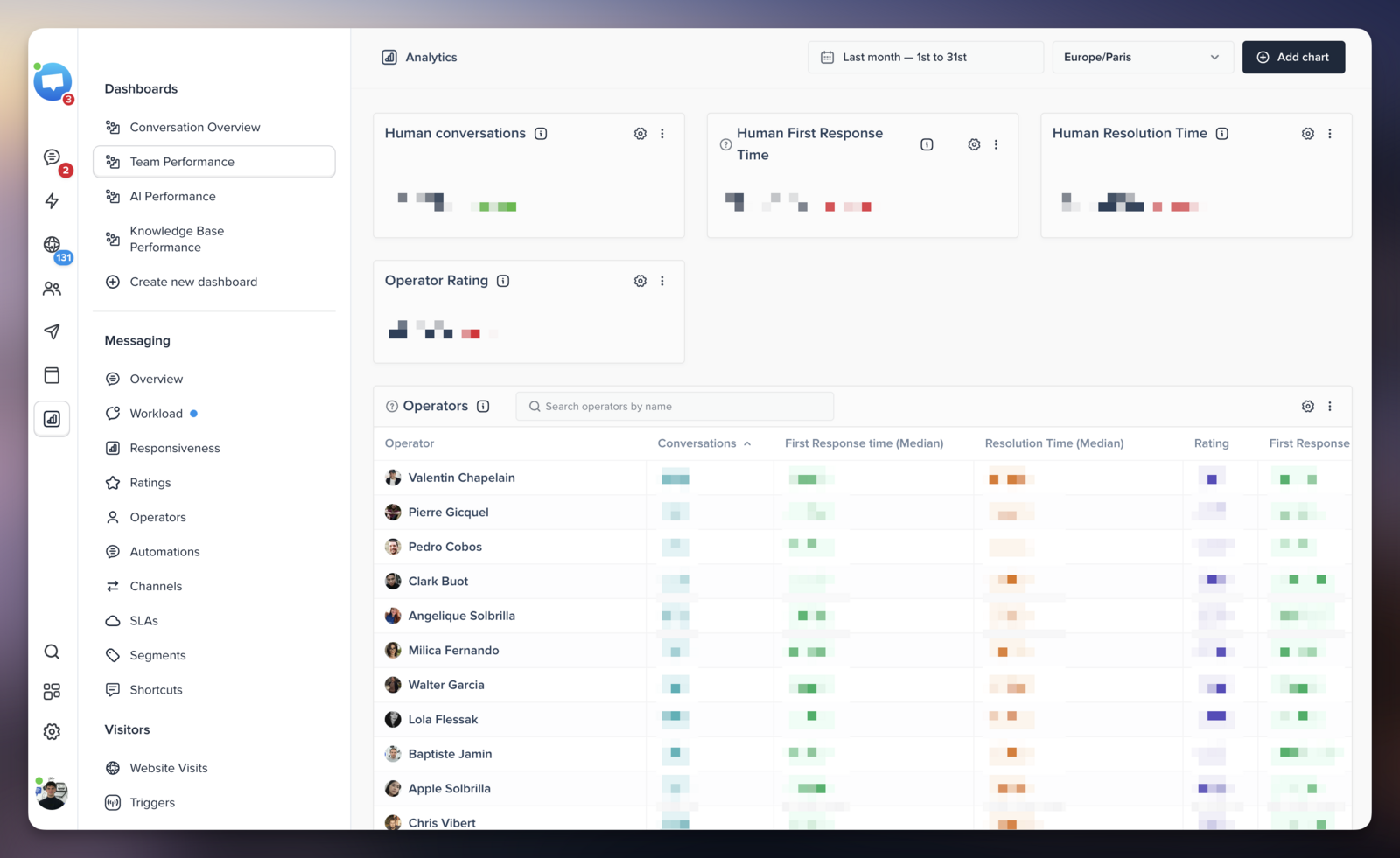
Visibility doesn't stay locked to a manager's dashboard, either. The Team Performance Dashboard surfaces Conversations Per Operator, first response time, resolution time, operator ratings, and conversations breaching SLA, and the standard read is to start with workload distribution: if a few operators are handling a disproportionate share, that's the signal to review routing, shifts, and assignment rules before it turns into a burnout problem.
The goal isn't perfect distribution on a spreadsheet. It's a team where no one is quietly absorbing a disproportionate share of the hardest work, and where the agents best at handling difficult conversations stay long enough to keep getting better at it.
Frequently asked questions
Why is open-conversations-per-agent a misleading metric for workload?
Because it treats a 30-second reply and an hour-long complaint as equal. Two agents can have the same ticket count with completely different effort loads. Balancing on count alone moves the imbalance somewhere you can't see it.
What's the difference between skills-based routing and workload-aware routing?
Skills-based routing sends conversations to agents qualified to resolve them. Workload-aware routing factors in who has capacity right now. Without both, you maximize skill match while burning out your specialists.
How much does agent turnover actually cost?
Replacing a single frontline agent runs $10,000–$20,000 when you factor in recruiting, training, and the 60–90 day ramp period where quality is lower. High turnover also destroys institutional knowledge, the context and pattern recognition that can't be documented.
What's a healthy agent utilization rate?
Between 60–80% is the sustainable range. Consistently above 85% is a burnout precursor, not a sign of a productive team. The goal is agents who are active and engaged — not stretched to the point where quality starts degrading.
How does AI help with workload balance during spikes?
By resolving routine conversations autonomously, AI prevents volume spikes from translating directly into human workload. The queue grows; the human pressure doesn't have to. That's what keeps agents at a manageable load when inbound surges hit.
How do I know if load is concentrated on my best agents?
Pull utilization and ticket distribution by agent over 30 days. If your highest-performers consistently show the highest load, the routing model is creating concentration. It's not a coincidence — it's the system rewarding speed with more work.
Sources
McKinsey & Company, Addressing Employee Burnout: Are You Solving the Right Problem, https://www.mckinsey.com/mhi/our-insights/addressing-employee-burnout-are-you-solving-the-right-problem
McKinsey & Company, Predictive Analytics in Contact Centers: Workforce Efficiency Research, https://www.mckinsey.com/capabilities/operations/our-insights/the-next-frontier-of-customer-engagement-ai-enabled-customer-service
Gartner, Customer Service Disloyalty and the Effortless Experience, https://www.gartner.com/en/customer-service-support/insights/effortless-experience
Gartner, Agentic AI Will Autonomously Resolve 80% of Customer Service Issues by 2029, https://www.gartner.com/en/newsroom/press-releases/2025-03-05-gartner-predicts-agentic-ai-will-autonomously-resolve-80-percent-of-common-customer-service-issues-without-human-intervention-by-20290
Forrester Research, 2026 Customer Service AI Predictions, https://www.forrester.com/blogs/2026-the-year-ai-gets-real-for-customer-service-but-its-not-glamorous-work
Forrester Research, The Future of Customer Service, https://www.forrester.com/report/the-future-of-customer-service/RES137042
Eagle Hill Consulting, Workforce Burnout Survey 2025, https://www.eaglehillconsulting.com/news/workforce-burnout-survey-2025
Aflac, 15th Annual WorkForces Report 2025, https://www.aflac.com/business/resources/aflac-workforces-report/default.aspx
Harvard Business Review, AI Can Help Reduce Customer Service Costs — But Don't Automate the Wrong Things, https://hbr.org/2023/04/ai-can-help-reduce-customer-service-costs-but-dont-automate-the-wrong-things
U.S. Bureau of Labor Statistics, Customer Service Representatives Occupational Outlook, https://www.bls.gov/ooh/office-and-administrative-support/customer-service-representatives.htm
📚 Related articles
Automated ticket routing: how to get every conversation to the right agent · Round-robin vs skills-based ticket assignment: which routing method is right for your team? · How to set up automated ticket routing rules that actually work

September 2026 - Product Update
Discover the new Knowledge Base editor, benchmark your AI support performance, track how often Hugo escalates conversations, and more. Discover the latest features and improvements released by the Crisp team in September 2026.


Summer 2026 - Product Update
Meet the refreshed Crisp experience, Understand how Artificial Intelligence handles every conversation, Build reusable teams across your workspace, and more. Discover the latest features and improvements released by the Crisp team in Summer 2026.

Best 9 helpdesk software and ticketing systems for 2026
Need help to choose your next helpdesk with a ticketing tool for 2026? We've gathered a guide that gives you everything you need to convince your C-levels.