Customer Support Brain: Build an AI Customer Service Agent That Actually Resolves Tickets
Get started with your first AI Brain for customer support, the self-improving piece of knowledge that gets the work done.

It's Monday, 9:04 a.m. Your inbox holds 312 new conversations from the weekend. You skim the first twenty. "Where is my order?" "How do I reset my password?" "Can I switch to yearly billing?" Same questions, different names. Your team will spend the morning copy-pasting answers they've written a thousand times, and the one customer about to churn sits at position 247.
This is the problem an AI customer service agent solves, if you build it right. Gartner predicts that by 2029, agentic AI will autonomously resolve 80% of common customer service issues without human intervention. The same research firm found that 64% of customers would prefer companies didn't use AI for customer service at all.
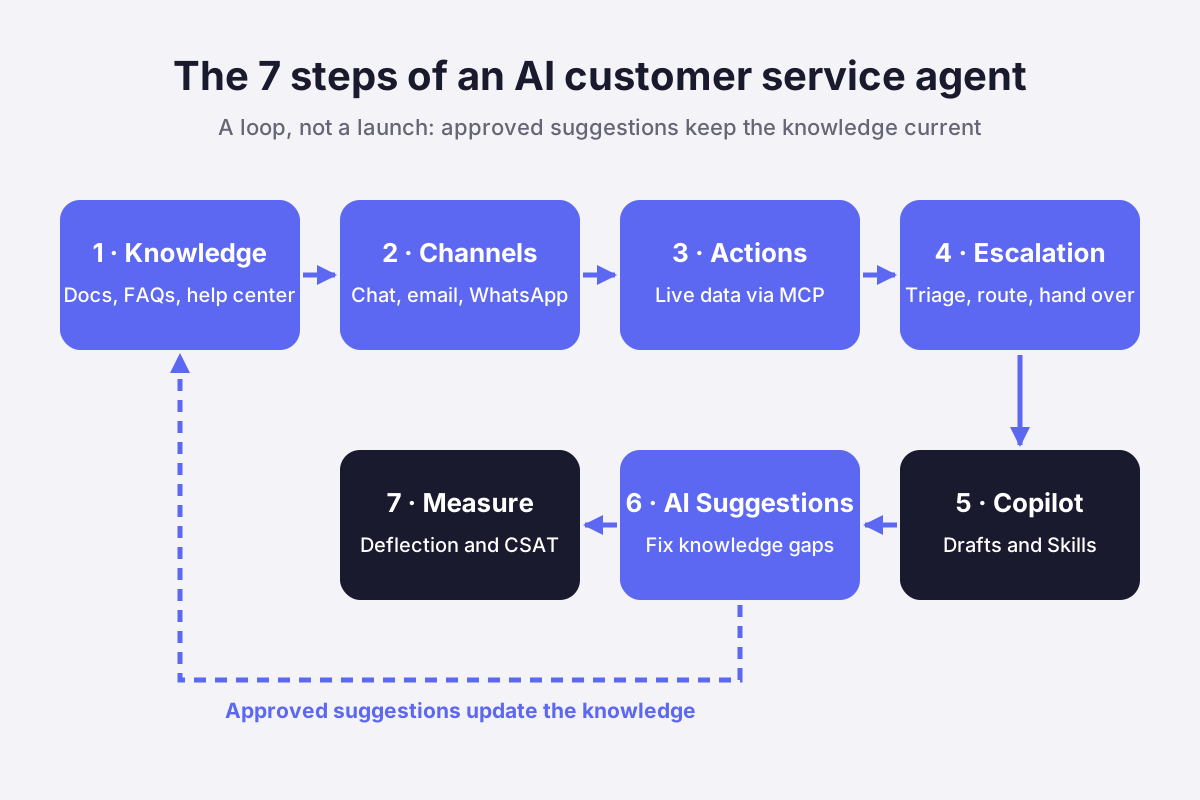
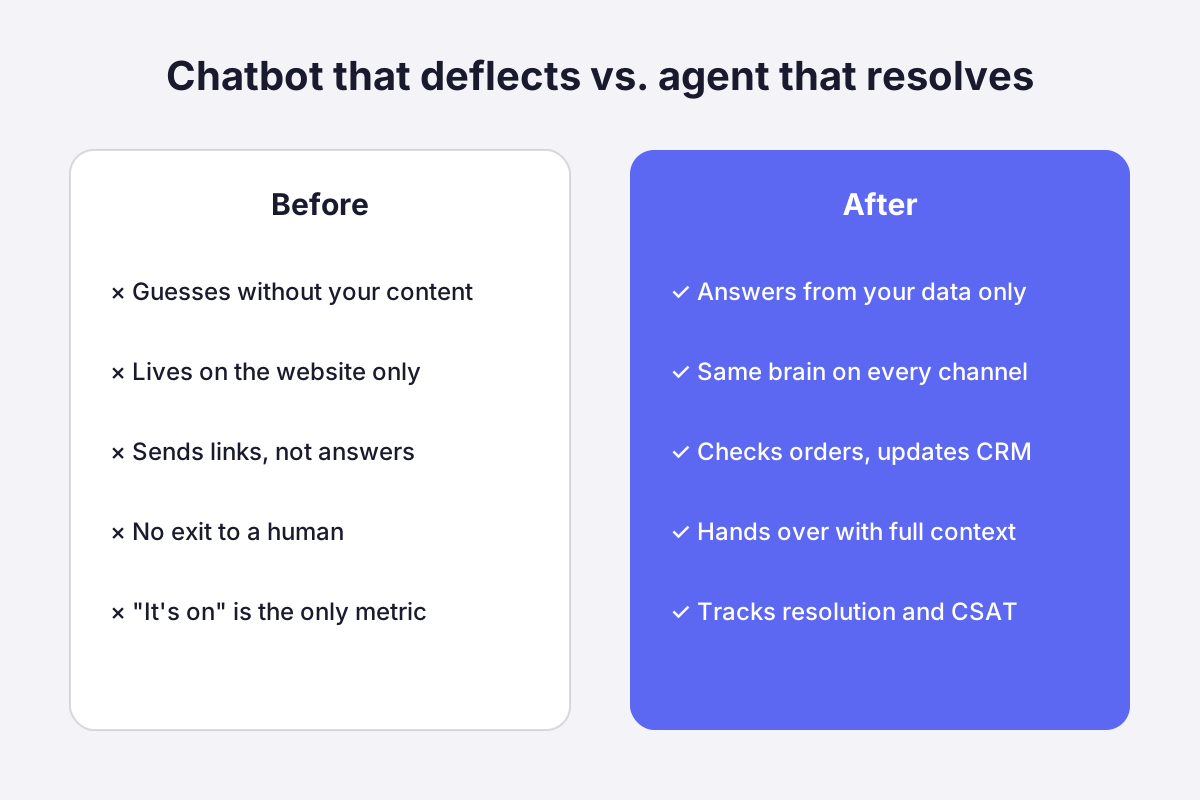
Both numbers are true at once. The gap between them is the gap between a chatbot that deflects and a support brain that resolves. This guide walks you through building the second one, in seven steps.
Why most AI support projects stall
AI support projects stall because teams start with the wrong question. They ask "which bot should we buy?" when the real question is "what does the AI need to know, and what is it allowed to do?"
A bot with no access to your knowledge guesses. A bot that can only link to help articles frustrates. A bot with no exit to a human traps customers, which is precisely what they fear: in Gartner's survey, the top concern was that AI would make it harder to reach a person.
The teams that get results treat the AI as a new teammate. It reads everything you know. It answers on every channel, day and night. It takes actions in your tools. And it knows when a human should take over. Your team keeps the conversations that need judgment, empathy, or a decision. The AI takes the repetitive volume.
That framing also protects you from the opposite mistake. Gartner expects that 50% of organizations planning to significantly cut their service workforce because of AI will abandon those plans by 2027. The goal is not an agentless team. The goal is a team that never touches the same question twice.
Step 1: Feed it your knowledge
An AI customer service agent answers only as well as the content behind it. The rule is simple: it answers from your data only. No guessing, no invented refund policy, no made-up feature.
Before: your answers live in a help center nobody updates, a pricing PDF in someone's Drive, and the heads of three senior agents.
After: every source sits in one place the AI reads from. That means your help center and knowledge base articles, your docs, FAQs and PDFs (pricing grids, onboarding guides, terms), your website, and your helpdesk and CRM, so the AI stays in sync with how you actually work today.
How to do it in Crisp: Hugo, Crisp's AI agent, trains from the Train section of the AI Agent menu:
- Questions & Answers: short snippets that act as Hugo's private FAQ. Keep them purely informative: a question as the title, the answer as the content. Tone and behavior belong in Instructions, not here.
- Web pages: Hugo crawls your site and ingests its content. Add a URL filter to skip pages that would dilute relevance.
- Files: import CSV, PDF, or TXT files for pricing grids, manuals, or structured Q&A.
- Knowledge Base: Hugo retrains automatically every time you create, update, or delete an article.
Before training, fill in Agent → Settings with a business description written as if you were introducing your company to a new audience. Hugo uses it to understand what you sell and to whom.
One point that matters for privacy: Hugo does not train on your inbox conversations. It uses only the sources you enable, plus the context of the current conversation, so one customer's private details don't resurface in another customer's answer. When a resolved conversation contains a good answer, turn it into a Q&A snippet. Full setup: Getting started with Hugo AI Agent.
💡 Quick win: write Q&A snippets for your 20 most asked questions first. That alone usually covers a big chunk of your volume.


Step 2: Answer customers on every channel
Customers don't care which channel your AI was configured for. They write where they already are.
Before: the chatbot lives on your website. Email, WhatsApp, and Instagram still land in a human queue.
After: one trained agent answers on the website chat widget, email, WhatsApp, Messenger, Instagram, and more, with the same knowledge and the same tone everywhere.
The second shift matters even more: the AI handles full conversations, not single questions. It keeps context across several messages, so a customer can ask a follow-up without starting over.
Customer: Can I switch from monthly to yearly billing?
AI agent: Yes, you can switch anytime from your billing settings. Want me to walk you through it?
Customer: And do I keep my current data?
AI agent: Yes, nothing changes on your account. Only the billing cycle does.
How to do it in Crisp: Hugo runs on 10 channels from the Crisp inbox. Connect each channel once (WhatsApp Business, Instagram DM, Messenger), then go to AI Agent → Agent → Activation:
- Tick Enable agent for new conversation.
- Set the default target to Answer with AI Agent.
- Optionally restrict Hugo to specific channels. Everything else goes straight to your human agents.
Conversations Hugo handles land in a dedicated Automated inbox, so your main inbox only shows what needs a human. Before going live, test real customer questions in Evaluate → Playground: it's a sandbox, so nothing you try there touches production. Hugo also detects the customer's language and answers in it.
💡 Quick win: configure office hours in Agent → Activation and start Hugo only when your team is offline. You cover nights and weekends with zero risk to your daytime service.
Step 3: Let it take action in your tools
An AI customer service agent stops being a smarter FAQ the moment it can act in your tools. A customer asking "where is my order?" doesn't want a link to your shipping policy. They want the tracking status.
Before: the AI says "please contact our team" for anything that requires account data.
After: the AI connects to your business tools, reads live data, and acts on it. In practice, it can look up an order or delivery status, check a customer's plan or subscription, update a contact in your CRM, create or tag a ticket, and pull account info before answering.
This is the core of what Gartner calls agentic AI: systems that take action to resolve requests, not just provide information.
How to do it in Crisp: Hugo uses tools through MCP (Model Context Protocol). Think of MCP as the back-office for your AI agent.
Go to AI Agent → Automate → MCP & Integrations and pick one of two paths:
- 1-Click Integrations: native tools for Shopify, WooCommerce, PrestaShop, Stripe, Monday or Notion. For "Where is my order?", connect your store and enable the Get Order Details tool. Hugo then answers order status questions with live data, on every channel, with no workflow to build.
- External MCP servers: connect your own back-office. If you already have a REST API, most of the work is done: expose the existing endpoints as MCP tools and define what the AI can read or do.
Tool descriptions do the heavy lifting: they tell Hugo when and how to use each tool, so write them in detail. For sensitive actions, enable Require user identity verification on the tool, and Hugo sends the customer a one-time code by email or SMS before executing it.
Full guide: How to build MCP integrations with Hugo.
Step 4: Triage, route, and escalate
Escalation is not a failure state. It's a feature you design. The best AI agents know when to step aside, and they hand over cleanly.
Before: every conversation lands in one queue. A VIP waits behind a password reset. The customer explains their problem twice: once to the bot, once to the agent.
After: you design the flow. The AI detects the topic and urgency of each request (triage). It sends billing to finance, bugs to product, and VIPs to a senior agent (routing). It hands over to a human whenever it shouldn't answer alone (escalation). When it escalates, your agent gets the full conversation and context. The customer never repeats themselves.
How to do it in Crisp: Hugo escalates in three ways:
- Automated escalation: in Agent → Settings → Auto-Escalation, enable "Offer human when Hugo can't find an answer" and "Automatically escalate when the user is frustrated or asks for a human." Hugo tells the customer an agent is coming and moves the conversation to your human inboxes.
- Situational escalation: in Guidance → Routing, describe a situation (an intent, a topic, or an emotion) and choose an action: hand over to an Inbox, start a Workflow, or let the Agent handle it.
- Manual escalation: reply to any conversation in the Automated inbox and Hugo steps aside instantly.
Routing rules describe what Hugo should detect, never how it should reply. A good one is specific and lists its exceptions:
The customer asks about personalized cookies for events (e.g. weddings, birthdays, corporate gifts, bulk quantities). Does not apply if the customer asks about the delivery status of an existing order.
"The customer is asking about an order" is too broad and will misfire. Hugo's Review with AI button flags vague, conflicting, or over-broad rules for you. To triage, create topics in Automate → Topic detection and auto-assign a segment when one is detected, so a Billing topic can route straight to your finance inbox. For multi-step flows, such as collecting an order number before handover, routing rules can start one of your Workflows, the no-code visual builder. Details: How does Hugo Routing work.
Step 5: Give your team a copilot
The AI that answers customers should also work for your agents. Every conversation that reaches a human is, by definition, a hard one. That's where speed and context matter most.
Before: agents search three tools for an answer, then rewrite it to fix the tone.
After: inside the inbox, agents get smart reply suggestions trained on your content, auto-summaries of long conversations, and writing tools to fix tone, translate, or shorten an answer.
The impact is measurable. A study of 5,179 support agents found that AI assistance increased productivity by 14% on average, and by 34% for novice and low-skilled workers. The same study found AI assistance improved customer sentiment and employee retention.
How to do it in Crisp: Hugo Copilot sits inside the Crisp inbox. Beyond drafts and summaries, you can turn your recurring procedures into Copilot Skills in AI Agent → Guidance → Copilot skills. Each Skill has a command (such as /ticket or /investigate), a description, instructions, and a result type: plain text, text to copy, a reply draft, or a private note. Agents run a Skill by typing its command, and Workspace Skills can trigger automatically when an agent describes the task in plain language.
For reliable Skills, structure the instructions in four parts: the task, the process, the output format, and the rules (for example, "only include information confirmed by the conversation or available tools"). Copilot Skills only help your agents. Hugo never uses them to answer customers. Full guide: How to create and manage Copilot Skills.
/ticket Skill that formats bug reports for your product team. That's where the NBER study found the biggest gains.Step 6: Build a self-improving AI Brain
An AI customer service agent is never finished: your product ships new features, your pricing changes, and customers find questions nobody wrote an answer for. The knowledge you loaded in Step 1 starts aging the day you go live.
Before: someone on the team rereads conversations "when there's time," spots a gap, and maybe updates an article three weeks later. Meanwhile, the AI keeps escalating the same question.
After: the AI reads your customer conversations, groups them into recurring themes, and proposes concrete fixes to its own knowledge: add what customers keep asking about, update what's incomplete, correct what no longer matches reality, and remove what's outdated. Your team reviews and approves. The agent gets better every cycle, and the gap between your documentation and what customers actually ask keeps shrinking.
How to do it in Crisp: go to AI Agent → Evaluate → AI Suggestions. The page opens on an Analysis recap: an AI digest of the period, the number of conversations analyzed, the recurring themes detected, and the suggestions generated. Expand "What customers wrote about" to see each theme with real examples.
Below it, Suggested improvements lists the proposed changes to your Knowledge Base articles and Q&A snippets. Each one shows the content concerned, the addition, edit, or removal recommended, why Hugo flagged it, how many conversations support it, and how strong the signal is. Open a suggestion to see the changes highlighted in the existing content, then accept or reject each one individually (or use Accept All) and save. Nothing changes until you approve it.
A few settings keep the loop clean:
- Settings: pick the AI model, the output language, and custom instructions so suggestions follow your documentation style and tone.
- Statuses: suggestions move between Improvements, Approved, Ignored, and Outdated. Outdated means the source changed after the suggestion was generated, so check the latest version before editing again.
- Re-analyze: after a round of fixes, run a fresh analysis to see what customers are asking about next.
AI Suggestions is available on the Crisp Plus plan. Full guide: How to use Hugo AI Suggestions.
Step 7: Measure what it does
An AI agent improves only when you measure what it resolves. Vanity metrics like "conversations handled" hide the real picture.
Before: you know the bot is "on." You don't know if it's helping.
After: you track three numbers in real time: how many conversations the AI resolves on its own, answer accuracy, and customer satisfaction. You see exactly where it performs, and where your knowledge base needs one more article.
How to do it in Crisp: AI Agent → Evaluate → Analytics shows conversation funnels (how often Hugo activates and how it handled each conversation) and topic volumes. To measure ROI, import the ready-made AI Performance dashboard in Analytics → Create new dashboard → Import dashboard and track the metrics that matter:
- Deflected conversations: fully resolved by AI with no human. The main driver of ROI.
- Automation first-hand: conversations where the AI sends the first reply.
- Avg. resolution time, AI vs. human: the gap is time your team gets back.
- Automation rating: how customers rate AI answers. Deflection without good ratings is not a win.
- Fallback messages: answers the AI couldn't give. Each one points to missing content.
Plug those numbers into the free AI Performance Calculator to turn deflection into hours and cost saved.
💡 Quick win: sort your fallback messages by topic each Friday. If a topic keeps coming back after an AI Suggestions cycle, it needs a new Q&A snippet or knowledge base article.
10 things you can automate this week
Once the seven steps are in place, these are the requests most teams hand to the AI first:
- "Where is my order?"
- Password resets and login issues
- Pricing and plan questions
- Billing changes and invoice requests
- Onboarding questions from new customers
- Feature questions ("Can I do X with your product?")
- Return and refund policy questions
- Tagging and routing every incoming ticket
- After-hours and weekend coverage
- Answering in your customers' languages
Common mistakes along the way
Launching on everything at once. The team that turns the AI on across all topics on day one spends week two apologizing. Start with your top 20 questions, prove accuracy, then expand.
Hiding the human. If customers can't find the exit, they'll find a competitor. Gartner found 53% of customers would consider switching if they learned a company was going to use AI for customer service. A visible handover path is what earns their trust.
Feeding it stale content. An outdated pricing page becomes an outdated answer, delivered confidently at 3 a.m. Treat knowledge base maintenance as part of the AI project, not a separate chore.
Ignoring data residency. Your AI reads customer conversations and account data. Know where that data is stored and processed before you connect anything, and pick the processing region and model that match your policy.
What success looks like
Picture the next Monday. The weekend's order-status and billing questions are already resolved. The 40 conversations waiting for your team are the ones that need a human: an angry enterprise customer, a bug report, a renewal negotiation. Your newest agent answers a tricky question in two minutes with a copilot draft. On Friday, you approve three AI Suggestions that close the gaps from the week's conversations.
That's not a forecast. Teams running Hugo report real numbers: AFS Foiling automates around 60% of its requests, while EMMA and Spider-vo each automate around 40%, with an average customer satisfaction of 4.7/5.
Pick the model and keep control of your data
Hugo runs on the model of your choice: OpenAI, Anthropic , Google Gemini, Mistral, or models hosted by Crisp for teams with stricter EU hosting requirements.
- Start with automatic selection,
- compare models side by side in the Playground on your real questions.
- In Agent → Settings, you also choose the processing region,
- enable a Crisp-hosted fallback model in case a provider goes down,
- set Answer guidance: Conservative (Hugo answers only with highly relevant sources), Balanced, or Creative. Guide: How to choose and configure Hugo's AI model.
On security, Crisp is GDPR-compliant, stores data on 🇪🇺 European servers, and uses enterprise-grade encryption with strict access controls.
Build your AI customer service agent in under 5 minutes
An AI customer service agent that actually resolves tickets comes down to seven moves: feed it your knowledge, put it on every channel, let it act in your tools, design the escalation, equip your team, keep improving its knowledge, and measure everything. Skip one and you get a chatbot. Do all seven and you get a teammate that handles the repetitive volume while your people handle what matters.
Hugo is built by Crisp and trusted by 10,000+ companies. Connect your knowledge, pick your channels, and watch it answer your first conversations today.
Start for free with a 14-day free trial, no card required.

Single customer view: how to unify scattered data into one support-ready record
Customer data lives in five tools, and none of them sit where the reply happens. Here is how to build a single customer view that your AI agent and your team can both use the second a conversation opens.

SLA management in customer support: how to set response targets you actually keep
An AI agent can answer a customer in ten seconds, before a human ever sees the conversation. That changes what an SLA actually protects. This guide covers setting response and resolution targets from real data and catching breaches before they happen, not after.

Collaborative Inbox vs. Shared Mailbox: What's the Difference and Which One Does Your Team Need?
A shared mailbox works until two people answer the same customer. Here is what separates a native shared mailbox from a collaborative inbox, where each one breaks, and how to pick the right one when AI already answers first.