Automated ticket routing: how to get every conversation to the right agent
Manual triage worked when a manager could eyeball every conversation. Now that AI resolves the easy tickets automatically, what's left for your team is the hard, ambiguous residual: exactly the conversations where routing to the wrong agent hurts most.


Still have memories of your manager assigning conversations manually? Here is a quick revival:
A customer's message lands in the support queue.
The manager skims it, guesses who should take it, and assigns it. The agent opens it, realize it's not their area, and bounces it to someone who's out today, so it sits. By the time the right person sees it, the customer has waited hours for a problem that the right agent could have solved in minutes. Nobody did anything wrong. The routing did.
For years, that was just the cost of doing support: a tax every support team paid, but it's about to look indefensible. Now there is an AI agent in the loop, the easy tickets stop reaching the queue at all: they're resolved instantly, autonomously, before a human ever sees them.
What's left in front of your people is the hard, ambiguous, angry, high-stakes residual: exactly the conversations where sending it to the wrong agent hurts most.
In the AI agentic era, automated ticket routing becomes the bottleneck, because the work that survives automation is the work that most depends on landing in the right hands the first time.
And the old fix doesn't scale anymore: A human manually triaging a queue can guess at a billing question versus a bug but they can't reliably triage the spiky, messy edge cases AI hands back, the ones that need a specific person's context, workload, and skill.
On average, 23% of SaaS support tickets are misrouted, adding 4.2 hours to resolution times and costing teams managing 3,000 tickets monthly over $260,000 annually. That number was bad when humans handled everything. It gets worse when humans only handle the hard part.
This guide is about fixing that structurally. It covers:
- Why misrouted conversations cost more than you think, and more in the agentic AI era than before.
- Why manual ticket triage no longer holds up.
- How skills, workload, and AI-powered routing actually work.
- Best practices for routing conversations to the right agent or team automatically.
- How better routing improves response times, transfers, and first-contact resolution.
TL;DR — How to do automated ticket routing:
- Decide your routing logic first: choose whether to match by skill, language, workload, priority, or a combination, before configuring any rule
- Set up rule-based routing for the clear-cut cases: channel, keyword, tier, or language conversations that route unambiguously
- Add skills-based and workload-aware assignment so conversations reach agents equipped to resolve them without overloading the same specialists
- Layer in intent-based AI routing to catch what keyword rules can't, reading what the customer actually needs rather than surface-level text matches
- Keep 8–15 well-defined routing categories, since accuracy drops sharply above 20
- Revisit the rules regularly: routing logic decays as products, teams, and volume shift, so treat it as a living system, not a set-and-forget one
What Is Automated Ticket Routing?
Automated ticket routing is the system that reads each incoming conversation and assigns it to the agent or team best equipped to resolve it without a human making that decision by hand.
The emphasis is on best equipped, routing isn't just distribution. Handing tickets out evenly is easy but real routing matches each conversation to the agent most likely to resolve it on the first contact. A system that spreads load evenly while ignoring who can actually solve what isn't routing.
Routing is not the same as triage. Triage decides urgency; how fast a conversation needs attention. Routing decides ownership; who handles it.
Here's more clarity to help you understand the differences:
| Common Misconception | Routing Actually Means |
|---|---|
| Spreading tickets evenly across the team | Matching each conversation to the agent most likely to resolve it quickly and correctly |
| A manager manually assigning conversations from a queue | Automatically assigning conversations the moment they arrive using rules, skills, intent, and availability |
| Round-robin distribution that treats every ticket the same | Intelligent assignment based on expertise, workload, language, priority, and customer needs |
| A fixed workflow configured once and left untouched | An evolving system that adapts as products, teams, customer volume, and support processes change |
| Triage: determining what the issue is and how urgent it is | Routing: determining who should handle the issue once it has been identified |
| Categorizing and prioritizing conversations | Directing conversations to the best destination for resolution |
Shift to intent-based routing
For most of its history, routing has been static: round-robin rotation, or rules based on channel and manual tags. These ignore what the conversation is actually about.
The shift now underway is intent-based routing — AI reads the content of the incoming message, understands what the customer needs, and matches it to the right agent on that basis, rather than on a crude tag. This is the difference between routing on metadata and routing on meaning, and it's what finally lets automated routing match the accuracy a knowledgeable human would achieve — at machine speed and scale.
Why manual triage breaks as you grow
Every support team reaches a point where the systems that once felt efficient start creating friction. Early on, manually reviewing conversations and assigning them to the right person works well enough. Teams are small, products are simple, and everyone has a rough idea of who should handle what.
Growth changes that equation. More customers, more channels, more products, and more specialized agents mean every incoming conversation becomes a routing decision.
Understanding where manual triage begins to break down is the first step toward building a support operation that can scale without sacrificing speed, quality, or customer satisfaction.
1. The tipping point
Manual triage has a hard ceiling. With a few agents and one product line, a manager (or the agents themselves) can eyeball each conversation and assign it correctly from memory. Add products, channels, languages, and agents, and the number of routing decisions per day outpaces what any human can make well. The manager becomes a bottleneck, the whole queue waits behind, or triage gets rushed, and accuracy collapses. Either way, the thing that worked at a small scale actively holds the team back at a larger scale.
2. The cost of getting it wrong
Misrouting is more expensive than it looks because its cost is hidden in transfers. When a conversation goes to the wrong agent, it gets handed off — and every handoff forces the customer to wait longer and, often, to repeat themselves to the next person. That's not a minor annoyance; it's one of the most damaging things you can do to loyalty.
The loyalty math is unforgiving. Gartner research found that service interactions are nearly four times more likely to drive disloyalty than loyalty — so every misrouted conversation that adds a transfer is pushing an already-risky interaction toward the bad outcome.
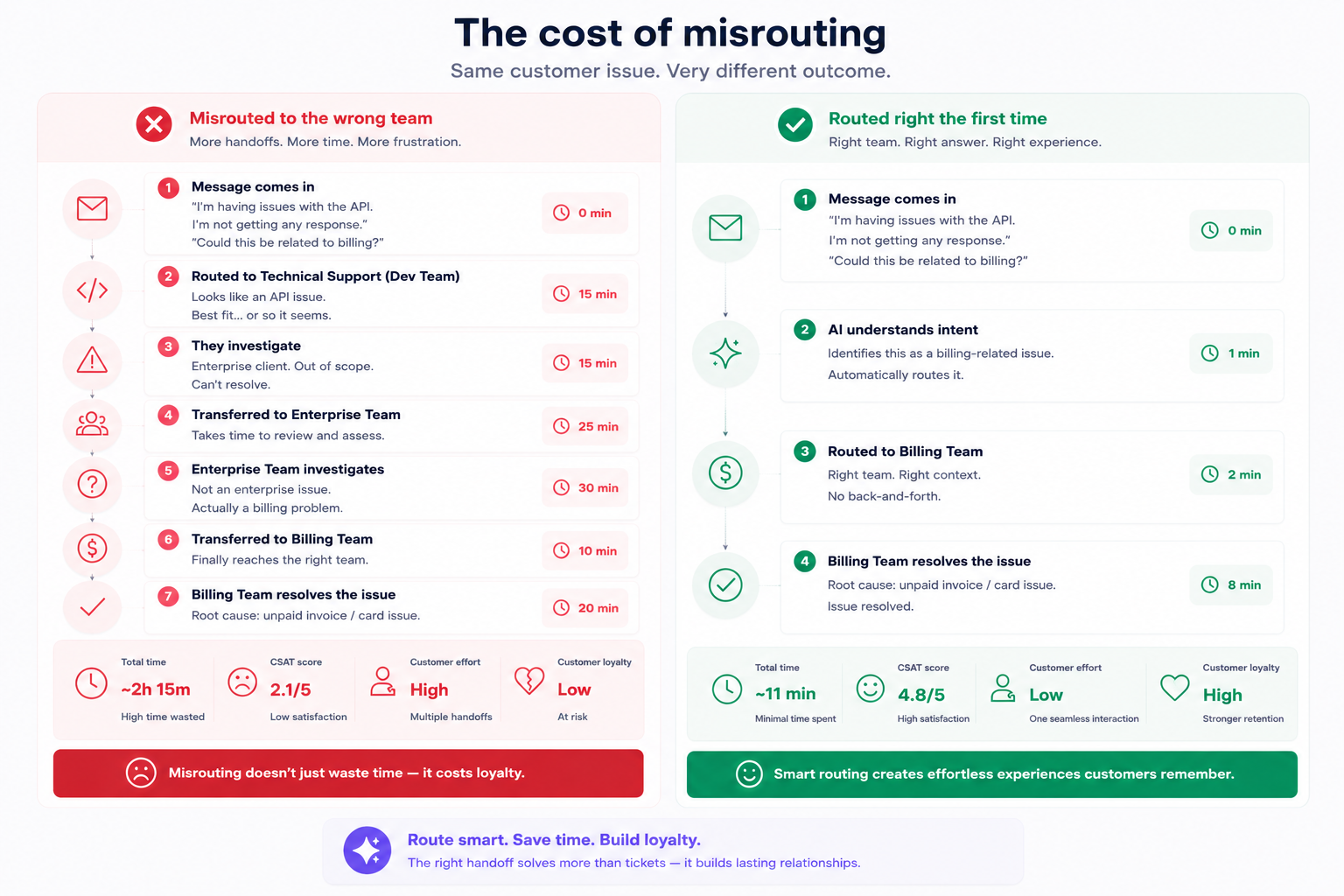
The flip side is the opportunity. Getting the conversation to the right agent the first time is what drives first-contact resolution — and FCR pays off directly: Gartner found that low-effort, first-contact resolution reduces repeat calls by up to 40%, escalations by 50%, and channel switching by 54%. Routing accuracy is upstream of all of that.
You've hit this point if...
- Conversations regularly get reassigned one or more times before reaching the person who resolves them.
- A manager spends a meaningful slice of the day sorting and assigning the queue by hand.
- Customers wait not because the team is at capacity, but because the right agent didn't see the conversation in time.
- The same few specialists become bottlenecks because everything in their area routes to them by default, regardless of load.
- When someone is out, conversations assigned to them simply sit until they're back.
If these are familiar, the issue isn't how hard your team is working — it's that routing decisions are being made by hand, or by rules too blunt to match conversations to the right people.
What good routing looks like
When routing works, conversations reach the right agent the moment they arrive — with no one sorting the queue by hand. A billing question goes to someone who handles billing. A message in French goes to a French speaker. An urgent issue from an enterprise account jumps the line. Load stays balanced, so no specialist drowns while others sit idle.
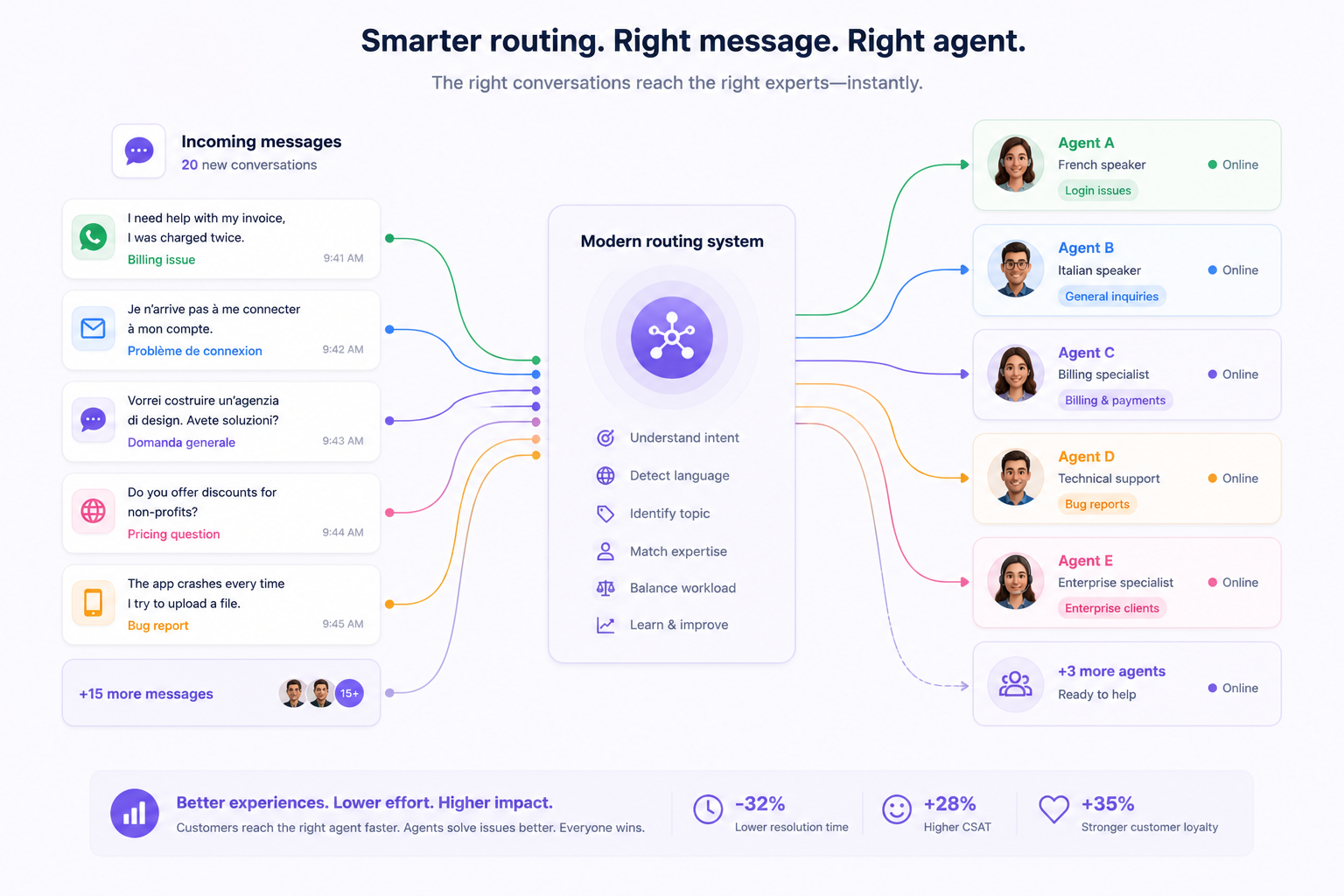
When someone is unavailable, their conversations reroute instead of stalling. Agents spend their time resolving issues in their wheelhouse — and customers reach the right person first, so they never have to explain themselves to a chain of agents.
Proxy metrics vs. real signals
Routing is easy to measure badly. Counting "tickets assigned" tells you the system is running, not that it's working. The signals that matter capture whether conversations reach the right agent.
| Proxy metric | Real signal |
|---|---|
| Tickets assigned per agent | First-contact resolution rate — solved by the first agent it reached |
| Even distribution across the team | Reassignment / transfer rate — how often a conversation is bounced |
| Queue cleared | Time-to-first-response by intent — are the right conversations reaching the right people fast |
| Number of routing rules configured | Misroute rate — share of conversations that reach the wrong agent first |
| Agent utilization in isolation | Balanced workload and CSAT held steady across agents |
The real signals — first-contact resolution, transfer rate, misroute rate — are the ones that move only when routing actually matches conversations to the people who can resolve them.
A realistic benchmark
Perfect routing isn't the goal; some conversations are genuinely ambiguous and will need a reassignment. The target is to drive the misroute and transfer rate down steadily as your rules and AI learn the patterns, while first-contact resolution climbs. A maturing team should see reassignments become the exception rather than a routine step in every conversation's life.
How to automate ticket routing: a layered approach
Routing isn't a single rule you configure and forget. Think of it like air traffic control: you have a set of protocols for the clear-cut cases, human judgment for the ambiguous ones, and systems that continuously update as the picture changes. You build it in layers.
Step 1: Decide your routing logic before you automate it
Choose how conversations should be matched:
- by skill,
- by language,
- by workload,
- by priority,
- or a combination, before you configure a single rule.
Map your most common conversation types to the agents or teams best equipped to handle them.
Automation executes your logic faithfully, including bad logic. If you automate a flawed routing model, you make the wrong assignments faster at a larger scale. When support teams use more than 20 routing categories, accuracy drops to around 78%. Teams with 8–15 well-defined categories achieve around 92% accuracy. The routing strategy is the decision; the tooling is the execution.
Step 2: Set up rule-based routing for the clear-cut cases
Build automatic assignment rules for conversations whose routing is unambiguous: a specific channel, a keyword, a customer tier, or a language going to a defined agent or team. A large share of conversations route cleanly on simple, deterministic rules.
Automating these removes the bulk of manual triage immediately and frees human attention for the genuinely ambiguous cases. AI classification cuts ticket handling time by 30–60 seconds per ticket and reduces misrouting by 50–60%, gains that start materialising as soon as the clearest routing decisions move from human judgment to automated rules.
Step 3: Add skills-based and workload-aware assignment
Route by agent skill so conversations reach people equipped to resolve them. Layer in workload awareness so assignments stay balanced rather than piling onto the same specialists.
Skill matching is what drives first-contact resolution. Workload awareness is what keeps it sustainable. Together, they eliminate both the "wrong agent" problem and the "same five people overloaded" problem. Escalated tickets cost 3–5x more to resolve than first-tier tickets. Every conversation that reaches the right agent the first time is a resolution you're getting at base cost, rather than at a multiplier.
Step 4: Layer in intent-based AI routing
Use AI to read the content of each incoming conversation, understand what the customer actually needs, and route on that meaning, not on channel, tags, or keywords alone.
A keyword rule can't distinguish between "I want to cancel because of a billing error" and "I want to cancel my newsletter subscription." Intent-based AI routing catches the cases that rules can't express, and pushes misroute rates down further.
AI-powered automation reduces backlogs by 35–55% and achieves 98% classification accuracy versus 60–70% for manual processes. That accuracy gap is where misrouting lives.
Common mistakes that keep ticket routing broken
No matter how prepped your routing system is, some mistakes are likely to happen. Here are some to watch out for and avoid:
- Defaulting to round-robin because it's simple. Round-robin distributes evenly, which feels fair and is easy to set up, but it ignores whether the assigned agent can actually resolve the conversation. An evenly distributed queue full of mismatched assignments generates transfers, and the wrong agent handling a conversation is slower than the conversation waiting briefly for the right one. Even distribution is an agent-fairness metric, not a customer-resolution one.
- Routing on metadata instead of meaning. Rules based on channel, tags, or keywords route on proxies for what the customer needs, not the need itself. A keyword rule can't tell the difference between "I want to cancel because of a bug" and "I want to cancel my newsletter." Static rules handle the clear cases; the ambiguous ones need routing that reads intent, otherwise they misroute and bounce.
- Setting routing rules once and never revisiting them. Routing logic decays. New products launch, teams reorganize, agents come and go, and volume shifts between channels — and rules written for last year's setup quietly start misrouting. The teams whose routing keeps working are the ones who treat it as a living system, checking misroute and reassignment rates and tuning the rules as the business changes.
How to master automated ticket routing?
Go deeper on each part of routing:
→ Round-robin vs. skills-based ticket assignment: which routing method is right for your team? — the decision framework for choosing how to match conversations to agents.
→ Skills-based vs. team-based ticket assignment: which routing method is right for your business? — the decision framework for choosing how to match conversations to agents.
→ How to set up automated ticket routing rules that actually work — the step-by-step for building rules durable enough to survive organizational change.
→ Team workload management for support: how to balance the queue without burning anyone out — the workload dimension of routing, and how to surface imbalances before they cause turnover.
Routing in Crisp
Crisp is built to make the layered approach work without a dedicated ops team maintaining it. The pieces stack from cheapest to most contextual:
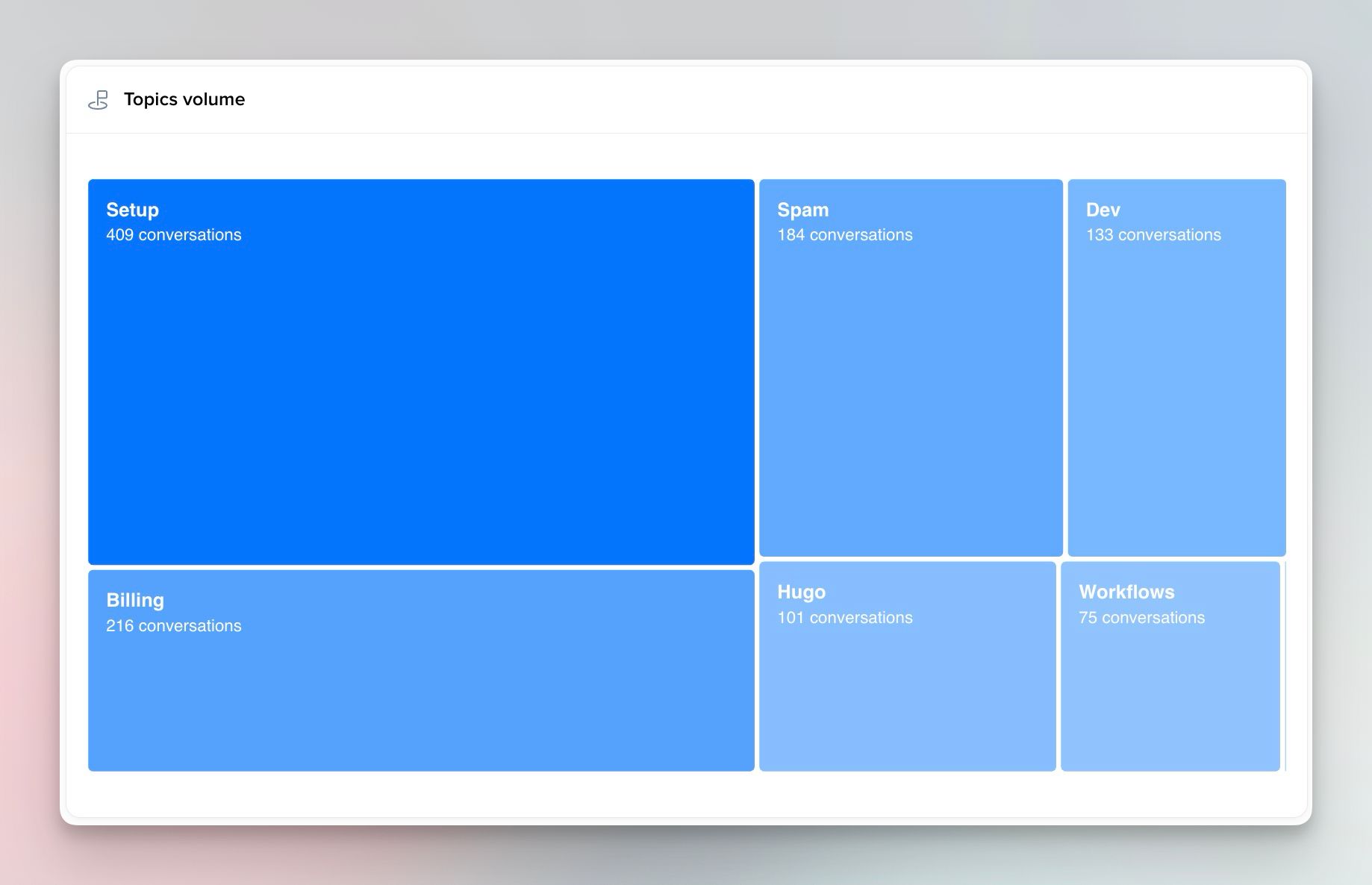
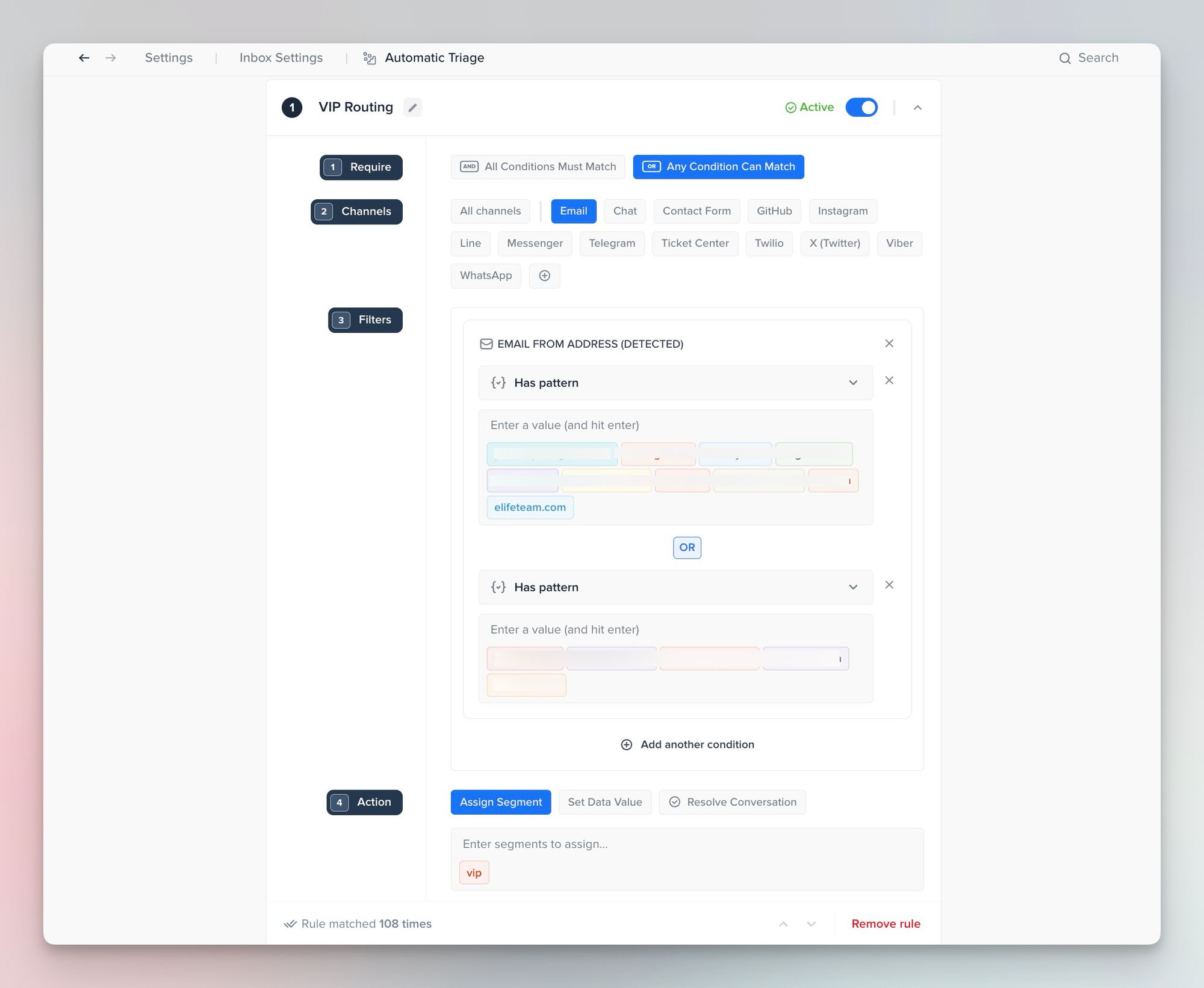
Automatic Triage qualifies conversations the moment they arrive: adding segments or custom data based on channel, sender patterns, or message text to make sure everything downstream has something clean to act on. It also catches spam before it ever reaches the queue.
➡️ how to this in Crisp: https://help.crisp.chat/en/article/how-to-categorize-and-route-with-the-automatic-triage-feature-1sihmjf/
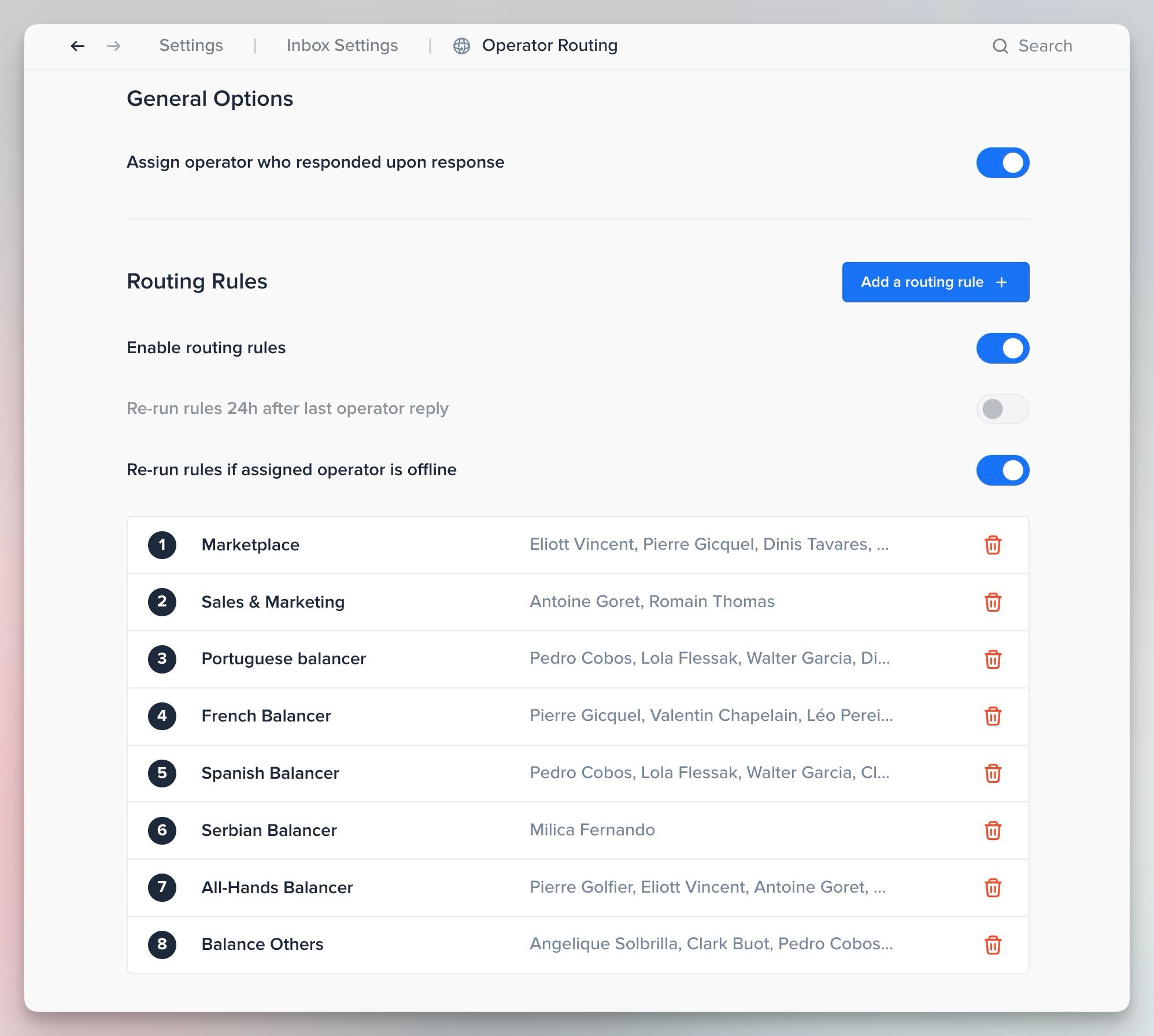
Operator Routing then assigns conversations to the right agent based on rules you define — segments, language, location, or custom data. Rules are evaluated top to bottom, and Crisp only assigns to agents who are actually online, falling through to broader fallback rules when your specialists aren't available. Stale or offline-assignee conversations get reassigned automatically, so nothing sits waiting on someone who's out.
➡️ How to do this in Crisp: https://help.crisp.chat/en/article/how-to-route-and-assign-conversations-to-operators-in-crisp-qjl2d2/
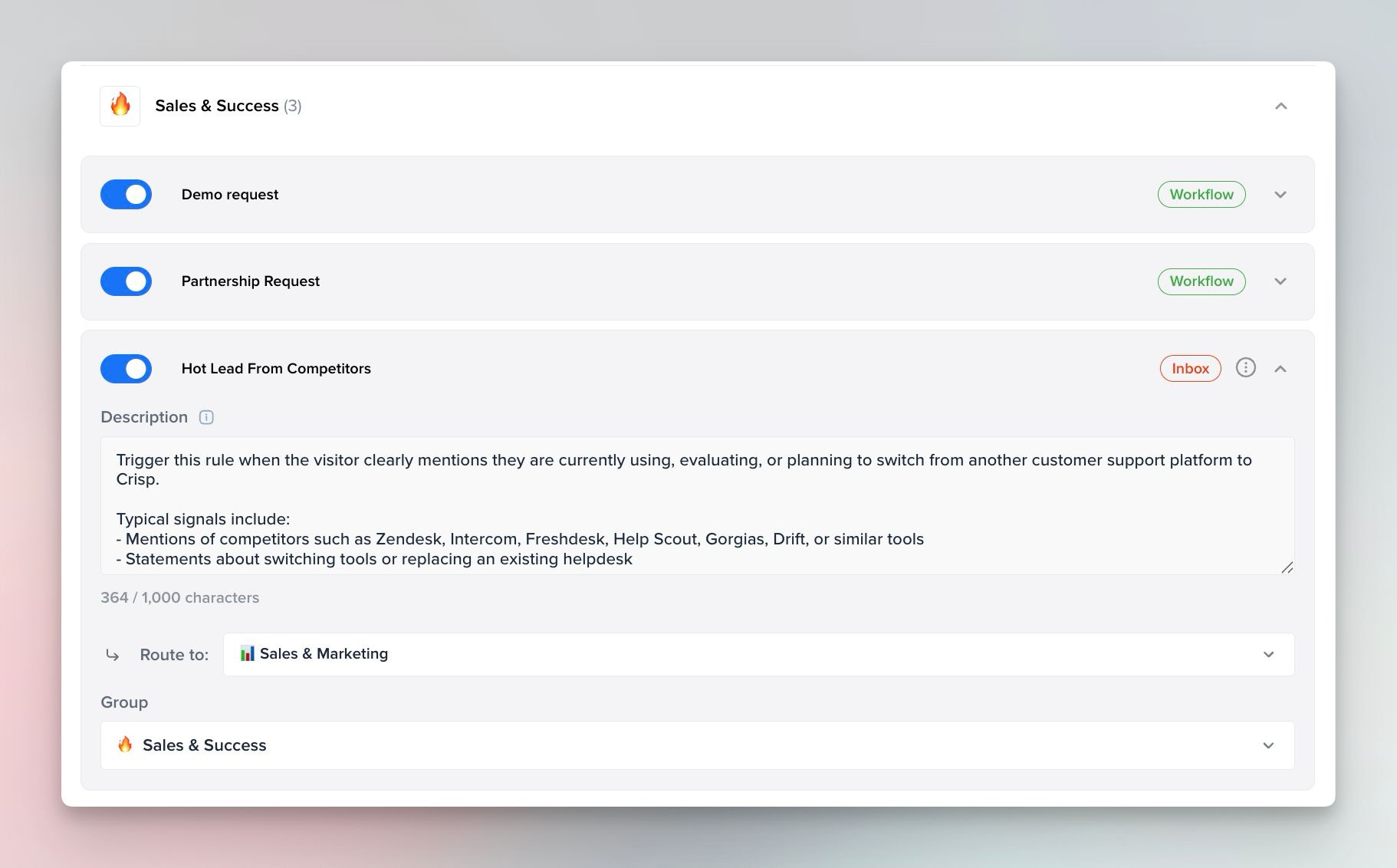
Hugo AI reads every incoming conversation for intent, topic, and even emotion — resolving the routine cases outright, and for everything else, triggering the action you've defined: handing the conversation to a specific inbox, starting a workflow, or escalating. Because Hugo classifies first, it can tag a conversation as "billing" or flag frustration before routing, so the human who picks it up starts with the context already attached rather than reconstructing it from scratch.
➡️ How to do this in Crisp: https://help.crisp.chat/en/article/how-does-hugo-routing-work-47o06k/
The result isn't a fancier queue. It's a system where the easy tier is resolved automatically, and the hard residual moves directly to the person best equipped to close it, first time, with the story already attached. The customer on the other end never has to know how it happened.
Ready to get every conversation to the right agent?
Frequently asked questions about automated routing
What's the difference between ticket routing and ticket triage?
Triage assigns urgency: how fast something needs attention. Routing assigns ownership: who handles it. They work together, but a system that only prioritizes hasn't solved who actually picks up each conversation.
Why doesn't round-robin routing work at scale?
It distributes evenly but ignores fit. A conversation handled by the wrong agent, even quickly, still generates a transfer, repeats the customer's effort, and costs more per resolution than one that waits briefly for the right person.
What is intent-based routing, and how is it different from keyword rules?
Keyword rules route on surface-level text matches. Intent-based AI reads the full message, understands what the customer actually needs, and matches it to the right agent on meaning — catching cases that keyword rules miss or misclassify.
How do I know if my current routing is broken?
Track your reassignment rate and FCR. If conversations are routinely reassigned more than once before resolution, or if FCR is below 65%, routing is a primary cause.
How many routing categories should we have?
Research points to 8–15 well-defined categories as the accuracy sweet spot. Below that, you lose precision. Above 20, agents stop using categories consistently and classification accuracy drops to around 78%.
Does AI routing still need human oversight?
Yes. AI routing should be measured like any other system — track misroute and reassignment rates and correct the model where it misfires. Treating it as a black box is what causes silent accuracy decay over time.
Sources
Gartner, Effortless Experience Research, https://www.gartner.com/en/customer-service-support/insights/effortless-experience
Gartner, Customer Service AI Automation Forecast 2025, https://www.gartner.com/en/customer-service-support
Forrester, Contact Center Transformation Research 2025, https://www.forrester.com/report/contact-center-transformation
SQM Group, First Contact Resolution Benchmarks 2025, https://www.sqmgroup.com/resources/library/blog/first-call-resolution-benchmark
Unthread, Support Ticket Tagging Statistics 2026, https://unthread.io/blog/support-ticket-tagging-statistics
Supportbench, Ticket Routing QA and Misroute Cost Analysis 2026, https://www.supportbench.com/reduce-misrouted-tickets-routing-qa-checklist
SysAid, Automated Ticket Routing and SLA Compliance 2026, https://www.sysaid.com/blog/generative-ai/7-ways-automated-ticket-routing-transforms-your-service-desk-operations-in-the-age-of-agentic-ai
📚 Related articles
Round-robin vs skills-based ticket assignment: which routing method is right for your team? · How to set up automated ticket routing rules that actually work · Team workload management for support: how to balance the queue without burning anyone out

September 2026 - Product Update
Discover the new Knowledge Base editor, benchmark your AI support performance, track how often Hugo escalates conversations, and more. Discover the latest features and improvements released by the Crisp team in September 2026.


Summer 2026 - Product Update
Meet the refreshed Crisp experience, Understand how Artificial Intelligence handles every conversation, Build reusable teams across your workspace, and more. Discover the latest features and improvements released by the Crisp team in Summer 2026.

Best 9 helpdesk software and ticketing systems for 2026
Need help to choose your next helpdesk with a ticketing tool for 2026? We've gathered a guide that gives you everything you need to convince your C-levels.