Agent productivity: the complete guide for support managers
Want to improve your customer support reps' productivity? Here is the definitive guide for the Agentic AI era.


Your team is busy. Everyone's online, the AI Agent is killing the queue, occupancy looks healthy on the dashboard.
And yet support tickets still pile up while your best agents are firefighting something they can't turn off.
The problem was never how hard the team works. It's how much of that work shouldn't have reached a human at all, and how much of what does reach them arrives without the context, routing, or tools to resolve it cleanly the first time.
In a world where AI can now own the first layer of resolution entirely, a support queue that keeps filling up is less a people problem and more a signal that the system isn't built for how support actually works now.
Counting tickets-per-agent or occupancy rewards motion, not resolution time. A support team can be maxed out on activity while resolving very little.
Real agent productivity is about output: how many customer problems each agent actually resolves, per unit of time. And in a world where AI can now resolve a large share of routine work autonomously, the lever is not "make agents faster." It's "remove the work that shouldn't reach them, and set up the rest to be resolved the first time."
This guide gives you the complete picture:
- A true definition what agent productivity actually means in companies,
- Four structural levers that move agent productivity up,
- A sequence to apply some changes in your organization, based on your team's size



What is agent productivity?
A productive agent is not the one who is busiest. It is the one who resolves the most issues well, in the least time, with the least rework.
Agent productivity is the volume and quality of customer problems each agent resolves per unit of time. It measures resolution, not motion.
Think of it like a kitchen during a dinner rush. A cook who is constantly moving, plating, and wiping counters looks productive. If half the dishes are being sent back, and the other half never reach the table at all, that motion is not output. The truly productive cook is the one whose plates land correctly, on time, every time, because their station is set up right, their tools are within reach, and they are not doing things that should have gone to another station.
That is the distinction at the centre of agent productivity: output versus activity.
A team can look maximally busy:
- high occupancy,
- everyone handling tickets all day
and still be unproductive if those agents are spending their time hunting for context, switching tools, fielding tickets that should never have reached them, or re-handling issues that were not resolved the first time.
Productivity is what is left after you strip out the motion that does not end in a resolved customer.
The components of agent productivity
Agent productivity isn't one number; it's the product of several measurable factors.
Here's a useful way to break it down through dedicated KPIs:
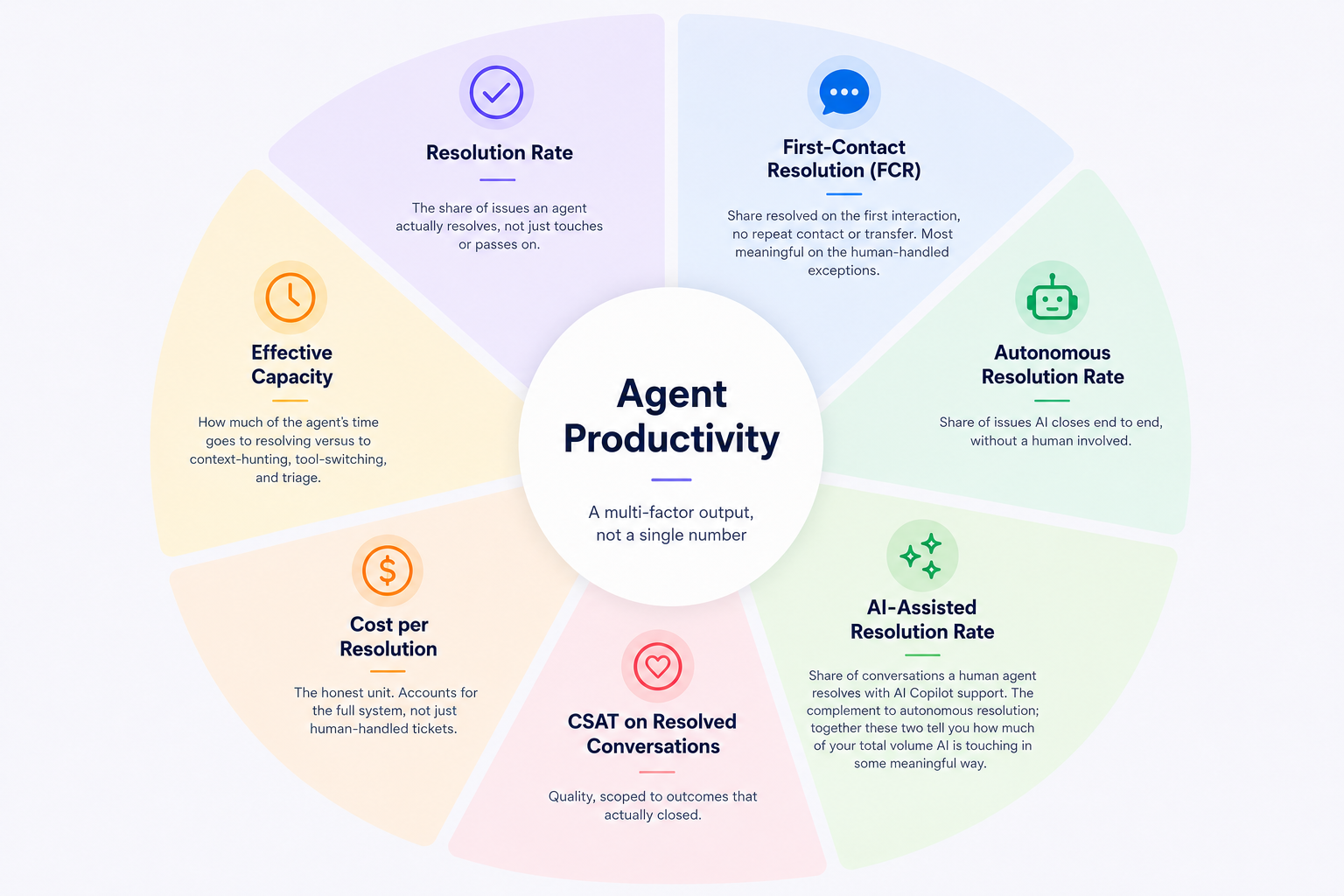
- Resolution rate — the share of issues an agent actually resolves, not just touches or passes on.
- Rework — reopen and repeat-contact rate; work that comes back is productivity lost.
- Effective capacity — how much of the agent's time goes to resolving versus to context-hunting, tool-switching, and triage.
- Autonomous resolution rate — share of issues AI closes end to end, without a human involved.
- AI-assisted resolution rate — share of conversations a human agent resolves with AI Copilot support. The complement to autonomous resolution; together these two tell you how much of your total volume AI is touching in some meaningful way.
- First-contact resolution (FCR) — share resolved on the first interaction, no repeat contact or transfer. Most meaningful on the human-handled exceptions.
- Cost per resolution — the honest unit. Accounts for the full system, not just human-handled tickets.
- CSAT on resolved conversations — quality, scoped to outcomes that actually closed.
The old standby support metrics: tickets-per-agent, occupancy, average handle time aren't wrong. They're just measuring a shrinking slice as AI carries more of the routine load, the metrics that matter are the ones that count the whole system.
The metrics that actually reflect modern productivity are autonomous resolution rate (how much closes without a human at all), human escalation rate (how cleanly the rest reaches a person), cost per resolution rather than cost per ticket, first-contact resolution, and CSAT on resolved conversations.
Where a legacy metric still earns its place — handle time, for instance — it should apply only to the human-handled exceptions, not as a blanket measure of a team where AI carries the routine load.
Productivity is not the same as utilization. Utilization measures how much of an agent's time is occupied; productivity measures what that time produces. A team can be fully utilized and barely productive — which is exactly the state that makes managers reach for headcount when the real fix is removing the friction that's consuming the capacity they already have.
Audit your agent productivity
The ceiling pattern
Every support team has a ceiling: a point beyond which its current setup cannot deliver more output, no matter how hard the team works.
The support team is facing the same friction again and again: the same context-hunting, the same misrouting, the same repetitive questions consuming the day, the same bug not being fixed by product teams, the same implementation problems, the same lack of consideration from technical support or engineers, the same conversations slipping through follow-up.
This is the productivity ceiling.
Self-Diagnosis Checklist
If more than one of these is familiar, the constraint is not your team's effort. It is the system around them.
Take the quiz below to audit your support team productivity.
Is the constraint your team — or the system around them?
7 quick questions about how work reaches your agents. You'll get a score and a verdict.
The cost of staying there
Leaving the ceiling in place converts a system problem into a recurring headcount problem.
Contact center turnover has reached 31.2% annually, nearly one in three agents leaving every year, and McKinsey research puts the true replacement cost at $10,000 to $20,000 per departing agent. The friction that caps productivity is the same friction that drives that burnout and attrition. You pay again in re-hiring.
And it shows up in the customer experience too. The rushed, transferred, repeat-contact interactions a capped system produces are exactly the high-effort experiences that erode loyalty. Gartner research found that service interactions are nearly four times more likely to drive disloyalty than loyalty. That ceiling does not just limit output. It quietly inflates the cost of every unit of output you do get, and damages the customers on the other end.
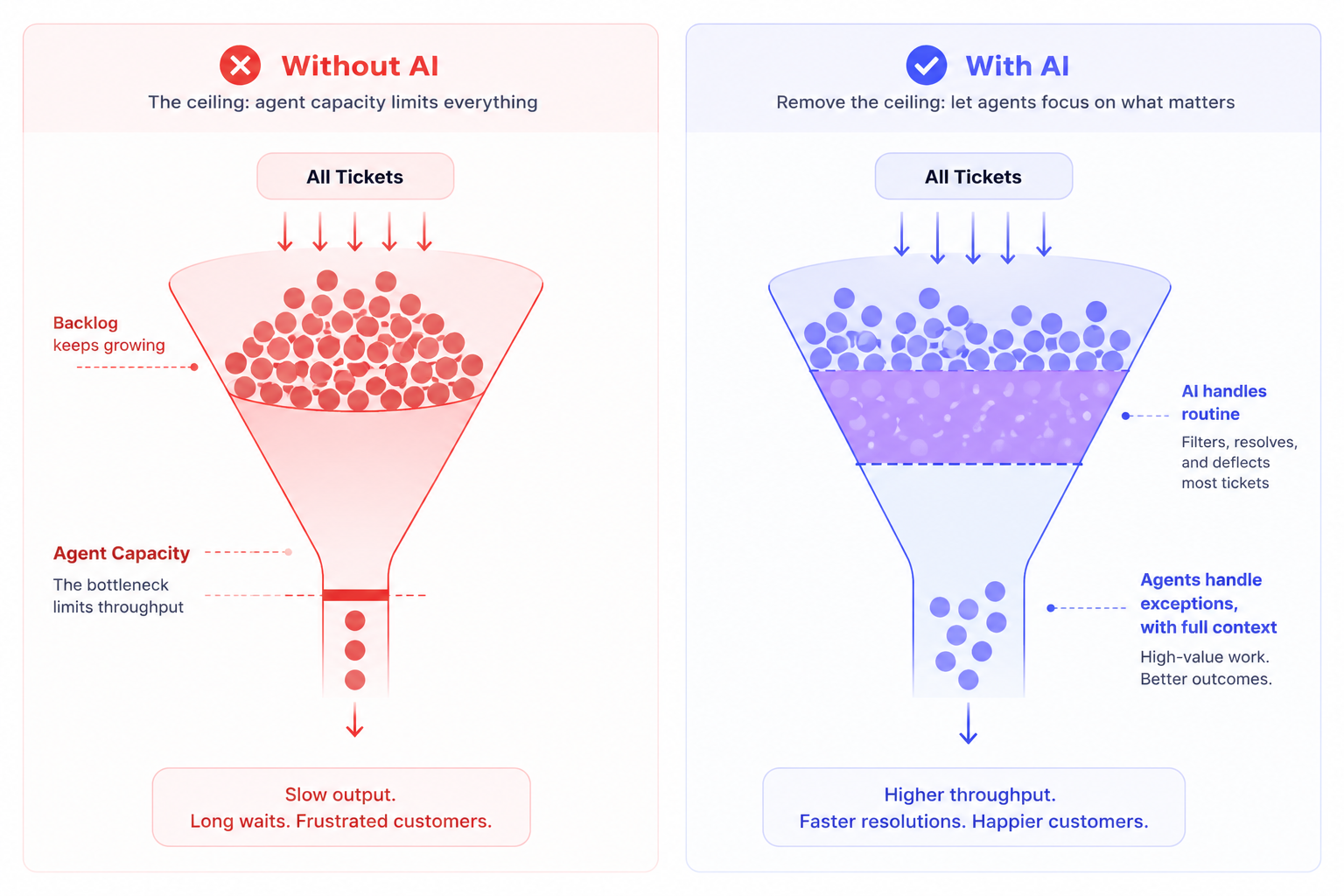
Here's what it looks like when agent productivity is actually working.
What good agent productivity actually looks like
When productivity is working in the modern sense, the routine structured work largely resolves itself. AI handles the high-volume, low-judgment requests autonomously, so they never consume a human agent's time at all.
The work that does reach a human arrives routed to the right person, with full context already gathered. The agent starts solving immediately rather than assembling the picture first. Follow-ups do not slip, because the system tracks them.
The result is that each agent's time goes almost entirely to resolving — the high-judgment, high-value conversations that actually need a person — rather than to the friction that used to consume it.
Proxy Metrics vs. Real Signals
The metric you lead with determines the behaviour you get. Most productivity dashboards lead with the wrong one.
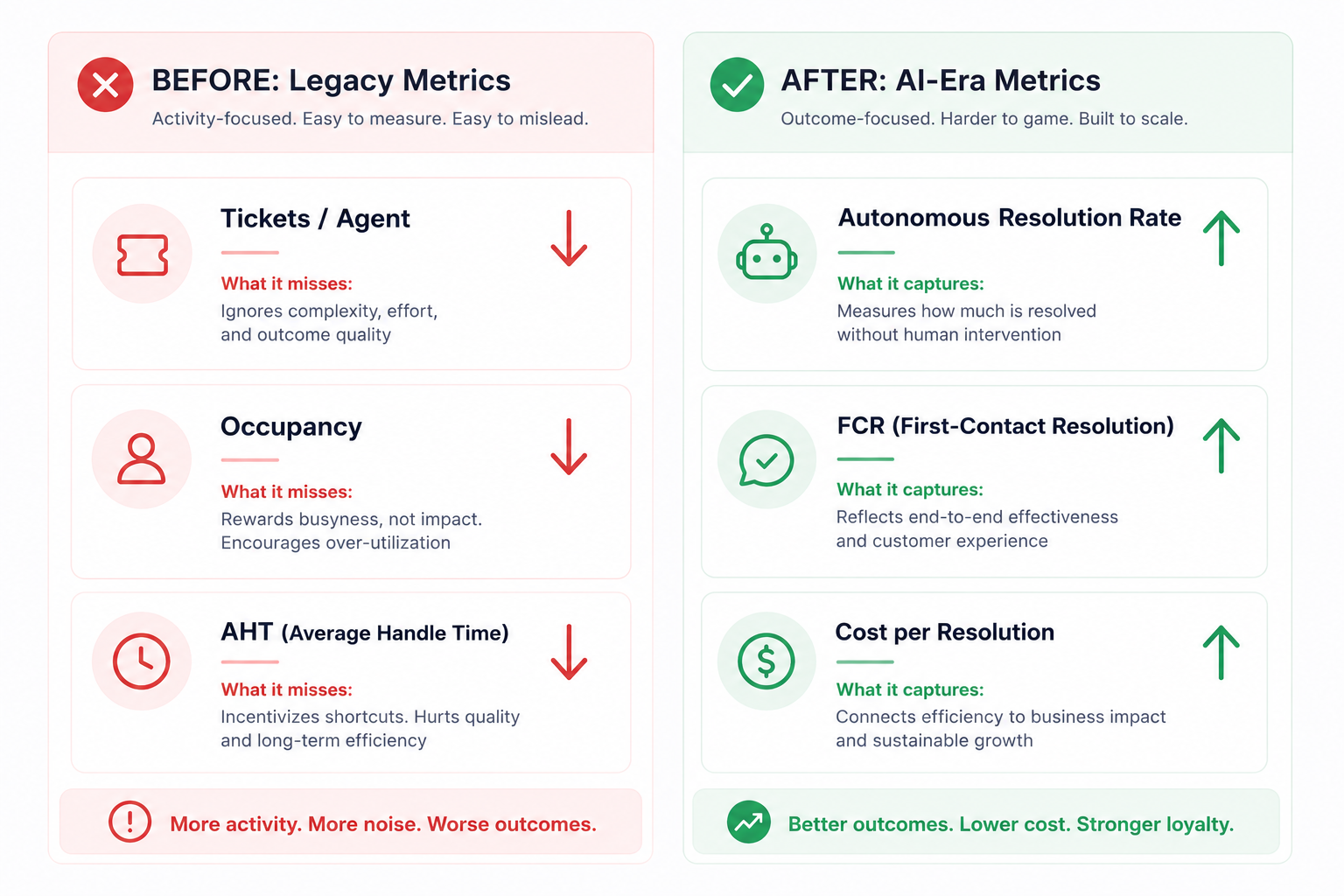
| Legacy Metric | What It Actually Measures | Real Signal to Use Instead |
|---|---|---|
| Tickets per agent per day | Volume touched, not resolved | Autonomous resolution rate |
| Occupancy | Time filled | Effective capacity |
| Average handle time | Speed | FCR + CSAT on resolved conversations |
| Raw ticket volume | Work arriving, not work done | Cost per resolution |
The real-signal column is the agentic-era vocabulary the rest of this guide uses: autonomous resolution rate, FCR, cost per resolution, escalation rate, and CSAT on resolved conversations.
These are the numbers that move only when the team is genuinely more productive, not merely busier. First-contact resolution in particular pays for itself: Gartner found that low-effort, first-contact resolution cuts repeat calls by up to 40%, escalations by 50%, and channel switching by 54% — every one of which is rework that would otherwise have consumed agent capacity.
Agent productivity self-diagnostic
There's no universal "good" number: productivity benchmarks vary by channel, complexity, and team maturity.
The more useful target is direction: a rising autonomous resolution rate, FCR climbing, cost per resolution falling, and rework shrinking, while CSAT holds or improves.
A team that's genuinely getting more productive sees output per human agent rise while the share of work that needs a human falls — the opposite of the "hire to keep up" treadmill.
Before diving into the levers, take 2 minutes to assess where your team stands today. The results will tell you which lever to pull first.
Assess your agent productivity in 2 minutes
Answer 6 quick questions about your current setup. You'll get a score and the one lever to pull first.
The four levers that drive agent productivity
Agent productivity isn't moved by exhortation or by adding people — it's moved by removing the friction that caps how much each agent can resolve. Four levers do most of the work. Each addresses one of the structural drains on productivity, and each has a dedicated guide that goes deep on the how.
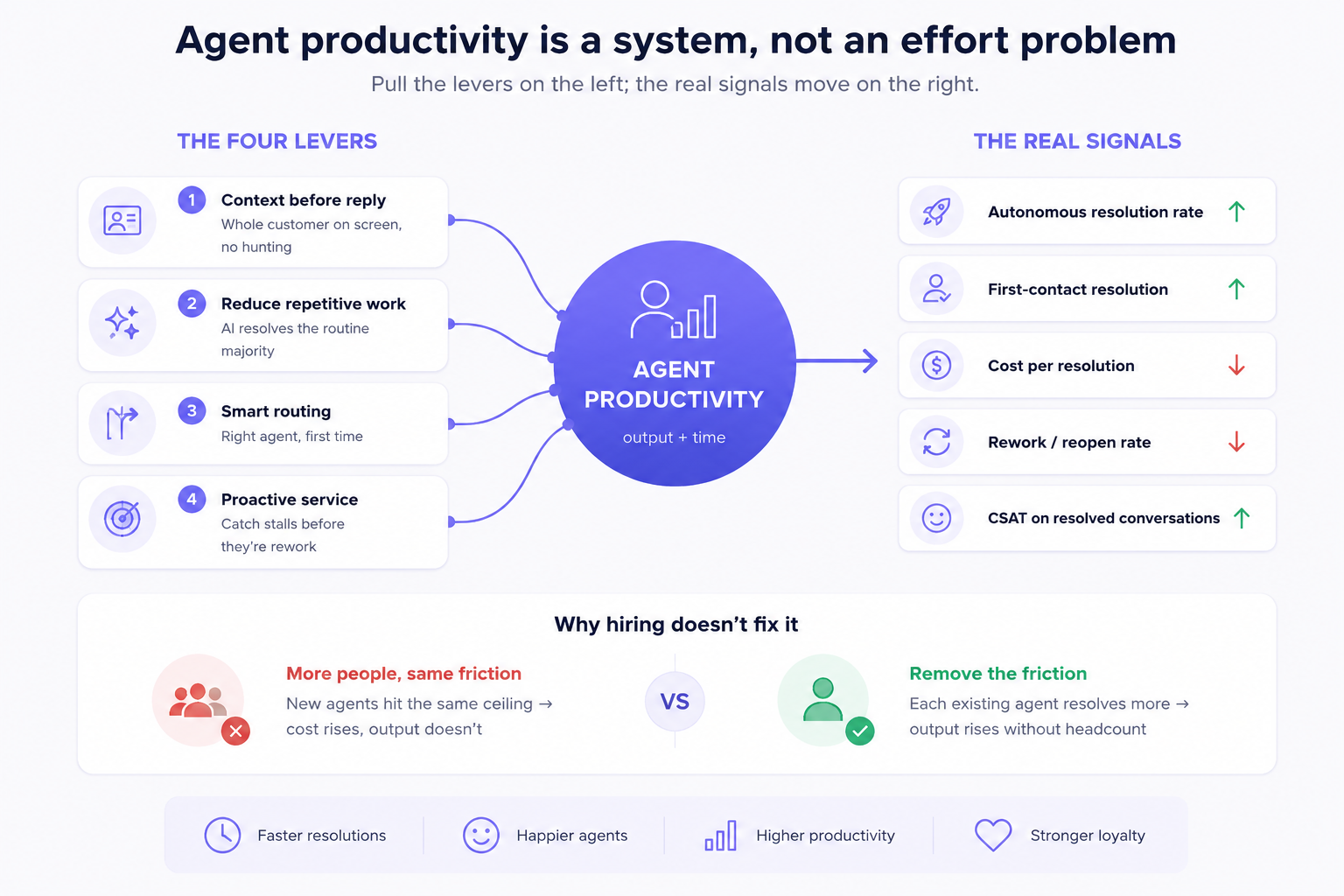
Lever 1: Give every agent full context before they reply
The job: Let the agent see the whole customer; every past conversation, profile data, and internal note, before they respond, without hunting across tools.
The friction it removes: When context is scattered across channels and systems, agents spend a chunk of every reply reassembling it and often reply with only half the picture. That context-hunting is pure productivity drain — time spent not resolving.
What good looks like: The agent opens a conversation and the full history and customer context are already on screen. They read for a moment and start solving.
Metric to track: First-contact resolution rate, and effective capacity (share of time spent resolving vs. context-hunting).
Learn how to give every support operator full context before they reply
➡ ️https://crisp.chat/en/blog/unified-customer-view/
Lever 2: Reduce repetitive work with automation
The job: Remove the high-volume, low-judgment requests from agents' plates so their time goes to work that actually needs a human.
The friction it removes: Without automation, every password reset and order-status question consumes an agent. These are often the majority of volume. The team's capacity is spent on work that should not need a person.
What good looks like: AI resolves the structured majority autonomously and end to end, escalating only what genuinely needs judgment — with full context attached.
Metric to track: Autonomous resolution rate, and cost per resolution.
Learn how to move from support ticket deflection to autonomous resolution ⬇️
 Antoine Goret
Lever 3: Route every conversation to the right agent
The job: Get each conversation to the person best equipped to resolve it — by skill, workload, language, or intent — without manual triage.
The friction it removes: Manual or round-robin routing sends conversations to the wrong agent, who then transfers them. The wrong agent is slower than no agent, and the customer repeats themselves. Misrouting is productivity lost to rework.
What good looks like: Conversations reach the right agent the moment they arrive, so they are resolved on first contact rather than bounced.
Metric to track: First-contact resolution rate, and transfer/reassignment rate.
Learn how to get every conversation to the right support agent ⬇️
Antoine Goret
Lever 4: Get ahead of issues with proactive service
The job: Catch stalled conversations, missed follow-ups, and at-risk customers before they become escalations — and reach customers before they have to chase you.
The friction it removes: A purely reactive team only acts when chased, so follow-ups slip and problems compound into bigger, costlier conversations later. Dropped and re-escalated work is productivity lost downstream.
What good looks like: Open conversations are owned and tracked, stalls surface before they go cold, and fewer issues escalate because they are caught early — so less work flows back to the team as rework.
Metric to track: Reopen/repeat-contact rate, and follow-up completion rate.
Learn how to build a proactive customer support ⬇️
Antoine Goret
Lever 5: Bring AI Internal Copilot For Support Teams
The job: Allow teams to leverage an AI Copilot that can make them more productive, rephrase a sentence, draft an answer, Summarize a conversation, prepare a handover ...
The friction it removes: Low-value, repetitive actions that are brainless.
What good looks like: Each conversations is hanlded more efficiently, teams are less buried in the day to day work, but rather focus on resolving the inquiry.
Metric to track: AI-Assisted resolution rate.
How the levers compound
These four levers are not independent. They reinforce each other in a specific sequence.
Context (Lever 1) makes both automation and routing more accurate, because AI and routing logic both perform better with richer signals. Automation (Lever 2) frees the human capacity that routing (Lever 3) then directs to the right problems. Proactivity (Lever 4) stops the downstream rework that would otherwise flow back through all three. Finally, the support rep can leverage a custom AI Internal copilot to help him draft the best answer and resolve tickets at lightspeed.
Together, they shift the whole system from "humans handle everything, capped by friction" to "AI handles the routine, humans handle the exceptions with full support, and a twist of AI." That is what raises output per agent without raising headcount.
The productivity gain is real and quantified. A peer-reviewed study of over 5,000 customer support agents — published in the Quarterly Journal of Economics — found that AI assistance raised issues resolved per hour by 14 to 15% on average, with gains of up to 34% for newer and lower-skilled workers. AI effectively lifted the whole team toward the performance of its best people.
Common mistakes to avoid
Most support teams are working hard. The mistakes that cap productivity are rarely about effort. They are about the system.
- Measuring activity instead of output. The most common mistake is leading with tickets per agent, occupancy, or handle time, metrics that reward motion. A team optimizing for these gets faster and busier without resolving more. Quality quietly drops as agents rush to close conversations. Lead instead with resolution rate, FCR, and CSAT on resolved conversations. These are the signals that only move when productivity genuinely rises.
- Hiring to fix a system problem. When the queue outgrows the team, headcount is the instinctive answer. But if the constraint is friction, context hunting, misrouting, and repetitive work, new agents just hit the same ceiling. Cost to serve rises without proportional resolution capacity. Fix the system first. The four levers above raise output per existing agent. Hire to grow, not to paper over friction.
- Adding tools without removing friction. It is tempting to bolt on another application for every gap. But each new tool an agent has to switch into adds context switching overhead. That is itself a productivity drain. The goal is fewer surfaces, not more. Consolidate context rather than scatter it across another window.
- Automating for deflection instead of resolution. Teams chasing a productivity number sometimes deploy automation that deflects rather than resolves. A deflected but unresolved ticket comes back, often angrier, as rework. That is negative productivity dressed up as a win. Automate to resolve, and measure autonomous resolution rate, not deflection rate.
How to prioritize: which lever to pull first
You do not pull all four levers at once. Which one delivers the fastest return depends on where your team is today.
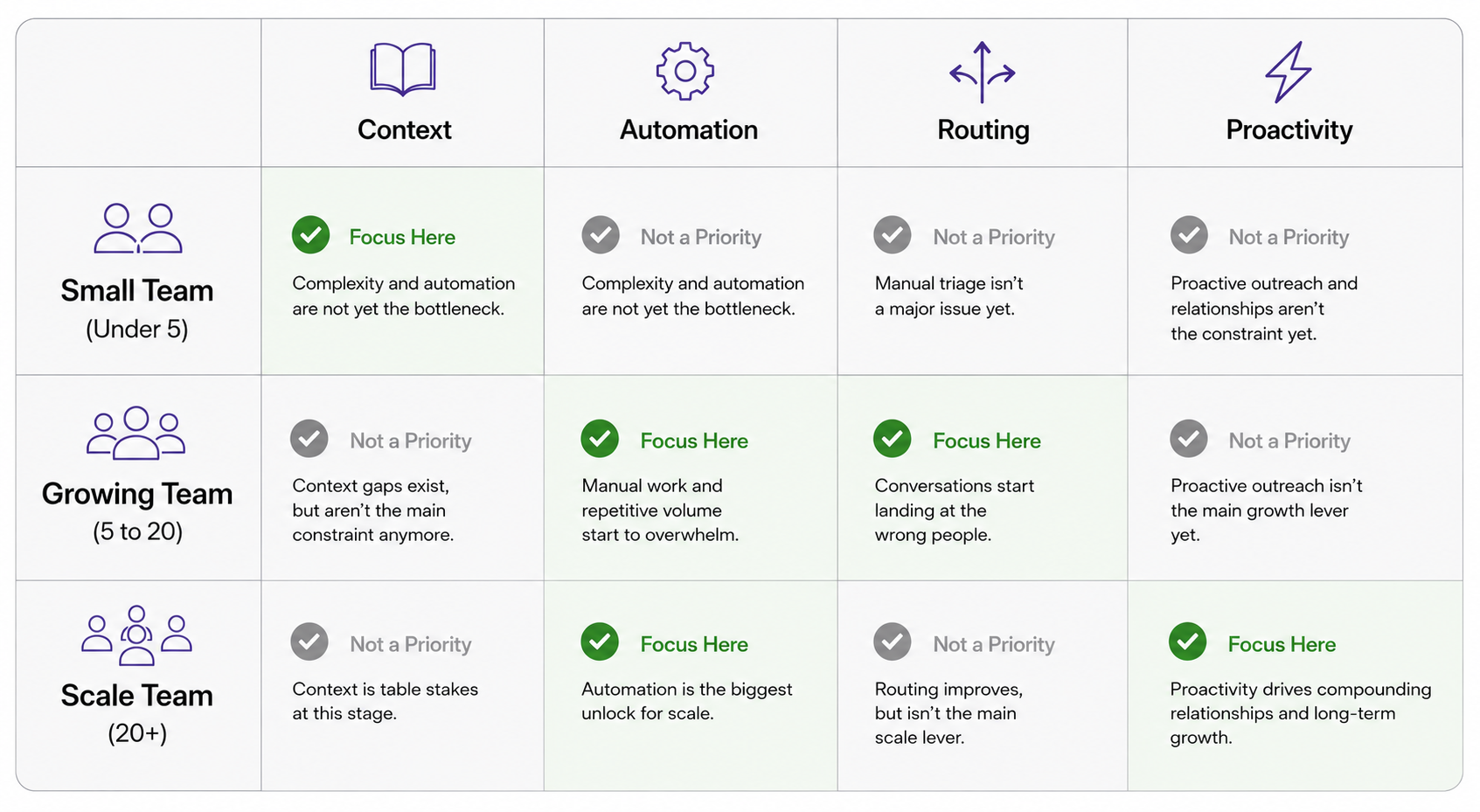
- Small teams (under 5 agents): Start with Lever 1 — context. But first, check your autonomous resolution rate. If AI is already handling volume, the priority is making sure what it escalates arrives with full context attached. If AI isn't in the picture yet, context is still the fastest win — agents stop hunting, FCR climbs immediately.
- Growing teams (5 to 20 agents): Focus on Lever 3 (routing) and Lever 2 (automation). This is where manual triage breaks down and repetitive volume balloons. If your autonomous resolution rate is below 30%, automation is the urgent lever — you're paying human attention for work AI should own. Routing then directs the remainder to the right person without bouncing.
- Scale teams (20 or more agents): Lever 2 (automation) and Lever 4 (proactivity) are the biggest unlocks. At scale, every percentage point gained in autonomous resolution rate compounds across a large human team. Proactivity then stops the high-volume conversations that slip through from flowing back as rework — which at this size is a significant hidden cost.
The through-line: start by removing whatever friction is currently capping resolution for your team's size. Measure the real signals — FCR, autonomous resolution rate, cost per resolution. Add the next lever as the first one's gains plateau.
Boosting agent productivity with Crisp
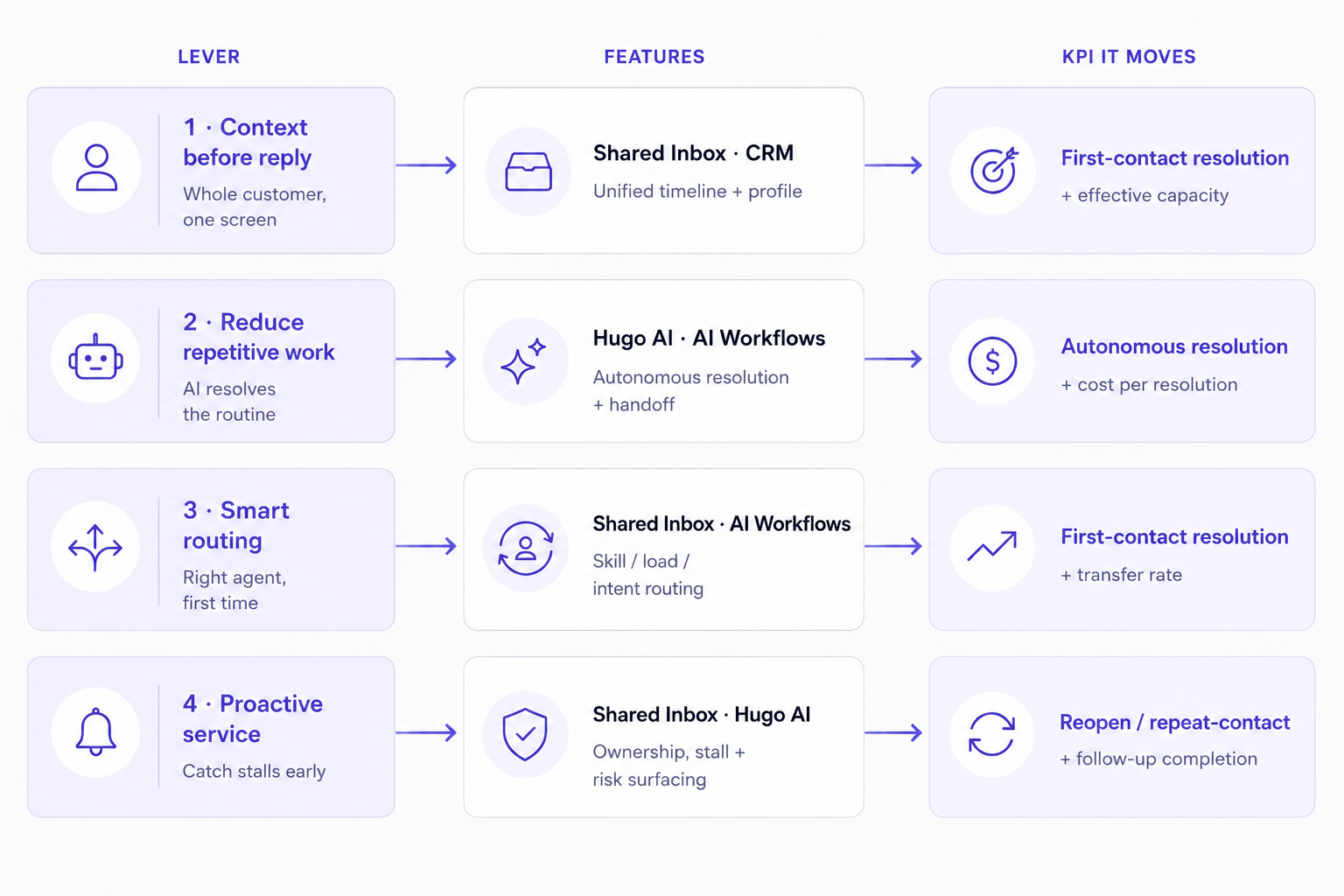
The four levers above are a framework. Crisp is the platform built to apply them.
With a Shared Inbox, built-in CRM, AI Workflows, and Hugo AI in one platform, agents have everything they need without switching between tools.
- Keep context in one place. Every conversation, customer history, and internal note is available in a single view, so agents spend less time searching and more time resolving.
- Automate repetitive work. Hugo AI resolves routine requests and hands complex conversations to the right agent with the full context attached.
- Route conversations intelligently. AI Workflows assign chats by intent, skill, workload, and language, reducing manual triage and unnecessary transfers.
- Prevent unnecessary follow-ups. The Shared Inbox highlights stalled conversations and outstanding actions before they become customer frustrations.
The result is simple: agents spend more time solving the conversations that need human judgment, and less time on everything else.
Ready to raise your team's productivity?
Frequently asked questions
What is the difference between agent productivity and agent utilization?
Utilization measures how much of an agent's time is occupied. Productivity measures what that time actually produces in resolved customer issues.
What metrics should I use to measure agent productivity in the AI era?
Lead with autonomous resolution rate, first-contact resolution, cost per resolution, and CSAT on resolved conversations — not tickets handled or occupancy.
How much can AI realistically improve agent productivity?
A peer-reviewed study of over 5,000 agents found AI assistance raised issues resolved per hour by 14 to 15% on average, with up to 34% gains for newer agents.
Why does adding headcount not solve a productivity ceiling?
New agents inherit the same system friction — misrouting, context-hunting, repetitive work. More people inside a broken system hit the same cap at higher cost.
What is first-contact resolution and why does it matter so much?
FCR is the share of issues fully resolved on the first interaction. Gartner's research links high FCR to up to 40% fewer repeat contacts, 50% fewer escalations, and measurably lower cost per resolution.
When should a support team start using automation?
As soon as routine, structured volume is consuming meaningful agent time — typically when the team reaches 5 or more agents and the same question types appear daily.
Sources
Gartner, Gartner Predicts Agentic AI Will Autonomously Resolve 80% of Common Customer Service Issues Without Human Intervention by 2029, https://www.gartner.com/en/newsroom/press-releases/2025-03-05-gartner-predicts-agentic-ai-will-autonomously-resolve-80-percent-of-common-customer-service-issues-without-human-intervention-by-20290
Gartner, Effortless Experience: Drive Customer Loyalty and Retention Through Service, https://www.gartner.com/en/customer-service-support/insights/effortless-experience
Gartner, Unveiling the New and Improved Customer Effort Score, https://www.gartner.com/smarterwithgartner/unveiling-the-new-and-improved-customer-effort-score
Brynjolfsson, E., Li, D., Raymond, L., Generative AI at Work, Quarterly Journal of Economics, https://academic.oup.com/qje/article/140/2/889/7990658
Stanford HAI, Will Generative AI Make You More Productive at Work?, https://hai.stanford.edu/news/will-generative-ai-make-you-more-productive-work-yes-only-if-youre-not-already-great-your-job
HR Dive, AI Increased Customer Service Agent Productivity by 14%, Study Finds, https://www.hrdive.com/news/generative-ai-chatgpt-increased-customer-service-agent-productivity/648925/
Insignia Resources, Call Center Turnover Rates: 2026 Industry Average, https://www.insigniaresource.com/research/call-center-turnover-rates/
SQM Group, First Call Resolution: Metric and Operating Philosophy, https://www.sqmgroup.com/resources/library/blog/fcr-metric-operating-philosophy
Stealthagents, First Contact Resolution Statistics 2026: Benchmarks, Cost Impact and Industry Data, https://stealthagents.com/research/first-contact-resolution-statistics-2026

September 2026 - Product Update
Discover the new Knowledge Base editor, benchmark your AI support performance, track how often Hugo escalates conversations, and more. Discover the latest features and improvements released by the Crisp team in September 2026.


Summer 2026 - Product Update
Meet the refreshed Crisp experience, Understand how Artificial Intelligence handles every conversation, Build reusable teams across your workspace, and more. Discover the latest features and improvements released by the Crisp team in Summer 2026.

Best 9 helpdesk software and ticketing systems for 2026
Need help to choose your next helpdesk with a ticketing tool for 2026? We've gathered a guide that gives you everything you need to convince your C-levels.