SLA management in customer support: how to set response targets you actually keep
An AI agent can answer a customer in ten seconds, before a human ever sees the conversation. That changes what an SLA actually protects. This guide covers setting response and resolution targets from real data and catching breaches before they happen, not after.


If the story below rings a bell, don't quit, this article is written for you:
A customer sends a message. Maybe it is a billing issue. Maybe their account is broken, and they have a demo in two hours. They hit send. Ten seconds later, an AI agent has already read the message, checked their account status, and answered. No wait. No queue. The promise is kept before a human ever sees the conversation.
Basically, an SLA is a time-based commitment: a first response within a window, a resolution within another one. For years, meeting that commitment meant staffing enough humans to hit the number. In the era of artificial intelligence and AI Agents, it means something different. It means building a system where an AI agent handles the response instantly, and a human steps in only when the conversation actually needs one.
But it requires better integration, between tools so an AI can understand a server is down, a maintenance is ongoing, or any other status that could help hit he SLA the right way.
but the problem hasn't disappeared, it has moved. Writing the commitment is still trivial: any team can open a document and type "first response within four hours." What changed is where the real work happens. It used to be about keeping that promise across every shift and every volume spike. Now it's about designing the handoff the proper experience, focusing on the real work, instead of dealing with the noise.
This guide closes that gap for support teams, not for IT uptime contracts, it covers:
- What SLA management is for customer support, and how it differs from the ITSM version
- How to set first-response and resolution targets from your own data
- How to differentiate targets by priority
- How to spot at-risk conversations before they breach
- How to use automation and AI to protect the SLA
- The SLA metrics that matter
TL;DR
- Set SLA targets from your own response/resolution data, not a number that "sounds right".
- Differentiate targets by priority: 3 tiers (urgent, standard, general) is the practical ceiling.
- Surface at-risk conversations before they breach, not in a monthly postmortem.
- Let AI absorb routine volume entirely, so it never enters SLA risk in the first place. AI now closes about 40% of conversations without a human on teams running an AI Agent
What SLA management means for customer support
In customer support, SLA management is the practice of setting, tracking, and reliably meeting time-based service commitments, such as human first-response and resolution times, so customers get the responsiveness you've promised.
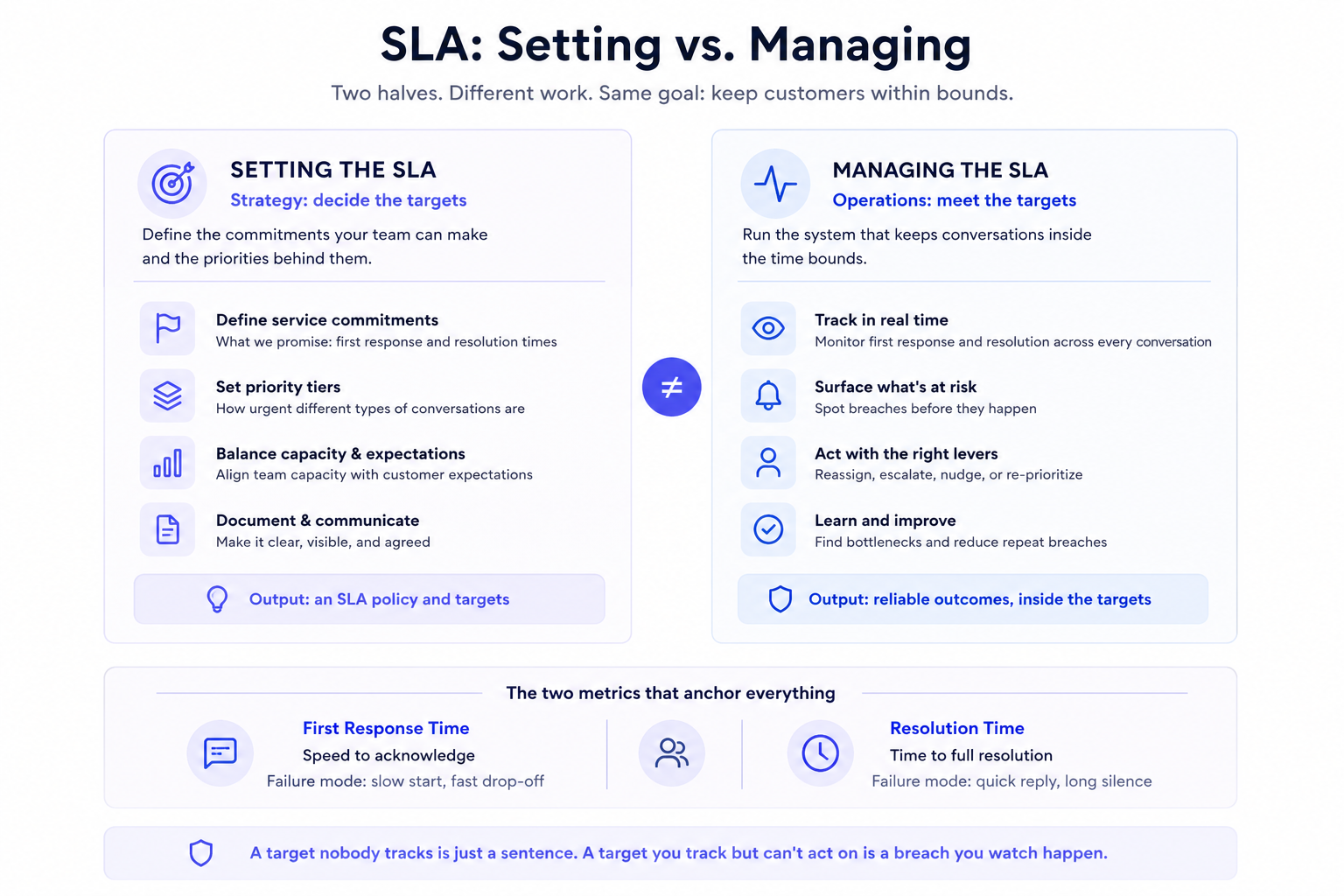
It has two halves that are easy to confuse: setting the targets (what we promise), and managing to them (the system that makes sure we deliver). Most teams do the first and neglect the second.
It's worth separating this from the IT/ITSM meaning of the term:
- In IT, an SLA is often a contractual document with a vendor: uptime percentages, penalty clauses, tiered priorities.
- In customer support, an SLA is operational and customer-facing: it's the responsiveness standard your team holds itself to on live conversations.
The mechanics of tracking are similar but the purpose is different:
- SLA management for customer support isn't about contract compliance, it's about consistently being there for customers when you said you would be.
The stakes are real: slow, drawn-out interactions are high-effort ones, and Gartner found that 96% of customers who have a high-effort service interaction become more disloyal.
The two SLA targets that matter most in support are human first response time (how quickly a person picks up once the AI hands a conversation over) and resolution time (how quickly the issue is actually solved).
When an AI agent takes the first reply in seconds, a generic first-response target is met by default and stops telling you anything. The commitment that slips is the wait for a human, so that is the clock worth putting an SLA on. A fast human pickup followed by a slow resolution still fails the customer, so a real SLA system tracks both.
How to set support SLA targets that actually work
Step 1: Set targets from your data
The most common SLA mistake teams make is picking a number because it sounds right. 'Four hours sounds professional.' 'Two hours sounds ambitious.' None of that is analysis. It is aspiration dressed up as policy, and aspiration without operational backing produces targets that get breached on day one.
🚨 Start with your current data:
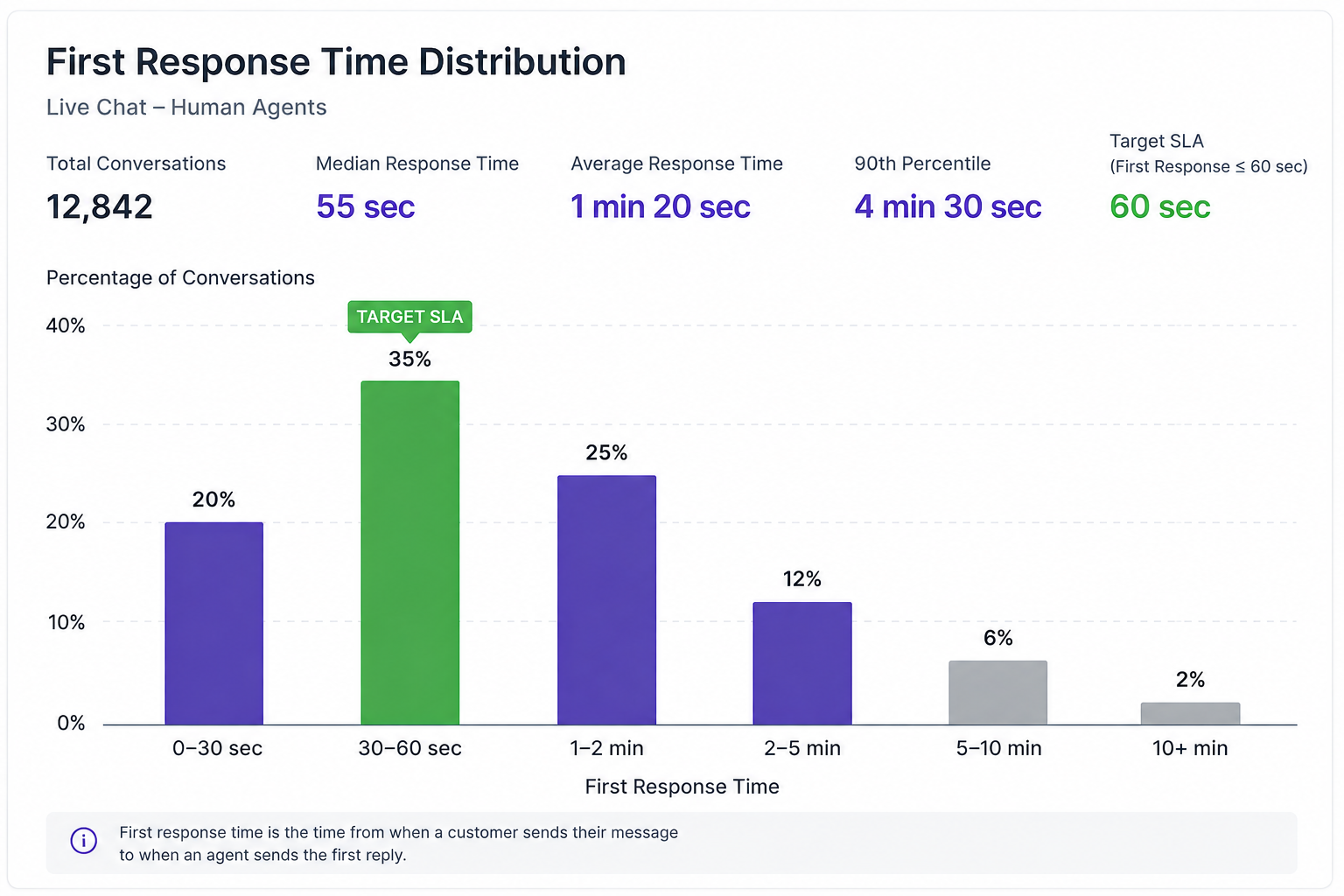
What is your team actually achieving today, measured across your real conversation volume? That number, whatever it is, is your baseline.
Your SLA target should be set at a point your team can reliably hit, not at the edge of your best-case capacity.
An SLA you breach constantly is worse than no SLA at all. It trains agents to stop caring about the target because it is obviously disconnected from reality, and it sets a customer expectation you will repeatedly fail to meet.
The right way to improve SLA performance is to start from a defensible baseline and tighten it incrementally, as you build the operational systems to support faster response.
Resist the urge to copy industry benchmark numbers: Best-in-class' response times found in case studies are the output of teams with specific staffing levels, volume profiles, and tooling. Your context is different. Benchmark to your own data first.
- Read your baseline in Crisp Analytics first. The Analytics dashboard gives you response and resolution times across your conversation history. Pull the last 90 days before you write a single SLA number.
- Then let your LLM do the analysis. A dashboard average blends two very different queues: the conversations Hugo closes in seconds, and the ones a person picks up after escalation. To set a human first response target, you need that second number on its own, at the median and the 90th percentile, split by channel and by hour. Crisp's MCP server connects your workspace analytics to Claude, ChatGPT or any assistant that accepts a custom MCP connector. You ask in plain language, and the assistant pulls the numbers and proposes your thresholds.
- In Crisp, go to Settings → Workspace Settings → Advanced configuration and click Generate Token in the MCP Server Token section. Copy it right away: it is shown only once, and regenerating it also regenerates your REST API tokens.
- In your assistant, add a custom connector named Crisp, with the endpoint
https://api.crisp.chat/mcp/and the headerAuthorization: Bearer <your token>(setup guide for Claude). - Paste the prompt below. The assistant queries your Crisp analytics for the last 90 days and returns the baseline, the breakdowns and a target per channel.
- Set your first target at the 90th percentile it returns, not the median. Rerun the same prompt every quarter and tighten the target as your routing and staffing improve.
Using the Crisp connector, pull my support analytics for the last 90 days.

1. Give me human first response time (from AI escalation to the first
   human reply) and resolution time, at the median and 90th percentile.
2. Split both by channel (chat, email, WhatsApp, other).
3. Show human first response time by hour of day and day of week,
   and flag the time slots where the 90th percentile is worst.
4. Tell me the share of conversations Hugo resolved with no human reply.

Then propose an SLA per channel, with a human first response target
and a resolution target my team can hit 90% of the time. Explain each
number from the data, and list the 3 time slots most at risk of a breach.
One limit to keep in mind: the connector carries your token's permissions, including write actions such as sending messages. Approve each tool call, and keep the token private.
Step 2: Differentiate targets by priority
A single SLA target across every conversation type is a blunt instrument that fails in both directions. Set it tight, and you over-promise on routine inquiries that could tolerate a longer wait. Set it loose, and you under-serve the urgent situations where a slow response causes real damage.
Priority differentiation aligns your fastest response capacity with the conversations that most need it. An account compromised in the middle of a live demo has a different urgency profile than a billing question about last month's invoice.
Build a handful of clear priority tiers: typically urgent, standard, and general is enough for most teams.
Define what routes into each tier based on conversation attributes, user plan tier, keywords, or intent for example. Set tighter SLA targets for higher-priority tiers, and make sure your queue surfaces those conversations first.
Where teams go wrong here is over-engineering the system, if you have eight priority tiers with six different SLA thresholds, you have created a taxonomy that agents cannot hold in their heads. They will stop trusting it, default to working the queue chronologically, and your tiering becomes decorative. Simplicity in prioritization is not a compromise: it is what makes the system actually operate.
Here is how to do it in Crisp, with a fintech app as the example: a mobile account with cards, transfers and identity checks, serving personal and business customers.
1. Send customer data into every conversation
Topic alone does not set priority. "My transfer failed" means one thing from a free personal account and another from a business account paying suppliers. Push the data points that change urgency from your app when the customer signs in, as custom data and segments:
// Run when the customer signs in to your app
$crisp.push(["set", "session:data", [[
  ["plan", "premium"],           // free, premium, business
  ["account_type", "business"],  // personal, business
  ["kyc_status", "pending"],     // verified, pending, rejected
  ["risk_flag", true]            // from your fraud monitoring
]]]);

$crisp.push(["set", "session:segments", [["premium", "business"]]]);
Send only what routing needs. Card numbers, balances and identity documents never belong in support metadata.
2. Qualify the conversation by intent
- When Hugo answers first: go to AI Agent → Guidance → Routing and write one rule per urgent situation, described in plain language: "The customer reports a transaction they don't recognize, a lost or stolen card, or suspects fraud." Set the action to Inbox and point it to your fraud and security inbox (Hugo Routing).
- To label every topic: go to AI Agent → Automate → Topic detection → New topic, create one topic per row of the table below, and assign a segment when it is detected (
fraud,card-lost,kyc,transfer). Routing rules and sub-inboxes can then act on that segment (Topic detection). - For email that reaches the inbox directly: go to Settings → Inbox Settings → Automatic Triage and create Sort Rules on message text or sender patterns, such as "unauthorized", "stolen", "chargeback" or your card network's alert address, to add the same segments. Triage runs before routing, so every later rule sees the label (Automatic Triage).
3. Map topics and customer data to tiers
| Tier | Topics detected | Customer data that upgrades it | Example target |
|---|---|---|---|
| Urgent | Unrecognized transaction, suspected fraud, lost or stolen card, account locked or 2FA lost | risk_flag is true, whatever the topic | Human first response in 5 min on chat, 1 h on email |
| Standard | Failed or delayed transfer, card declined, charge dispute, KYC document rejected | account_type is business, or plan is premium | Human first response in 30 min on chat, 4 h on email |
| General | Fees and pricing, statements, app how-to, plan changes | None: Hugo answers first, a human picks up only on escalation | Human first response in 4 business hours after escalation |
The targets are illustrative. Set yours from the baseline you pulled in Step 1.
4. Route each tier to its own queue
Go to Settings → Inbox Settings → Sub-Inboxes and click Add Sub-Inbox for each tier. Conditions can combine segments, customer data, language, country and channel, and the first matching inbox wins, so order them from most specific to broadest (Sub-inboxes):
- Fraud & Security: segment is
fraudorcard-lost, or custom datarisk_flagis true. - Business & Premium: custom data
account_typeis business, or segment ispremium. - Compliance: segment is
kyc. - General support: no condition, the fallback for everything else.
Then, in Settings → Inbox Settings → Operator Routing, assign each inbox to the team trained for it, and turn on reassignment for conversations left unanswered and for offline assignees, so an urgent conversation never waits on someone who is away.
The result: a stolen-card message from a business customer lands in Fraud & Security already labeled, already assigned, and on the 5-minute clock, before anyone has scrolled the queue.
Step 3: Make breaches visible before they happen
This is the step that separates teams that manage SLAs from teams that merely report on them, and it is the step most teams skip.
If the first time you learn about an SLA breach is from a dashboard showing last week's numbers, you are not managing SLAs. You are archiving failures. The only moment that matters operationally is before the breach, while there is still time to act. A conversation 45 minutes into a two-hour response window and still unassigned is a preventable problem. A conversation that breached six hours ago is a retrospective one.
Real SLA management means your team sees the at-risk conversations in real time, with enough runway to do something about it. That requires two things: a queue view that shows each conversation's SLA status dynamically as time passes, and a workflow where agents know to prioritize conversations with the least time remaining. Without both, you get breaches that were foreseeable.
The most dangerous form of this failure is purely retrospective SLA tracking: a monthly review where the team discovers it missed targets 23% of the time and vows to do better. The vow does nothing. The system does. Build visibility into the moment of risk, not the moment of postmortem.
- Start from the live view you already have. In Analytics → Dashboards, the native Workload view tracks the Conversation State metric: how many conversations are unresolved, pending or resolved across the workspace right now. That is your queue in real time, and the first place to check before a break or a shift handover (Crisp Analytics).
- Then make it an SLA view with AI Copilot. Workload shows how much is waiting. It does not show which conversations are about to breach, because it does not know your targets. Open AI Copilot in Analytics and describe the dashboard you need, with the tiers you set in Step 2. Hugo AI Copilot answers with your real metrics and builds the charts for you:
Build me a dashboard called "SLA live" that tracks our SLA in real time.
Our targets, by priority tier:
- Urgent (segments fraud, card-lost): human first response under 5 min
  on chat, under 1 h on email
- Standard (segments premium, business): under 30 min on chat, 4 h on email
- General (everything else): under 4 business hours after escalation

Add these charts:
1. Live workload: conversations by state (unresolved, pending, resolved)
   right now, split by sub-inbox.
2. Human first response time today, median, per segment.
3. Load per operator: open conversations assigned to each operator.

Apply office hours, use our workspace timezone, and split by hour.
Pin the result and keep it open on a screen the whole team can see. The "At risk" chart is the one that changes behavior: it turns a breach into a task while there is still time to act.
Two native reports back it up. Under Messaging → SLAs, Conversations SLA Above 1 Hour and its During Office Hours version track breaches out of the box, and you can adjust the filter to match each tier's threshold. Inside the inbox, filter on unresolved and sort by waiting time, so agents always pick up the conversation with the least time left.
Step 4: Use automation to protect the SLA
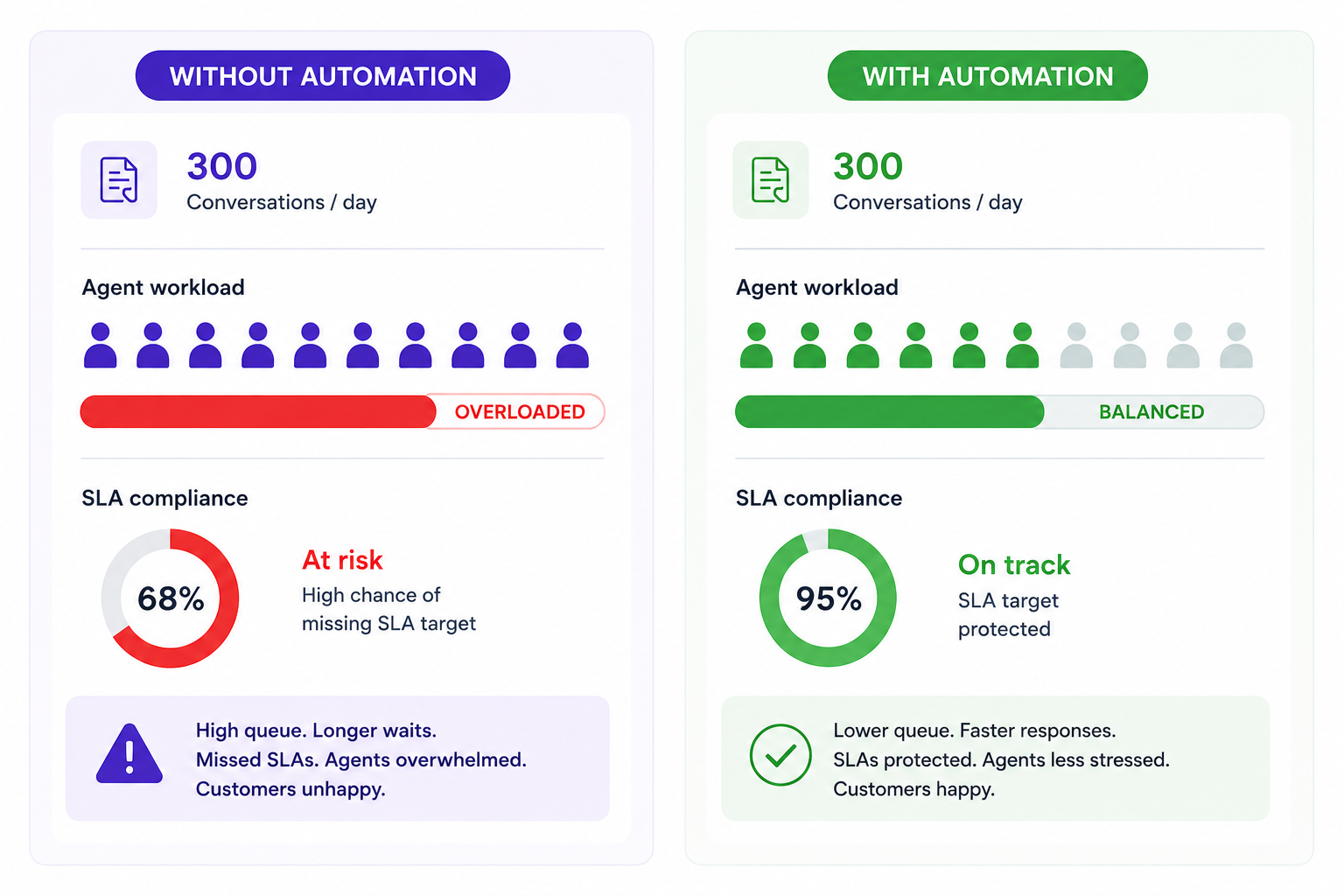
Volume is the most common reason SLAs break. Not because the team is slow, but because there are more conversations than the team has capacity to handle at their committed response speed. When the queue grows faster than agents can clear it, something gets breached. Often that something is the conversation that most needs attention.
The structural fix is not more headcount. It is removing from the human queue the conversations that do not need a human. A large share of support volume is routine: password resets, order status checks, basic how-to questions, billing inquiries with clear answers. A well-configured AI agent can deliver an instant, accurate response on these at any hour, with no SLA risk whatsoever.
When routine conversations are handled automatically, two things happen. First, they get resolved faster than any human response target could achieve. Second, human agents working the remaining queue have capacity to hit their SLA targets on the conversations that actually need them. This is how automation protects SLA performance systemically, not just tactically.
The gap is measurable: teams without an AI Agent still close only about 11% of conversations without a human, the same as a year earlier, while teams running one are at 40%.
Do not treat SLA failure as a pure staffing problem. The first question should always be: what percentage of our current volume could be resolved automatically? A team handling 300 conversations a day with 60% routine volume and no automation is running its humans into the ground on work that should not reach them. Fix the routing before you hire.
Your support SLA breaks at the exact moment your uptime SLA does, and your agents spend the incident typing "we're aware and investigating" instead of handling everything else.
This is where support SLAs and ITSM meet, and where the setup pays off twice:
- Monitor your services with Crisp Status Page . In Settings → Status Page → Monitored services, add the endpoints customers depend on (app, API, login). Crisp checks them in poll mode, or your servers report their own health in push mode. When a service goes down, your on-call team gets an alert by email, Slack or push, and the chatbox and Knowledge Base show a downtime warning automatically (Status Page guide).
- Connect the Status Page MCP to Hugo AI. Hugo then reads live service health before it answers. When a customer writes "I can't log in" during an incident, Hugo confirms the outage, shares the latest update and the expected resolution, and offers to notify them when it is fixed. The conversation resolves without reaching a human, and without a wrong answer like "try resetting your password".
- Route what Hugo cannot close. Add a Hugo Routing rule for incident-related escalations, such as a customer reporting data loss or a failed payment during the outage, and send them to a dedicated incident inbox with your urgent-tier target.
- Close the loop with announcements. Post updates and the resolution notice from the Status Page, so Hugo, the chatbox and your subscribers all repeat the same message, with no agent copying and pasting.
The result: during an outage, the human queue holds only the conversations that need a person. Your first response SLA holds on the rest of the queue, your uptime SLA has a clean incident record, and customers hear one consistent message from the first minute.
The SLA Metrics That Matter
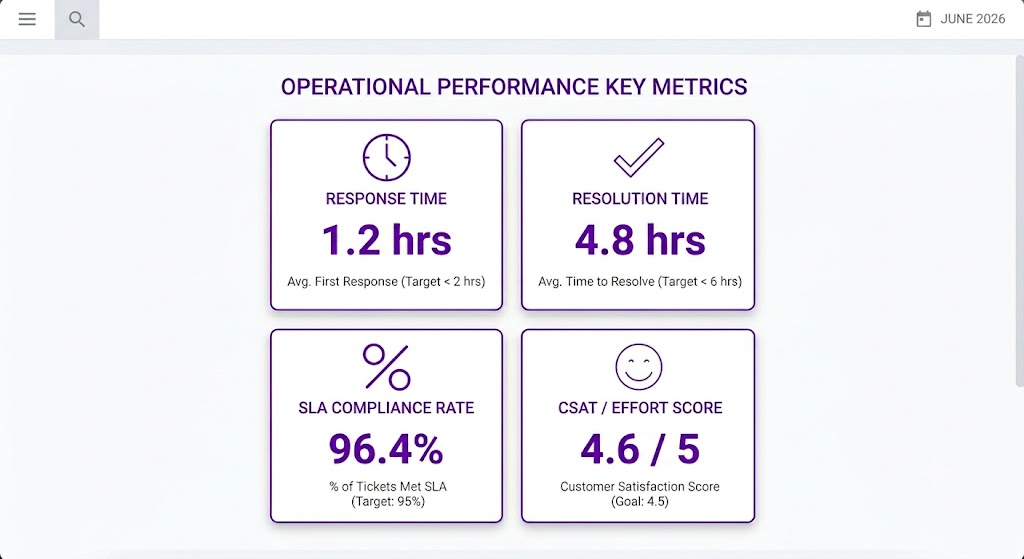
Most support teams track too many numbers loosely, rather than a small set of numbers rigorously. SLA management lives or dies on a short list of metrics your team can act on in real time. Here is what belongs on that list.
1. Human First Response Time. The time between the AI escalating a conversation and a human's first meaningful reply. In an AI-first setup, the AI answers in seconds, so this is where customers actually wait and where your SLA gets tested. An escalated conversation already carries the customer's frustration from the first exchange, so a slow pickup compounds it instead of resetting it. Salesforce research shows that 83% of customers expect an immediate response when they reach out. The AI covers that first moment. The human pickup decides whether the promise holds. Track median and 90th percentile separately: your median might look healthy while 10% of customers wait unacceptably long.
2. Resolution Time, Split by criterias. How long AI-only resolutions take, versus how long escalated, human-involved resolutions take. Blending both paths into one number hides which one is actually dragging your average down.
3. Escalation Accuracy. The percentage of AI-handled conversations that were correctly resolved without needing a human follow-up, versus the percentage that should have escalated but didn't. This metric didn't exist in the pre-agentic model. It now sits upstream of every other SLA number, because a missed escalation is a breach that hasn't been discovered yet.
4. Customer Effort Score (CES). CES measures how easy or difficult a customer found the interaction. Gartner's research found it is a stronger predictor of customer loyalty than both satisfaction and delight. In an AI-first system, CES also tells you something specific: whether customers are getting bounced between the AI and a human, or whether the handoff felt seamless. A technically fast resolution that required three loops between bot and agent is still a high-effort experience.
5. SLA Compliance Rate
The percentage of conversations resolved within their target window. This is your headline SLA health metric. But it requires one discipline to remain useful: segment it by priority tier. An 85% overall compliance rate masking a 60% compliance rate on urgent conversations is not healthy performance. It is healthy performance on low-priority tickets covering for a broken process on the ones that matter most.
6. Breach Rate by Hour and Day
Where in the week are your SLA breaches clustering? Most support teams have predictable volume patterns: Monday mornings, post-holiday spikes, post-release incident surges. Breach rate by time segment tells you where to concentrate staffing, automation coverage, and pre-emptive response templates. A flat team applying flat effort to a spiked volume curve will produce avoidable breaches on a completely predictable schedule.
Frequently asked questions
What is the difference between human first response time and resolution time?
Human first response time is how long a customer waits for a person once the AI escalates the conversation. Resolution time is how long it takes for the issue to be fully resolved. When an AI agent answers first, a generic first-response time is met in seconds and says little, so the human pickup is the response target that counts. A fast pickup followed by a slow resolution still fails the customer, so a complete SLA system tracks and targets both independently.
How do I know if my current SLA targets are realistic?
Pull your last 90 days of response and resolution time data and look at your median and 90th percentile figures. If your team is consistently missing your stated target, the target is aspirational, not operational.
How many SLA priority tiers should we set?
Three is the practical ceiling for most support teams: urgent, standard, and general. More than that creates a taxonomy agents cannot hold in their heads, and the tiers stop being followed. Clarity in prioritization is what makes the system operate.
What is the best way to prevent SLA breaches in real time?
Surface at-risk conversations before they breach, not after. Your queue view needs to show each conversation's SLA status dynamically so agents can prioritize by time remaining rather than by arrival order.
Can automation really protect SLA performance, or does it just deflect tickets?
Done well, automation does both simultaneously. An AI agent that resolves a routine inquiry instantly removes it from the at-risk queue entirely. It does not deflect the conversation; it closes it, faster than any human SLA target could achieve.
What is Customer Effort Score and why does it belong in SLA reporting?
Customer Effort Score measures how difficult customers found it to get their issue resolved. It captures what time-based metrics miss: a conversation that met its SLA window but required four exchanges to reach resolution is still a high-effort experience.
Sources
Gartner, Stop Trying to Delight Your Customers (Harvard Business Review), https://hbr.org/2010/07/stop-trying-to-delight-your-customers
Salesforce, State of Service Report (6th Edition), https://www.salesforce.com/resources/research-reports/state-of-service/
Salesforce, Latest Customer Service Statistics, https://www.salesforce.com/service/what-is-customer-service/stats/
McKinsey & Company, Effective End-to-End Customer Service with Social Media, https://www.mckinsey.com/capabilities/operations/our-insights/social-media-as-a-service-differentiator-how-to-win
McKinsey & Company, Where Is Customer Care in 2024?, https://www.mckinsey.com/capabilities/operations/our-insights/where-is-customer-care-in-2024
Forrester Research, The Forrester Wave: Customer Service Solutions, Q1 2024, https://www.forrester.com/report/the-forrester-wave-tm-customer-service-solutions-q1-2024/RES180530
📚 Related articles
How to track customer conversations so nothing falls through the cracks · Proactive customer service: how to get ahead of issues instead of chasing them · Ticket escalation done right: how to move issues up the chain without losing context

Collaborative Inbox vs. Shared Mailbox: What's the Difference and Which One Does Your Team Need?
A shared mailbox works until two people answer the same customer. Here is what separates a native shared mailbox from a collaborative inbox, where each one breaks, and how to pick the right one when AI already answers first.

The Real Cost of Managing Customer Emails With CC and Reply-All (With Data)
CC and reply-all feel free. They cost duplicate replies, lost ownership and hours of inbox triage. Here is what that adds up to for a support team, and what replaces it once AI takes the first reply.

Omnichannel customer support: how to never miss a customer request
Customer requests rarely get ignored on purpose. They slip between channels, sit unassigned or close without a fix. Here is how to centralize every channel, route automatically and track each request to resolution, with AI answering first.