Omnichannel customer support: how to never miss a customer request
Customer requests rarely get ignored on purpose. They slip between channels, sit unassigned or close without a fix. Here is how to centralize every channel, route automatically and track each request to resolution, with AI answering first.


A customer messages you on WhatsApp. Nobody replies. They try the contact form on your website, where a different agent has no idea about the WhatsApp message and asks them to repeat everything. Frustrated, they email support directly, and that thread sits in a personal inbox nobody else can see. Three channels, three conversations, zero resolution.
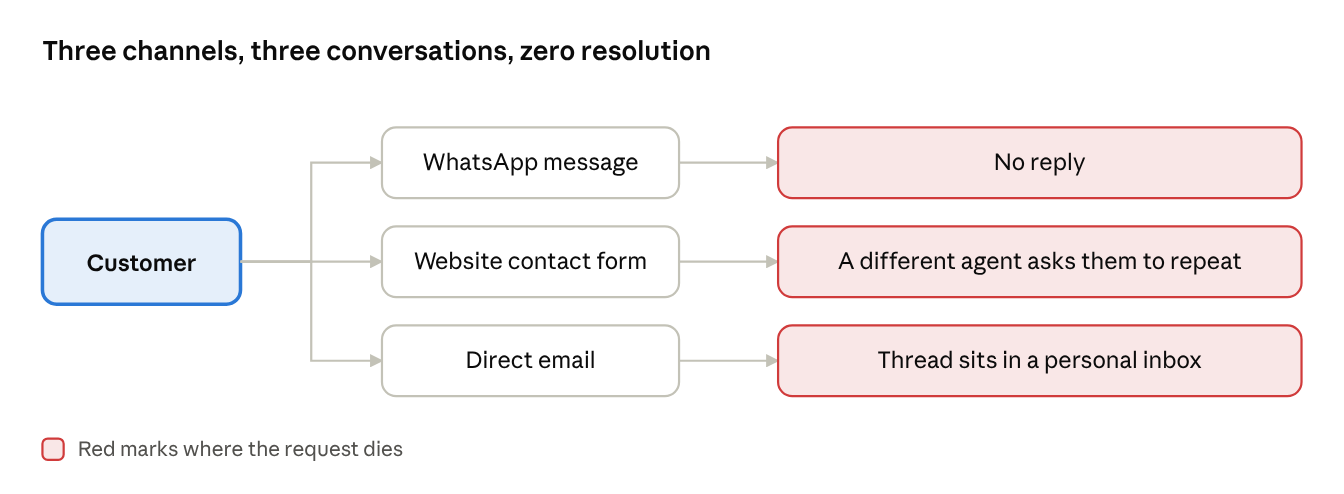
This is not a headcount problem: it is an architecture problem. Most teams that lose leads or customer requests are not understaffed: they have no single system that sees every inbound message, triggers AI Agent, answers what it can in seconds, and routes the rest to the right person with context attached.
Every channel you add, whether live chat, a contact form, WhatsApp, or an app, creates another place a request can get stuck. Gartner found that only 22% of customers start, stay, and resolve their issue entirely within a company's own channels, which means most journeys already cross surfaces your setup may not be tracking.
The cost is not abstract: missed request does not just annoy one customer, it erodes the belief that reaching out actually works. Churn from no answer, missed deals, stays invisible until you look for it, because customers or potential buyers who give up rarely complain first. They leave.
Here is what this guide covers:
- What omnichannel customer support means in practice, and how it differs from multichannel
- The 5 signs requests are already slipping through your setup
- The metric that exposes missed requests, plus 3 AI-era metrics to track on top of it
- The 4 levers that close the gap: one queue, AI first with automatic routing, tracking to resolution, and mobile continuity
- Step-by-step setup for each lever in Crisp, with Hugo AI Agent and AI Copilot
- The 3 mistakes that bring the problem back
- Where to start based on your team size
What is omnichannel customer support?
Omnichannel customer support is the practice of unifying every channel a customer might use, chat, email, social, SMS, and in-app, into a single operational support system where a request is tracked, routed, and resolved regardless of where it originated. The defining trait is not channel coverage, since most tools support that now. It is continuity: a customer can start on live chat and continue by email without repeating themselves, and both the AI agent and the human agent see the full history whichever channel they are replying from.
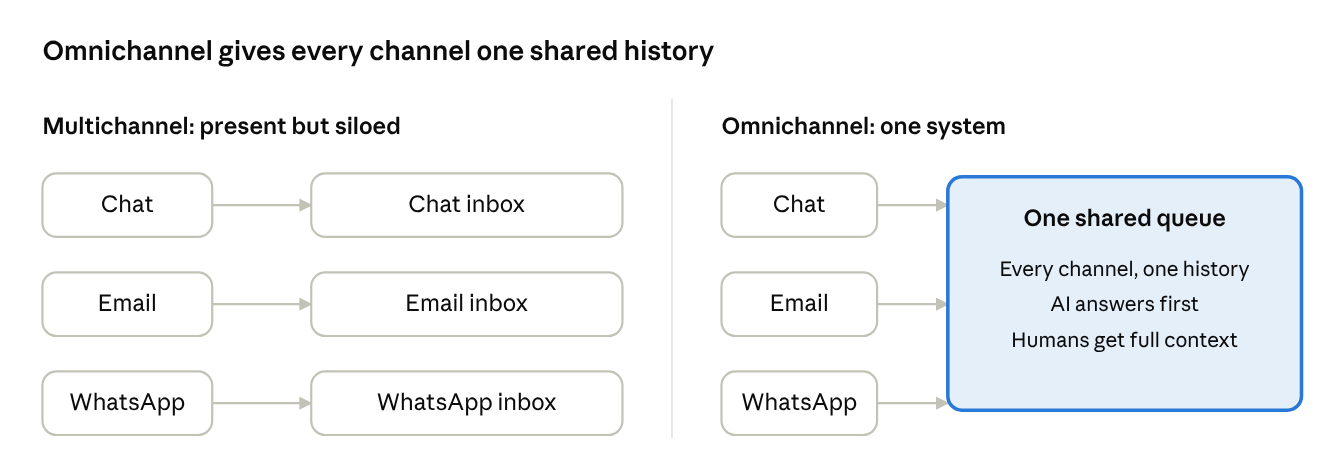
This differs from multichannel support, which simply means being present on several channels, each running as its own silo. Multichannel gets you reachability. Omnichannel gets you continuity. Our omnichannel vs. multichannel comparison breaks the difference down, and if you are choosing a tool, start with the best multichannel AI support platforms or these multichannel customer service tips.
Working omnichannel support has five measurable components:
Component | What it measures |
|---|---|
Channel centralization | Percentage of inbound requests that land in a single unified queue, regardless of origin channel |
First response time | Time between a customer's first message and the first AI or human reply, per channel |
Assignment accuracy | Percentage of requests routed to the correct agent or team on the first attempt |
First contact resolution (FCR) | Percentage of requests closed without requiring a second contact from the customer |
Missed request rate | Percentage of inbound requests that receive no reply within a defined SLA window |
5 signs inbound requests are slipping through
A specific pattern shows up right before requests start slipping through. Agents keep personal notes to remember which customer they already replied to, because the system does not tell them. Managers hear about missed requests from angry customers on social media before their dashboards flag anything. New channels get added faster than anyone builds a process for triaging them, so each one becomes its own quiet backlog.
Requests are slipping through if:
- A customer has followed up asking "did you get my message?" more than once this month
- Two people, or a person and a bot, have replied to the same customer thread without knowing the other already responded
- You cannot say, without checking multiple tools, how many open requests you have across all channels right now
- A new channel (WhatsApp, a new social account, an app) went live without anyone assigned to own its triage
- Your team relies on an agent's memory or a personal note, not the system, to know a conversation is still open
None of these are hypothetical edge cases, they are checkable symptoms of a fragmented architecture, and each one compounds: A team that misses a request once will miss more, because the usual fix (another inbox, another spreadsheet, another manual check) makes the system harder to reason about.
The damage lands hardest at the handoffs. Gartner found that 62% of customer service channel transitions are high-effort for customers, and that fewer than half of customers who experience a high-effort transition will use self-service again. Every handoff without context is a small tax on customer trust.
The metrics that prove nothing slips
Most teams default to average response time as their proxy for reliability. It is worth watching, but it measures speed on the requests you already caught, not the ones you missed. And with AI answering first, it no longer separates strong systems from weak ones.
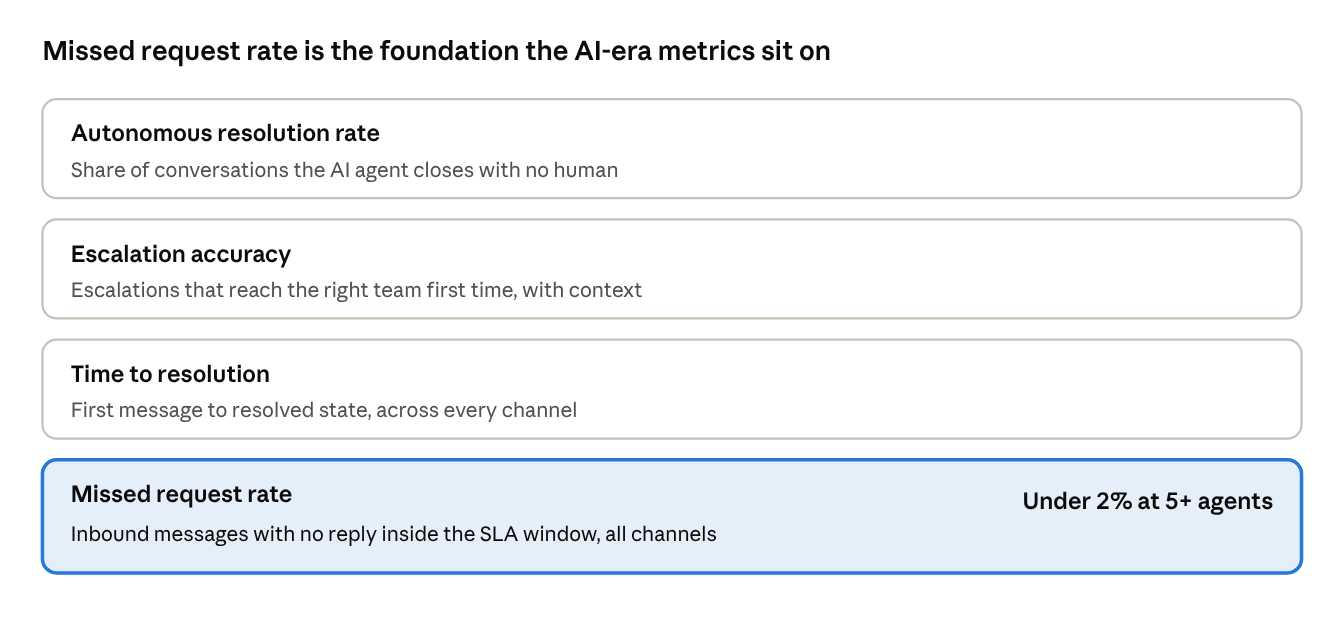
The foundation metric is missed request rate: the percentage of inbound messages, across every channel, that receive zero reply within your defined SLA window. A team can post an excellent average response time and still lose requests that never became a conversation, usually because they arrived on a channel nobody was monitoring or where the handover wasn't properly done (or never was).
Layer three AI-era metrics on top of it:
- Autonomous resolution rate: the share of conversations the AI agent closes end to end with no human involvement, segmented by channels.
- Escalation accuracy: the percentage of escalations that reach the right team on the first attempt, with full context attached.
- Time to resolution: how long a request takes from first message to resolved state, across every channel it touched.
Track the human queue on its own, too: on conversations handled by humans alone, Crisp found median first response rose to roughly 32 minutes on teams with an AI agent, versus around 13 minutes on teams without one.
That is not a performance decline: the AI absorbs the repetitive requests, so the work that reaches people is harder and slower to resolve. Judging that queue by legacy response-time targets would penalize the system for working correctly.
Set a target that matches your team size:
- Under 5 agents: aim for a missed request rate at or near 0%. Volume is low enough that any miss is a process gap, not a scale problem.
- 5 to 20 agents: aim for a missed request rate under 2%. The main risk is new channels added without a clear ownership and routing plan.
- 20+ agents: hold the same under-2% target, but the mechanism shifts from manual vigilance to automated routing and escalation, because manual tracking breaks down entirely at that volume.
Want the full benchmark? Our State of AI Customer Support 2026 webinar breaks down response times and automation rates across 484.8 million conversations:
4 levers to stop losing customer requests
Each lever maps to a specific point where requests get lost. Together they cover visibility, first response and routing, resolution tracking, and mobile continuity.
Lever 1: Centralize every channel into one queue
The job: Get every inbound message, regardless of channel, into a single place where an AI agent can answer it and a human can act on it.
Why it is hard without the right setup: Each new channel arrives with its own native inbox. WhatsApp Business has one, the contact form emails a shared address, and social DMs live inside the platform. Nobody has a single answer to "how many open requests do we have right now," and an AI agent cannot answer what it cannot see. Copying teammates on email makes it worse: CC and reply-all chains have a measurable cost, and nobody owns the reply.
What good looks like: One unified view where a WhatsApp message, a live chat conversation, and an email all appear as the same type of object, a trackable request. Sub-inboxes organize volume by team or topic without fragmenting the underlying system.
Email is where most teams lose the thread first. If yours still runs on a shared mailbox, these shared inbox tips and our pick of the best shared inbox software show what to move to.
Some requests never reach the queue at all: a visitor hesitates on your pricing page, has a question, and leaves without asking. Proactive live chat catches them before they go, and these live chat trigger examples show where to start.
How to do it in Crisp:
- Forward your support address into Crisp, then connect WhatsApp Business, Messenger, Instagram DM or SMS and phone calls so every message lands in the Shared Inbox.
- Go to Settings → Inbox Settings → Sub-Inboxes and click Add Sub-Inbox for each team or topic.
- Under Conditions, sort conversations by channel, segment, language or customer data. Order the list from the most specific inbox to the broadest fallback (sub-inboxes guide).
- Train Hugo on your website, Knowledge Base and Q&A snippets, then test it in AI Agent → Evaluate → Playground.
- Go to AI Agent → Agent → Activation and enable Hugo on every channel it should answer: chat, email, WhatsApp, Messenger, Instagram, SMS and your contact form.
Metric to track: Percentage of total inbound requests unified into the single queue (target: 100%).
Lever 2: Let AI take the first turn and route the rest automatically
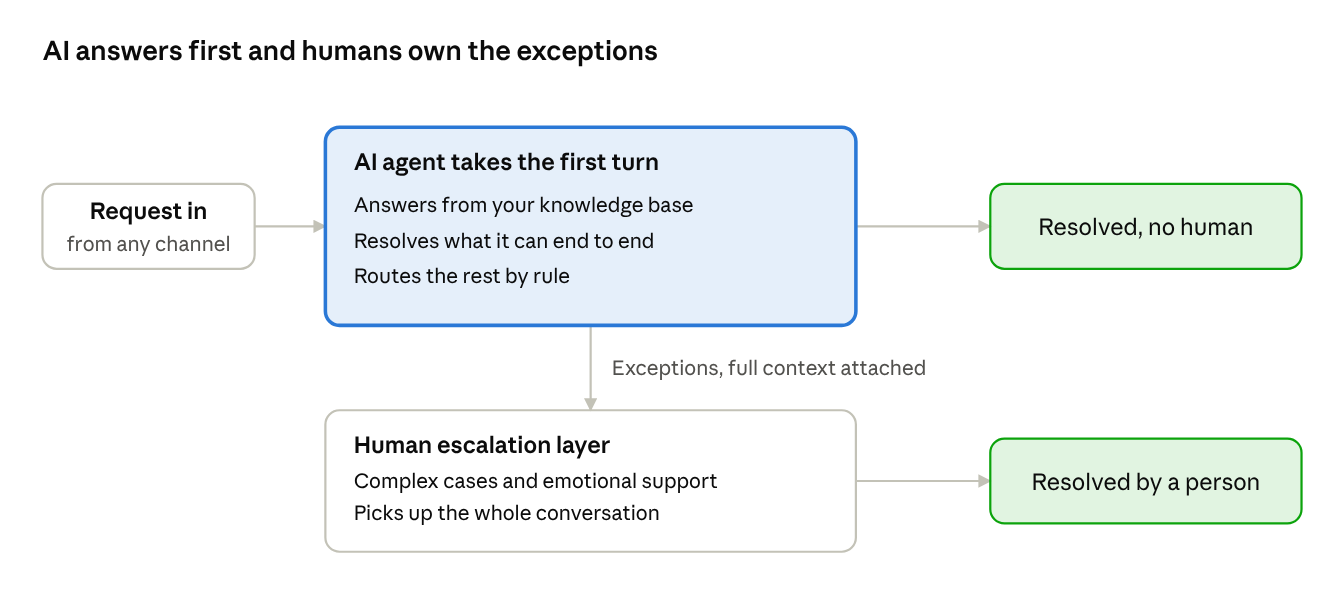
The job: Get every request answered or correctly assigned the moment it arrives, without relying on someone noticing it and claiming it.
Why it is hard without the right setup: Manual assignment works at low volume and breaks the moment two agents are online at once. Urgent issues sit behind low-priority ones, and duplicate replies happen when two people grab the same conversation.
Handoffs are fragile too: in Crisp's data, once an AI agent hands a conversation over, operators typically take around an hour to respond. A handoff that arrives without context or at the wrong desk wastes the work the AI already did.
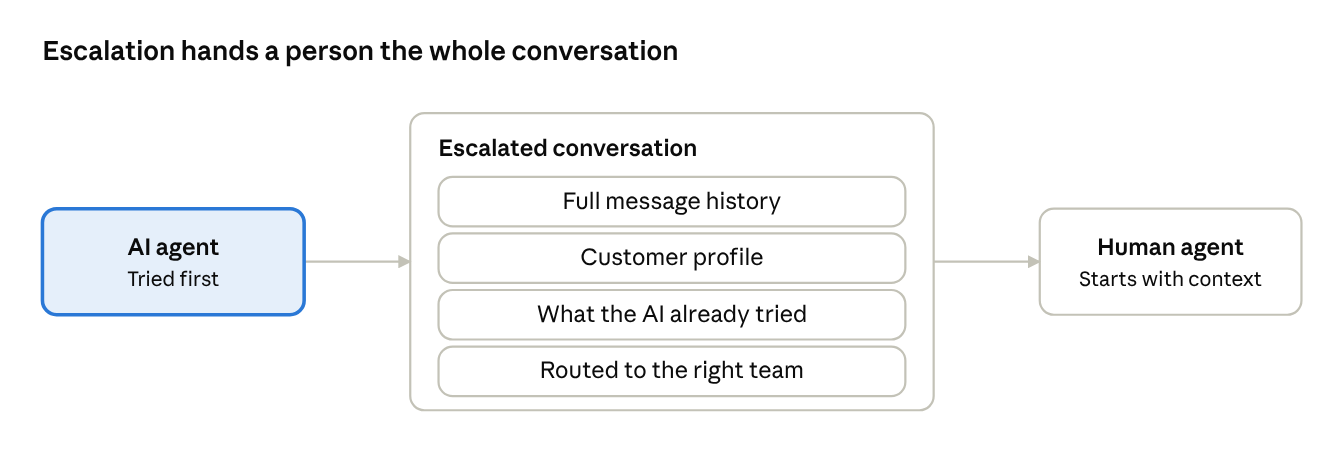
What good looks like: The AI agent resolves what it can from your knowledge base. Everything else routes by rule to the correct team, based on channel, topic, or customer attributes, with clear escalation paths for specialist cases. Escalations are the system working correctly: complex issues finding the right person. When a teammate needs to pull in a specialist, the exchange stays inside the conversation as an internal note instead of a forwarded email.
How to do it in Crisp:
- Go to AI Agent → Agent → Settings → Escalation and choose when Hugo hands over: no confident answer, a frustrated customer, or a request for a human (escalation guide).
- Set the default escalation destination in AI Agent → Guidance → Routing. Every escalation also triggers your sub-inbox and routing rules.
- Go to Settings → Inbox Settings → Operator Routing, enable auto-assignment, and create rules by segment, language, location or custom data. Turn on reassignment for stale conversations and offline assignees, so each conversation always has one owner (routing guide).
- Create one topic per recurring question in AI Agent → Automate → Topic Detection, so escalations arrive already classified. Workflows can then act on those topics.
- When an escalation lands, click Copilot in the message editor and run /summary to see the issue and pending topics. Run /draft for the reply, review it and send (Hugo AI Copilot guide).
Metric to track: Autonomous resolution rate and escalation accuracy (percentage routed correctly on the first attempt).
Watch how routing rules and Hugo work together to send every escalation to the right desk:
Lever 3: Track every request to a resolved state, not just a reply
The job: Convert every inbound message into something with a clear open or closed status, and let customers see that status themselves.
Why it is hard without the right setup: A reply is not a resolution. Without a ticket-like state attached to every conversation, requests get a first response and then quietly stall, because nothing in the system says they are still open. Customers have no way to check progress, so they follow up on a second channel, which fragments the request further.
What good looks like: Every request has an explicit state (open, pending, resolved) visible to the agent, the AI, and the customer. A ticket portal lets customers browse their current and past requests without creating a duplicate contact. Customer history is preserved so a human picking up an escalation sees everything that came before.
How to do it in Crisp:
- Filter the inbox on unresolved to see everything still open, and resolve a conversation only once the request is fixed.
- In AI Agent → Agent → Settings, set Auto-resolve after user inactivity. Finished threads close, and Hugo picks them up again if the customer writes back.
- Before passing a case to another team, run /handover in AI Copilot and add the brief as a private note, so the next person starts with full context. The CRM profile keeps the customer's full history beside it.
- On Crisp Plus, go to Plugins → Ticket Center → Settings and set your categories and up to five FAQs. Customers can then open tickets and browse their current and past requests from your site (Ticket Center guide).
Metric to track: First contact resolution rate, and percentage of requests with an explicit open or closed state.
See how /summary and /handover give the next person full context in seconds, without rereading the thread:
Lever 4: Keep mobile users inside the conversation
The job: Let customers using your mobile app get support without leaving the app, with the conversation connected to the same history as their web and chat interactions.
Why it is hard without the right setup: Mobile users are often routed to an external email address or web contact form the moment they need help. That breaks the app experience and starts a brand-new, contextless conversation, which is one of the easiest ways to silently duplicate a request already being handled elsewhere.
What good looks like: In-app support that triggers based on real user behavior, with history that carries over if the same customer later messages from the web, so the AI agent and your team always work from one thread.
How to do it in Crisp:
- Install the Crisp Mobile SDK for iOS, Android or React Native (developer docs).
- Set the user's email when they sign in (
CrispSDK.user.emailon iOS), so in-app conversations attach to the right contact. - Give each signed-in user the same private token in the app (
CrispSDK.setTokenID) and on your website (CRISP_TOKEN_ID). Both bind to one session, so the conversation continues across app and Live Chat on web. Never use a guessable value like an email (session continuity guide). - Reset the session on logout, so the next person on the device starts clean.
Metric to track: Share of mobile conversations started in-app through the SDK, versus conversations redirected to email or a web form.
3 common mistakes to avoid missing support requests
Adding a channel before assigning ownership and AI coverage. Turning on WhatsApp or a new social inbox feels like progress, but if nobody owns it and the AI agent cannot see it, it becomes the exact blind spot this guide describes. Every new channel needs an owner, a routing rule, and a place in the unified queue before it goes live, not after the first missed message.
Treating "responded" as the finish line. A fast first reply looks good on a dashboard but does not mean the request got resolved. This applies to AI as much as humans. Crisp's data makes the point that the speed advantage only compounds when the first reply can resolve the request, not just greet the customer. Teams that optimize purely for response time end up with conversations that got a quick acknowledgment and then stalled, which customers experience as being ignored twice.
Solving volume with more agents instead of better first-turn coverage and routing. Hiring to cover a growing backlog treats the symptom. If requests are not centralized, answered by AI where possible, and routed correctly, more agents just means more people checking the same fragmented inboxes. Fix the architecture first, then evaluate whether headcount is actually the bottleneck.
How to fix your organization
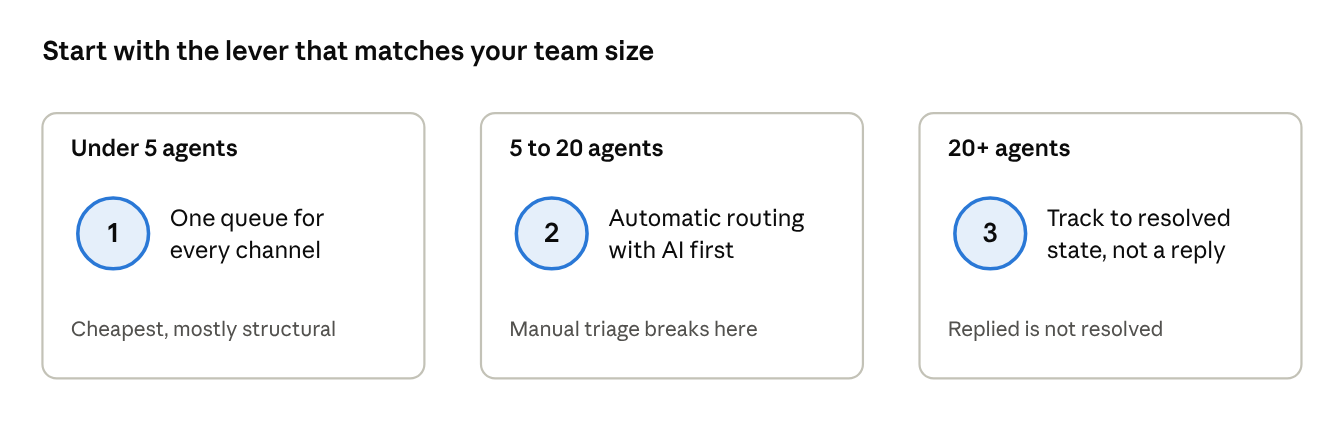
If your team is under 5 agents: Start with Lever 1. At this size the fix is almost entirely structural: get everything into one queue and let an AI agent take the first turn. It is also the cheapest lever, since there is no complex routing logic needed yet.
If you are growing fast (5 to 20 agents): Focus on Lever 2. This is the stage where manual triage breaks. Two or three people online simultaneously creates duplicate replies and missed handoffs, and rules-based routing with AI-first coverage pays off immediately.
If you are at scale (20+ agents): Lever 3 is your biggest unlock. At this volume, the gap between "replied to" and "actually resolved" decides whether your missed request rate stays low or creeps up invisibly. A ticket portal where customers browse their own requests also takes pressure off the queue by cutting status-check messages.
Ready to stop losing customer requests?
Crisp brings Hugo, Shared Inbox, Ticketing, and Live Chat together in one platform, so every channel feeds the same queue, gets answered or routed automatically, and gets tracked to an actual resolution.
Frequently Asked Questions
What is missed request rate in customer support?
Missed request rate is the percentage of inbound messages, across every channel, that get no reply within your SLA window. It catches what average response time hides, because it counts requests that never became a conversation. Track it first, then layer AI resolution and escalation metrics on top so you see both coverage and quality.
What is omnichannel customer service?
Omnichannel customer service connects every channel a customer uses, from live chat and email to WhatsApp, social messaging and in-app chat, into one system with one shared history. A request keeps its context when the customer switches channels, so the AI agent and the human agent both see what came before. The customer never starts over.
What is autonomous resolution rate?
Autonomous resolution rate is the share of conversations an AI agent closes end to end without human involvement. AI-assisted resolution differs: the AI drafts or routes, but a person sends the reply. Tracking both shows how much of your queue the system handles alone and how much still needs human judgment.
How does an AI agent hand off to a human without losing context?
The AI attaches the full conversation history, the customer profile, and what it already tried, then routes the escalation by rule to the right team. The human picks up mid-conversation instead of starting cold, so the customer never repeats themselves. A clean handoff is the system working correctly, not a failure.
How do you stop requests slipping through when you add a new channel?
Assign an owner and a routing rule before the channel goes live, and connect it to your unified inbox so the AI agent can answer first. Without that, each new channel becomes its own silent backlog. Treat both as part of launching the channel, not something you bolt on after a miss.
Do small support teams need an AI agent to cover multiple channels?
Small teams often benefit most, because an AI agent acts as extra capacity on every channel at once. It answers routine questions instantly, so your one or two people handle only exceptions. Fix routing and first-turn coverage first, then judge whether headcount is truly the bottleneck before hiring.
Sources
Crisp, The State of AI Customer Support 2026, https://crisp.chat/en/reports/state-of-ai-support/
Gartner, Gartner Survey Finds 62% of Customer Service Channel Transitions are "High-Effort", https://www.gartner.com/en/newsroom/press-releases/2023-07-11-gartner-survey-finds-62-percent-of-customer-service-channel-transitions-are-high-effort
Gartner, Gartner Predicts Agentic AI Will Autonomously Resolve 80% of Common Customer Service Issues Without Human Intervention by 2029, https://www.gartner.com/en/newsroom/press-releases/2025-03-05-gartner-predicts-agentic-ai-will-autonomously-resolve-80-percent-of-common-customer-service-issues-without-human-intervention-by-20290
Gartner, Gartner Survey Finds More Than Half of Customer Service Journeys Now Start on Third-Party Platforms, https://www.gartner.com/en/newsroom/press-releases/2025-07-23-gartner-survey-finds-more-than-half-of-customer-service-journeys-now-start-on-third-party-platforms

The Real Cost of Managing Customer Emails With CC and Reply-All (With Data)
CC and reply-all feel free. They cost duplicate replies, lost ownership and hours of inbox triage. Here is what that adds up to for a support team, and what replaces it once AI takes the first reply.

Reduce Repetitive Support Tickets With a Self-Service Knowledge Base
A knowledge base only cuts tickets if customers find the answer before they write. Here is how to build one that does: answer-first articles, search that matches real phrasing, multilingual coverage and upkeep driven by data.

Internal Notes vs. Email Forwarding: The Better Way Your Team Should Be Collaborating on Customer Tickets
Forwarding a customer email to ask a teammate creates two threads that drift apart. Internal notes keep the question, the answer and the customer history in one place, which matters more once AI hands over only the hard cases.