Collaborative Inbox vs. Shared Mailbox: What's the Difference and Which One Does Your Team Need?
A shared mailbox works until two people answer the same customer. Here is what separates a native shared mailbox from a collaborative inbox, where each one breaks, and how to pick the right one when AI already answers first.


Below is a story that you might already have heard, if it sounds familiar, this article is for you:
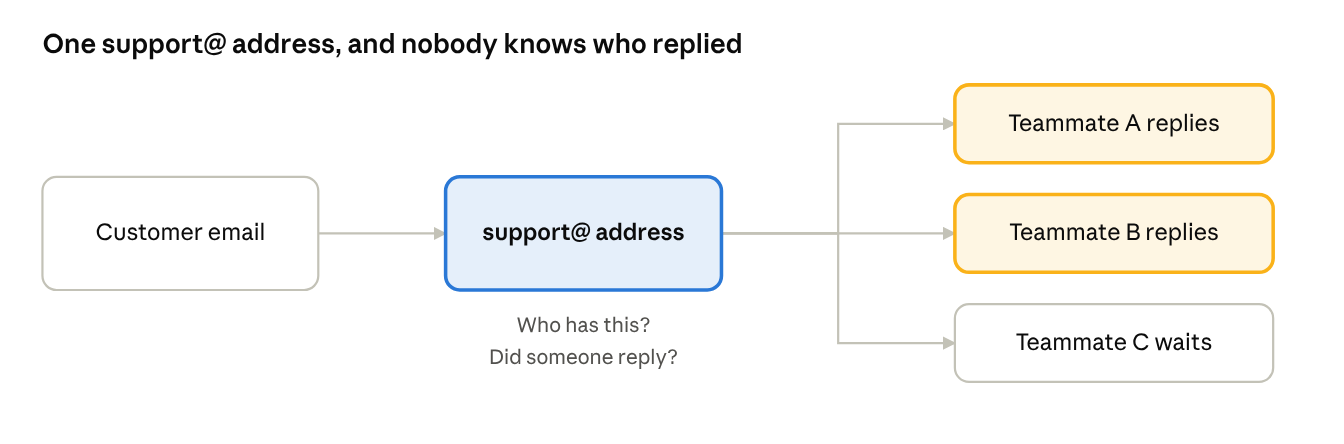
A support@ address gets set up in an afternoon, somebody in IT flips on a shared mailbox in Outlook, or turns a Google Group into a Collaborative Inbox, and the team starts answering customer email from one address instead of five personal ones. Then the company grow, team doubles, the ticket volume triples, and the questions that started as minor annoyances (who's handling this? did someone already reply?) start costing real time and brand reputation every day.
That is the point where "collaborative inbox vs. shared mailbox" stops being a semantic question and becomes an architecture decision. For teams that run an AI agent, the AI is already dealing with all the inbound customer service emails, resolving or routing, while the inbox behind it still assumes a person reads every message.
So the choice is really this: keep extending what your email platform already gives you for free, or move to a tool built to be the escalation layer behind an AI-first email responder, where the conversations that need a person land with their context intact. Both are legitimate choices. The right one depends on where your team actually is, not on which option sounds more sophisticated.
Here is what this guide covers:
- What a shared mailbox and a collaborative inbox actually are
- A quick-pick table of what matters, at a glance
- Where a shared mailbox holds up, where it breaks down, and which teams it fits
- Where a collaborative inbox pays off, and when it does not pay off yet
- A side-by-side comparison and the signals that tell you it is time to switch
- The criteria and metrics to check before you commit, once AI takes the first reply
What are the differences between a shared mailbox and a collaborative inbox?
A shared mailbox is a feature built into your existing email platform, such as Outlook's Shared Mailboxes or a Google Group with Collaborative Inbox enabled, that lets multiple people access and reply from one address using their own login. It is an extension of email, not a separate tool: the interface is the same inbox you already use, with shared access bolted on. Every message lands in a queue for a person to read.
A collaborative inbox (as a dedicated product category, not Google's specific feature of the same name) is purpose-built software for teams managing shared conversations at scale. It is still connected to your support@ address, but the interface, the workflow, and the underlying data model are designed around team collaboration from the ground up, and around a first responder that is not always a person. An AI agent takes the first turn, and the team steps in where a conversation needs judgment.
Modern collaborative inbox also not only deal with emails but also centralize many channels into one unified hub.
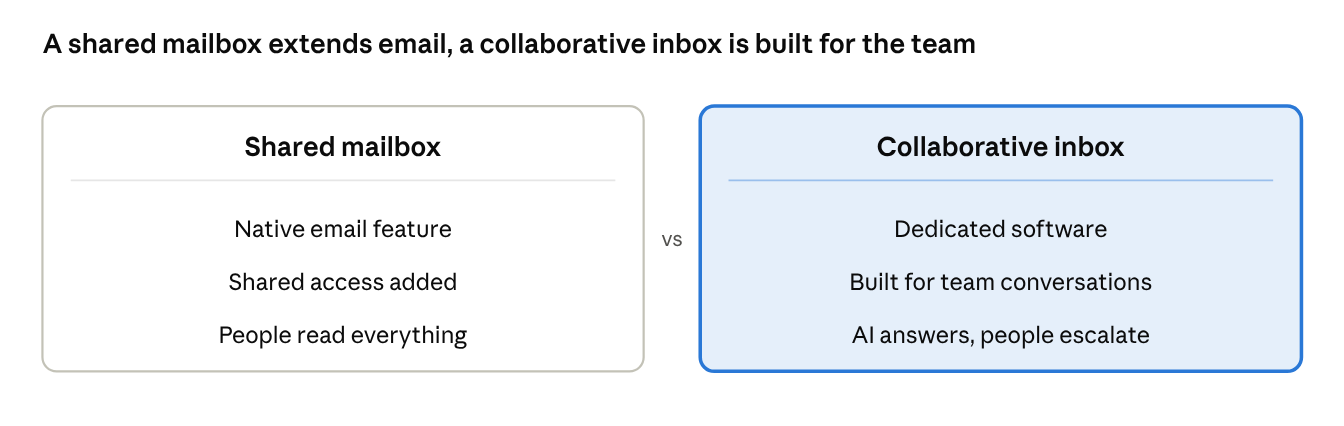
The confusion between the two is understandable, since "collaborative inbox" is also the literal name Google gives its Google Groups feature, which is itself a type of shared mailbox, not the dedicated tool category.
For clarity in this guide, shared mailbox means the native email-platform feature (Outlook or Google), and collaborative inbox means a dedicated, purpose-built tool.
Quick-pick: what matters, at a glance
What matters | Shared mailbox | Collaborative inbox |
|---|---|---|
First response | A person reads every message | An AI agent takes the first turn; people own escalations |
Ownership | Honor system | An explicit, visible owner on every conversation |
Duplicate-reply protection | None; no way to see who is looking at a message | Shows in real time when a teammate has a conversation open |
Internal discussion | Forwarding or a side Slack channel | In-context internal notes |
Reporting | None | Visibility into response times and workload |
Cost and setup | Included in your email platform; set up in minutes | A new subscription; connects to your existing support@ address |
Best for | Under roughly five people, low and steady volume | Past roughly five to ten people, or after a duplicate or dropped reply |
Shared mailbox, in detail
A native shared mailbox is genuinely a reasonable starting point. It costs nothing beyond a platform subscription you already have, it takes minutes to set up, and for a team of two or three people fielding a low volume of email, it does the job without adding a new tool to learn.
Where it holds up: Small teams with low, predictable volume. Nobody is asking "who's handling this?" because there are only two or three people to ask. The team already lives in Outlook or Gmail all day, so there is no new interface to adopt.
Where it breaks down: Interaction workers already spend an estimated 28% of their workweek on email and nearly another 20% looking for information or colleagues who can help, and a shared mailbox adds to that second number, because there is no built-in way to see who is already looking at a message. As volume or headcount grows, that gap turns into duplicate replies, conversations nobody owns, and zero visibility into how the team is performing. There is also no layer for an AI agent to answer first, so every message, routine or not, waits in a human queue. There is no assignment system beyond an honor code, no internal discussion layer beyond forwarding or a side Slack channel, and no reporting at all.
Best for: Teams under roughly five people handling low, steady volume, where the cost of a dedicated tool is not yet justified by the problem it would solve.
Collaborative inbox, in detail
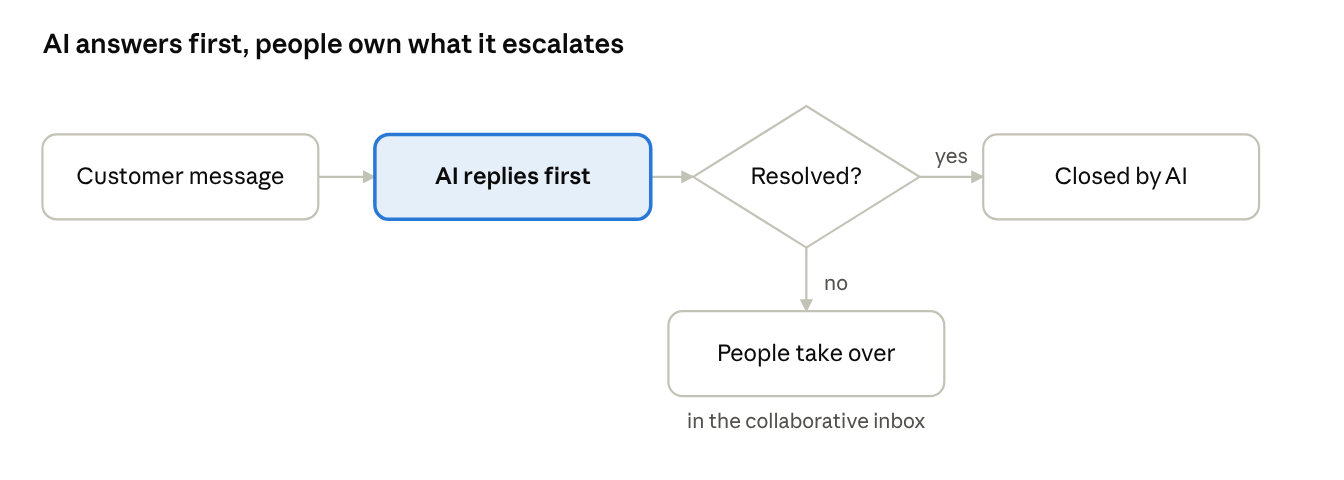
A dedicated collaborative inbox is built around the specific failure points a shared mailbox hits at scale: who is handling what, whether two people are about to reply to the same thing, and whether the team is keeping up. In an AI-first setup it has a second job. It is the escalation layer, the place a conversation lands when the AI agent hands it to a person.
Where it holds up: Any team past the point where "just ask in Slack" is a reliable way to find out who is working a conversation. Real-time visibility, structured assignment, and in-context internal notes remove the coordination overhead a shared mailbox does not address. 74% of service leaders say tool sprawl slows their teams down, and a dedicated inbox consolidates the conversation, the internal discussion, and often the customer's history into one place instead of splitting them across email, Slack, and a spreadsheet.
The report reads this as AI filtering out the repetitive requests first, leaving a smaller but more demanding queue, though it cannot measure complexity directly. That is the queue a collaborative inbox exists to organize.
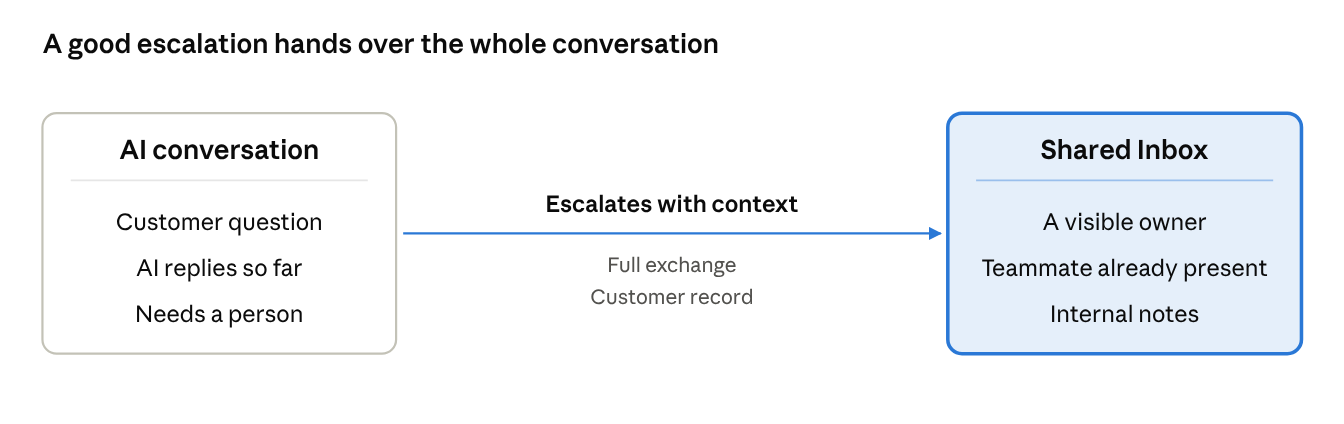
How Crisp handles the handoff: Crisp's Shared Inbox shows in real time when a teammate has a conversation open, before anyone starts typing a reply, which is the single mechanism that prevents ticket colision. Internal notes let the team discuss a conversation without generating a new forwarded email, and every conversation gets an explicit, visible owner. Hugo, Crisp's AI agent, takes the first reply and resolves what it can, drawing on multiplte data sources, such as your Knowledge Base. When it cannot finish, the conversation moves from the automation folder, where the AI deals with conversations, to the pre-defined folders dedicated to your company's rules. the Shared Inbox with the exchange already on the thread and the customer's record in the CRM alongside it, and the assignment rules can route it to the right person, so whoever picks it up does not start from zero.
Where it doesn't pay off yet: Headcount is not the only trigger. A two-person team still sleeps, takes holidays and gets sick, and an AI agent answering first covers those hours without a third hire. Add a second channel, like live chat or WhatsApp, and a shared mailbox stops seeing part of the conversation. The real question is not team size. It is whether a customer has ever waited because nobody was there.
Best for: Any team that needs someone, human or AI, to answer while it is offline. Teams handling more than one channel, teams running, or planning to run, an AI agent that needs a clean escalation layer, and any team past five to ten people, where “who has this one?” has become a daily question.
Side-by-side comparison of team mailbox vs collaborative inbox
Criteria | Shared mailbox | Collaborative inbox |
|---|---|---|
Setup | Minutes, inside Outlook or Google Workspace | Connects to your support@ address; customers see no difference |
Interface | The inbox you already use, with shared access added | Built around team conversations from the ground up |
AI first response | No built-in layer for autonomous resolution | An AI agent can answer first and hand off with the full exchange |
Assignment | An honor code | Structured assignment with a visible owner |
Collision detection | None | Real-time view of who has a conversation open |
Internal discussion | Forwarding or a side channel | In-context internal notes |
Reporting | None | Response times and workload visibility |
Customer history | Scattered across email threads | Often consolidated with the conversation |
Where it breaks down | Rising volume or headcount: duplicate replies and unowned conversations | A two-person team at low volume pays for a problem it does not have yet |
The decision itself comes down to a few signals your team can observe today. Answer six quick questions to see where you land ⬇️.
📊 Collaborative inbox check: assess your inbox setup in 1 minute
Do you need a collaborative inbox? Six yes-or-no questions, under a minute.
What to actually look for when evaluating
Whichever direction a team leans, a few questions cut through most of the noise:
- Who answers first, and can an AI agent take that first reply and resolve what it can?
- Does the option show, in real time, that a teammate already has a conversation open, not just that it is technically "assigned" but that someone is actively there right now?
- Can the team discuss a conversation internally without creating a new, disconnected copy of it?
- Is there any visibility into response times and workload distribution, or is that information locked inside people's individual habits?
Then judge the setup on the metrics that matter once AI is first in line:
- Autonomous resolution rate: the share of conversations the AI closes without a person.
- AI-assisted resolution rate: conversations where the AI takes the first turn and a person finishes the job.
- Escalation accuracy: whether the right conversations reach a person, with context, at the right time.
- Time to resolution: how long a customer waits for the actual answer, not just the first reply.
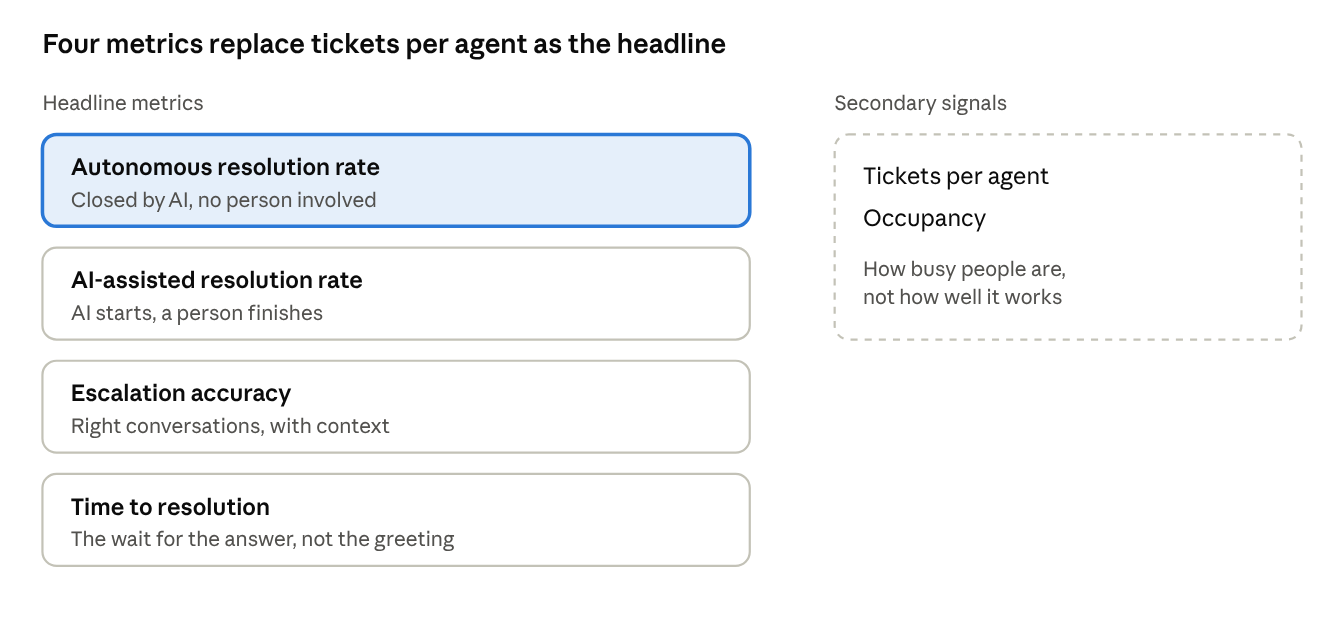
Tickets per agent and occupancy describe how busy people are, not how well the system works, so they stop being the headline numbers.
None of these questions require picking a specific vendor to answer honestly. An average of 59% of US customers trust the brands they interact with, and a duplicate or dropped reply is exactly the kind of moment that erodes that trust further. 88% of customers say good service makes them more likely to purchase again, which is what is actually at stake in getting this decision right, well before pricing or feature lists enter the conversation.
What teams say about shared mailboxes and collaborative inboxes
Every vendor comparison has an angle, this one included. So here is what people running support from these tools say in public forums and verified reviews, in their own words.
When the shared mailbox breaks
- "When another user within the same organization has replied to an email in a shared support mailbox I cant see their reply without going to that users mailbox its self." A Microsoft 365 user on Microsoft Q&A, January 2023. The fix exists, but the setting that shows teammates' replies is off by default and needs an admin.
- "There can be cases where emails are replied to multiple times." An Outlook shared mailbox user on Microsoft Q&A, February 2023, explaining that nothing in the mailbox shows a message was already answered.
- "Is there a way to see the replies made by other members? I have already enabled the 2 checkboxes." Another user on Microsoft Q&A, February 2026. Three years later, the same question.
- "Our issues is not shared passwords, but the confusion that arises out of multiple people managing the same account." A team running support@ on Gmail, on Hacker News.
- "Too many requests come in via email and it's hard to track, discuss, resolve." A small business owner on Hacker News.
Why some teams hold back
- "Now you're going to have 2 jobs." A Hacker News commenter on adding a separate ticketing tool on top of email.
- "It shows them that their email became some sort of ticket." The same Gmail team on Hacker News, on why helpdesk-style replies put them off.
- "Had to pay extra for necessary features, had no support behind it and was tricky to set up." A CEO reviewing a self-hosted help desk on Capterra, January 2023.
What changes after the switch
- "It allows all email communication to run through a single platform." A partner reviewing a shared inbox tool on Capterra, June 2022, on managing several departments from one place.
- "The shared inbox supports team collaboration with internal notes, conversation assignment, and status tracking." From a hands-on review by Hack'celeration, an automation agency that tested Crisp on client projects.
- "Best live chat + shared inbox tool we've used for customer support." A small-business reviewer on G2.
The pattern is consistent. Shared mailboxes fail on visibility: nobody can see who already replied. The hesitation around dedicated tools comes from setup cost, a second tool to learn, and customers feeling processed. A good collaborative inbox has to answer both: show the team everything, and keep the reply personal.
How this comparison was built
We built this comparison in four steps:
- Product documentation. We compared the native shared mailbox features of Microsoft 365 (Outlook shared mailboxes) and Google Workspace (Google Groups Collaborative Inbox) with dedicated collaborative inbox software, using each vendor's help documentation rather than its marketing pages.
- Field evidence. We read public threads on Microsoft Q&A and Hacker News and verified reviews on G2 and Capterra, and kept the problems that came up again and again: replies teammates cannot see, duplicate answers, conversations with no owner, and the cost of adopting a new tool.
- Data. We used Crisp's State of AI Customer Support 2026 report to see how AI-first teams split work between the AI agent and humans, and McKinsey research for the time teams already lose to email.
- Weighting. We ranked every criterion by how directly it affects duplicate replies, human response time and team visibility, the failure modes users describe most often at this decision point.
Crisp makes a collaborative inbox, so we built in three checks against our own bias: every capability claim is checked against documentation, the user voices above include criticism of dedicated tools, and the quiz tells teams to stay on a shared mailbox when the signals are not there. Last reviewed in November 2026.
Frequently asked questions
Is Google's Collaborative Inbox the same as a dedicated collaborative inbox tool?
No. Google's Collaborative Inbox is a Google Groups feature, so it is a type of shared mailbox. It adds basic assignment and status tracking to a mailing list, but it lacks real-time collision detection, in-context internal notes, and reporting. It has no AI agent answering first, so a person still reads every message.
Can a shared mailbox handle a support team, not just internal coordination?
Yes, up to a point. It is a legitimate way to run a small support operation. The limitation is not whether it can take in customer email. It is that it does not warn you when two people are about to answer the same message, and it gives no view of team performance.
How do we know when we've outgrown a shared mailbox?
The clearest signal is a duplicate or dropped reply that actually reached a customer, because a shared mailbox has no mechanism to prevent it. A second signal is anyone manually tracking who is handling what in a spreadsheet or on a sticky note. At that point the inbox has already stopped doing its job.
Does switching to a collaborative inbox mean giving up Outlook or Gmail?
No. A dedicated collaborative inbox connects to your existing support@ address the same way a shared mailbox does, and customers see no difference. What changes is the interface your team works from and what that interface can see and do, including receiving conversations an AI agent has already started.
Where does an AI agent fit in a collaborative inbox?
The AI agent takes the first reply and resolves what it can on its own. When a conversation needs judgment, an exception, or a human touch, it escalates, and the collaborative inbox is where the team picks it up with the history intact. Escalations are the system working as designed.
Sources
Crisp, The State of AI Customer Support 2026, https://crisp.chat/en/reports/state-of-ai-support/
McKinsey Global Institute, The social economy: Unlocking value and productivity through social technologies, https://www.mckinsey.com/industries/technology-media-and-telecommunications/our-insights/the-social-economy
Microsoft Q&A, Shared mailboxes: multiple users cannot see each other's replies, https://learn.microsoft.com/en-us/answers/questions/5210125/shared-mailboxes-multiple-users-cannot-see-each-ot
Microsoft Q&A, Show replies in shared email, https://learn.microsoft.com/en-us/answers/questions/4605330/show-replies-in-shared-email
Microsoft Q&A, See replies other members made to a shared mailbox, https://learn.microsoft.com/en-us/answers/questions/5767282/see-replies-other-members-made-to-a-shared-mailbox
Hacker News, Ask HN: Shared email accounts?, https://news.ycombinator.com/item?id=9637150
Hacker News, Front: The $1.3B Startup Slackifying Email, https://news.ycombinator.com/item?id=25272533
Capterra, FreeScout reviews, https://www.capterra.com/p/208727/FreeScout/reviews/
G2, Crisp reviews, https://www.g2.com/products/crisp/reviews
Hack'celeration, Crisp review, https://hackceleration.com/labs/review/crisp

The Real Cost of Managing Customer Emails With CC and Reply-All (With Data)
CC and reply-all feel free. They cost duplicate replies, lost ownership and hours of inbox triage. Here is what that adds up to for a support team, and what replaces it once AI takes the first reply.

Omnichannel customer support: how to never miss a customer request
Customer requests rarely get ignored on purpose. They slip between channels, sit unassigned or close without a fix. Here is how to centralize every channel, route automatically and track each request to resolution, with AI answering first.

Reduce Repetitive Support Tickets With a Self-Service Knowledge Base
A knowledge base only cuts tickets if customers find the answer before they write. Here is how to build one that does: answer-first articles, search that matches real phrasing, multilingual coverage and upkeep driven by data.