Replace Tier 1 Help Desk Work With AI Chatbots
Tier 1 Support = repetitive, low-value. With the help of an AI Chatbot for customer support, teams can focus on escalated, complex inquiries.


Your support agents are burning out. And it isn't the hard conversations doing it.
The average agent is now fielding 50 to 80 tickets per day. Salesforce's State of Service data shows that 65% of service agents say their workload has increased significantly over the last two years. Separate workforce studies consistently put agent burnout rates above 74% across customer-facing support roles.
And the thing killing them isn't the complex cases. It's not the escalation calls or the upset enterprise customers or the edge cases that require real judgment. Those are hard, yes... but they're also the conversations most agents actually want to be having.
What's burning them out is the volume sitting on top of those conversations. The password resets. The order tracking requests. The "what's my refund status?" queries that arrive 40 times a day, have a factual answer every single time, and don't require a single second of human judgment to resolve.
That volume has a name. It's called Tier 1 support. And it is eating your operation alive.
What does it cost to run Tier 1?
On paper, Tier 1 looks cheap. It’s not.
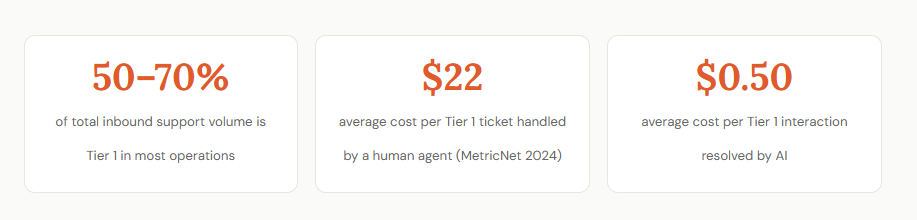
A single Tier 1 ticket costs around $20–$25 to resolve with a human. Tier 2 jumps to roughly $60–$80, and Tier 3? You’re looking at $100+ per ticket once specialists get involved.
Now compare that to AI handling Tier 1 at $0.50–$0.70 per interaction. Same question. Same answer. Just without the payroll, queue, or delay.
But here’s where it gets interesting.
The cost of Tier 1 doesn’t stop at Tier 1.
Every simple query you don’t resolve instantly starts a chain reaction. It clogs your queue, slows down Tier 2, and pushes more tickets into Tier 3 than should ever be there. Suddenly you’re hiring more agents, increasing response times, and burning money on problems that were never complex to begin with.
And that’s before you factor in churn. Or lost deals. Or the customer who just didn’t wait around.
Tier 1 isn’t just a cost center. It’s the pressure point that quietly drives all your other costs up.
What Tier 1 actually looks like in most support operations
Most support leaders can describe Tier 1 in broad strokes. Fewer have actually mapped it inside their own queue with enough precision to know what percentage of their total volume it represents... or what it's costing them as a result.
Tier 1 is any first-touch query that can be resolved without escalation, specialized system access, or human judgment. No negotiation. No empathy calibration. No situational discretion. The answer exists in your documentation or your systems. The only task is retrieving it quickly. In practice, that covers five distinct categories, each generating more volume than most leaders realize.
Account and Authentication
Password resets, login failures, two-factor authentication setup, account unlocks, profile update requests. According to Gartner, password-related requests alone account for 20 to 50% of all IT help desk tickets. In B2C support operations, the share is comparable. The resolution path is identical every time: verify identity, trigger the reset, close the ticket.
Billing and Payments
Invoice requests, payment confirmation, subscription changes, charge clarification. Billing queries tend to arrive with emotional weight, but most have a factual resolution that requires nothing more than a lookup. The customer wants to know what they were charged, or why a payment failed, or when a refund will land. The answer is already in your billing system.
Order and Shipping Status
WISMO (Where Is My Order) queries are among the highest-volume Tier 1 categories in e-commerce and retail support. A Convey study found that 90% of consumers actively track their deliveries, and 70% contact support when tracking information is unclear or unavailable. Every one of those contacts is answerable with a single lookup.
Product FAQs and Basic Troubleshooting
Feature explanations, compatibility questions, setup guides, how-to requests. This category maps almost directly to your help center content. If your documentation answers it, an AI trained on that documentation answers it too... instantly, consistently, and at any hour.
Policy and Process Questions
Return windows, refund timelines, warranty terms, shipping policies. Pure knowledge base queries. The answer doesn't change. It's already written. The only task is delivering it to the customer before frustration sets in and they give up.
In most B2C and SaaS operations, Tier 1 accounts for 50–70% of total inbound volume. Research indicates that 80% of routine customer questions can be resolved through chatbots — a number that maps almost exactly to the Tier 1 share of most support queues.
And right now, every single one of them is competing for the same agent bandwidth as your Tier 2 escalations and Tier 3 edge cases.
Here's what that architecture looks like in practice:
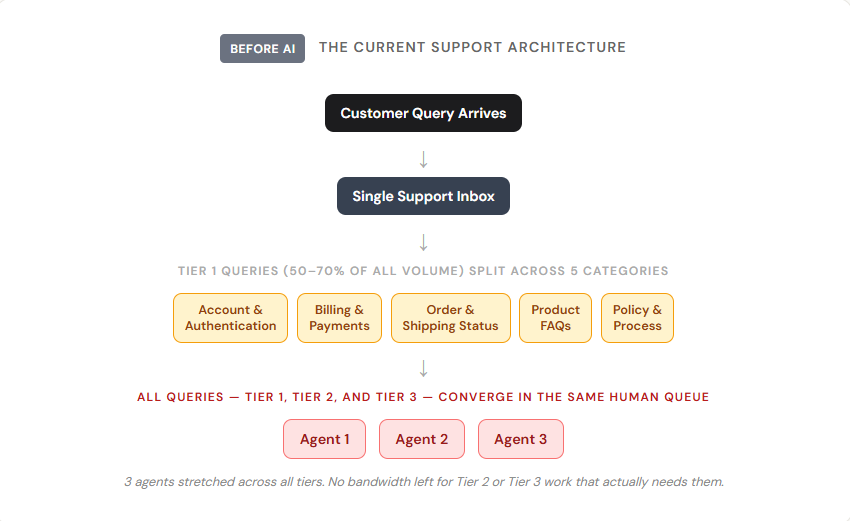
When everything routes to the same queue, agents don't get to prioritize. They work through whatever's in front of them. That means a complex escalation from a churning enterprise customer sits waiting while three agents answer password reset requests and WISMO queries that an AI could have resolved in under three seconds.
The operational cost shows up in two ways:
- Direct Cost
MetricNet's 2024 benchmarking data puts Tier 1 human resolution at $22 per ticket and Tier 3 escalations at $104 or more. Every Tier 1 ticket handled by a human costs the same as a query that genuinely needed human judgment. That mismatch is where support budget waste lives.
2. Capacity Cost
HDI benchmarking data consistently shows that teams with high Tier 1 volume handled manually deliver measurably lower first-contact resolution rates on complex issues. Agents arriving at Tier 2 tickets already fatigued and behind on queue make more mistakes, escalate faster, and produce lower CSAT scores on the tickets that actually matter.
The Tier 1 overload isn't just a cost problem. It's a quality problem that spreads downstream into every tier of your operation.
Why AI is built for Tier 1
This isn't about replacing human capability. It's about not wasting it.
Tier 1 support has three structural characteristics that make it a poor fit for human agents and a near-perfect fit for AI. Understanding these characteristics is what separates teams that deploy AI strategically from teams that deploy it and then wonder why the numbers didn't move.
1. High Repetition
Tier 1 queries don't vary in any meaningful way. The 500th password reset request your AI handles this month is structurally identical to the first. A well-trained AI has pattern-matched against thousands of these queries and can resolve them accurately, consistently, and without the cognitive fatigue that degrades a human agent's performance after the 40th repetitive ticket of the day.
2. Low Ambiguity
Tier 1 queries have definitive answers. They don't require reading a situation, calibrating tone, or making judgment calls in real time. They require retrieving the correct information from the correct source and delivering it clearly. That is precisely what AI does well. The queries that require nuanced empathy, situational discretion, and genuine human judgment are exactly the queries AI should escalate.
3. Speed Sensitivity
Tier 1 customers aren't looking for a conversation. They want an answer in seconds, not minutes. Freshworks' CX 2025 Benchmark found that top-performing support teams achieve first response times under 10 seconds with AI deployed on Tier 1. For a customer waiting on an account unlock or an order status update, a 10-second AI resolution is a materially better experience than a 12-minute wait for a human agent who is going to retrieve exactly the same information anyway.
Here's what the support architecture looks like when AI handles what it should handle.
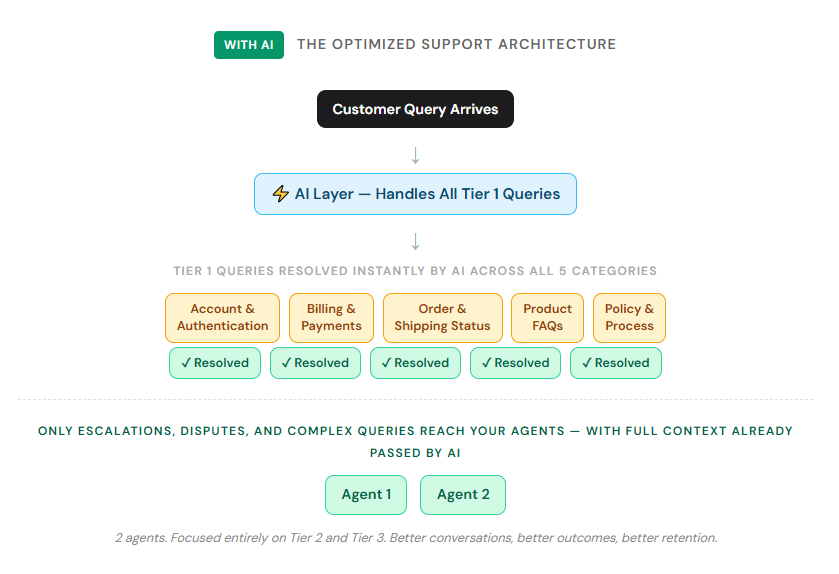
Notice the difference. In the first architecture, three agents are fielding everything and nothing gets done well. In the second, two agents are handling only the work that genuinely needs them... with full conversation context already assembled by AI on every escalation.
That shift in what your agents are doing every day is also a shift in how your agents feel about the job. Studies from Salesforce and Qualtrics consistently show that agents in AI-augmented operations report higher job satisfaction and lower burnout rates than agents in fully manual queues, specifically because the repetitive work is gone.
Less repetition. More variety. More scope for skill development. Those are the conditions that retain good people.
How to build an AI layer that replaces Tier 1 Work
This is where most deployments either land correctly or fall apart in the first 60 days. The steps here are not complicated. But each one has a specific failure mode attached to skipping it, and those failure modes are expensive... both in cost and in customer trust.
Step 1: Audit your Tier 1 volume
Pull 90 days of ticket data before you configure anything. Tag every ticket that was resolved at first touch with no escalation, no specialized system access, and no judgment call required by the agent. The resulting percentage is your realistic AI deflection ceiling.
For most operations, this lands between 40 and 60% of total volume. That number matters because it tells you what you can actually contain end-to-end with AI... not the theoretical maximum, but the real ceiling you're working with. Teams that complete this audit before deployment consistently achieve 30 to 40% higher containment rates than teams that skip it and go straight to training on documentation, according to Intercom's 2024 deployment data.
The audit also reveals something else: which Tier 1 categories carry the most volume. That tells you where to invest the most time in your knowledge base and where your AI will earn back its cost the fastest.
Step 2: Build your AI knowledge base
An AI chatbot is only as good as what it's trained on. Before deploying, compile:
- Your full help center documentation
- Your top 50 most common ticket responses from the past year
- Your return, refund, and policy documentation
- Integration data your AI needs to access (order status APIs, billing systems)
Gaps in the knowledge base are where AI fails customers. Identify them before launch, not after.
Step 3: Define your escalation rules clearly
The failure mode of Tier 1 AI is not wrong answers on questions it knows. It is attempting to answer questions it doesn't know, or failing to escalate when it clearly should. Those mishandled conversations are the ones that generate CSAT drops, negative reviews, and the kind of customer trust damage that takes months to rebuild.
Your AI must route to a human immediately in four situations:
- The query involves a complaint or dispute
- The customer has expressed frustration or used language indicating distress
- The query falls outside your defined knowledge base scope
- The customer explicitly requests a human agent
Clear escalation rules, paired with full conversation context handed off to the agent, mean no customer ever has to repeat themselves.
Step 4: Measure containment, not just deflection
Most teams track deflection rate as their headline AI metric. Deflection rate measures the percentage of conversations an AI starts. It is the wrong metric.
Containment rate measures the percentage of conversations an AI resolves end-to-end, without any escalation to a human. That is the number that tells you whether your deployment is actually working. A chatbot with 60% deflection and 25% containment is worse than one with 40% deflection and 38% containment. The first is generating 60% first contacts and handing off most of them to human agents anyway, having added friction and wasted time. The second is actually closing issues.
Track both numbers, side by side, from day one. Every failed containment is a specific, addressable data point: either a knowledge base gap or an escalation rule failure.
What happens to your agents when AI takes Tier 1
This is the question underneath every AI deployment conversation, even when nobody says it out loud.
The answer for most growing teams is this: AI doesn't eliminate agent roles. It eliminates the need to keep adding them every time ticket volume grows. In terms of organizational impact, this is significant.
Klarna's widely cited deployment saw its AI handle the equivalent of 700 full-time agents' worth of chat volume in a single month. Klarna didn't reduce headcount by 700. It absorbed its next wave of growth without the proportional hiring that would otherwise have been required to manage that volume. The economics of scaling flipped. Volume could grow without headcount growing with it.
For teams already operating at scale, Tier 1 AI shifts what agents do, not whether agents exist. When Tier 1 volume is handled end-to-end by AI, human agents work exclusively on Tier 2 escalations, complex troubleshooting, high-stakes conversations, and the cases that benefit from real human empathy and judgment. Those conversations are better for agents too. Less repetition. More variety. More scope for genuine skill development.
The support organizations with the best cost structure and the best agent retention in three years are the ones automating Tier 1 right now, then using that freed capacity to handle Tier 2 and Tier 3 better. Better Tier 2 handling reduces escalation cost. Better Tier 3 handling improves CSAT on the conversations that matter most. The whole operation compounds upward.
What to avoid?
Every AI deployment creates opportunities to get it wrong. Most of the mistakes aren't unique. They're the same failure modes across teams, in the same order, for the same reasons. Knowing them in advance is a real advantage.
- Deploying AI without enough real query data. An AI trained only on your formal documentation but not on real customer phrasing will miss too many queries. Train on both.
- Setting the escalation threshold too high. An AI that tries to answer everything will give wrong answers on edge cases. It's better to escalate 5 extra conversations per day than to mishandle 5 escalations per month.
- Launching without an agent assist layer. Even when AI handles Tier 1, agents need tools for Tier 2. A Tier 1 AI solution that ignores agent productivity at Tier 2 is solving half the problem.
- Not reviewing AI errors weekly. Every failed containment is a knowledge base gap or an escalation rule failure. Review them weekly and iterate monthly.
The operations that win are the ones that replace tier 1 first
The support organizations with the best cost structure in three years are the ones automating Tier 1 today, then using the freed capacity to handle Tier 2 and Tier 3 better — which reduces escalation cost and improves customer satisfaction simultaneously.
Crisp gives support teams an AI chatbot that handles Tier 1 end-to-end, an analytics dashboard to measure containment vs. deflection, and a shared inbox so agents can handle escalations with full AI-generated context.
Frequenly Asked Questions
What happens if the AI gives a wrong answer?
Every wrong answer is a knowledge base gap or an escalation rule misconfiguration — and both are fixable. This is why reviewing AI errors on a weekly cadence matters.
Does automating Tier 1 mean reducing headcount?
For most operations, no. The more accurate framing is that it changes what existing headcount does and eliminates the need for proportional hiring as ticket volume grows. Agents in AI-augmented operations move to Tier 2 and Tier 3 work.
Will AI mishandle complex or sensitive queries?
A properly configured AI will not attempt to resolve queries outside its defined scope. Any query involving a complaint, a dispute, expressed customer distress, or a request that falls outside the knowledge base should route to a human immediately.
Sources
MetricNet, "2024 benchmarking data reports average costs of $22 for Tier 1 and $104 for Tier 3 support per ticket.", https://www.netfor.com/2025/04/02/it-help-desk-support-2/
Salesforce, "77% of agents report increased and more complex workloads compared to just one year ago, and 56% say they've experienced burnout.", https://www.salesforce.com/blog/call-center-burnout/
Gartner, "Between 20% and 50% of all help desk calls are for password resets.", https://www.techtarget.com/searchenterprisedesktop/tip/Resetting-passwords-in-the-enterprise-without-the-help-desk
Invesp, "Chatbots can answer up to 80% of routine customer questions.", https://www.invespcro.com/blog/chatbots-customer-service/
Freshworks, "Top companies using AI in conversational support achieve first response times of just 10 seconds.", https://www.freshworks.com/How-AI-is-unlocking-ROI-in-customer-service/
Klarna, "AI assistant handled the equivalent work of 700 full-time agents within its first month of operation.", https://www.klarna.com/international/press/klarna-ai-assistant-handles-two-thirds-of-customer-service-chats-in-its-first-month/
📚 Related articles
How to Reduce Customer Service Costs With AI (Without Cutting Quality) · AI Chatbot Cost-Benefit Analysis: Do You Really Save 30%? · Call Center Cost Reduction: How AI Cuts the Biggest Line Item in Support · The True Impact of AI Chatbots on Customer Service Costs (2026 Edition)

September 2026 - Product Update
Discover the new Knowledge Base editor, benchmark your AI support performance, track how often Hugo escalates conversations, and more. Discover the latest features and improvements released by the Crisp team in September 2026.


Summer 2026 - Product Update
Meet the refreshed Crisp experience, Understand how Artificial Intelligence handles every conversation, Build reusable teams across your workspace, and more. Discover the latest features and improvements released by the Crisp team in Summer 2026.

Best 9 helpdesk software and ticketing systems for 2026
Need help to choose your next helpdesk with a ticketing tool for 2026? We've gathered a guide that gives you everything you need to convince your C-levels.