The Future of Agent Onboarding: Conversational AI as Your Trainer
Want to get a glimpse of your future support agent onboarding? Here is how conversational AI as a trainer can help your business surf the AI wave.


Monday morning. A new support hire, Maya, receives her login credentials, a 47-page onboarding document, and a senior agent with 45 minutes of availability between escalations. By Thursday she is live on her first supervised chat. A question comes in that she cannot answer. She puts the customer on hold, navigates to the knowledge base, searches, reads two articles that do not quite fit, then glances toward her supervisor, who is three meetings deep and unreachable.
This is not a bad hire. It is not a bad team. It is a broken model.
Traditional customer service onboarding assumes knowledge can be front-loaded, that shadowing translates to readiness, and that supervisors have infinite capacity for coaching. None of those assumptions hold under operational pressure. The result is a predictable pattern: slow ramp-ups, inconsistent quality, and supervisors who spend more time firefighting than developing their teams.
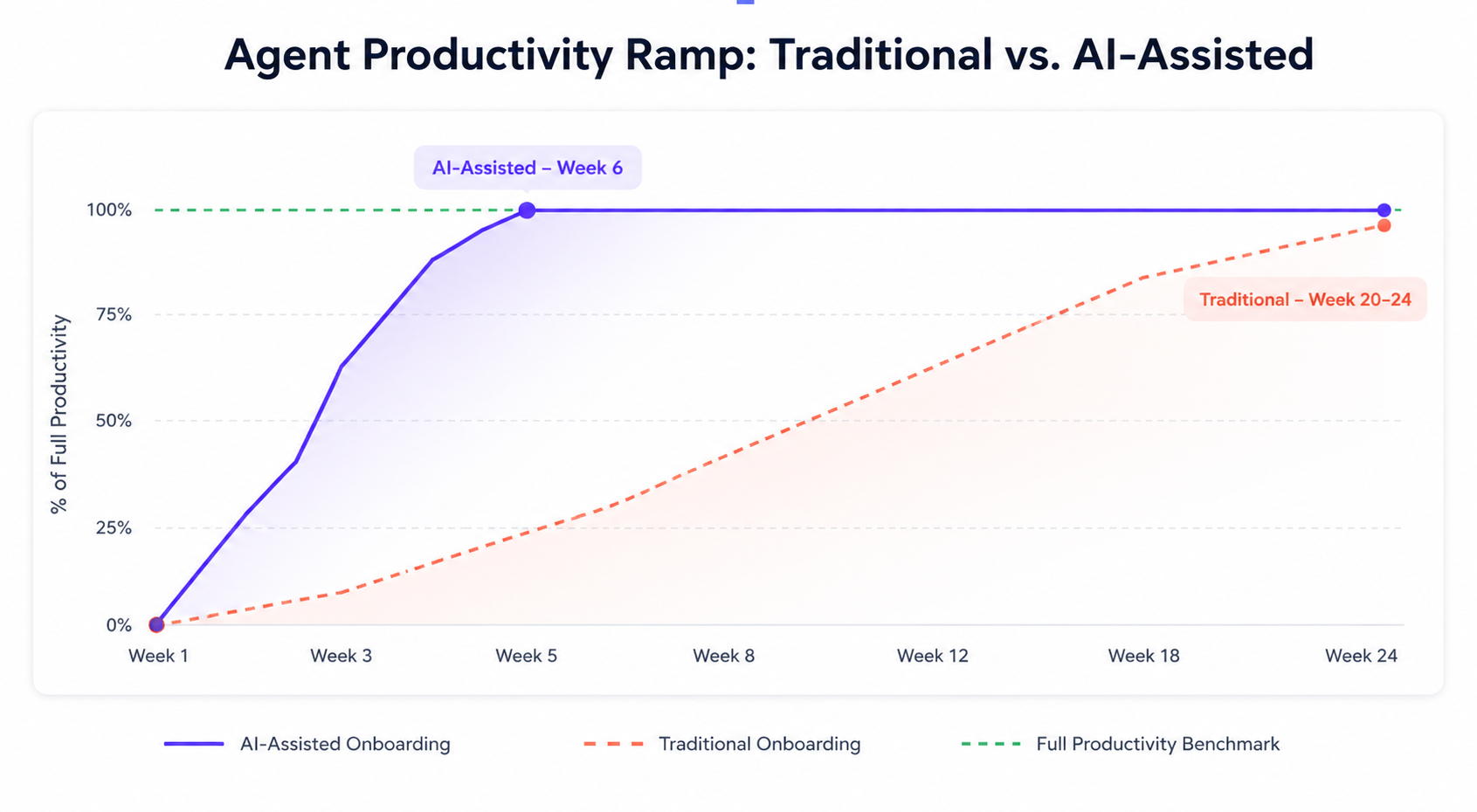
The data reflects this clearly. Most customer service agents take three to six months to reach full productivity under traditional onboarding structures. That timeline carries a real operational cost, showing up in CSAT scores, first-contact resolution rates, and the customer relationships that new agents are responsible for shaping from day one.
Conversational AI changes the premise entirely. Rather than front-loading what agents need to know, it makes knowledge available at the moment it is needed, inside a live conversation, without breaking the agent's flow. Companies implementing AI-assisted onboarding are completing the process up to 53% faster, not by compressing the content, but by embedding it in every single ticket.
This guide breaks down exactly how to build that system...



Why traditional onboarding keeps failing
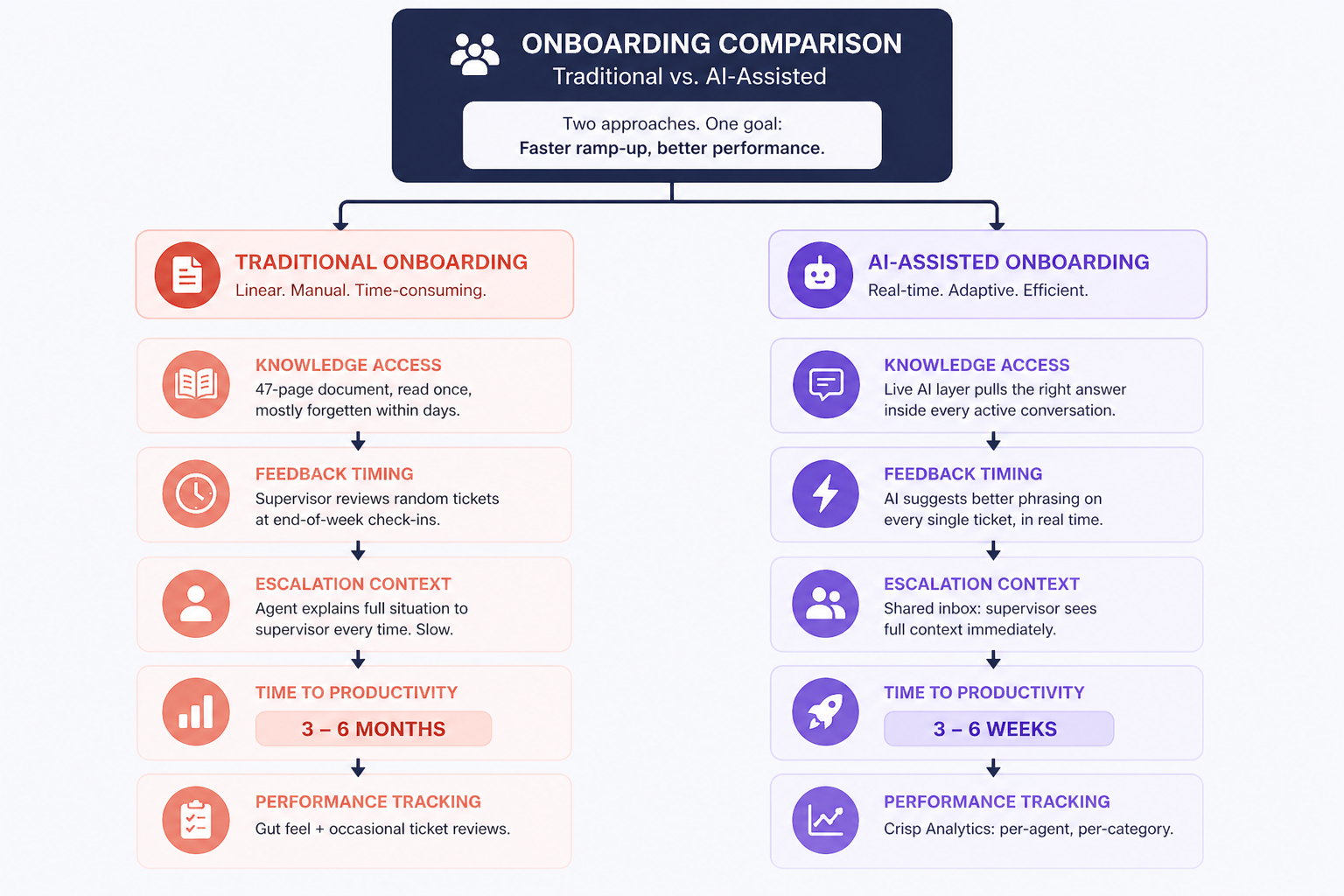
Before we build the solution, it helps to understand exactly where the current model breaks down.
Support onboarding fails for the same reason that classroom education sometimes fails: the gap between knowing something and applying it under pressure is enormous. You can read every article in your knowledge base and still struggle to recall the right information when a frustrated customer is typing at you.
The three structural flaws below explain why even well-resourced support teams consistently produce slow, inconsistent onboarding outcomes:
- Information overload without retrieval practice. New agents are given documentation, product tours, and recorded walkthroughs — and then expected to recall them when it matters. Research shows that knowledge retention without application practice drops sharply within days of a training session, regardless of how well the content was delivered.
- Episodic mentorship. Supervisors are available for coaching, but not continuously. The new agent has to catch issues, wait for a review session, and apply feedback in the abstract. By the time feedback arrives, the teachable moment is gone.
- No calibration loop. Without real-time feedback, new agents develop habits — some good, some problematic — and don't get corrected until a manager reviews a random sample of tickets. AI-powered onboarding addresses all three by reducing time to peak performance by 40% — not by compressing content delivery, but by eliminating the gap between needing an answer and having it.
The roadmap: 4 steps to AI-powered support agent onboarding
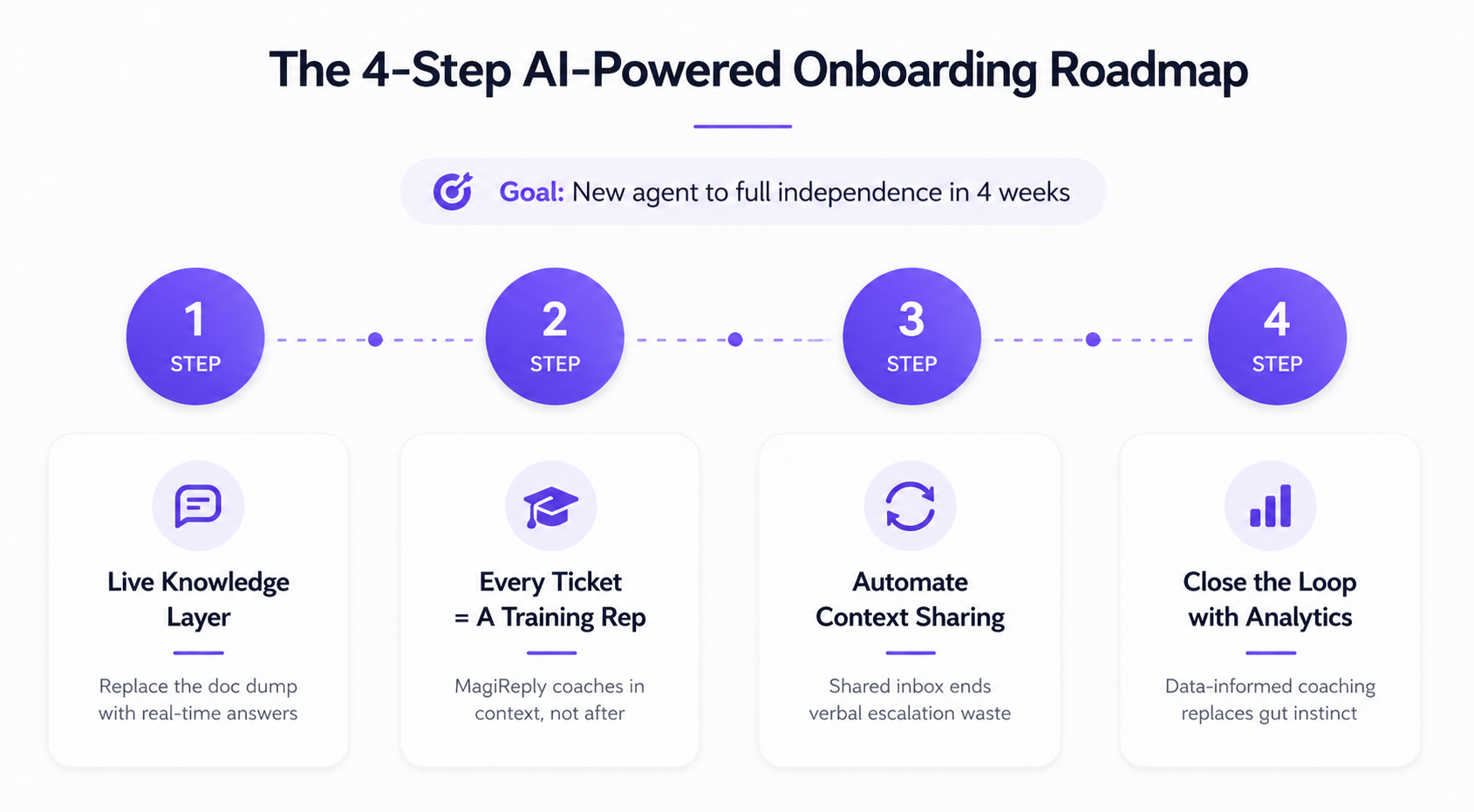
Step 1 — Replace the knowledge dump with a live knowledge layer
Before: On day one, Maya receives a folder of documentation. She reads it over two days, retains roughly 30% of it, and has no way to access specific information during a live conversation without breaking her flow.
After: On day one, Maya receives login credentials to a properly configured Crisp environment. The AI layer is connected to the knowledge base from day one. Every question she can't answer, the AI answers for her — contextually, inside the active conversation, without a tab switch.
The shift isn't about skipping the documentation. It's about distributing its retrieval across every ticket, rather than concentrating it in a two-day session that will mostly be forgotten. Companies using AI for onboarding complete the process 53% faster not because the content is shorter, but because it's delivered when it's needed.
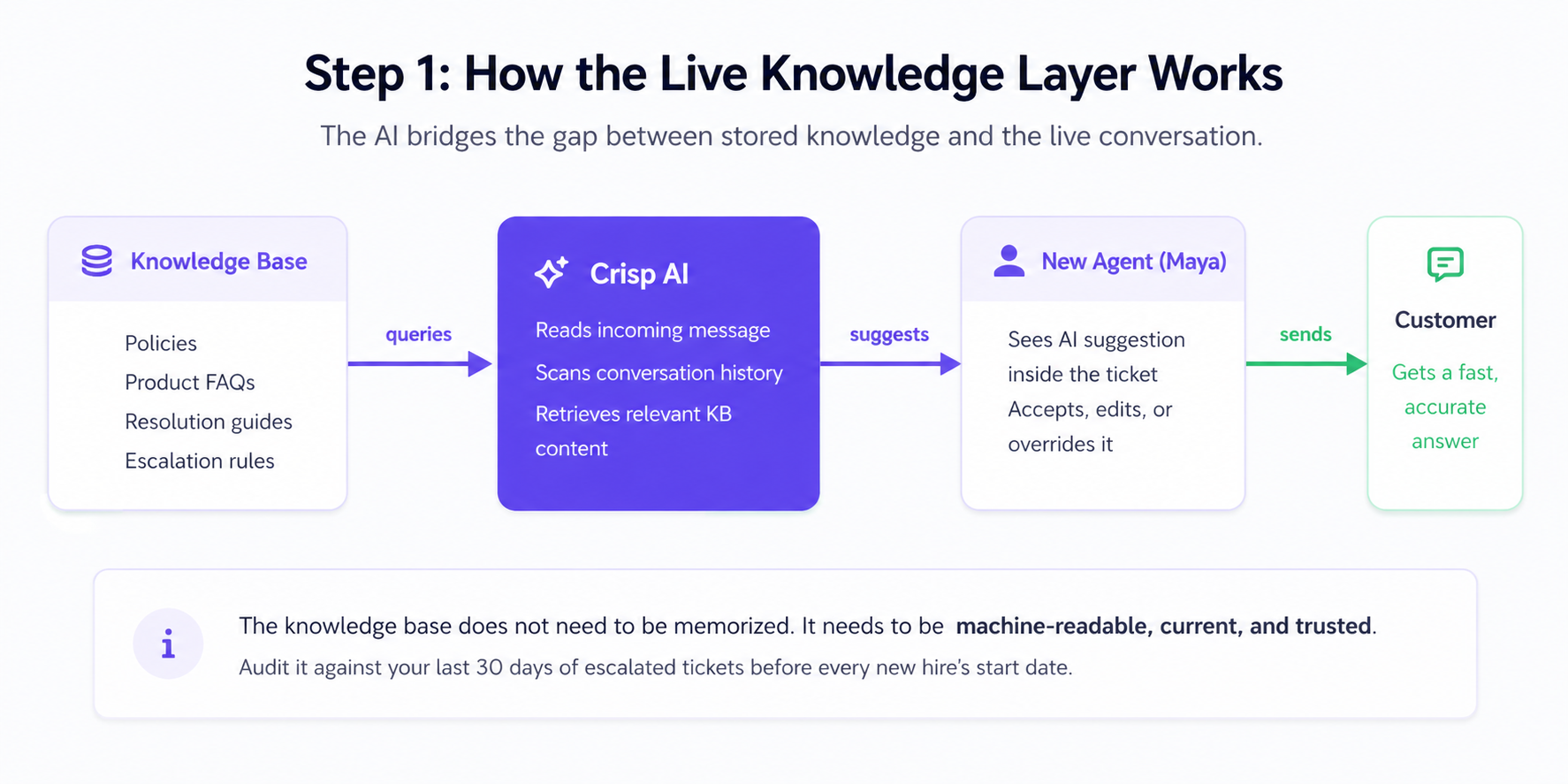
How Crisp fits in: Crisp's AI draws from everything you've loaded into its Training Hub — crawled web pages, knowledge base articles, uploaded files (PDF, TXT, CSV), and Q&A snippets you've written specifically for Hugo. New agents begin handling supervised conversations from day one, with Hugo surfacing the most relevant content as questions arise. The Training Hub becomes a live, multi-layered resource rather than a static document to be read once.
Step 2 — Make every conversation a learning moment
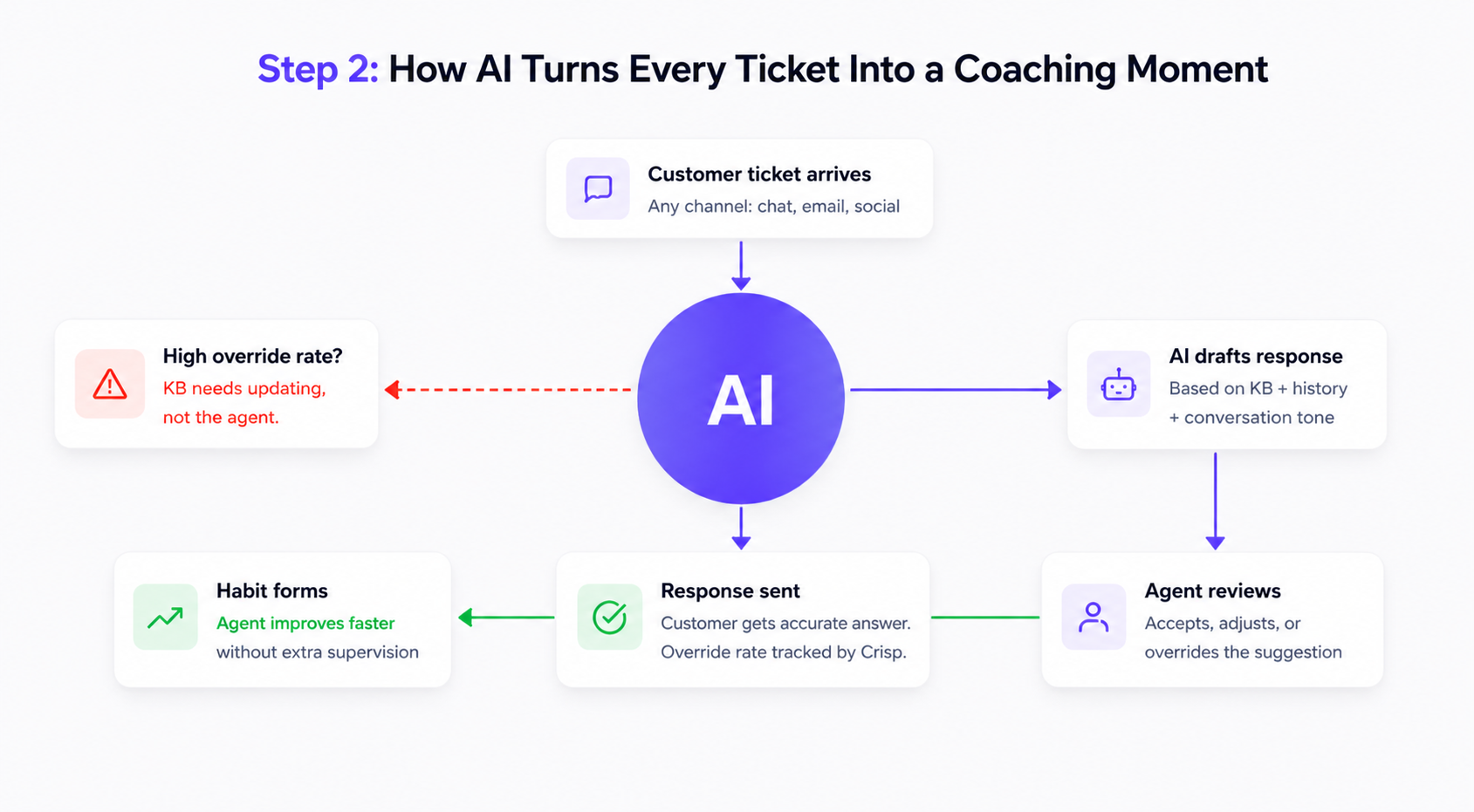
This step transforms the daily ticket queue from a source of stress into a structured coaching environment. Hugo is not just answering questions here. It is modeling what a good response looks like, every single time.
Before: Maya handles 20 tickets in her second week and makes the same mistake on 7 of them, phrasing refund policies in a way that creates customer confusion. Her supervisor notices on ticket 7, brings it up in Friday's check-in, and asks her to rephrase it going forward. The habit is already forming.
After: When Maya sends her first refund policy explanation, Hugo has already suggested a more precise formulation. She reads it, adjusts her draft, and sends. By ticket 3, she is using the right framing without prompting. By ticket 7, it is habit, the good kind.
This is the core promise of conversational AI as a trainer: every ticket is a rep, and every rep comes with a coaching signal. AI-based coaching systems boost productivity by 35% specifically because they deliver feedback in the context of action, not after it.
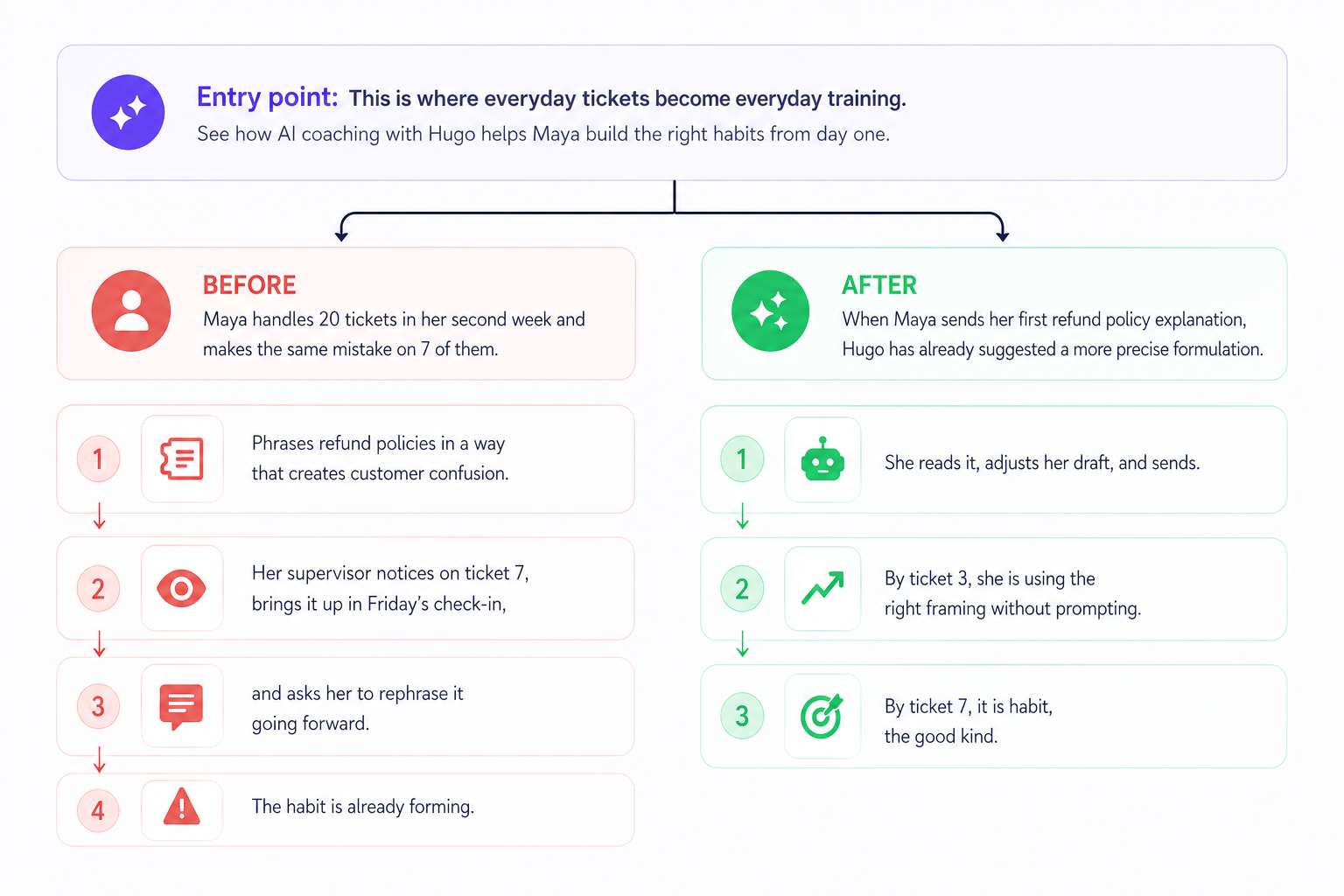
How Crisp fits in: Hugo generates response suggestions based on the incoming message, the conversation history, and your knowledge base. For new agents, each suggestion is a model to learn from, more effective than any style guide because it arrives in the moment.
Step 3 — Automate the context that supervisors currently provide
Before: When Maya needs to escalate a tricky issue, she has to explain the full context to her supervisor: what the customer said, what was tried, what she already knows about the account. Five minutes. Supervisor's flow broken. Resolution delayed.
After: When Maya escalates, the shared inbox already shows the full conversation history, the customer's CRM data, and internal notes. Maya and her supervisor see the same picture in seconds — without either having to explain anything.
The amount of supervisor time consumed by context-sharing in support teams is rarely measured but enormous. Eliminating it gives supervisors the capacity to coach more and context-switch less.
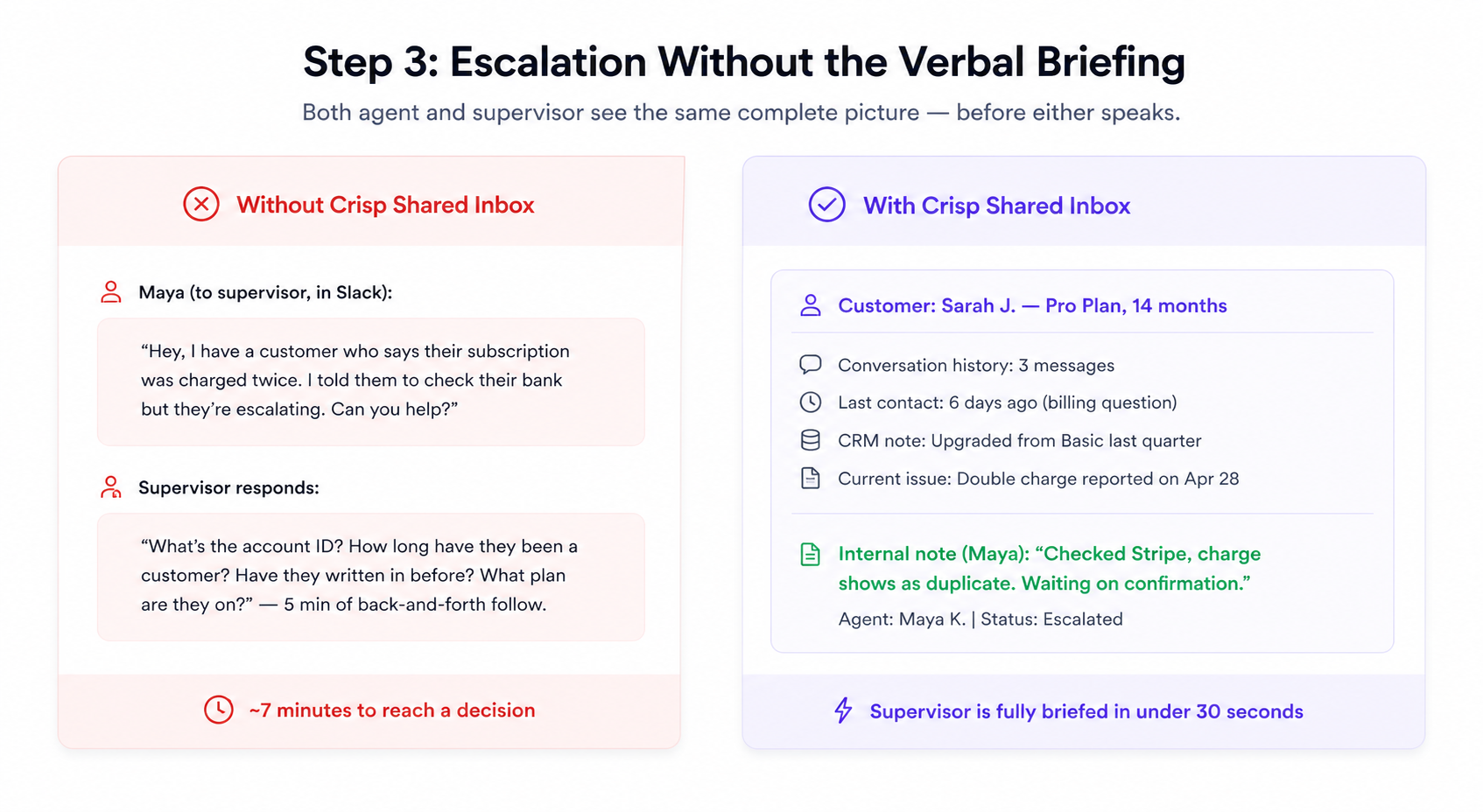
How Crisp fits in: Crisp's Shared Inbox surfaces full conversation history, CRM data, and internal notes in one view. When a new agent escalates, both parties start from the same picture — immediately.
Step 4 — Close the loop with performance visibility
Before: After three weeks, Maya's manager reviews a handful of her tickets and gives general feedback. There's no systematic view of where she's strong or struggling. Coaching is informed mostly by memory and instinct.
After: At the end of each week, Maya's manager opens Crisp Analytics, filters by Maya's operator ID, and reviews her handle times, first-contact resolution, and CSAT scores by ticket category. The coaching conversation becomes specific: "Your handle time on billing queries is 3 minutes above the team average — let's look at one together."
Organizations that do structured AI-supported onboarding see new hire retention improve by 82% and productivity increase by 70% — outcomes that depend not just on day-one experience but on sustained, data-informed feedback through the first months.
How Crisp fits in: Crisp's Analytics dashboard tracks every operator's key metrics. For onboarding, the most useful filters are by agent and by ticket category, which reveals specific areas needing support rather than vague general feedback.
Before the first live ticket: the case for simulation
Going straight from setup to supervised live tickets leaves a gap that AI alone cannot fully bridge. A structured simulation phase closes it before it costs you a customer relationship.
AI's assistance during live conversations is powerful. But the first time a new agent experiences a real escalation under pressure, some degree of hesitation is inevitable, regardless of how well the knowledge base is configured. A simulation phase before live tickets absorbs that initial friction in a zero-stakes environment.
AI-powered role-play and scenario training put a new agent through realistic support situations before they ever interact with a real customer. These simulations adapt in real time, presenting escalating complexity as the agent improves. Research from Second Nature found that AI-powered role-play cuts agent onboarding time by up to 30% specifically because it builds muscle memory for common scenarios before the stakes are real.
A Practical Simulation Protocol
Spend the second half of week one running two-hour simulation sessions. Use these three inputs:
- Your top 20 ticket types from the previous 30 days, pulled from Crisp Analytics
- Real closed tickets with customer data anonymized as the scenario base
- Your existing quality rubric as the scoring framework
Clear agents for supervised live work only after they score above threshold on at least 15 of the 20 scenarios. This single checkpoint removes the most common source of early-stage errors: agents who technically understand the process but have not yet developed the response reflex that separates proficient agents from novices.
Your training data is only as good as your last update
The original promise of AI-assisted onboarding depends entirely on accurate KB content. This section addresses the maintenance discipline that determines whether AI will be an asset or a liability for your new hires.
A knowledge base that was accurate six months ago is quietly generating wrong answers today. Product changes, policy updates, new pricing structures, these do not automatically update your KB. And when the KB is wrong, your AI will be wrong as well. New agents who trust AI suggestions and receive incorrect guidance are not just giving bad answers: they are building bad habits at exactly the moment when habits are forming.
Building a maintenance rhythm is not optional. It is the operational foundation that everything else depends on.
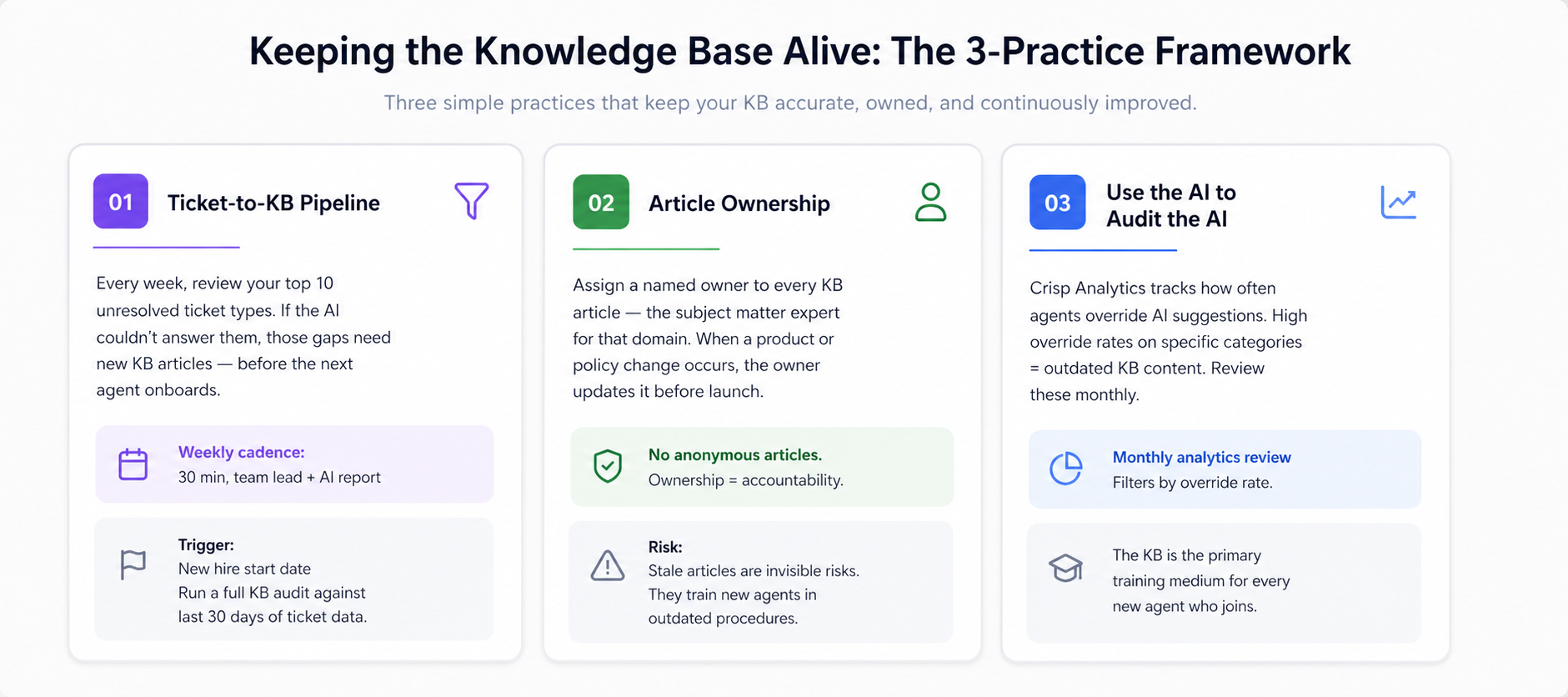
Practice 1: Build a Ticket-to-KB Pipeline
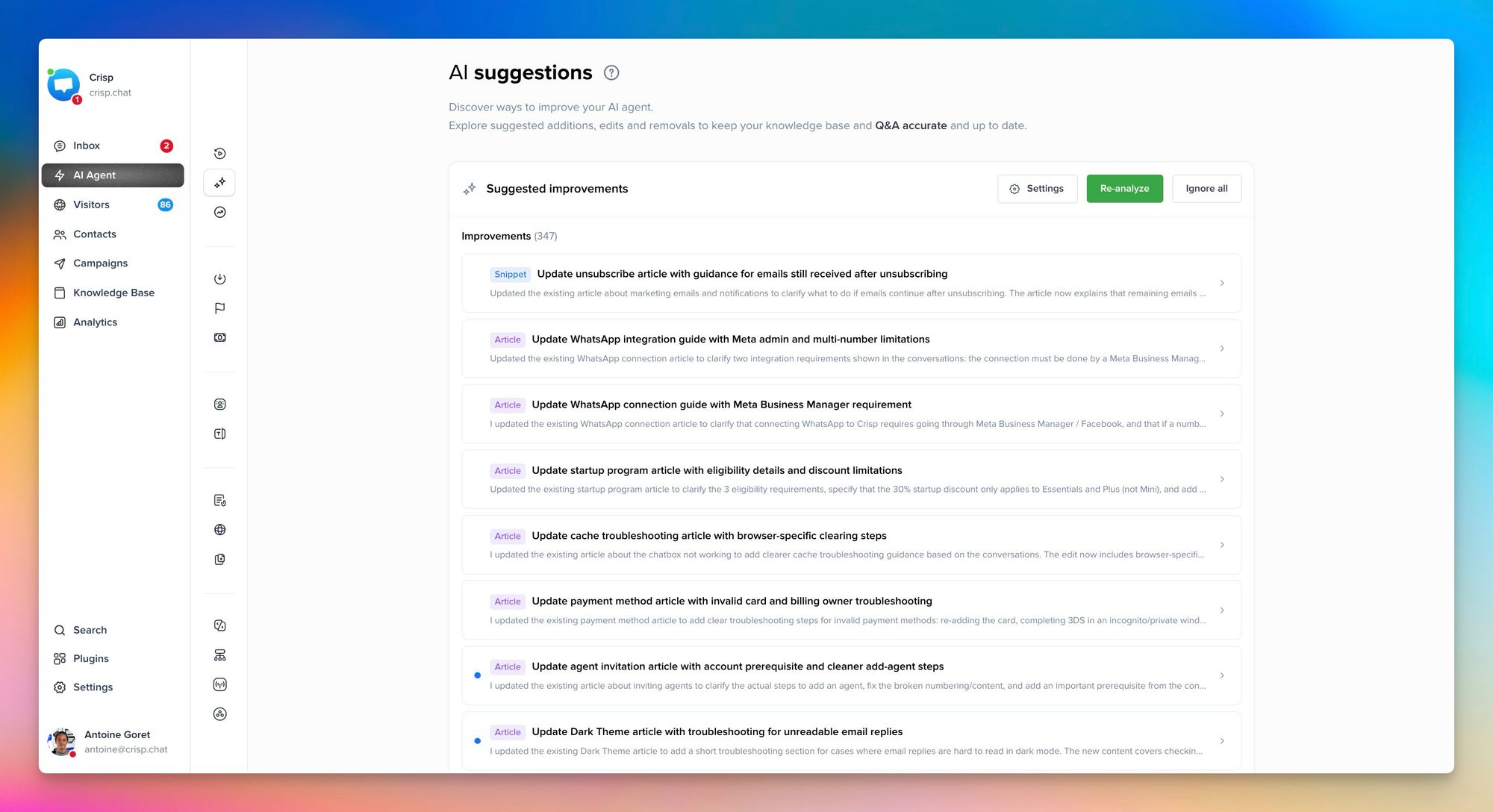
After every week, have the team lead review the top 10 unresolved or escalated ticket types. If those tickets reveal questions Hugo could not answer confidently, those gaps need new or updated KB articles. The knowledge gap that hurt a customer this week should not hurt the next customer next week.
Practice 2: Assign article ownership
Every KB article should have a named owner, typically the subject matter expert for that topic. When a product or policy changes, the owner is responsible for updating the corresponding article before the change goes live. This prevents the silent drift that accumulates when no one is accountable for accuracy. Stale articles are invisible risks: they train new agents in outdated procedures without anyone noticing until a complaint surfaces.
Practice 3: Use the AI to Audit the AI
Crisp Analytics shows which Hugo responses are most frequently overridden by agents. High override rates on specific article categories are a reliable signal that the content is outdated or insufficient. Review these categories monthly. The KB is not a document library. It is the primary training medium for every new agent who joins your team.
Common mistakes along the way
Even well-planned AI onboarding implementations run into predictable failure modes. Here are some common mistakes you should avoid as you take action:
- Going live without a ready knowledge base. The AI is only as good as what's in the knowledge base. If it's thin or outdated, AI suggestions will be wrong — and new agents won't know the difference. Make a full Training Hub audit — web pages, KB articles, uploaded files, and Q&A snippets — a prerequisite for every onboarding cycle.
- Treating AI suggestions as optional. Some managers tell new agents that Hugo is available but don't make it part of the workflow. Agents who aren't guided toward it miss the entire learning value. Make it a standard step from day one.
- Skipping the weekly analytics review. Data is only useful if it's read. Many teams generate performance data but never build a cadence around it. Schedule the weekly review before the new agent starts.
- Rushing from supervised to solo. Conversational AI reduces the need for supervision — it doesn't eliminate it. Design a deliberate ramp: supervised tickets in week one, AI-assisted solo in week two, full solo with weekly reviews from week three onward.
What success looks like
In a well-structured AI-assisted onboarding, a new agent handles supervised tickets on day two, solo tickets with review in week two, and fully independent work by week four. Their handle time starts above the team average and drops toward it, sometimes below it, within six weeks. Research shows that with AI acceleration, new agents can reach experienced productivity levels in two months rather than the standard eight months.
Supervisors are freed from constant context-provision and can focus their time on edge cases and skill development. The knowledge base improves continuously as agents flag gaps Hugo could not fill.
The goal is not just a faster new hire. It is a support team where learning is embedded in every ticket, where the gap between "new" and "experienced" closes measurably, not because of better hiring, but because of better tools.
Frequently Asked Questions
How long does it take for a new agent to reach full productivity with AI-assisted onboarding?
Most agents reach full productivity within four to six weeks, compared to the standard three to six months under traditional onboarding.
Does AI replace the need for a human supervisor during onboarding?
No, AI handles knowledge delivery and real-time suggestions, but supervisors remain essential for coaching edge cases and building team culture.
What happens if the knowledge base contains outdated information?
Your AI's suggestions will reflect inaccurate content directly. A regular knowledge base audit cycle is critical before and throughout every onboarding cycle.
Can a small support team still benefit from AI-powered onboarding?
Yes. AI works at any team size, and even small teams see measurable ramp-up speed gains from the first ticket.
How should managers track new agent progress during AI-assisted onboarding?
Use Crisp Analytics filtered by operator ID, reviewing handle time, first-contact resolution, and CSAT scores at weeks two, four, and eight.
What is the most common reason AI-assisted onboarding underperforms?
An incomplete or unaudited Training Hub. When Hugo's web pages, KB articles, files, or Q&A snippets are outdated or missing, it produces unreliable suggestions at exactly the moment when new agent habits are forming.
Sources
Glean, Benefits of AI in customer service agent training, https://www.glean.com/perspectives/the-benefits-of-ai-in-customer-service-agent-training
Second Nature, AI role-play for customer support onboarding, https://secondnature.ai/use-case/customer-support/
Hey Harvey, How AI customer service training improves performance, https://blog.heyharvey.me/posts/how-ai-customer-service-training-actually-improves-performance
ChurnZero, Three strategies for effective customer onboarding with AI, https://churnzero.com/blog/customer-onboarding-with-ai/
CustomerThink, Integrating AI for customer service into support agent training, https://customerthink.com/integrating-ai-for-customer-service-into-support-agent-training-yay-or-nay/
IBM, Using AI to accelerate the customer onboarding process, https://www.ibm.com/think/insights/using-ai-to-accelerate-customer-onboarding-process

September 2026 - Product Update
Discover the new Knowledge Base editor, benchmark your AI support performance, track how often Hugo escalates conversations, and more. Discover the latest features and improvements released by the Crisp team in September 2026.

Summer 2026 - Product Update
Meet the refreshed Crisp experience, Understand how Artificial Intelligence handles every conversation, Build reusable teams across your workspace, and more. Discover the latest features and improvements released by the Crisp team in Summer 2026.

Best 9 helpdesk software and ticketing systems for 2026
Need help to choose your next helpdesk with a ticketing tool for 2026? We've gathered a guide that gives you everything you need to convince your C-levels.