Call Center Cost Reduction: How AI Cuts the Biggest Line Item in Support
Phone calls are the most expensive channel. Show how AI chatbot deflects repetitive calls to chat/self-service so it decrease cost per tickets and increase support scalability.


The most expensive thing in your support operation isn't your headcount. It isn't your tools, your real estate, or your software stack.
It's the phone call.
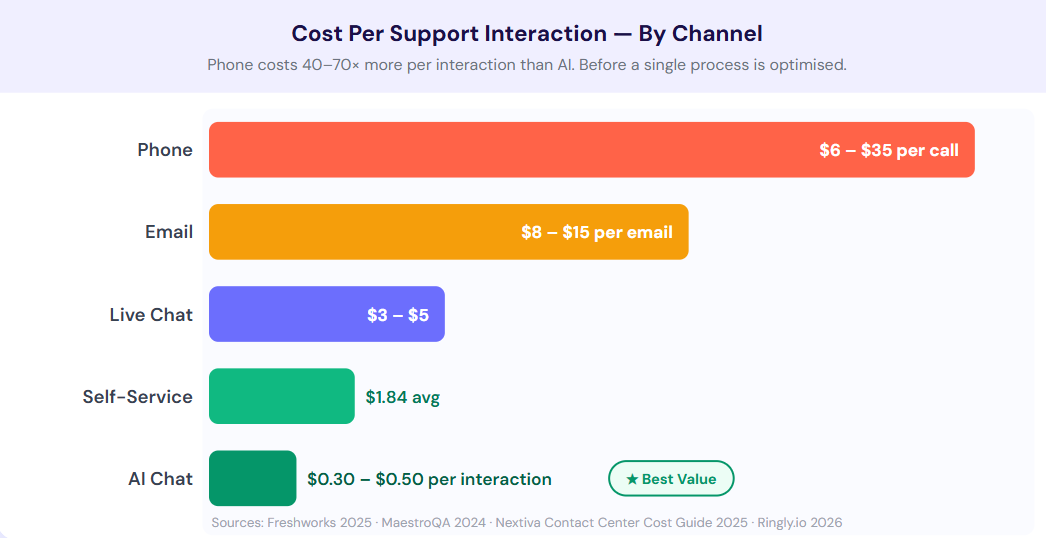
A single inbound call to a live agent costs between $6 and $15 for basic service queries. In SaaS, financial services, and healthcare, that number climbs to $25–$35 per ticket.
Multiply that across tens of thousands of inbound contacts per month, and you're staring at the single largest controllable cost line in your operation. And the worst part? Most of those calls don't need to be calls.
And yet, most support operations are still routing everything through the same human queue, paying live-agent rates for queries an AI could resolve in seconds, and watching their cost-per-contact numbers remain unchanged.
According to Gartner, conversational AI is on track to reduce contact center agent labor costs by $80 billion globally. Vodafone cut its cost-per-chat by 70% after deploying its AI chatbot. These aren't edge cases or moonshots. They are the result of one structural decision: redirecting the right call volume to the right channel, before it ever reaches an agent.
This guide breaks down exactly why calls are so expensive, what the current architecture looks like, and the five specific levers that fix it.
Why calls are so expensive (and why that number is not going down)
The cost of a phone interaction is almost never just the call itself. Most support leaders look at their agent salary line and stop there. That's the visible part. The full cost picture is considerably wider, and understanding it is what separates teams that run lean from teams that keep headcount scaling alongside ticket volume.
Four components make up the real cost of a phone interaction, and only one of them is the conversation itself.
| Cost Component | What It Includes | Typical Share of Total Call Cost |
|---|---|---|
| Handle Time | Active call duration + hold time + after-call wrap-up work | 50–60% |
| Staffing Overhead | Scheduling, training, management, attrition backfill costs | 20–30% |
| Infrastructure | Telephony, call recording, QA tools, workforce management | 10–15% |
| Opportunity Cost | Every routine call is an agent unavailable for complex escalations | Unmeasured, but significant |
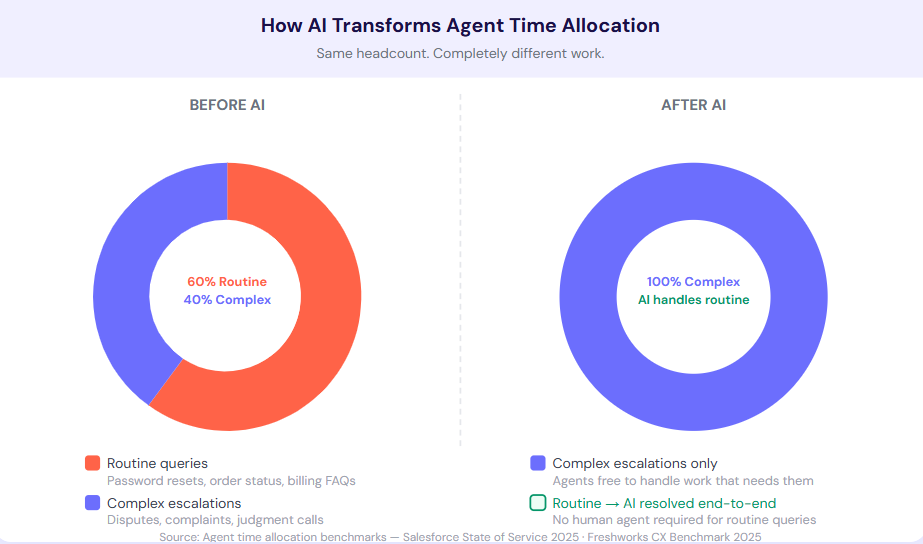
The last row is the one most teams don't measure... but it's the one doing the most damage. When 40 to 60% of inbound phone volume consists of routine queries — account status, order tracking, password resets, billing questions — those calls consume agent bandwidth at the same rate as a complex escalation that genuinely needs human judgment.
Every minute your agents spend on a routine call is a minute they aren't spending on the conversation that actually requires them.
Here's what that looks like inside a real support operation at any given moment.
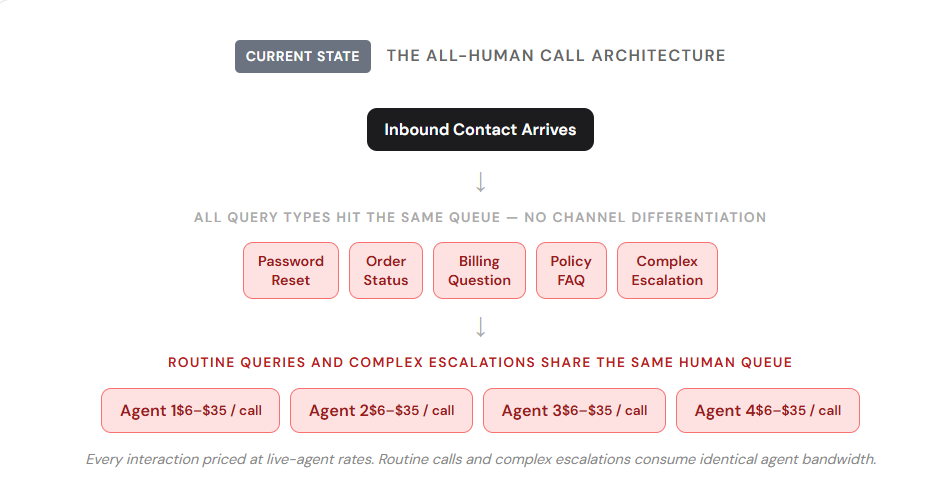
At 10,000 inbound contacts per month, the difference between a fully human queue and an AI-first operation is very significant. It's the difference between a $150,000 monthly cost structure and one closer to $30,000 — before you account for a single agent's time reclaimed for higher-value work.
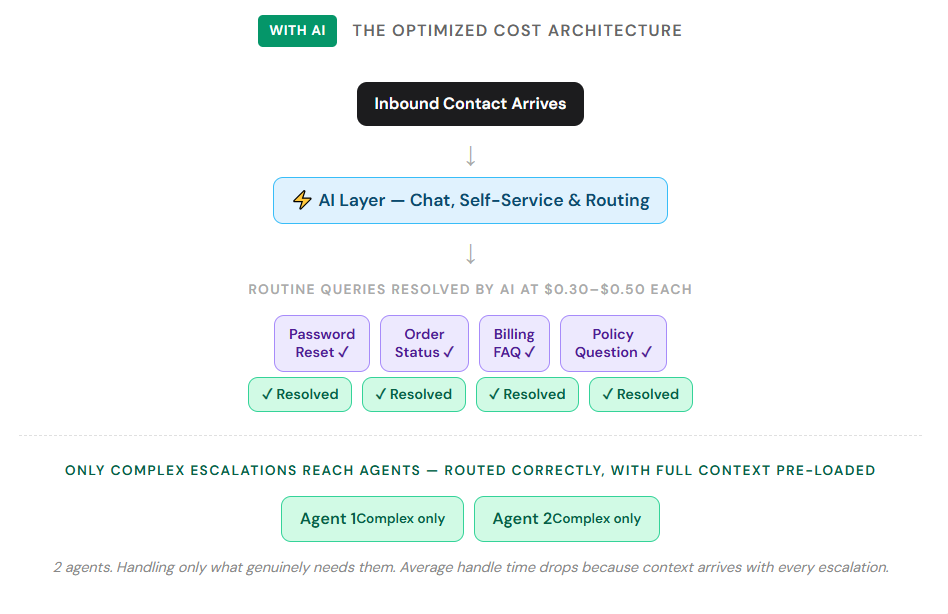
Routine calls: account status, order tracking, password resets, billing questions — consume 40–60% of inbound phone volume in most operations. These are queries that can be resolved in seconds by AI, but each one costs the same per minute as a complex complaint that genuinely needs a human. This leads to:
- The Direct Cost Problem
AI handles the same Tier 1 queries for $0.30–$0.50 per interaction. Every routine call handled by a human instead is 20 to 50 times more expensive than it has to be. - The Capacity Problem
Agents consumed by routine calls aren't available for complex escalations. Queue times rise. Complex cases fall behind. CSAT drops on the interactions that matter most; the expensive ones you can't afford to get wrong.
Five levers that actually reduce call center costs
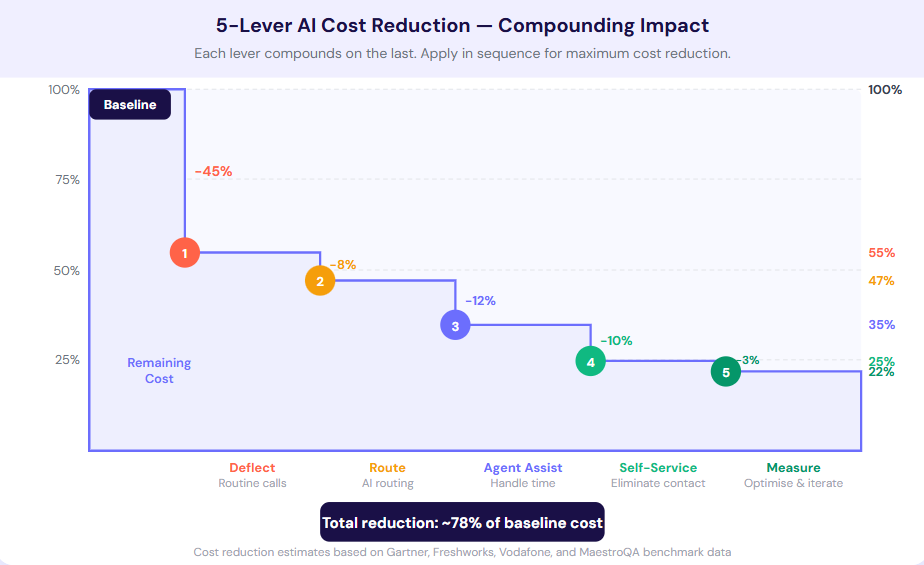
Reducing call center costs with AI isn't a single deployment decision. It's a sequence of architectural changes, each targeting a different cost driver. The teams that see sustainable cost reduction work through these levers in order, measure the impact of each before moving to the next, and build a compounding advantage over the operations still running the old architecture.
1. Deflect routine calls to chat with an AI chatbot
The highest-ROI move in call center cost reduction isn't optimizing the call. It's stopping it from happening in the first place. Most customers calling your support line aren't calling because they prefer voice. They're calling because they couldn't find the answer fast enough anywhere else. That's an upstream failure, and it has an upstream fix.
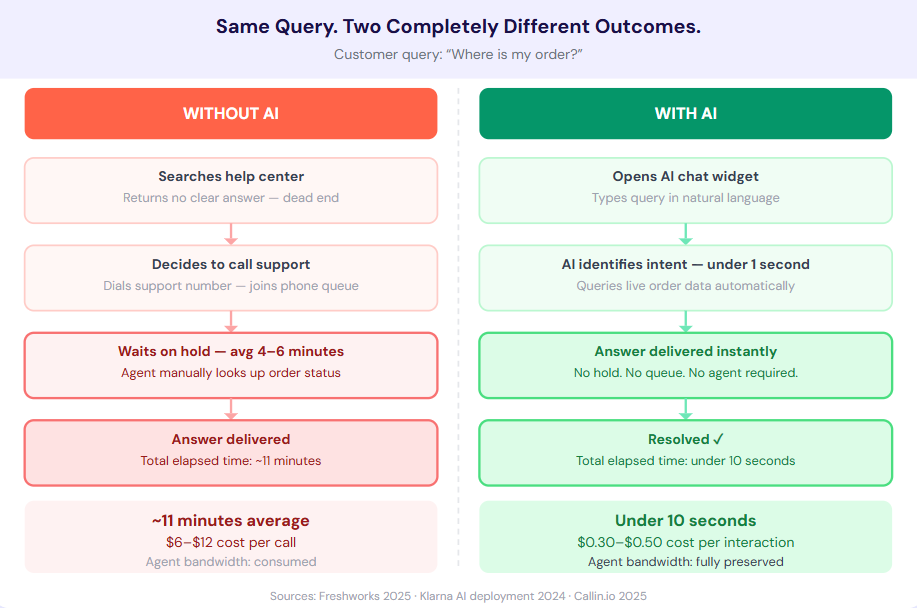
An AI chatbot deployed on your website and app — one trained on your actual documentation and conversation history — intercepts that intent before it becomes a phone call. The customer gets an instant, accurate answer. You don't pay live-agent rates for a routine query. Nobody waits on hold for a password reset.
According to Freshworks' 2025 CX benchmark data, AI agents now deflect over 45% of incoming customer queries, with retail and travel companies seeing deflection rates above 50%. Each deflected call is a call your agents never have to take. At $10 per call average and 10,000 monthly contacts, a 45% deflection rate is a $45,000 monthly cost reduction before any other changes are made.
2. Use IVR and AI to route what can't be deflected
Not every inbound call can be deflected to chat. Some customers prefer the phone. Some situations require it. For those calls, the next cost lever is routing efficiency: making sure every call lands in the right queue on the first attempt.
Bad routing costs money twice: once in the misdirected call's handle time, and again in the re-queue wait that erodes satisfaction. AI-powered intelligent routing (which reads intent from the first seconds of interaction, not just menu selections) eliminates unnecessary transfers and reduces average handle time.
The baseline metric to check before anything else: if more than 15% of your calls are being transferred to a second agent, your routing logic needs work before your AI layer does. Transfer rate is the clearest leading indicator of routing efficiency, and fixing it consistently drops overall average handle time by 10 to 20%.
Gartner projects that by end of 2025, 73% of customer service organizations will have implemented agent assist solutions, with intelligent routing as one of the foundational pieces. The operations building this infrastructure now are creating a cost structure that their competitors will struggle to replicate later.
3. Reduce handle time with AI-Copilot for Support agents
For the calls that do reach an agent, handle time is the primary cost driver. Every extra 60 seconds of average handle time across 10,000 monthly calls adds roughly 167 agent-hours to your monthly labor cost. That's real money, and it doesn't require adding a single new call to your queue to show up on your cost line.
Agent assist AI shortens handle time without rushing conversations. Real-time reply suggestions, automatic call and chat summaries, instant retrieval of relevant knowledge base articles mid-conversation, and after-call work automation all eliminate the seconds and minutes that compound into your biggest cost driver. Agents aren't faster because they're stressed, they're faster because they have the right information exactly when they need it.
The benchmarking data from Freshworks shows that organizations integrating AI copilot tools see 38% improvements in resolution time, not through rushed interactions but through eliminated dead time between understanding a query and finding the answer to it. The after-call work reduction alone typically frees 15 to 20% of agent capacity per shift.
4. Build self-service that eliminates the call entirely
The cheapest support interaction is the one that never happens.
A well-structured help center, surfaced correctly by an AI that understands natural language, eliminates the need for a call before the customer even considers picking up the phone. Gartner found companies report up to 70% reduction in call, chat, and email inquiries after implementing a virtual customer assistant.
Self-service works when it's fast, accurate, and doesn't feel like a dead end. The failure mode is a help center that's hard to search, outdated, or that routes to a chatbot that keeps saying, "I didn't understand that."
Run a 30-day report on the top 10 search terms in your help center that return zero results. Those are your highest-value knowledge base articles to write next.
5. Measure cost per call, not just volume
Call volume is a vanity metric. Teams that track it as their primary measure of cost will optimize for the wrong thing: deflecting contacts that come back, closing tickets that re-open, and reducing visible volume while real resolution rates stay flat.
The metric that matters is cost per resolved interaction, segmented by channel. When you know your cost per resolved phone call versus your cost per resolved chat versus your cost per self-service resolution, you know exactly where automation investment pays back fastest. You can model the impact of each percentage point of deflection.
A quick win for you: Calculate your cost per call today using: (total monthly support labor cost) ÷ (total resolved contacts). Now model what that number looks like at 40% AI deflection. That's your business case.
What to avoid
The cost reduction logic here is clear. The execution is where most deployments fall apart. These failure modes aren't rare edge cases — they're the predictable mistakes that show up consistently across operations that don't hit their targets.
- Deploying AI on calls without first optimizing deflection. If customers are calling instead of chatting, the fix is upstream — better self-service and chatbot coverage — not a voice AI layer on top of an already-expensive channel.
- Cutting headcount before deflection rates are proven. Reduce staffing costs by stopping the hire, not by cutting existing agents. Teams that eliminate agents before AI is proven end up with worse coverage and no margin for error during peaks.
- Ignoring first contact resolution. Deflecting a call that comes back as two tickets is not a win. Measure FCR alongside deflection rate to ensure the AI is resolving, not just rerouting.
How to actually get started
Knowing what to fix is one thing. Actually making the move? That’s where most teams stall because it feels like trying to rebuild a plane mid-flight.
Here’s the simpler way to approach it:
Step 1: Start with volume, not technology
Don’t begin with tools. Begin with patterns. Pull your last 30 days of tickets and ask:
1. What are the top 10 most common queries?
2. How many of them are repetitive?
3. How many require zero human judgment?
You’ll usually find that 40–60% of your volume is the same handful of questions.
That’s your starting point.
Step 2: Deflect first, optimize later
Most teams make the mistake of improving calls before reducing them. That’s backwards. Your first move should be:
- Deploy an AI chatbot on your highest-traffic pages
- Train it on your help center + past conversations
- Target only the top 10–20 queries
You don’t need perfection. You need coverage. Even a basic support chatbot rollout here can remove a massive chunk of inbound calls within weeks.
Step 3: Fix routing before adding more automation
If calls are still being transferred multiple times, your routing is leaking money. Before layering more AI:
1. Reduce transfers
2. Route based on intent, not just menu options
3. Track misrouted tickets
This alone can cut handle time by double digits.
Step 4: Equip your agents, don’t replace them
AI isn’t just for deflection. It’s also for making your agents faster without burning them out. Focus on:
1. Automatic summaries
2. Real-time reply suggestions
3. Instant knowledge retrieval
This is where you reclaim hours of capacity without hiring.
Step 5: Build self-service that actually works
Most help centers fail for one reason: they’re written for documentation, not for urgency. Fix that by:
- Writing answers like conversations, not manuals
- Prioritizing searchability over completeness
- Continuously updating based on failed searches
If your help center can answer questions in under 30 seconds, calls disappear naturally.
Which tool can you use for this?
This is where most teams hit friction. They need 4–5 different tools to execute this strategy… and none of them talk to each other cleanly. That’s exactly the gap Crisp is built to solve. With Crisp, you can:
- Deflect calls with AI chatbots trained on your docs and conversations
- Route conversations intelligently inside a shared inbox
- Assist agents in real time with AI-powered suggestions and context
- Unify channels (chat, email, social) in one place
- Track performance with analytics that actually map to cost
Instead of stitching together a stack, you’re building the entire support flow in one system.
A simple way to get started this week
If you do nothing else, do this:
1. Take your top 10 support queries
2. Turn them into chatbot answers
3. Deploy them on your website
4. Track how many conversations never become calls
That’s it. No full migration... just a controlled test that shows immediate impact.
From there, you expand.
The Cost Structure Of The Next Support Operation
The operations that will have the lowest cost structure in three years are building the infrastructure now: AI chatbots on every channel, intelligent routing for what AI can't handle, and agent assist tools that reduce handle time for everything that reaches a human
Gartner's projection that automated channels will handle 75% of interactions by 2026 isn't a warning — it's a benchmark. Teams that hit that threshold first will have a cost structure their competitors can't match.
Crisp gives support teams the AI chatbot, shared inbox, and analytics to build that structure today.
Frequently asked questions
What queries should not be automated?
Anything complex, emotional, or high-stakes should go to a human, with AI handling routine frontline tasks.
How quickly can I see cost savings?
Most teams see reduced volume within weeks and meaningful cost savings within 1–3 months.
Do I need multiple tools to implement this?
You can, but it gets messy fast—an all-in-one platform like Crisp keeps everything aligned and easier to scale.
Can AI integrate with my existing support stack?
Yes—most modern tools integrate with CRMs, help desks, and knowledge bases, so you don’t have to rebuild everything.
How accurate are AI chatbots for customer support?
When trained on your actual docs and past conversations, they’re highly accurate for Tier 1 queries and improve over time.
Sources
- Freshworks, "AI agents deflect over 45% of incoming queries, with retail and travel companies seeing deflection rates above 50%.", https://www.edesk.com/blog/customer-support-software-ai-agent-ecommerce/
- Freshworks, "Organizations integrating AI copilot tools see 38% improvements in resolution time.", https://www.freshworks.com/assets/resources/Customer_Service_Benchmark_Report_2024.pdf
- Gartner, "73% of customer service organizations will have implemented agent assist solutions by the end of 2025.", https://www.gartner.com/en/newsroom/press-releases/2025-12-02-gartner-survey-finds-only-20-percent-of-customer-service-leaders-report-ai-driven-headcount-reduction
- Gartner, "Companies report up to 70% reduction in call, chat, and email inquiries after implementing a virtual customer assistant.", https://www.techmonitor.ai/digital-economy/ai-and-automation/gartner-80-percent-agentic-ai-2029
- Gartner, "Automated channels will handle 75% of customer service interactions by 2026.", https://www.itential.com/resource/analyst-report/gartner-predicts-2026-ai-agents-will-reshape-infrastructure-operations/
- Assembled, "Inbound call center interactions average $6–$15, climbing to $28–$38 in high-touch regions like North America.", https://www.assembled.com/page/customer-service-outsourcing-cost
- Vodafone, "AI customer service implementation led to a 70% reduction in cost-per-chat interaction.", https://masterofcode.com/blog/ai-in-customer-service-statistics

September 2026 - Product Update
Discover the new Knowledge Base editor, benchmark your AI support performance, track how often Hugo escalates conversations, and more. Discover the latest features and improvements released by the Crisp team in September 2026.


Summer 2026 - Product Update
Meet the refreshed Crisp experience, Understand how Artificial Intelligence handles every conversation, Build reusable teams across your workspace, and more. Discover the latest features and improvements released by the Crisp team in Summer 2026.

Best 9 helpdesk software and ticketing systems for 2026
Need help to choose your next helpdesk with a ticketing tool for 2026? We've gathered a guide that gives you everything you need to convince your C-levels.