The True Impact of AI Chatbots on Customer Service Costs (2026 Edition)
Move beyond “AI = cost savings.” Understand how AI Chatbots can impact productivity, churn prevention, and agent morale benefits for a global impact, not just financial one.


The conversation about chatbots and cost reduction has been dominated by a single number for years: 30%. That's the headline; AI cuts support costs by about a third. And while the number is broadly accurate for well-implemented deployments, it misses most of what actually happens when chatbots are integrated into a customer service operation at scale.
The true impact of chatbots for customer support goes well beyond the labor cost line. It reaches into customer retention, agent morale, operational scalability, and revenue protection. Understanding the full picture is what separates the organizations that treat chatbots as cost-cutting tools from the ones that treat them as infrastructure.
The Direct cost impact: what the numbers actually show
Let's start with what's verifiable and measurable. At the interaction level, the cost comparison is stark.
A human agent handles a routine query at $20 to $25. A chatbot handles the same query at $0.50 to $0.70. That's not a marginal efficiency improvement. That's a structural repricing of every Tier 1 conversation in your support queue.
Juniper Research estimates AI-powered customer service saves businesses $8 billion annually globally. Companies report an average 340% ROI in the first year on AI customer service investments, with $3.50 returned for every $1 spent. NIB Health Insurance saved $22 million and cut costs by 60%. Vodafone reduced cost-per-chat by 70%. Klarna's AI generated $40 million in profit improvement in a single year.
The underlying AI cost is small. According to Crisp’s State of AI Customer Support report, the median inference cost of an AI conversation runs from just $0.06 to $0.14 across industries, depending on the sector.
These aren't outliers. They're the results of implementations that were scoped correctly, measured precisely, and maintained actively.
But they're still only counting one line item.
Beyond labor cost: The other four cost dimensions that support chatbots actually affect
Beyond the obvious argument of labor cost, there are four equally important dimensions that drive down support costs, but rarely get mentioned in discussions:
1. Hiring and Scaling Costs
The most underappreciated financial impact of AI in support is what it does to your hiring math.
Without AI, support operations scale linearly with customer volume: more customers = more agents. With AI at 40–60% containment, that ratio breaks. You absorb growth without proportional headcount expansion. The savings aren't on the payroll you have — they're on the payroll you don't have to create.
For a company growing at 30% annually with a support team of 20 agents, AI deflection can mean the difference between hiring 6 agents this year or hiring 2 — at fully-loaded costs of $60–80k per agent, that's $240–$320k in annual savings from hiring avoidance alone.
2. Training and Onboarding Costs
Every new support agent requires 4–8 weeks of onboarding. During that period, they're partially productive at best, and their early tickets often require senior agent review. AI doesn't need onboarding, doesn't forget product updates, and doesn't have a ramp period.
AI also compresses the onboarding period for new human agents by providing real-time reply suggestions and knowledge base access during live conversations. New agents reach full productivity faster when AI is functioning as a coaching layer.
Fewer new hires needed (from hiring avoidance) + faster ramp for those you do hire (from Copilot-assisted onboarding) = a significantly lower total training cost burden year over year.
3. Churn prevention and revenue protection
This is the impact that almost never appears in chatbot ROI calculations, despite being significant.
Customers are 2.4 times more likely to remain loyal to a brand when their problems are resolved quickly. Chatbots resolve routine queries instantly, at any hour, with no queue. That speed isn't just efficiency — it's a retention mechanism.
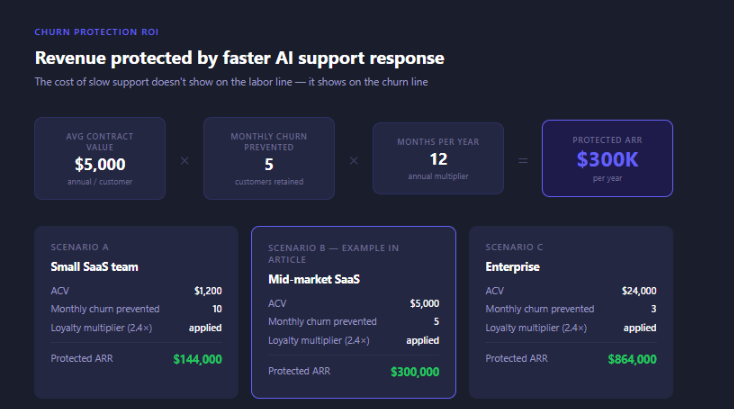
For a SaaS company with an average contract value of $5,000 and a monthly churn rate of 2%, preventing even 5 additional churns per month from faster support response represents $300,000 in protected ARR annually. That number never appears on the cost reduction line, but it absolutely belongs in the ROI conversation.
4. Agent morale and retention
This one is counterintuitive, but it's real. Support agent turnover is one of the largest hidden costs in the industry; replacing a trained agent typically costs 50–75% of their annual salary in recruiting, onboarding, and lost productivity.
The most common reason agents leave: burnout from repetitive, low-complexity work. Password resets. Order status queries. The same five questions, hundreds of times a day.
When AI takes Tier 1, agents spend their time on more complex, more varied, more intellectually engaging conversations. Satisfaction increases. Tenure improves. Turnover costs fall.
The Full Five-Dimension Picture
When you account for all five dimensions, the economics of AI support look like this:
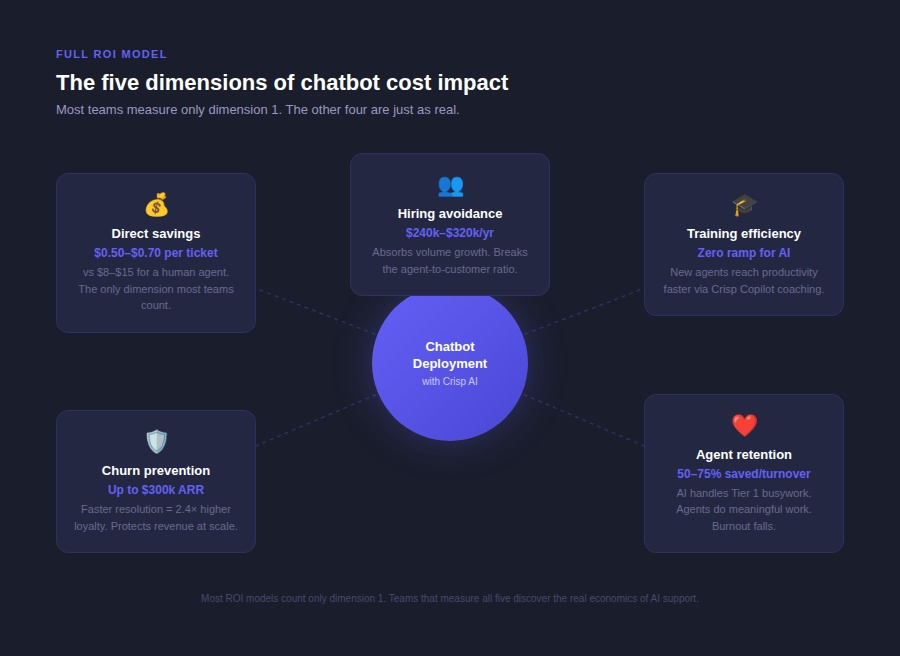
- Direct savings: $0.50–$0.70 per AI interaction vs $20–$25 for a human agent
- Hiring avoidance: absorb volume growth without proportional headcount expansion
- Training efficiency: faster onboarding for new agents via Crisp Copilot, zero ramp for AI
- Churn prevention: faster resolution = higher retention = protected ARR
- Agent retention: more complex work = lower burnout = lower turnover costs
The teams that account for all five dimensions, not just the labor line, are the ones that build an honest, comprehensive case for AI investment. And they're the ones who are willing to spend the budget to do it right.
What AI support chatbots don't fix
The impact of chatbots is real and substantial, but it comes with conditions that honest cost analyses tend to gloss over.
- They don't fix a broken knowledge base. A chatbot trained on thin or outdated documentation produces wrong answers. Wrong answers cost more to recover from than having no chatbot at all.
- They don't replace human judgment for complex interactions. Complaints, disputes, high-value renewals, cancellation conversations — these need human empathy and situational judgment. Routing them through an AI that can't handle them creates cost, not savings.
- They don't improve without measurement. The implementations that achieve sustained 30–40% cost reduction are the ones that review AI performance weekly, fix knowledge base gaps monthly, and expand chatbot scope only as accuracy is proven. Static deployments degrade as your product and policies change.
The 2029 Forecast: Why Starting Now Matters
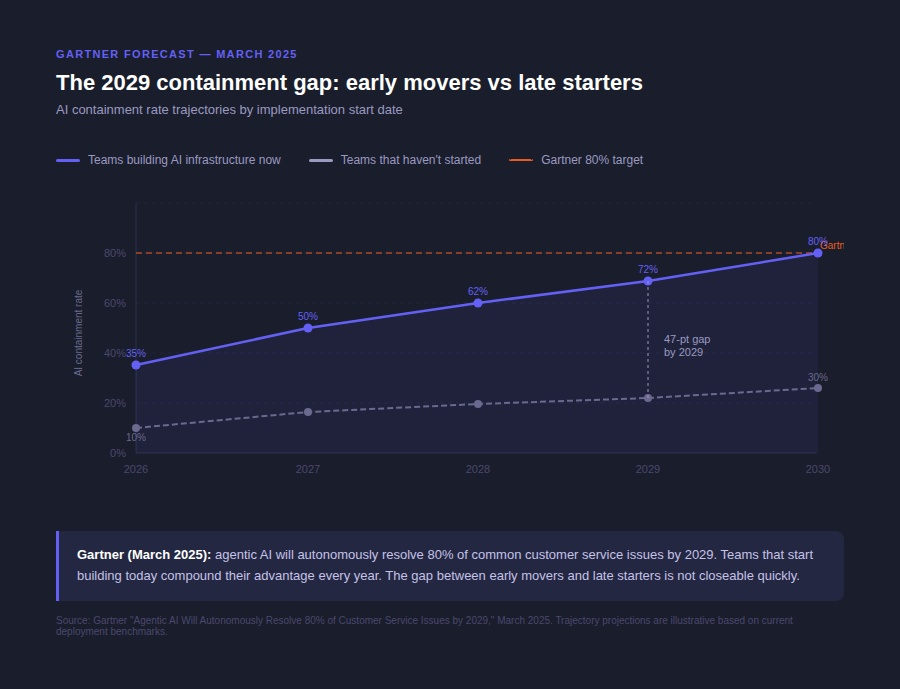
Gartner's March 2025 research predicts that agentic AI will autonomously resolve 80% of common customer service issues by 2029, with a corresponding 30% reduction in operational costs. That's not a projection for a distant future — it's three years away.
The teams that have built AI-powered support infrastructure today will be at 60–70% containment by then. The teams that haven't started will be at 20–25%, and facing a competitive cost disadvantage that will be very difficult to close quickly.
So, how do you get started?
Getting Started: your first move towards support cost reduction
Most chatbot implementations fail the same way. Not because the technology doesn't work. But because the team skipped the groundwork, they blamed the tool.
Here's how to do it right, with Crisp, in 90 days.
Phase 1 (Week 1–2): Build Your Baseline
Before you activate anything, you need two numbers: your current cost-per-ticket and your current Tier 1 ticket breakdown by volume. Without these, you have no way to measure what AI is actually doing for you.
- Pull your cost-per-ticket.
Calculate: total support cost (agent salaries + tools) divided by total conversations closed per month. For most SMB and mid-market teams, this lands between $20 and $25 per ticket. Write that number down. It's your before state.
2. Map your top 10 Tier 1 ticket types by volume.
Go into your conversation history and tag or sort the last 500 closed conversations. You're looking for the repeat patterns. In most support inboxes, five to seven ticket types account for 60 to 70% of total volume. Typical Tier 1 candidates:
- Password resets and login issues
- "Where is my order?" / WISMO queries
- Billing questions and invoice requests
- Plan or subscription change requests
- Basic how-to and feature navigation questions
- Refund eligibility questions
- Account setup and onboarding steps
These are your deflection targets. Not because they're easy, but because they're high-volume, well-defined, and answerable without human judgment.
3. Audit your knowledge base before doing anything else.
For each of those top 10 ticket types, check whether a clear, current help article exists in your knowledge base. If the answer doesn't live there, the AI you'll be deploying can't ingest and use it to resolve support tickets. This is the most skipped step and the most common reason for bad AI resolution accuracy in the first 30 days. Fix the gaps now. Add or update articles for every ticket type you plan to automate.
Phase 2 (Week 3–5): build and deploy Hugo on your first use cases
Once your knowledge base is solid for your top five ticket types, you're ready to deploy an AI support tool. For this example, we'll use Crisp's powerful AI agent, Hugo!
1. Activate Hugo, Crisp's AI agent, on your first use case scope.
Don't start with all ten ticket types. Start with two or three where your documentation is strongest and the conversation paths are most predictable. Password resets and WISMO are usually the right first targets. The goal in Week 3 is not maximum coverage. The goal is a clean, accurate first deployment.
In the Crisp AI Chatbot Builder:
- Connect your Knowledge Base as a data source — this is what Hugo draws from when generating answers.
- Add your Inbox Messages as a data source — past resolved conversations give Hugo real resolution patterns from your own team.
- Set your tone and brand voice. This is what keeps Hugo sounding like your company, not a generic bot.
- Define your escalation triggers. Any conversation where Hugo detects frustration signals, billing disputes, account cancellation intent, or three consecutive unresolved replies should hand off to a human agent automatically. Hardcode these. Don't rely on Hugo to improvise on sensitive conversations.
- Set Hugo to pass the full conversation history on escalation. Your human agent should never start from zero when AI hands off a case.
2. Run a soft launch before going live.
Before exposing Hugo to 100% of incoming traffic, test it against your 500-conversation backlog. Load historical tickets from your top five ticket types and run them through Hugo manually. Check for: wrong answers, missing context, escalations triggered at the wrong moment, and tone mismatches. Fix what you find before the widget goes live.
A reasonable benchmark: if Hugo resolves fewer than 55% of your test cases correctly, your knowledge base still has gaps. Don't go live yet. Fix the documentation first.
Phase 3 (Week 6–12): Measure, Expand, and Build the Full ROI Case
This is where most teams stop. They deploy the AI, watch the deflection rate tick up, declare success, and move on. That's leaving most of the value on the table.
1. Track your five core metrics weekly in Crisp Analytics:
| Metric | What it tells you | Target benchmark |
|---|---|---|
| AI containment rate | % of conversations fully resolved by Hugo without escalation | 40–65% by Week 12 |
| AI resolution accuracy | % of AI responses rated correct or not escalated | Above 85% before expanding scope |
| Escalation rate | % of AI conversations handed to a human | Below 25% is healthy |
| First response time | Time from first message to first resolution attempt | Should drop significantly |
| CSAT on AI-handled conversations | Are customers satisfied with AI resolutions? | Within 5 pts of human CSAT |
Review these every Monday. Not monthly. Weekly. The knowledge base gaps that emerge in Week 1 are not the same gaps that emerge in Week 6. New product updates, policy changes, and seasonal ticket spikes create new gaps continuously. Catching them weekly keeps your containment rate from slowly degrading.
2. Expand scope only when accuracy is proven.
Add new ticket types to Hugo's scope one at a time, only after resolution accuracy on existing ticket types is 75% or higher. Each new ticket type is a new mini-deployment: update the knowledge base, test against historical tickets, set escalation logic, and go live. Resist the pressure to expand too fast.
3. Activate Crisp Copilot for your human agents.
Once Hugo is running on Tier 1, turn your attention to the conversations that reach human agents. Copilot surfaces relevant knowledge base articles, past resolution patterns, and suggested reply drafts in the agent inbox in real time. This is where you capture the training efficiency dimension of your ROI. New agents ramp faster. Experienced agents resolve complex tickets without hunting across multiple tools.
Run the full five-dimensional ROI model at the 90-day mark.
Pull your numbers and calculate each dimension:
- Direct savings — (old cost-per-ticket minus AI cost-per-ticket) × contained conversations per month
- Hiring avoidance — projected headcount needed at current growth rate without AI, minus current headcount with AI, × $70k loaded cost per agent
- Training efficiency — estimated reduction in onboarding time (weeks) × new hire cost per week + Copilot time savings per experienced agent per day
- Churn protection — calculate your resolution speed improvement × customer loyalty retention rate × average contract value × monthly customer base
- Agent retention — if turnover has decreased, calculate replacement cost savings using 50 to 75% of annual agent salary per avoided turnover event
That total, not the per-ticket line, is the number you bring to your CFO. That's the budget case for Year 2.
Crisp gives support teams an AI chatbot that delivers measurable impact across all five dimensions: deflection, agent productivity, resolution speed, and the analytics to measure everything.
Frequently Asked Questions
How much do chatbots actually reduce customer service costs?
Well-implemented chatbot deployments typically reduce support costs by 30 to 40% in the first year, primarily from per-ticket savings on Tier 1 queries. When hiring avoidance, training efficiency, churn prevention, and agent retention are included, the total economic impact is usually 2 to 3 times larger than the labor cost reduction alone.
What is a realistic ROI for AI customer service investment?
Companies report an average 340% first-year ROI, with $3.50 returned for every $1 invested. Actual ROI varies significantly based on ticket volume, current per-ticket cost, knowledge base quality, and implementation scope. Containment rates of 40 to 60% are achievable for teams with well-documented Tier 1 query types.
What percentage of support tickets can AI handle?
For teams with well-maintained knowledge bases and clearly defined Tier 1 query types, AI containment rates of 40 to 65% are realistic. Password resets, order tracking, billing questions, and account access issues are the strongest candidates for full automation.
Sources
- Crisp, “The State of AI Customer Support 2026” https://crisp.chat/en/reports/state-of-ai-support/
- Juniper Research, "Global cost savings estimates and per-interaction cost benchmarks.", https://www.juniperresearch.com/research/fintech-payments/messaging/conversational-ai-market-statistics/
- Gartner, "Agentic AI will autonomously manage 80% of standard customer service queries without human intervention... lead to a 30% decrease in operational expenses.", https://www.techmonitor.ai/digital-economy/ai-and-automation/gartner-80-percent-agentic-ai-2029
- NIB Health Insurance, "$22M savings and 60% cost reduction reported on record.", https://theaspd.com/index.php/ijes/article/download/6986/5040/17284
- Vodafone, "70% reduction in cost-per-chat interaction.", https://masterofcode.com/blog/ai-in-customer-service-statistics
- Klarna, "$40M profit improvement attributed to AI customer service in a single year.", https://www.jeffbullas.com/agentic-ai-revolution/
- Forrester Research, "ROI benchmarks and agent retention cost data.", https://www.clari.com/blog/forrester-tei-study-reveals-enterprise-scale-roi-with-clari-ai/
- Amplif AI, "Customers are 2.4x more likely to stick with a brand when their problems are solved quickly.", https://www.amplifai.com/blog/customer-service-statistics

September 2026 - Product Update
Discover the new Knowledge Base editor, benchmark your AI support performance, track how often Hugo escalates conversations, and more. Discover the latest features and improvements released by the Crisp team in September 2026.


Summer 2026 - Product Update
Meet the refreshed Crisp experience, Understand how Artificial Intelligence handles every conversation, Build reusable teams across your workspace, and more. Discover the latest features and improvements released by the Crisp team in Summer 2026.

Best 9 helpdesk software and ticketing systems for 2026
Need help to choose your next helpdesk with a ticketing tool for 2026? We've gathered a guide that gives you everything you need to convince your C-levels.