How to Scale Customer Support Without Adding Headcount: The Complete Guide for Support Leaders
Want to better understand task automations and how it can help your customer support experience when it is powered with AI? Here is a dedicated guide that can help you do such thing.


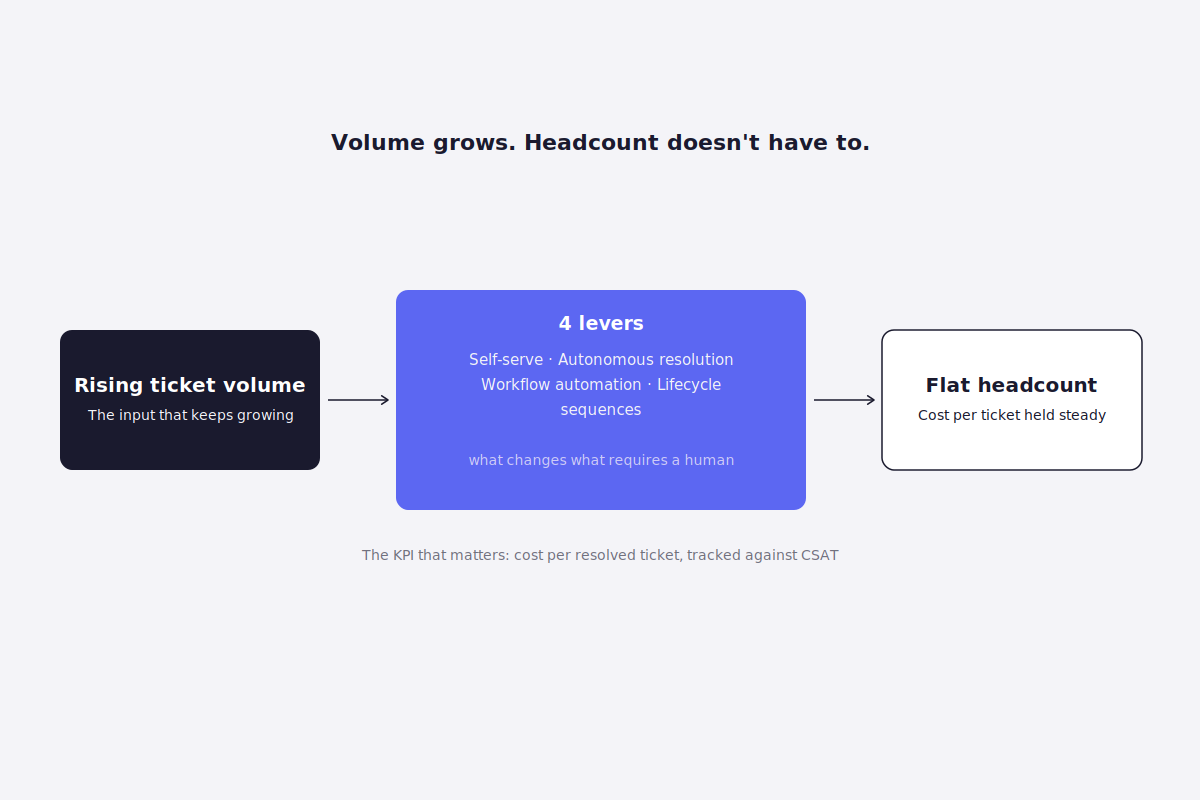
Ticket volume doesn't ask permission before it grows. A new channel gets added, a product launch spikes inbound questions, the customer base doubles, and the support queue grows with it, on its own schedule, regardless of what the hiring budget allows this quarter.
That gap is where most support leaders live: volume rising faster than headcount, with no realistic plan to close it by hiring alone. Left alone, the gap shows up as slower response times, burned-out agents absorbing the overflow, and a leadership conversation about "why is support always asking for more people" that never quite lands.
This guide covers what actually closes that gap, not by working agents harder, but by changing what requires an agent's attention in the first place.
What you'll get from this guide:- A clear, working definition of customer support automation (and what it isn't) - A self-diagnosis checklist to know if you've hit the headcount ceiling - The real signal to track instead of deflection rate, plus a 2-minute benchmark calculator - 4 concrete levers, mapped to specific tools, with the KPI each one moves - 10 real-world automation tasks teams are deploying right now - The mistakes that stall most automation efforts, and how to prioritize based on where your team is today
What is customer support automation?
Customer support automation is the use of technology, rules-based workflows, AI-driven response generation, and self-service systems, to resolve or advance a customer request without a human agent handling every step of it. The defining measure isn't whether a customer ever talks to a bot; it's how much of the support workload (the volume of decisions, lookups, and responses a team would otherwise need a human for) gets handled without one.
That distinction matters because "automation" gets used loosely to mean almost anything with AI attached. In practice, it breaks down into a few measurable components:
| Component | What it means |
|---|---|
| Deflection | Resolving a request before it ever reaches an agent (self-service, knowledge base, AI-answered queries) |
| Assisted resolution | An agent still handles the conversation, but AI drafts replies, summarizes context, or surfaces the answer |
| Workflow automation | Rules-based actions that fire without agent input, such as routing, tagging, triggered follow-ups, status updates |
| Autonomous resolution | An AI agent completes an entire request end to end (checking data, taking an action, closing the loop) with no agent step at all |
These four sit on a spectrum from "makes the agent faster" to "removes the agent from the step entirely," and most teams operate somewhere across all four simultaneously, not cleanly in one category.
What this isn't: automation is not the same as deflection rate, and it's not the same as a chatbot. Deflection rate is one output automation can produce, not automation itself: a team can automate heavily (routing, tagging, drafting) while deflecting very little, because the automation is aimed at helping agents rather than replacing them for that request. And a scripted chatbot that follows a fixed decision tree is the oldest, narrowest version of this. Most of what modern support automation does now doesn't involve a chat interface at all; it happens inside the agent's workflow, invisibly, before a human ever gets involved.
Signs you've hit the ceiling on headcount-driven scaling
There's a specific point where adding people stops being the answer, even though it's the instinct every team reaches for first. It looks like this: response times creep up despite the team working at full capacity, a hiring request gets submitted and then quietly shelved because the volume driving it doesn't clearly justify a full-time role, and the same 20-30 question types keep consuming senior agents' time exactly the way they did a year ago, headcount increase or not.
You've likely hit this ceiling if:
- You've asked "how many more agents would it take to handle 2x this volume" and the honest answer felt uncomfortably large
- A hiring request has been pushed back or delayed because leadership isn't convinced more headcount solves the actual problem
- Your best agents are still spending meaningful time on account lookups, order status, and password resets, the same low-judgment tasks a newer hire could theoretically absorb, except there's no newer hire
- Ticket volume during a spike (a launch, a promotion, an outage) requires either overtime or degraded response times, because there's no capacity buffer
- You've calculated cost per ticket and watched it stay flat or rise even as the team grew, meaning headcount alone isn't buying you efficiency
The cost of staying here compounds quietly. Every quarter the gap between volume and headcount widens, response times erode a little further, and the case for "we just need to hire more" gets harder to make credibly to anyone holding the budget, because the data increasingly says hiring alone isn't the fix.
Here's what it looks like when this is actually working.
What good automation-driven scaling actually looks like
The instinct is to track deflection rate, the percentage of conversations a bot or self-service system resolves without a human. It's an easy number to report, and it's frequently misleading: a high deflection rate can mean genuine resolution, or it can mean customers gave up, escalated through a different channel, or got an answer so generic they came back with a follow-up ticket anyway.
The signal that actually reflects healthy scaling is cost per ticket held flat (or falling) as volume rises, combined with CSAT that holds steady, not just deflection climbing in isolation. A team that automates well sees these move together: more volume handled, cost per resolution flat or down, satisfaction unchanged. A team optimizing for deflection alone often sees deflection climb while CSAT quietly erodes; the metric improved, the outcome didn't.
| Proxy metric | Real signal |
|---|---|
| Deflection rate | Cost per resolved ticket, tracked against CSAT |
| Number of automations deployed | Percentage of total ticket volume actually resolved without agent time |
| Chatbot conversation count | First-contact resolution rate for automated interactions |
| "AI is enabled" | Agent time reclaimed and measurably reallocated to complex work |
A realistic benchmark: teams in the early stage of automating typically see 15-25% of volume genuinely resolved without agent involvement within the first few months, concentrated on the highest-volume, lowest-judgment request types. Teams with a mature, multi-layered approach (self-service plus AI-assisted agents plus workflow automation) push meaningfully higher, but the ceiling depends entirely on how much of the ticket mix is genuinely low-judgment versus requiring real human discretion, which varies by business.
Before diving into the levers, take 2 minutes to assess where your team stands today. The results will tell you which lever to pull first.
Benchmark calculator
Assess where your team stands today, in under 2 minutes.
The 4 levers that drive support scaling without headcount
Lever 1: Let customers resolve their own questions before they reach the queue
The job: Give customers a way to find their own answer, instantly, correctly, for the questions that don't need a human's judgment at all.
Why it's hard without the right setup: A knowledge base that exists but isn't actually surfaced at the moment of need functions as a static archive, not a deflection tool. Customers don't search a help center reflexively; if the answer doesn't appear inside the conversation they're already having, they default to opening a ticket regardless of whether the answer was one click away.
What good looks like: Relevant help content appears automatically inside the customer's conversation (in the chat widget, in a suggested article, in an AI-answered response) without requiring the customer to leave what they're doing and go search for it separately. For a global customer base, this includes serving that same instant, accurate answer regardless of the language the question arrived in: a multilingual help center that doesn't require hiring a native speaker for every market.
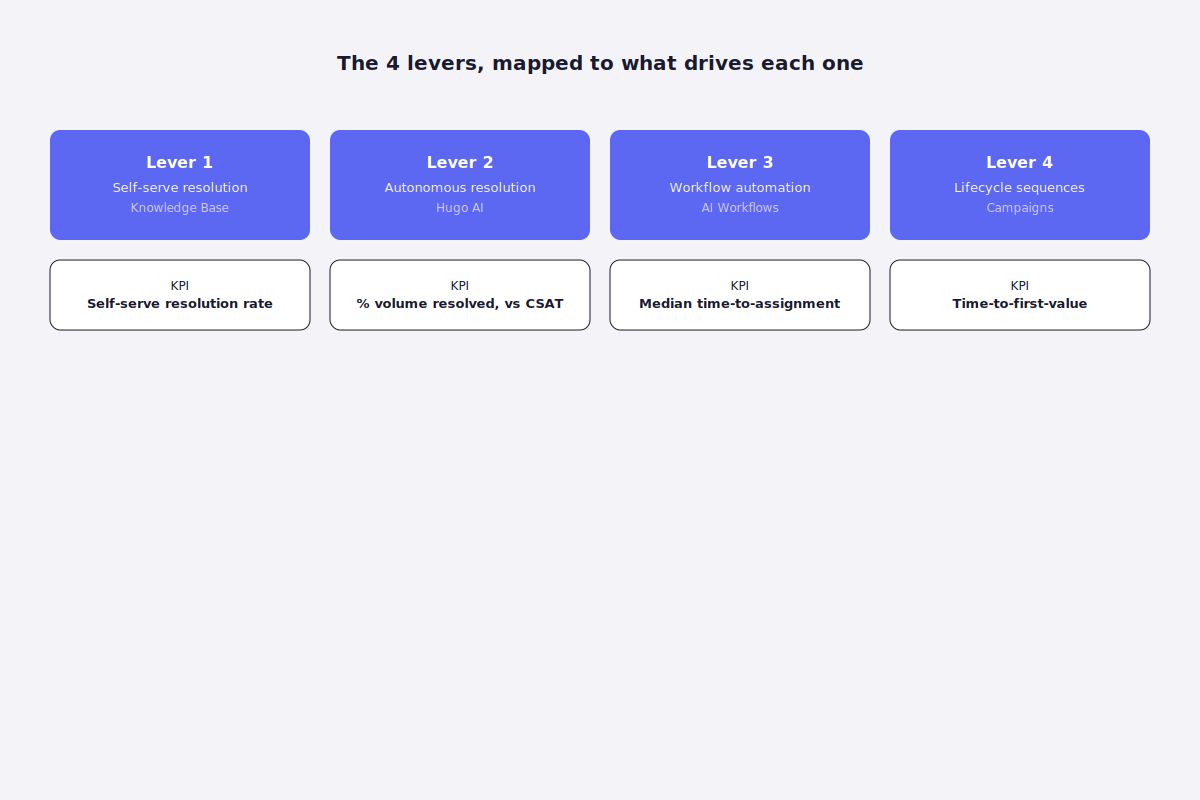
How Crisp addresses this: Crisp's Knowledge Base connects directly to the chat widget and AI layer, so relevant articles surface automatically based on what a customer is asking, rather than requiring a manual search.
Metric to track: Self-serve resolution rate, the share of inbound questions resolved via knowledge base or AI answer with zero agent involvement.
Lever 2: Resolve common requests without an agent touching them
The job: Handle the questions that follow predictable rules and require existing data, not judgment, completely, without a human executing each step.
Why it's hard without the right setup: Most support teams have the same 20-30 request types hitting them on repeat: order status, password resets, plan changes, refund checks. Handled manually, each one means an agent opening several tools, checking a record, and typing a response that's nearly identical to the last fifty they've sent.
What good looks like: A workflow understands the request, pulls the data it needs from connected systems, takes the action, and confirms it, closing the loop without an agent opening a single tab. Because none of that depends on a person being logged in, it works the same way at 2pm or 2am, coverage that doesn't require a night shift or a follow-the-sun team to deliver.
How Crisp addresses this: Crisp's AI Agent handles end-to-end resolution for common, rules-based requests, checking order status, processing straightforward refunds, updating account details, and hands off to a human only when the request needs judgment the automation doesn't have. Choosing the right AI agent for this matters: see the best AI agents for automating support tasks for a breakdown of what to look for.
Metric to track: Percentage of total ticket volume autonomously resolved, tracked against CSAT for that same segment.
Lever 3: Automate the workflow around every conversation, not just the reply
The job: Make routing, tagging, prioritization, and follow-up happen automatically, so no conversation depends on a human noticing it, categorizing it, or remembering to check back.
Why it's hard without the right setup: Manual triage doesn't scale linearly. A team that can eyeball and route 50 tickets a day by feel breaks down at 500, not because the logic changed, but because the volume of judgment calls exceeds what any person can hold in their head consistently.
What good looks like: Every incoming conversation gets classified by intent, urgency, and topic automatically, routed to the right team or agent without a Slack message asking "who should take this," and followed up on if it goes unanswered, all without a rule needing to be manually re-triggered.
How Crisp addresses this: Crisp's AI Workflows let a team build branching automation (intent detection, routing rules, triggered follow-ups) that runs the same way regardless of who's logged in or how busy the queue is.
Metric to track: Median time-to-assignment, how long a conversation sits before it's routed to the right owner.
Lever 4: Run onboarding and lifecycle sequences without manual effort
The job: Get new customers to value, and re-engage at-risk ones, through sequences that trigger automatically off real behavior, not a person manually sending each message.
Why it's hard without the right setup: Onboarding and lifecycle messaging often falls to whoever has time that week, which means it happens inconsistently or not at all once the team is stretched. The customers who'd benefit most from a proactive nudge are exactly the ones a busy team has no bandwidth to individually reach out to.
What good looks like: A new signup automatically enters a sequence based on their actual behavior, not a fixed calendar, and a customer showing early churn signals gets a triggered outreach without anyone having to notice the pattern manually.
How Crisp addresses this: Crisp's Campaigns trigger onboarding and re-engagement sequences automatically based on customer behavior and lifecycle stage, coordinated with the same data the support team already sees.
Metric to track: Time-to-first-value for new customers, and reactivation rate for at-risk segments entering a triggered sequence.
Ten real-world tasks teams are automating right now
The four levers above are the strategic shape of this. In practice, automation shows up as specific, narrow tasks. Here's what that looks like inside real support operations:
Ticket intent detection and context building. AI reads an incoming message, identifies intent (billing, bug, cancellation), and attaches relevant context automatically (plan, lifecycle stage, recent activity), so whoever picks up the conversation starts oriented instead of starting from zero.
Smart routing and prioritization. Conversations get assigned to the right inbox, team, or agent based on intent, urgency, SLA risk, or account value, removing the "who should take this" question entirely.
First-draft reply generation. AI proposes a ready-to-send response grounded in past replies and internal knowledge; the agent edits, validates, and sends, rather than starting from a blank field.
Knowledge gap detection. When AI can't confidently answer, or agents repeatedly edit a suggested reply the same way, that pattern flags a missing or weak help article, turning support friction directly into a content roadmap.
Escalation decision support. AI evaluates sentiment, churn risk, or refund and legal keywords to flag when a conversation needs escalation, giving less experienced agents a version of the judgment a senior agent would apply.
Multilingual support assistance. Incoming messages get translated and a localized reply is proposed automatically, preserving intent and tone, letting one team support a global customer base without hiring per language.
Churn risk detection. AI flags cancellation language ("thinking of leaving," "too expensive") and suggests a save path (education, a downgrade offer, human intervention) before the request becomes a lost customer.
Post-resolution summarization. Once a ticket closes, AI generates a clean internal summary (issue, root cause, resolution), so the next agent who touches that account isn't starting from an unread thread.
Agent onboarding assistance. New agents can ask questions in plain language and get answers pulled from internal knowledge and past tickets, shifting onboarding from weeks of shadowing toward being productive from day one.
Proactive status and update messaging. Customers get notified automatically when something relevant changes (an order ships, an issue is resolved, a known incident is fixed) without a human remembering to send the update.
Common mistakes that stall automation efforts
Chasing deflection rate as the goal instead of a byproduct. Teams that optimize purely for "how many tickets did the bot handle" end up automating the easiest requests regardless of whether that's where the real cost or volume actually sits, and often discover CSAT quietly dropping while the deflection chart climbs.
Automating the reply before automating the routing. A well-drafted AI response to a ticket that took two days to reach the right agent doesn't solve the actual bottleneck. Workflow and routing automation usually delivers more scale per effort than reply generation alone, but teams reach for the more visible, more discussed lever first.
Treating automation as a one-time deployment. A workflow that isn't revisited as the product, policies, or ticket mix change quietly drifts out of date, flagging the wrong things, missing new request types, still routing based on rules from a year ago.
How to prioritize: where to start based on where you are
If your support operation is small and just starting to feel volume pressure: start with Lever 1 (self-service) and the highest-volume items from the 10 tasks above, knowledge gap detection and first-draft replies. The setup cost is lowest, and the ROI shows up fast because a small number of question types usually account for a disproportionate share of ticket volume.
If you're growing fast and routing has started to break down: Lever 3 (workflow automation) is the priority. At this stage, manual triage is usually the actual bottleneck, not agent speed. Fixing routing and assignment unlocks more capacity than any amount of reply-drafting help.
If you're already at scale and looking for the next unlock: Lever 2 (autonomous resolution) compounds the most from here. With volume and data already substantial, end-to-end automated resolution of your highest-frequency request types returns the largest headcount-avoidance value per engineering hour invested.
Go deeper on each lever
Want to go further on each of these levers?
→ Reduce Repetitive Support Tickets With a Self-Service Knowledge Base, the Knowledge Base hub→ How to Build an AI Agent for Customer Support: A Step-by-Step Playbook, the Hugo AI hub → Customer service automation: how to move from deflection to autonomous resolution, the AI Workflows hub → The best AI agents for automating support tasks, a practical comparison for Lever 2 → Automate Onboarding Without Manual Effort, the Campaigns hub
This pillar shares real ground with agent productivity: many of the same levers that let a team scale without hiring also make each existing agent faster day to day.
Ready to scale support without scaling headcount?
Crisp brings together Knowledge Base, Hugo AI, AI Workflows, and Campaigns in one platform, so your team can absorb more volume without absorbing more headcount to match it.
Sources
- Salesforce, Top AI Agent Statistics: service reps spend 66% of their time on non-customer-facing tasks
- Gartner, Survey Finds 85% of Service and Support Leaders are Expanding Human Agent Responsibilities: 80% of leaders under pressure to reshape workforce due to AI, 63% reducing headcount via attrition
- Harvard Business Review, "Why Agentic AI Projects Fail—and How to Set Yours Up for Success"
- Harvard Business Review, "Generative AI Will Enhance — Not Erase — Customer Service Jobs"

September 2026 - Product Update
Discover the new Knowledge Base editor, benchmark your AI support performance, track how often Hugo escalates conversations, and more. Discover the latest features and improvements released by the Crisp team in September 2026.


Summer 2026 - Product Update
Meet the refreshed Crisp experience, Understand how Artificial Intelligence handles every conversation, Build reusable teams across your workspace, and more. Discover the latest features and improvements released by the Crisp team in Summer 2026.

Best 9 helpdesk software and ticketing systems for 2026
Need help to choose your next helpdesk with a ticketing tool for 2026? We've gathered a guide that gives you everything you need to convince your C-levels.