Reduce Repetitive Support Tickets With a Self-Service Knowledge Base
A knowledge base only cuts tickets if customers find the answer before they write. Here is how to build one that does: answer-first articles, search that matches real phrasing, multilingual coverage and upkeep driven by data.


A customer emails asking how to reset their password. It is the fortieth time this month someone has asked that exact question. An agent answers it anyway, the same way they answered it yesterday, because there is nowhere else for that customer to have found the answer on their own.
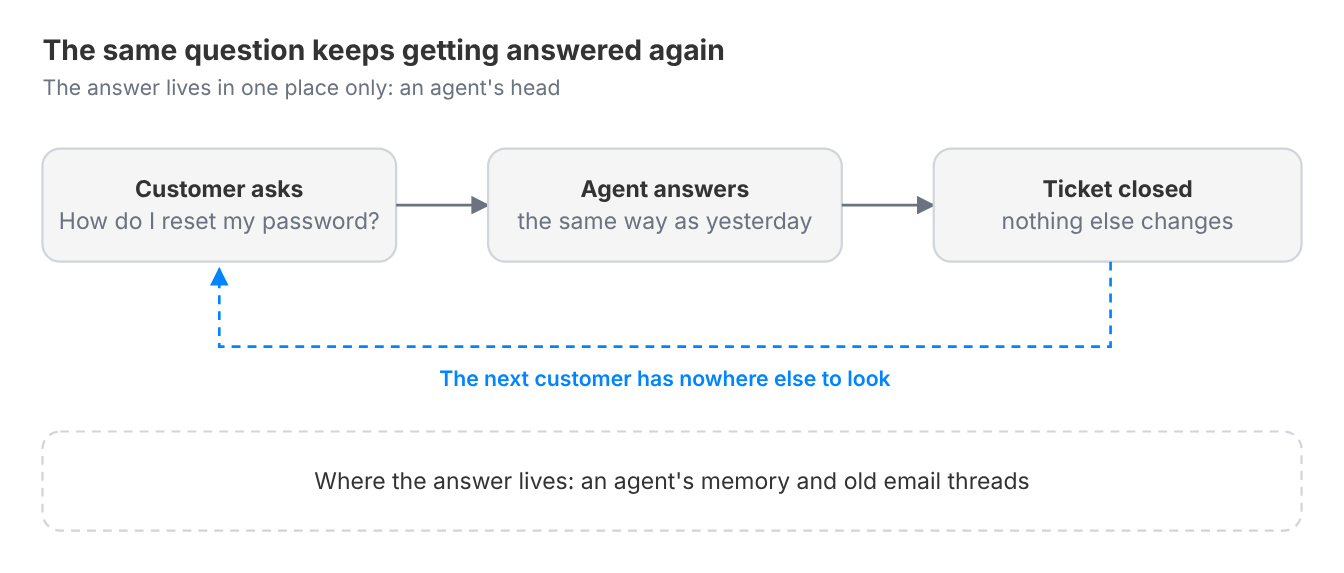
That is the failure a self-service knowledge base exists to close, and it keeps happening for a structural reason, not because of training. If answers to common questions only live inside an agent's head or scattered across old email threads, every customer who hits that question has no path to an answer except asking a human directly, every time, forever. The volume does not shrink as the team gets better at answering, because the underlying question never gets closed off. It just gets answered again. It also caps your AI agent: an AI agent can only resolve what your content can answer, so a thin knowledge base keeps both the AI and your people stuck on the same repeat questions.
This guide covers what a real self-service knowledge base needs to do to reduce that repeat volume, not just exist as a page nobody reads, and how to build it so your AI agent can answer from it first.
What is a self-service knowledge base?
A self-service knowledge base is a structured library of help content, organized so a customer can find the answer to a common question on their own, without contacting support. The distinction that matters is not whether the content exists. It is whether a customer can actually reach the right answer without help.
A knowledge base that is technically published but poorly organized, outdated, or unsearchable functions the same as no knowledge base at all from the customer's side, and from the AI agent's side too, since it answers from the same content.
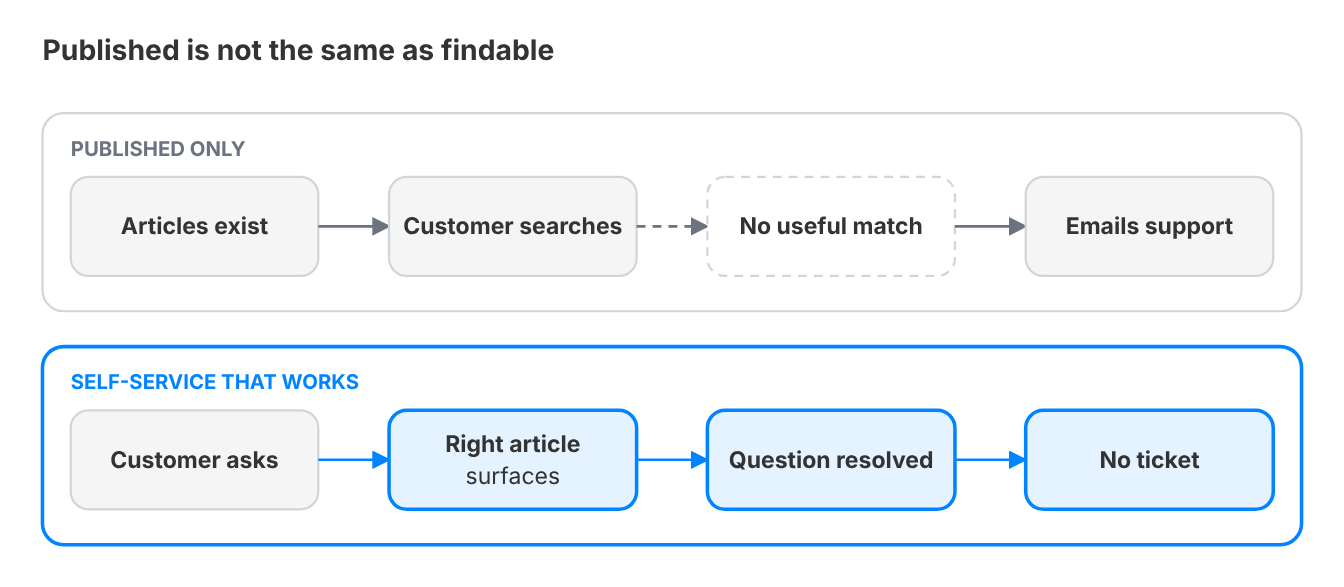
Here is the distinction that gets conflated most often:
Often conflated | What it actually is |
|---|---|
A published help center | Articles that exist are not self-service until a customer can reach the right one without help |
A short FAQ page | An FAQ lists a handful of questions. A knowledge base is a searchable library organized around how customers phrase problems |
An internal wiki | A wiki is written for the team's mental model. A self-service knowledge base is written for the customer's question, in the customer's words |
A destination customers must visit | A separate help center customers have to remember to check works far worse than articles surfaced inside the conversation they are already having |
This becomes acute for teams somewhere past the point where a handful of question types (password resets, billing basics, common setup steps) show up constantly enough that everyone on the team can recite the answer from memory. That is usually the moment a business realizes the same questions are consuming real agent hours that could be spent on things a knowledge base genuinely cannot solve.
Why this problem gets worse as you grow
Repeat questions get more expensive as volume grows. At a small scale, a handful of them is tolerable, an agent can answer the same thing a dozen times a week without much cost.
The tipping point arrives with volume: once a team is fielding hundreds or thousands of tickets a month, even if only 10 to 15% of them are pure repeat questions, that is real, dedicated time every week spent answering something that has already been answered a hundred times before.
A working knowledge base gives those hours back and lets your people spend them on the cases an AI agent cannot close.
The cost compounds in a second way that is easy to miss. Gartner found that only 14% of customer service issues are fully resolved in self-service, and that the most common reason, in 43% of cases, was that customers could not find content relevant to their issue.
Most self-service investments quietly underperform not because self-service does not work, but because the content is not structured well enough to close the loop. A knowledge base that exists but does not resolve the question still routes the customer back to a human, and the team pays to maintain content that is not doing its job.
There is also a language dimension that gets underweighted. Gartner predicted that by 2025, 60% of customers would seek service information in third-party sources not owned by the company. For a global customer base, content that only exists in English makes that shift easy to picture. It quietly pushes non-English speakers straight back into the ticket queue, or worse, out to unofficial, unreliable answers elsewhere.
You have hit this point if:
- The same 10 to 20 questions account for a disproportionate share of your total ticket volume, and everyone on the team could answer them without looking anything up
- Customers regularly ask a question that is already answered in an existing article, meaning they never found it in the first place
- Help content exists but has not been reviewed or updated in longer than the team can confidently say
- A meaningful share of your customer base does not speak the language your help content is written in
- Nobody on the team can say with confidence which help articles are actually being read versus which are dead weight
What solving this actually looks like
A team that has solved this does not experience "fewer support emails" as a vague improvement. They experience specific, previously common questions simply stopping. A customer who would have emailed about a password reset a year ago now finds the answer in under a minute, on their own, and the ticket never gets created. When a customer does start a conversation instead, the AI agent answers from the same articles first.
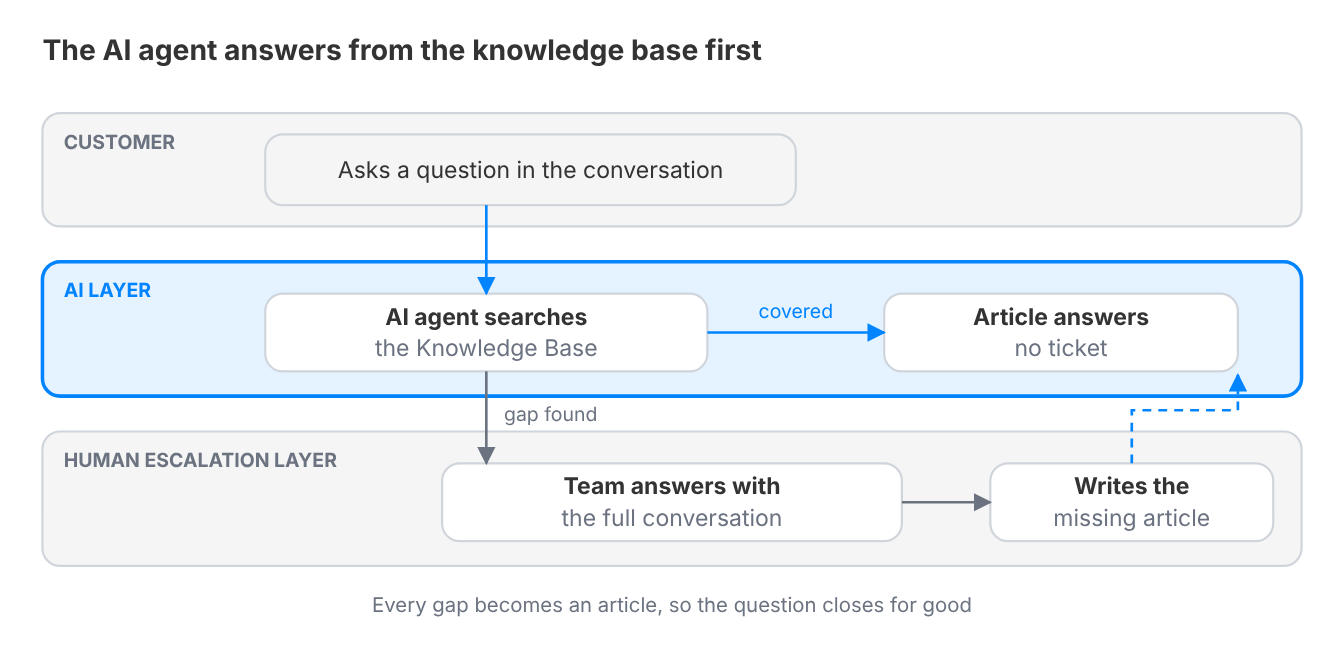
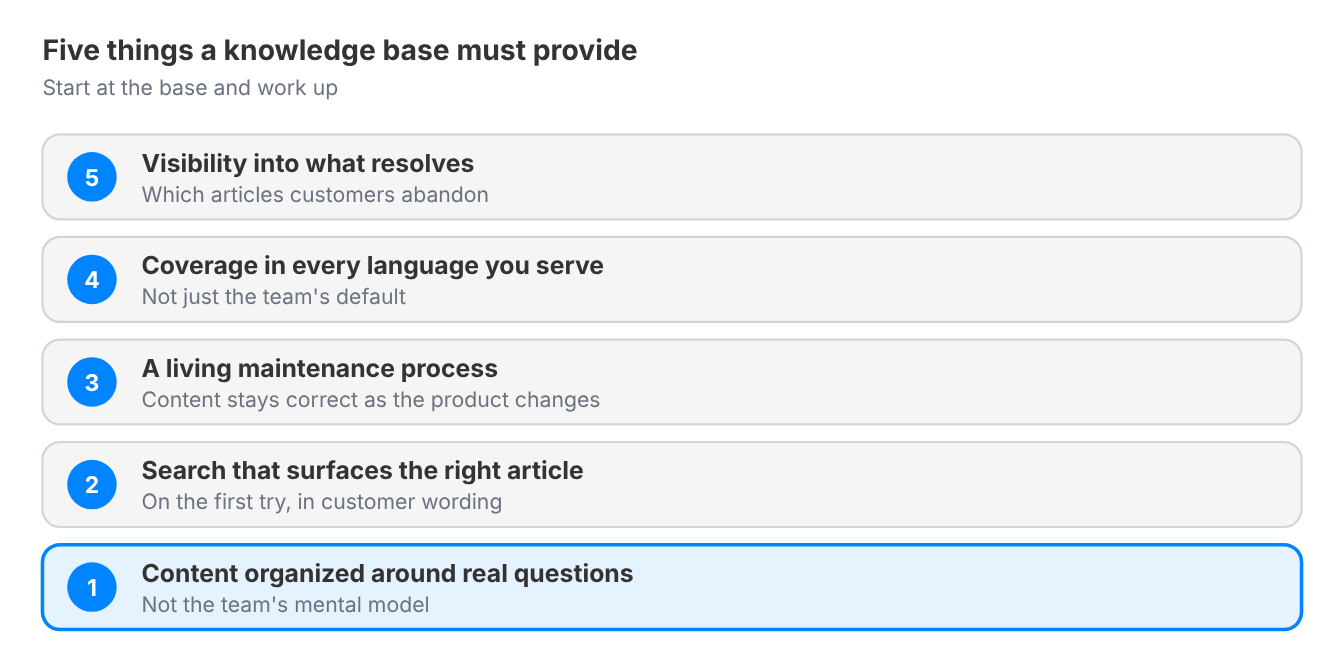
The demand is already there: HubSpot reports that 78% of CRM leaders say customers prefer to solve issues independently. A knowledge base a customer has to leave the conversation to go search is a tool switch, even when it is technically self-service. Getting to the solved state requires a few things that a page of static articles does not automatically provide:
- Content organized around real questions, not around how the internal team happens to think about the product
- Search that actually surfaces the right article, not just a folder structure the customer has to guess their way through
- A living maintenance process, since content that is not updated as the product changes quietly becomes wrong, which is worse than not having it at all
- Coverage in the languages your customers actually use, not just the language your team writes in by default
- Visibility into what is working, meaning some way to see which articles actually resolve a question versus which ones customers abandon
When evaluating whether a knowledge base setup actually closes this gap, the sharpest questions are practical:
- Does search return the right article on the first try for a real customer phrasing, not just the internal team's preferred wording?
- Does content surface automatically inside the conversation a customer is already having, or does it require them to leave and go hunting?
Crisp's Knowledge Base is built around exactly this: Hugo, the AI agent, answers from your articles the moment a question is asked, and Hugo AI Suggestions shows you which articles to update or write next. The underlying requirements above apply regardless of which tool a team ends up choosing.
How to reduce repetitive tickets with self-service: step by step
Reducing repetitive tickets with self-service takes five steps, each one moving you from guessing what customers ask toward a knowledge base that keeps closing questions.
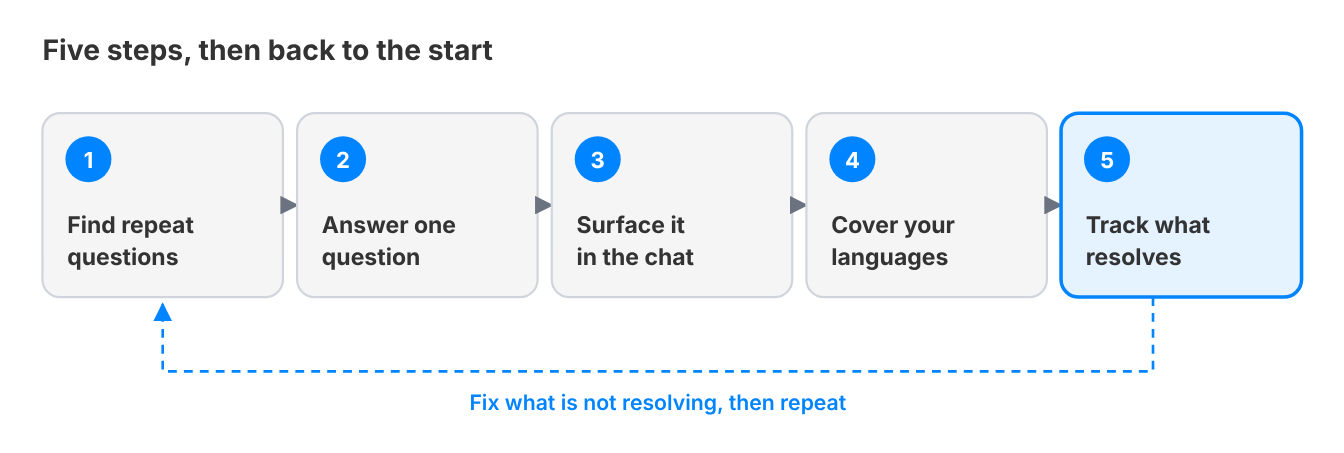
Step 1: Start with your actual repeat questions, not a guess
What to do: Pull the last few months of tickets and identify the specific questions that show up most often, in the customer's own words, not the internal team's paraphrase of them.
Why this step matters for this job: A knowledge base built around what the team assumes customers ask, rather than what they actually ask, ends up with well-written articles nobody's search query ever matches.
How to do it in Crisp:
- Go to AI Agent → Automate → Topic detection and click New topic. Hugo then classifies every conversation it handles against your topics.
- Name each topic after one recurring question, describe precisely what Hugo should detect, and assign a segment when the topic is detected if you want to filter or route on it.
- Open Hugo Analytics (AI Agent → Evaluate → Analytics) and check Topics volume to rank your topics by volume.
- Open your top topics and download their conversations to capture the exact words customers use.
- For conversations that reach the inbox directly, go to Settings → Inbox Settings → Automatic Triage and create a Sort Rule that adds a segment based on message text patterns.
- Create one topic per recurring question in AI Agent → Automate → Topic detection, and Hugo classifies every conversation it handles against them.
- Analyze the Topics volume view in Hugo Analytics (AI Agent → Evaluate → Analytics) ranks those topics by volume, and you can open any topic to download its conversations.
- For conversations that reach the inbox directly, Automatic Triage (Settings → Inbox Settings → Automatic Triage) adds a segment based on message text patterns, so every question lands in a filterable bucket from day one
Watch out for: Building the first ten articles around what feels most important internally (the newest feature, the most complex workflow) instead of what is actually generating the most repeat volume.
Step 2: Write each article to answer one question, completely
What to do: Structure each article around a single, specific question, with the answer stated plainly near the top rather than buried in context the customer has to read through first. Add a screenshot or a short screen recording wherever a step happens inside your interface, because many readers scan the visual before the text. Then link each article to its closest neighbors, so a customer who lands on the wrong article is one click from the right one.
Why this step matters for this job: A customer scanning an article for a quick answer gives up fast if the actual answer is three paragraphs down. An article that makes them keep reading past the answer functions worse than one that gives it immediately, and it gives your AI agent a clean answer to draw on as well.
How to do it in Crisp:
- Open the conversation where an agent solved the question, click Copilot in the message editor and run /summary to isolate the question and its resolution with Hugo Copilot.
- Run /draft to turn that context into a first version of the answer.
- Go to Knowledge Base, click New Article and open AI Copilot in the editor to create, proofread and improve the article with its built-in Skills.
- Create a custom Copilot Skill with your house rules (answer first, one question per article, your tone), so every teammate writes articles in the same format.
- File the article in its folder, check it in preview and publish. Use version history to roll back any edit.
- Write with AI Copilot directly inside the Knowledge Base editor. It creates, proofreads and improves articles, with built-in Skills for common content tasks, so nobody starts from a blank page.
- Start from an answer that already worked: in the conversation where an agent solved the question, Hugo Copilot's /summary command isolates the question and its resolution, and /draft command turns that context into a first version.
- Create a custom Copilot Skill with your house rules (answer first, one question per article, your tone), and every teammate produces articles in the same format.
- Then file the article in its folder, check it in preview and publish.
- Version history lets you roll back any edit.
Watch out for: Combining multiple related questions into one long article "for completeness." It is usually better to split into several focused articles than to make a customer read past two questions to reach the one they actually have.
Step 3: Make the content findable, and keep it complete
What to do: Connect the knowledge base to wherever customers are already asking questions, whether the chat widget, email, or in-app, so relevant articles surface automatically rather than requiring the customer to leave and search separately. Next, open every other door: a help center link in your main navigation and inside your product, proactive chat triggers on the pages where customers usually get stuck, a help center styled like the rest of your brand so customers trust they are in the right place, and search engine indexing, since many customers type their question into Google before they ever open your site. Finally, close the loop: track which questions still reach your team even though an article exists, and which ones have no article at all. Those two lists tell you what to update and what to write next.
Why this step matters for this job: A knowledge base a customer has to actively remember to go check functions far worse than one that appears the moment they need it. Most customers default to asking a human rather than searching a separate help center. And an article that is easy to find but incomplete or outdated sends the customer straight back to the inbox.
How to do it in Crisp:
- Go to AI Agent → Evaluate → AI Suggestions (Crisp Plus) to open Hugo AI Suggestions.
- Review what Hugo found in your conversations: questions your content does not cover yet, articles that no longer match what customers report, outdated content to remove, and articles or snippets that need more context.
- Open each suggestion, read the conversations behind it and check the highlighted changes.
- Accept or reject each change, or use Accept All or Reject All, then click Save. Nothing changes until you save.
- Click Re-analyze after every release to get a fresh pass on current conversations.
- Open Hugo AI Suggestions (AI Agent → Evaluate → AI Suggestions, Crisp Plus) and let it tell you what to update and what to write next.
- It analyzes your conversations, groups recurring themes and turns them into concrete recommendations: questions customers keep asking that your content does not cover yet, articles that no longer match what customers report, outdated content to remove, and existing articles or snippets that need more context.
- Each suggestion shows the conversations behind it and highlights the proposed change, so you accept or reject it in one click.
- Run a fresh pass whenever your product moves.
Watch out for: Treating the help center as a standalone destination linked from a footer, rather than something woven into the actual support flow. Or the opposite: a well-placed help center whose articles drift out of date until both customers and your AI agent get last quarter's answers.
Step 4: Cover the languages your customer base actually speaks
What to do: Identify which languages represent a meaningful share of your customer base, and build or translate content for those languages specifically, rather than defaulting to English only.
Why this step matters for this job: A knowledge base that does not speak a customer's language is not a worse version of self-service for that customer. It is no self-service at all, since they cannot extract an answer from content they cannot read.
How to do it in Crisp:
- Go to Knowledge Base → Actions → Add a new language and pick the language you want to cover.
- Let Crisp translate your articles on demand from your main language, which stays the reference.
- Review each translated article before it goes live, and use AI Copilot in the editor to proofread it.
- Open Analytics → Knowledge Base and check Visits per Knowledge Base Locale to see which languages earn their maintenance.
- Your main language stays the reference, and Crisp translates other locales from it automatically, on demand.
- Add a language from Knowledge Base → Actions → Add a new language, then review the translated articles before they go live.
- AI Copilot proofreads each version without leaving the editor, and Analytics → Knowledge Base shows visits per locale, so you can see which languages earn their maintenance.
Watch out for: Machine-translating content once and never revisiting it. Product changes and new articles need to propagate across every supported language, not just the original.
Step 5: Track what is actually resolving questions, and fix what is not
What to do: Monitor which articles customers actually find and use, which searches return no useful result, and which questions keep generating tickets despite an article existing for them. Add a quick "was this helpful?" rating at the end of every article. And read engagement data the right way: a short visit with no follow-up ticket is a success, because the customer found the answer and left.
Why this step matters for this job: Without this visibility, a knowledge base quietly decays. Articles go stale, searches fail silently, and the team has no signal that content needs attention until ticket volume creeps back up for reasons nobody can point to.
How to do it in Crisp:
- Go to Analytics → Knowledge Base and check visits and Popular Searches.
- Open the Articles report to see per-article visits, reactions, usefulness, ratings and comments, and rewrite the weakest articles first.
- Open Hugo Analytics (AI Agent → Evaluate → Analytics) and compare Topics volume with the escalation rate. A topic with high volume and frequent escalations is your next article.
- Ask AI Copilot directly in Analytics for the numbers you need. It answers with your real metrics and builds the chart for you.
- Analytics → Knowledge Base shows visits, Popular Searches and an Articles report with per-article visits, reactions, usefulness, ratings and comments.
- Hugo Analytics (AI Agent → Evaluate → Analytics) adds the AI side: the Topics volume view shows which questions keep arriving, and the escalation rate shows how often Hugo hands off to your team.
- A topic with high volume and frequent escalations is your next article.
- To skip the dashboard digging, ask AI Copilot directly in Analytics: it answers with your real metrics and builds the chart for you.
Watch out for: Treating "we published it" as the finish line. Publishing is the start of a maintenance responsibility, not the end of one.
Compare views against tickets to decide which article to fix first.
Common mistakes that keep this job unsolved
Writing content for the internal team's mental model instead of the customer's actual question. Articles organized by internal product architecture rather than by the way customers naturally phrase their problem consistently underperform, no matter how thorough the content is.
Treating translation as a one-time project. A knowledge base translated once at launch and never revisited falls out of sync with the English version within months, leaving non-English customers with stale or missing answers while the primary language stays current.
Never measuring whether the content actually resolves anything. A knowledge base can look comprehensive, with dozens of articles and well-organized categories, and still fail at its actual job if nobody is tracking whether customers find what they need or just give up and email anyway.
Leaving the knowledge base to one person. Support sees the questions, product knows the answers, and marketing owns search visibility. A knowledge base kept by one person falls behind the product fast. Make contributing an article part of every team's job.
Go deeper on each part of this guide
- How do you support a multilingual knowledge base? The practical mechanics of Step 4, in depth
- Knowledge Management System: 9 knowledge base examples you'll want to copy, real structural patterns worth borrowing
- FAQ best practices: how to build an FAQ page that answers questions and ranks in search, when an FAQ is enough, when to graduate to a knowledge base, and how to get your help content found in Google and AI answers
This job sits alongside other levers for handling volume without adding headcount:
- How to Build an AI Agent for Customer Support: A Step-by-Step Playbook, the Hugo AI hub, for questions too complex for static content alone
- Customer service automation: how to move from deflection to autonomous resolution, the AI Workflows hub
How this connects to scaling without headcount
Self-service is one of the fastest levers for handling more volume without hiring at the same pace. Every question a customer resolves on their own is a ticket that never enters the queue at all, not one that gets answered faster.
See the complete guide to scaling support without adding headcount for how this fits alongside the other three levers that drive that outcome.
Ready to stop answering the same questions over and over?
Crisp's Knowledge Base puts the right answer in front of customers, in their own language. Hugo answers from it first inside the conversation, and your team picks up what needs a person.
Frequently Asked Questions
How does a knowledge base reduce repetitive tickets?
A knowledge base reduces repetitive tickets by closing each question for good. Instead of an agent answering the same request again, the answer lives in one article a customer can find, or that an AI agent uses mid-conversation. The ticket never gets created at all. This only works when articles match how customers phrase problems in their own words.
How does an AI agent use a knowledge base?
An AI agent uses the knowledge base as its source of truth. When a customer asks a question, the agent searches the articles and answers from them first, so routine questions resolve without a person. Questions the content cannot answer escalate to your team with the conversation attached. Each gap becomes the next article.
How do you decide which articles to write first?
The first articles to write are the ones behind your most frequent questions. Pull a few months of tickets and rank the questions that appear most often, using the customer's own wording, not the team's paraphrase. Build the first articles around that ranked list, not around the newest feature or the most complex workflow. Each article should answer one question, with the answer stated plainly near the top.
Should a knowledge base be multilingual?
A knowledge base should be multilingual whenever a meaningful share of your customers speaks another language. Content they cannot read is not a weaker form of self-service. It is no self-service at all, and it sends them back to the ticket queue. Translate for the languages your customers actually use, then keep every version updated when the product or the original article changes.
How do you know if a knowledge base is working?
A knowledge base is working when the questions it covers stop generating tickets. Look at which articles customers actually view, which searches return nothing useful, and which questions keep generating tickets even though an article exists. Those three signals show where content is missing, hard to find, or failing to answer. Publishing is the start of maintenance, not the end, so review them regularly.
Sources
Crisp, The State of AI Customer Support 2026, https://crisp.chat/en/reports/state-of-ai-support/
Gartner, Gartner Survey Finds Only 14% of Customer Service Issues Are Fully Resolved in Self-Service, https://www.gartner.com/en/newsroom/press-releases/2024-08-19-gartner-survey-finds-only-14-percent-of-customer-service-issues-are-fully-resolved-in-self-service
Gartner, Gartner Predicts By 2025, 60% of Customers Will Seek Service Information From Third-Party Sources, https://www.gartner.com/en/newsroom/press-releases/gartner-predicts-by-2025--60--of-customers-will-seek-service-inf
HubSpot, 13 customer self-service stats that leaders need to know, https://blog.hubspot.com/service/self-service-stats

Single customer view: how to unify scattered data into one support-ready record
Customer data lives in five tools, and none of them sit where the reply happens. Here is how to build a single customer view that your AI agent and your team can both use the second a conversation opens.

SLA management in customer support: how to set response targets you actually keep
An AI agent can answer a customer in ten seconds, before a human ever sees the conversation. That changes what an SLA actually protects. This guide covers setting response and resolution targets from real data and catching breaches before they happen, not after.

Collaborative Inbox vs. Shared Mailbox: What's the Difference and Which One Does Your Team Need?
A shared mailbox works until two people answer the same customer. Here is what separates a native shared mailbox from a collaborative inbox, where each one breaks, and how to pick the right one when AI already answers first.