How to Build an AI Agent for Customer Support: A Step-by-Step Playbook
Build an AI support agent that starts at 30% automated resolution and climbs to 60%. A step-by-step playbook to help you dive in the Agentic AI era.


It's Monday morning. Your inbox holds 340 unanswered conversations. Half of them ask the same four questions you answered last week — where is my order, how do I reset my password, what does the pricing include, can I get a refund. Your two support agents will spend the day copy-pasting answers instead of handling the conversations that actually need them.
This is exactly the workload an AI agent for customer support was designed to absorb. Gartner predicts that by 2029, agentic AI will autonomously resolve 80% of common customer service issues, cutting operational costs by 30% along the way. Salesforce's State of Service report already puts AI at 30% of all service cases today, with service teams projecting 50% by 2027.
Yet most companies haven't embraced AI support agents — not because the technology falls short, but because the setup does.
Teams dump their entire website into the training data, write no instructions, skip routing entirely, and then conclude the AI "doesn't work."
This playbook walks through the six steps that separate an AI agent that resolves conversations from a chatbot that frustrates customers.
It's distilled from the setup process we teach Crisp customers in our live webinar series, and from what teams like IPLN — an e-commerce retailer running a 17,000-product catalog on AI-assisted support — do differently.
TLDR: How do you build an AI agent for customer support?
- Map your real conversation topics first,
- Train the agent on curated knowledge (website, Q&A, files),
- Write behavioral instructions separately from that knowledge,
- Launch it as the default first responder,
- Automate structured requests with workflows and live data connections, and
- Escalate sensitive cases to humans.
- Iterate weekly on topic data.
Why most AI support agents fail before they launch
The failure pattern is remarkably consistent. A team activates an AI agent, connects it to everything they can find — the full website, the entire blog, an old FAQ — writes a one-line prompt, and pushes it live.
Two weeks later, the answers are vague, customers ask to speak to a human, and the project gets shelved.
The root cause is almost never the model, It's three setup mistakes:
- Training data that's too broad and too shallow,
- No separation between what the AI knows and how it should behave,
- No plan for what happens when the AI shouldn't answer.
A Gartner survey found that 64% of customers would prefer companies didn't use AI for customer service at all — and their top concern is getting trapped in AI when they need a person.
That skepticism is the bar your setup has to clear. An AI agent that answers precisely, admits what it doesn't know, and hands off gracefully clears it. A rushed one confirms every fear.
The good news: building an AI support agent right isn't harder. It's just a different order of operations. And it's quite different from what we used to do with good-old chatbots.
Step 1 — Map what your customers actually ask
Every failed AI setup starts with a guess: "I think our most common questions are X, Y, and Z." The teams that succeed replace I think with I know before training anything.
Before: you assume shipping questions dominate, so you write twenty shipping Q&As — and discover post-launch that 40% of conversations were about account access.
After: you run topic detection on your real conversation history, see the actual distribution of requests, and train against evidence.
This measurement-first approach matters beyond the AI setup itself. Conversation topics are product intelligence: a spike in questions about one feature is a signal your product team needs. Support teams that surface this data stop being a cost center and start being the company's early-warning system.
How Crisp fits in: Hugo AI Agent's Topic Detection classifies every incoming conversation against topics you define with a short prompt — "conversations about WhatsApp settings, setup and credits," for example. Each detected topic assigns a segment you can track in Crisp Analytics and later use as a routing trigger.
Some examples of prompts you can steal for topic detection:
-
Billing & payments
"Conversations revolve around invoices, payment failures, refunds, charges the customer doesn't recognize, subscription renewals, or updating payment methods." -
Account access & security
"Conversations revolve around login problems, password resets, locked accounts, two-factor authentication issues, or changing the email address on an account." -
Cancellation & churn risk
"Conversations revolve around cancelling a subscription or order, downgrading a plan, closing an account, or the customer expressing intent to stop using the product." -
Bug reports & technical issues
"Conversations revolve around something not working as expected: error messages, features failing to load, crashes, or the customer describing broken behavior in the product."
Step 2 — Structure your knowledge in three layers
An AI agent learns your business from three sources, and each has a distinct job:
- Your website — the base layer: product or service pages, pricing, policies. Public information that rarely changes.
- Q&A pairs — the refinement layer: precise answers to the questions your website doesn't cover. This is where most resolution quality is won or lost.
- Files — the depth layer: process documents, internal guides, even annotated images inside PDFs for visual troubleshooting.
The single biggest mistake at this stage is importing too much. The famous running-app company Run Motion connected its entire blog as training data. Answer quality dropped, because the dataset was broad instead of precise.
Choose quality over quantity: a curated set of pages beats a full-site crawl every time.
For e-commerce, don't crawl your product catalog at all — products go out of stock and the AI won't know. Connect live stock data instead (more on that in Step 5).
For the Q&A layer, three rules make the difference between an answer that resolves and an answer that generates a follow-up:
- Write questions in your customer's words, not your internal vocabulary. Customers ask "can I get a refund?" — not "refund process for SaaS billing cycle."
- Write answers that end the conversation. "Go to the login page, click Forgot Password, enter your email, follow the link" resolves. "You can reset it in settings" escalates.
- Be clear, complete, and actionable. Avoid internal jargon, include edge cases, and spell out steps. The AI reproduces the structure you give it.
How Crisp fits in: Hugo AI Agent trains on your website, Q&As, files, and your Crisp Knowledge Base, with CSV import for bulk Q&A uploads. Past conversations don't train the agent directly, but they power Copilot for your human team and feed the AI Suggestions engine covered in Step 6.
Step 3 — Write instructions: behavior is not knowledge
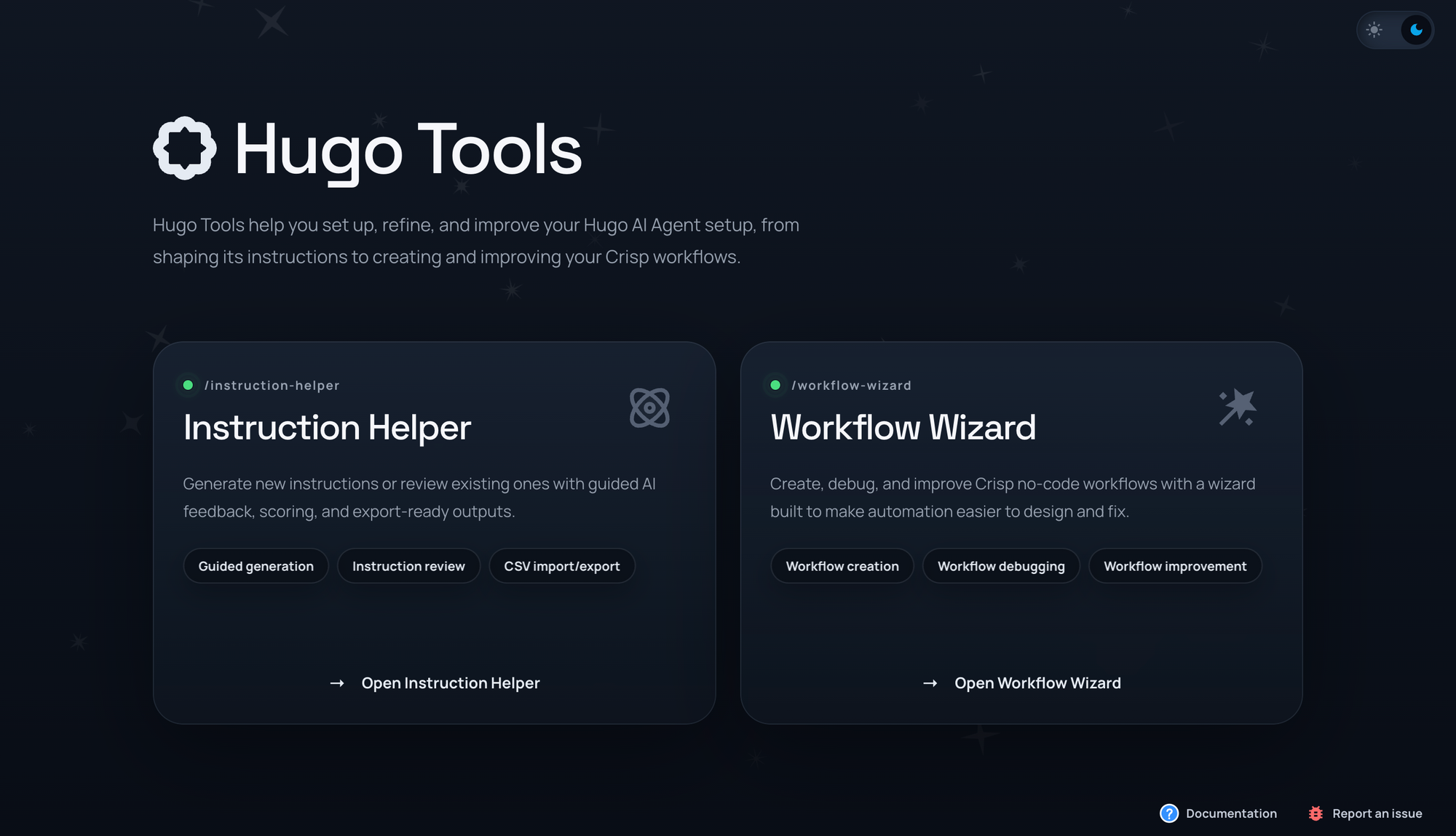
This is the step most teams get wrong, and the distinction is worth engraving: knowledge is what the AI knows; instructions are how it behaves.
The steps to cancel an account belong in knowledge. What the AI should do when someone wants to cancel — ask why, show empathy, offer an alternative, then point to the steps — belongs in instructions.
Mixing the two produces an agent that either recites policy with no judgment or improvises answers it shouldn't.
Good AI Agent instructions control four things:
- tone (friendly, formal, on-brand vocabulary),
- structure (answer length, when to use step-by-step formats),
- boundaries (topics to refuse, competitors not to discuss, medical or legal advice to avoid),
- context gathering (which details to collect before escalating — browser version for a bug report, order number for a delivery issue).
Keep each instruction concise and explicit:
- "Keep answers under three sentences."
- "Escalate if the user asks for a supervisor."
- "When a user reports a bug, ask for their browser and account email before escalating."
Teams that run mature setups maintain twenty or more instructions, grouped by theme — and the specificity pays off directly in answer quality.
Before: a one-line prompt ("be helpful and friendly") and an agent that behaves generically.
After: a structured instruction set that makes the AI answer like your best support agent on their best day.
Step 4 — Launch as the default path, and aim for 30%
Counterintuitive but critical: don't wait for a perfect setup. Launch the AI agent as the default first responder for every conversation, and set your expectations at 30% automated resolution — not 80%.
That number isn't a limitation; it's how the system is supposed to work. You cannot predict every question your customers will ask, and the gaps only become visible in production.
Teams that treat the first month as a calibration phase — watching which conversations escalate and why — routinely climb from 30% toward 60% automated resolution within a few months of iteration.
⚠️ Teams that expect 80% on day one shut the project down by week three.
The economics justify the patience. McKinsey estimates that applying generative AI to customer care can increase productivity by 30 to 45% of current function costs; in one company they studied with 5,000 agents, AI assistance increased issue resolution per hour by 14% while cutting handling time by 9%. Those gains compound as your setup matures.
How does AI Instructions work?
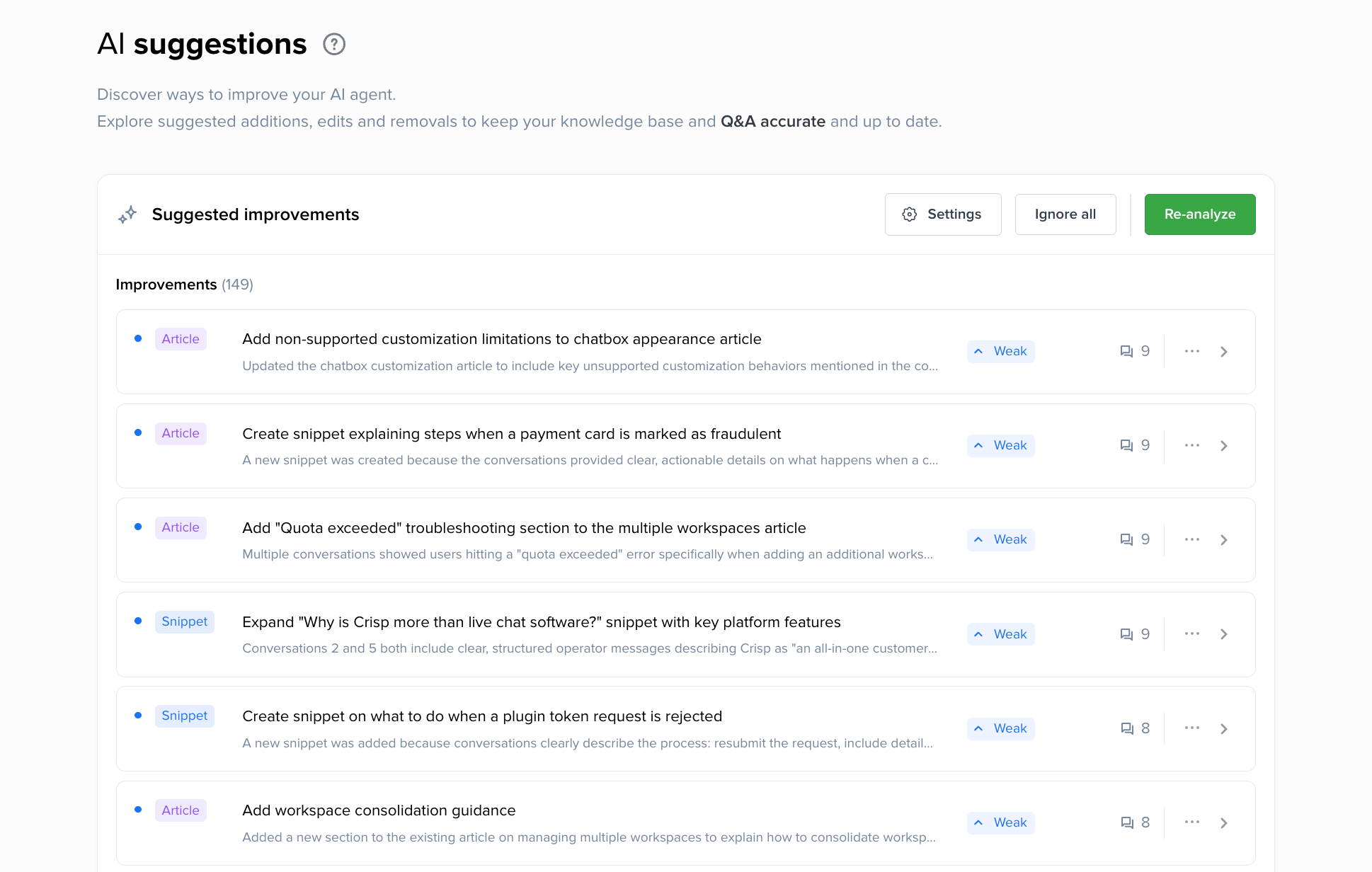
AI Suggestions is a feature of Hugo AI that lets you and your team gain access to automated knowledge improvements.
Basically, our product analyze the conversations that were escalated to the support, cross-match it with existing knowledge, and suggest improvement to the most relevant ressource so it is not escalated next time.
⚠️ This feature is still in bêta, reach out to us to get it enabled.
Step 5 — Automate structured requests with workflows and live data
Not every repetitive question needs the same fix. Once your topic data reveals what repeats, match the pattern to the right tool:
- The user needs information → improve your knowledge (Step 2).
- The user needs guidance from a known entry point → use proactive triggers with quick replies. A message on your pricing page offering "Compare plans" buttons removes the friction of typing the question at all.
- The request follows the same steps every time → build a workflow.
- The request needs live data or a custom action → connect an integration or an MCP server.
Examples of quick replies to better engage with AI Support Agent
Below are some examples you steal to build your first quick replies so your leads and customers can better engage with your AI-powered customer support.
SaaS
- Pricing page: "Compare plans" · "What's included in the free trial?" · "Do you offer annual discounts?" · "Talk to sales"
- Feature page: "How does this compare to [competitor]?" · "See a demo" · "Is this available on my plan?"
- Docs / help center: "I'm stuck on setup" · "Is there an API?" · "Contact support"
E-commerce
- Product page: "Is this in stock?" · "What's the delivery time?" · "Size & fit guide" · "Is this compatible with [X]?"
- Cart / checkout: "What payment methods do you accept?" · "How much is shipping?" · "Do you have a promo code?"
- Post-purchase / account page: "Where is my order?" · "Change my delivery address" · "Start a return"
Fintech
- Homepage / landing: "Is my money protected?" · "How do your fees work?" · "How long does signup take?"
- Onboarding / KYC step: "Which documents do I need?" · "Why was my document rejected?" · "How long does verification take?"
- Transactions / card page: "My transfer hasn't arrived" · "I don't recognize a charge" · "Freeze my card"
What is a workflow and when should you use it?
A workflow is the right tool when a request has a fixed structure:
- a product return that always needs a name, email, and order reference;
- a demo request that qualifies the lead before booking a calendar slot;
- a cash withdrawal that requires identity verification.
The workflow collects the inputs, applies your conditions, triggers the action, and can hand the conversation back to the AI when it's done.
The step-change in capability comes from live data. Through MCP (Model Context Protocol), your AI agent can query external systems mid-conversation:
- order status from your e-commerce backend,
- subscription state from Stripe,
- account data from your own database.
This is what turns "where is my order?" from an escalation into a two-second automated answer with a real tracking number.
Step 6 — Route what needs a human, and improve weekly
An AI agent doesn't eliminate human support; it changes the number of layers. Some conversations should always route to a person: frustrated customers who need empathy, sales opportunities worth a live conversation, VIP accounts, and legally sensitive requests.
Hugo Routing turns detected topics into routing rules targeting sub-inboxes or teams, with an AI review mode that sanity-checks your rules and JSON/CSV import-export.
Deciding this deliberately, rather than letting everything pile into one inbox, is what keeps the system organized as volume grows.
The routing logic follows a simple five-part framework:
- List your main conversation types (from your Step 1 topic data — not from guesses),
- Set the AI as the default path,
- Define which requests trigger a workflow,
- Define which requests need a human and route them to the right team's sub-inbox,
- Use topic analytics to spot gaps and refine the rules.
Examples of routing prompts you can add to your AI Support Agents
SaaS
- Sales sub-inbox: "Route when the user expresses interest in booking a demo, talking to sales, upgrading to a higher plan, or asks about enterprise pricing, volume discounts, or contracts."
- Technical support sub-inbox: "Route when the user reports a bug, an error message, an API failure, an integration not working, or degraded performance in the product."
- Billing sub-inbox: "Route when the conversation involves a failed payment, a refund request, an invoice dispute, a plan downgrade, or a request to cancel the subscription."
- Onboarding/CS team: "Route when a recently signed-up user asks for setup help, data import, team configuration, or seems lost in the first steps of the product."
E-commerce
- Returns workflow: "Route when the customer wants to return or exchange a product, reports a damaged or wrong item, or asks about the refund policy for an existing order."
- Logistics sub-inbox: "Route when the conversation involves a lost package, a delivery marked as delivered but not received, a customs issue, or an address change on a shipped order."
- Product specialist sub-inbox: "Route when the customer asks for expert advice before buying: technical specifications, compatibility between products, or comparisons within the catalog." (the IPLN pattern — one per specialist domain)
- B2B/wholesale team: "Route when the user mentions bulk orders, reseller pricing, purchase orders, or buying on behalf of a company."
Fintech
- Compliance/KYC sub-inbox: "Route when the conversation involves identity verification, rejected documents, account restrictions, or requests related to regulatory information."
- Fraud & security team (priority): "Route when the user reports an unrecognized transaction, a suspected account compromise, a stolen card, or any mention of fraud or phishing."
- Payments operations: "Route when a transfer, deposit, or withdrawal is delayed, failed, or missing, and the user provides or asks about a transaction reference."
- Retention team: "Route when the user expresses intent to close their account, move to a competitor, or complains about fees in a way that signals churn risk."
Then close the loop. 💅
Your topic analytics — the same tool you started with — now shows you which topics still escalate too often. Review it weekly or bi-weekly. Pair it with automated knowledge maintenance: analyzing what your human agents answered on escalated conversations reveals exactly which Q&As are incomplete and which help articles are outdated.
Topics start your process, and topics end it. Weekly.
What AI Support ROI looks like: 17,000 products, 20-hour coverage
IPLN, a French photo and video equipment retailer, shows what this playbook produces at full scale. The family-run company sells a highly technical catalog of 17,000 products, with in-house specialists per domain — video, photo, lighting — and more than 20 people working in Crisp.
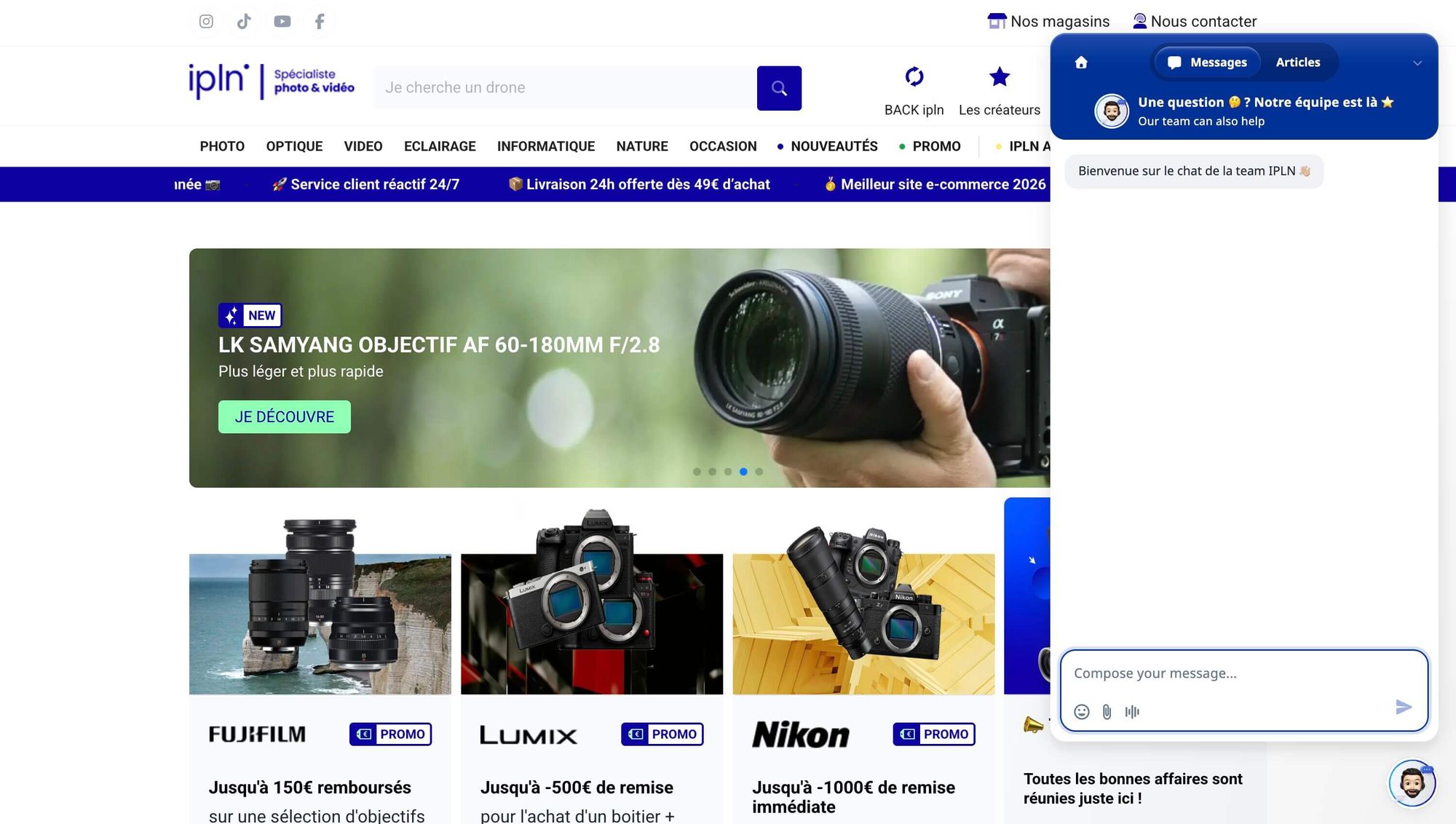
Their setup maps almost one-to-one onto the six steps:
- Topic detection identifies what each conversation is about,
- and routing sends Canon questions to the Canon specialist, trade-in requests to the buyback team.
- Workflows collect name, email, and order reference on returns before a human ever joins — so when the specialist picks up, every detail is already there.
- An MCP connection queries their PrestaShop database live, letting the AI answer technical product questions, suggest compatible accessories, and return real tracking numbers on "where is my order?" in one to two seconds.
The results, six weeks in: their AI agent handled more than 600 conversations in a single month, and the store went from standard office-hours coverage to roughly 20 hours a day of expert-level answers — including at 1 a.m., when a customer with a credit card in hand doesn't want to wait until morning.
As general manager Douglas Studient put it during our webinar, having the same quality of product expertise available around the clock is "priceless."
Common mistakes to avoid when building an AI Agent for customer support
Even with the playbook, four traps recur.
- Teams import everything and curate nothing, then blame the AI for vague answers — when the fix is deleting training sources, not adding them.
- Teams write knowledge into their instructions, bloating the behavioral layer with facts that belong in Q&As.
- Teams build a workflow for every repetitive question, when most repetition is solved faster with a better answer or a quick-reply button — reserve workflows for requests that genuinely collect inputs and trigger actions.
- Teams treat launch as the finish line, skip the weekly topic review, and watch their automation rate plateau at 30% when the compounding gains were waiting on the other side of iteration.
Your first 30 days Roadmap to get it right
Don't flip the switch on day one. Fix your foundations first, set the guardrails, then launch small and expand with data.
Hugo AI Agent ships with every tool in this playbook — topic detection, layered training, grouped instructions, workflows, MCP integrations, routing, and AI Suggestions — natively inside the Crisp inbox. Start with your ten most repetitive questions and let the data take it from there.
FAQ
Q: How long does it take to build an AI support agent?
A working first version takes about a few days: topic mapping, curated training data, and a basic instruction set, bunch of sandbox tests. Expect 30% automated resolution at launch and plan four to eight weeks of weekly iteration to climb toward 50–60%.
Q: What's the difference between an AI support agent and a chatbot?
A chatbot follows scripted decision trees and breaks outside them. An AI agent understands intent, draws on trained knowledge, takes actions — checking an order, triggering a return workflow, routing to a specialist — and knows when to hand off to a human.
Q: Do I need developers to build an AI agent for customer support?
Not for the core setup: Topic detection, training, instructions, and routing are all no-code. Technical skills only help for advanced MCP integrations that connect the AI to custom databases, and prompt-based generators now cover most workflow building.
Q: Will an AI agent replace my support team?
No — it changes what reaches them: the AI absorbs repetitive volume; your team handles complex cases, frustrated customers, and sales opportunities. IPLN runs 20+ people in Crisp alongside their AI agent; the AI extended their coverage rather than replacing their expertise.
Sources

September 2026 - Product Update
Discover the new Knowledge Base editor, benchmark your AI support performance, track how often Hugo escalates conversations, and more. Discover the latest features and improvements released by the Crisp team in September 2026.


Summer 2026 - Product Update
Meet the refreshed Crisp experience, Understand how Artificial Intelligence handles every conversation, Build reusable teams across your workspace, and more. Discover the latest features and improvements released by the Crisp team in Summer 2026.

Best 9 helpdesk software and ticketing systems for 2026
Need help to choose your next helpdesk with a ticketing tool for 2026? We've gathered a guide that gives you everything you need to convince your C-levels.