Customer journey tracking in support: how to see the full picture before you reply
An AI agent picks up a conversation with no memory of the three times the customer already explained it. This guide covers what it actually takes to track the customer journey in support — so every responder, human or AI, opens already knowing the story instead of becoming the next stranger to ask.


An AI agent picks up a conversation at 2am. The customer's message is short, almost bored: "following up on this."
Following up on what? The AI has no idea. It sees one message, no history, no thread. So it does what context-blind systems do. It asks the customer to explain from the beginning. Except this is the fourth time they've explained it. Three weeks ago it was chat. Last week, email. Yesterday, a different queue entirely. The AI just became the fourth stranger to ask the same question.
This is the failure mode support teams need to worry about now as well. Not just about a human agent opening a ticket cold. An AI system, running the front line, resolving message by message with no memory of what came before it. It looks efficient. It scales badly, because every isolated reply, human or AI, is really a repeat of the same original miss: nobody carried the story forward.
That story is the support journey: every conversation, ticket, and interaction a customer has had with your team, across whichever channel and whichever responder handled it. Tracking it means the next responder, human or AI, opens already knowing what happened. This guide is about building that, for a support operation where AI is now the first responder most customers meet.
By the end, you'll be able to:
- See what customer journey tracking actually means in support — not the marketing version
- Understand why journey data fragments across channels, time, and people — and what that costs in customer effort
- Apply the 5-part model for building a unified journey, from AI-first visibility to clean human handoffs
- Track the AI-era metrics that show whether resolution is real, not just a faster blind reply
What is customer journey tracking in support?
Customer journey tracking in support is the practice of recording and surfacing every interaction a customer has had with your support team, across channels, agents, and time, so that whoever responds next, human or AI, can see the full history before they reply.
Unlike marketing journey tracking, which follows a customer's path toward a purchase (ads, clicks, conversions), support journey tracking follows their service history: past tickets, conversations, issues raised, and resolutions delivered. Its goal isn't attribution; it's context: making sure no customer has to re-explain something your team already knows.
In practice, it has three requirements:
- The history must be complete (every channel and past conversation)
- Attached to the customer (so it persists across agents and time)
- Visible at the point of reply (so the agent uses it without hunting).
Miss any one and tracking breaks down. Incomplete history misleads, channel-bound history fragments, and buried history goes unused.
Why tracking the support journey is harder than it looks
The support journey sounds like it should be easy to see — it's all your own data. The reason it isn't comes down to how that data gets fragmented.
1.It's scattered across channels. A single customer might start on live chat, follow up by email, and mention it again in a social DM. Each channel often lives in its own tool or its own thread, so no single view shows the whole sequence. The agent sees the channel they're in, not the journey across all of them.
2.It's scattered across time and people. Today's conversation was handled by one agent; last month's by someone who's now on a different team. Unless the history travels with the customer, each agent starts from their own slice and reconstructs the rest from guesswork — or doesn't bother, and replies partial.
3.The cost of replying blind is steep, because it lands on the customer as effort. When an agent can't see the journey, the customer has to rebuild it — repeating their issue, re-explaining context, re-establishing what was already promised. And customer effort is one of the most reliable predictors of disloyalty there is: Gartner found that 96% of customers who have a high-effort service interaction become more disloyal, versus just 9% after a low-effort one — and it identifies having to repeat information and being transferred between agents as defining features of a high-effort experience. Every blind reply that makes a customer retell their story is pushing them toward the exit.
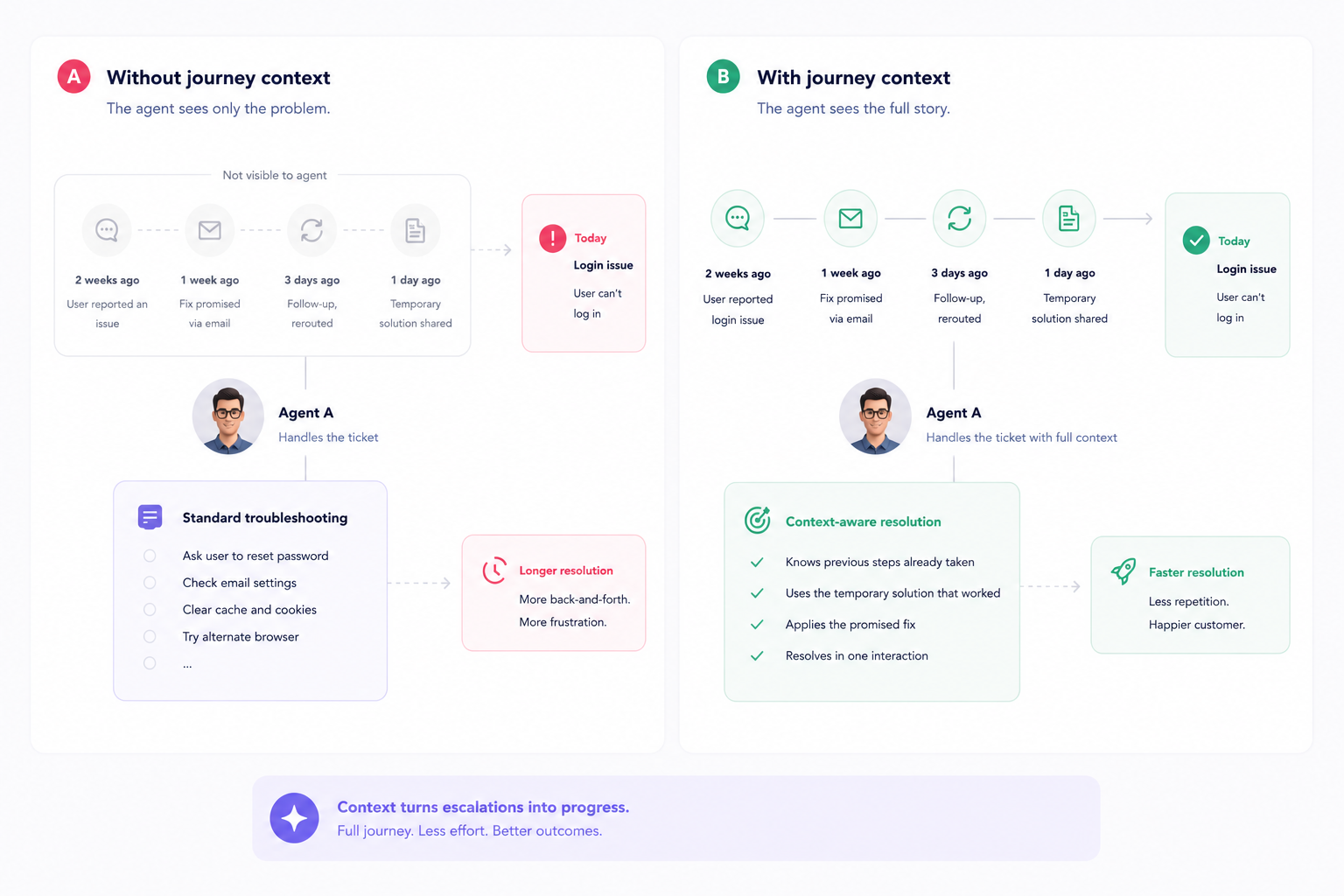
The flip side is the prize. Seeing the journey is what lets an agent resolve on the first contact instead of opening, yet another round — and first-contact resolution pays back directly: Gartner found that low-effort, first-contact resolution reduces repeat calls by up to 40%, escalations by 50%, and channel switching by 54%. Journey tracking is upstream of all of that.
How to track the customer journey in support
Tracking the support journey isn't a single feature you switch on. It's a stack of practices that puts the whole history in front of whichever responder is about to reply, starting with the one answering most tickets today: AI.
1. Give your AI the journey first, not last
If AI is handling first contact, it needs the same visibility a senior human agent would insist on before replying. An AI reasoning from a single incoming message, with no memory of prior tickets or prior promises, will resolve in isolation and recreate the exact repetition the whole system is meant to prevent.
This is not a small gap to close. Gartner predicts agentic AI will autonomously resolve 80% of common customer service issues by 2029. If that resolution happens without the journey attached, you're not automating support. You're running blind replies at machine speed, just faster than a human could produce them. The upside of doing this right is already measured: a study of over 5,000 support agents found that AI assistance working from full customer context raised issues resolved per hour by 14%, and by 34% for newer agents, gains that only show up when the assisting system can see the whole history, not just the current message.
2. Unify every conversation into one timeline
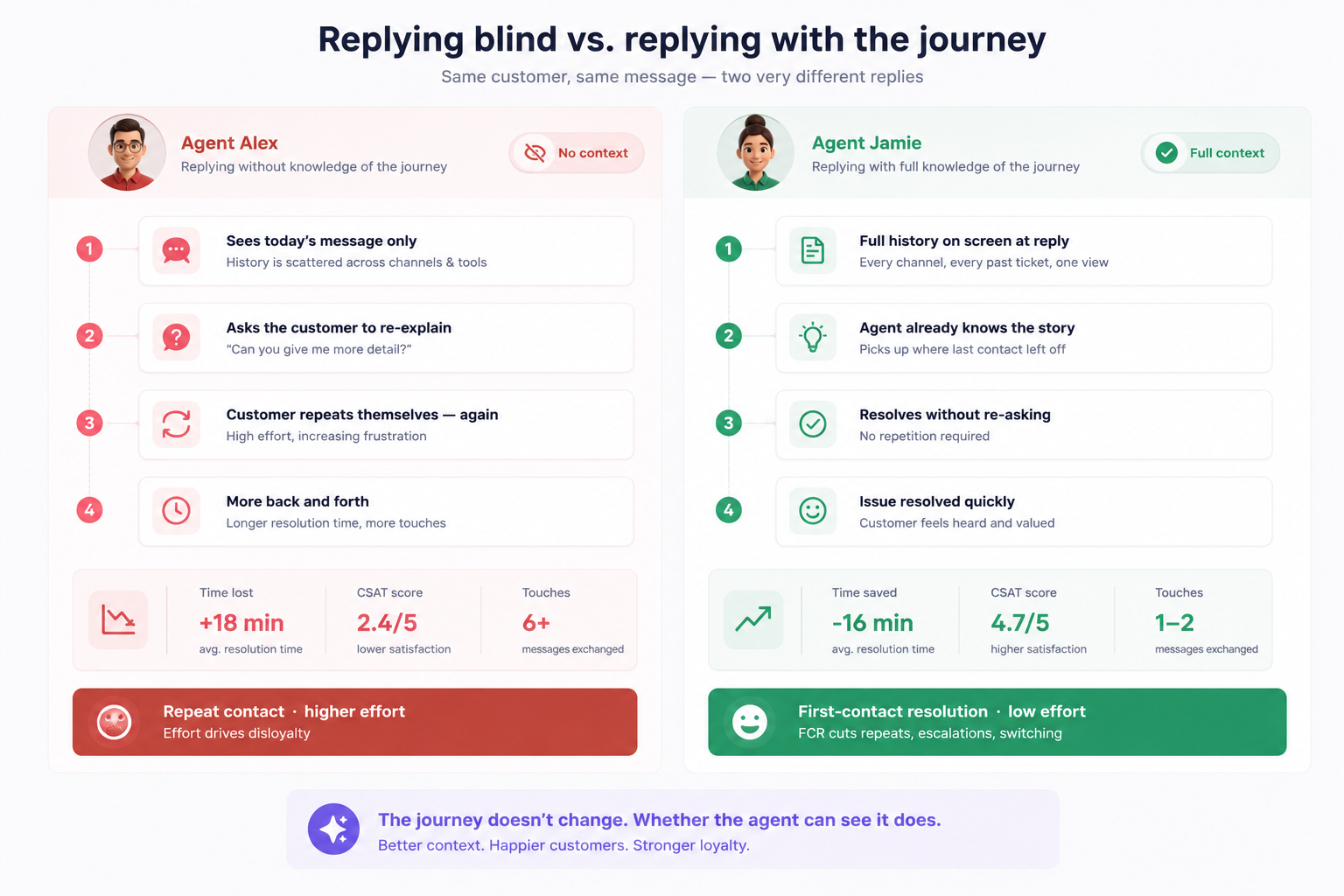
Underneath the AI layer has to sit a single chronological record of every interaction, chat, email, social, prior tickets, regardless of channel or who handled it. Without this, an AI system is only ever as good as whichever slice of history it happens to be fed for that one reply.
Omnichannel support that's actually unified achieves a CSAT of 67%, compared to 28% for a disconnected multichannel setup. That 39-point spread is the difference between a system that recognizes a returning customer and one that meets them as new every time, whether the one meeting them is a person or a model.
3. Attach the journey to the customer
History should live on the customer's profile, not on a thread, not on a channel, not on whichever agent or automation last touched it. When the full record sits on a persistent customer identity, the next responder inherits it automatically, no matter what form that responder takes.
81% of brands already agree that customer experience would improve if every conversation lived in one consolidated system of record. The gap is well understood. The fix is architectural: identity carries the history, not the interface.
4. Surface it at the point of reply, for AI and humans alike
None of this matters if the responder doesn't actually see it while composing the reply. Not in a separate tool. Not behind a lookup a model has to be specifically prompted to run. In the same view, at the same moment, as the response itself.
3 in 10 human agents already can't reliably pull up customer information mid-conversation. Now apply that same failure to an AI system: every additional hop between the incoming message and the customer's full record is a place where an automated reply gets generated from less than the whole picture. The target is zero hops, for AI and human responders both.
5. Hand off to humans without losing the thread
Human agents haven't disappeared from this picture. They've moved to the escalation layer, and that layer only works if the handoff carries everything the AI already knew. A human agent picking up an escalated conversation should never be starting over. They should be picking up exactly where the AI left off, with the full journey already visible, not rebuilding it from a summary or, worse, from scratch.
This is the step most AI rollouts skip, and it's the one that determines whether "agentic support" actually reduces customer effort or just adds a layer of automation on top of the same old blind handoff.
The metrics that tell you it's working
The old scorecard for support, first-contact resolution, handle time, repeat contact, still matters. But it was built to measure human agents answering one conversation at a time. An AI-first front line needs metrics that measure something the old scorecard was never designed to catch: whether the system resolves things itself, and whether it hands off cleanly when it can't.
- AI containment rate. The share of journeys an AI system resolves start to finish with no human touch at all. This is the number that tells you whether the journey infrastructure is actually letting AI do what it's supposed to do, or whether every conversation still routes to a person eventually regardless of what the AI attempted.
- Escalation fidelity. When AI does hand off to a human, does the human inherit the full context, or does the customer end up re-explaining anyway, just one layer later? This is the metric that actually proves the journey claim. An AI that resolves 80% of tickets but escalates the remaining 20% with zero context has automated the easy cases and left the hard ones exactly as broken as before.
- Post-AI repeat contact rate. Specifically, how often a customer comes back about an issue the AI marked resolved. A rising number here means the AI is closing tickets without actually closing the problem, which is a worse outcome than slow resolution, because it looks like success in the dashboard while the customer's problem is still open.
- First-contact resolution, now split by responder. FCR climbing toward and past 70% still tracks with rising satisfaction, roughly one point of CSAT per point of FCR. What changes is that you now need this broken out separately for AI-resolved and human-resolved conversations, because a blended number hides which layer is actually doing the work.
- Handle time, for the escalation layer specifically. When context travels with the handoff, human agents spend less time reconstructing the story before they can start solving it. Centralized customer data has cut call handling time from five minutes down to two or three, and in an AI-first stack, that saved time is concentrated entirely in the escalation layer, since AI-resolved conversations shouldn't be generating handle time at all.
Journey tracking in Crisp
Crisp is built around the premise that history should follow the customer, not sit scattered in whichever tool last touched them. Every channel feeds into a unified inbox. Every conversation attaches to a persistent customer profile. The history is present where the agent replies. And Hugo AI works from the same context, so even when automation handles the front line, it's doing so with the full picture of the customer's journey.
The result is an agent who opens every conversation already knowing who they're talking to, what they've already been through, and what was promised.
Ready to give every agent the full picture?
Frequently asked questions
What's the difference between multichannel and omnichannel support?
Multichannel means offering multiple ways to contact you. Omnichannel means those channels share a single customer history — so context doesn't reset when a customer switches from chat to email.
Why do customers have to repeat themselves so often?
Because most support stacks are built channel by channel, not around a unified customer record. Each channel has its own data, and when a customer switches, the context stays behind.
What does it mean to attach the journey to the customer rather than the channel?
It means the customer's full history — every past conversation, every prior resolution — lives on their profile and follows them everywhere, regardless of which channel or agent they reach next.
How does a unified inbox actually reduce handle time?
Agents spend less time asking questions the system should already know the answer to. When context is already present at the point of reply, conversation time drops to solving rather than reconstructing.
Does AI need the same customer history that human agents do?
Yes, and this is critical. An AI working from a single message without prior history creates the same repetition problem it's supposed to solve. Context-blind automation scales the problem, not the solution.
What's the fastest way to start closing the context gap?
Consolidate channels into a single inbox first. You cannot track a journey that's split across five separate tools. That's the foundation everything else builds on.
Sources
Deloitte Digital, 2024 Consumer Trends Survey, https://www.deloittedigital.com/us/en/insights/insight-list/the-digital-native-goes-mainstream.html
Gartner, Effortless Experience Research, https://www.gartner.com/en/customer-service-support/insights/effortless-experience
Gartner, Agentic AI Will Autonomously Resolve 80% of Customer Service Issues by 2029, https://www.gartner.com/en/newsroom/press-releases/2025-03-05-gartner-predicts-agentic-ai-will-autonomously-resolve-80-percent-of-common-customer-service-issues-without-human-intervention-by-20290
Salesforce, State of Service Report 2024, https://www.salesforce.com/resources/research-reports/state-of-service
SQM Group, Omnichannel CSAT Benchmarks, https://www.sqmgroup.com/resources/library/blog/omnichannel-customer-service
Stanford University / NBER, Generative AI and Productivity in Customer Support, https://www.nber.org/papers/w31161
Plivo, Omnichannel Customer Service Statistics, https://www.plivo.com/blog/omnichannel-customer-service-statistics-you-should-know
📚 Related articles
Unified customer view: how to give every support operator full context before they reply · Single customer view: how to unify scattered data into one support-ready record

September 2026 - Product Update
Discover the new Knowledge Base editor, benchmark your AI support performance, track how often Hugo escalates conversations, and more. Discover the latest features and improvements released by the Crisp team in September 2026.


Summer 2026 - Product Update
Meet the refreshed Crisp experience, Understand how Artificial Intelligence handles every conversation, Build reusable teams across your workspace, and more. Discover the latest features and improvements released by the Crisp team in Summer 2026.

Best 9 helpdesk software and ticketing systems for 2026
Need help to choose your next helpdesk with a ticketing tool for 2026? We've gathered a guide that gives you everything you need to convince your C-levels.