Unified customer view: how to give every support operator full context before they reply
Most support setups store customer context in pieces: chat here, email there, a note nobody linked. This guide shows what a true unified customer view requires, why fragmented context gets more expensive as you scale.


A customer writes in, frustrated. It's the third time they've raised the same issue. The agent who picks it up has no idea. They see a fresh message, ask the customer to explain what's happening, and the customer's frustration doubles in a single sentence.
The information existed. It was sitting in a different channel, a different tool, a previous ticket nobody linked: the support operator just couldn't see it.
This happens because most support setups store context in pieces: The chat history lives in one place, the email thread in another, the billing record in a third, and the note a colleague left last week in Slack. Whoever is assembling the full picture, a human agent today, increasingly an AI agent tomorrow, has to go hunting.
Under queue pressure, or simply because the data isn't wired together, that context hunt often doesn't happen. The reply goes out with whatever's in front of the responder, which is half the story.
The structural problem isn't diligence. It's that no single screen holds the whole customer context.
This guide is about closing that gap, and it argues for fewer tools, not more. It covers what a unified customer view actually is, why fragmented context gets more expensive as your team grows, get a self-audit for fragmented context in your organization, and how to give every responder, human or AI, the complete picture before a word gets typed.
TL;DR — How to get customer context to quicken ticket resolution:
- Consolidate every channel (email, chat, social, messaging) into one inbox so no context is split across tools
- Resolve customer identity automatically across channels, so the same customer isn't treated as several different people
- Surface profile and account data (plan, value, history) right at the point of reply, not in a separate tab
- Attach internal notes and prior team discussion directly to the customer record, visible to whoever picks up next
- Extend that same unified view to AI agents, so automation isn't working from a stripped-down, fragmented picture
- Result: whoever responds — human or AI — reads the full context in seconds and starts solving instead of asking the customer to repeat themselves
What is a unified customer view?
A unified customer view is a single, real-time picture of everything you know about a customer, every conversation, across every channel, plus their profile, history, and account data, assembled in one place so that the AI agent handling the reply has full context before it responds, and so that a human agent inherits that same complete picture the moment a conversation escalates to them.
The key word is before. Plenty of systems can reconstruct a customer's history if you go digging across tabs. On the contrary, a unified customer view means nobody digs, human or AI: the relevant context is already there at the moment of response. It collapses what used to be a five-tab scavenger hunt into one screen, and it's exactly the layer that lets an AI agent act with judgment instead of guessing, and a human agent pick up an escalation without starting cold.
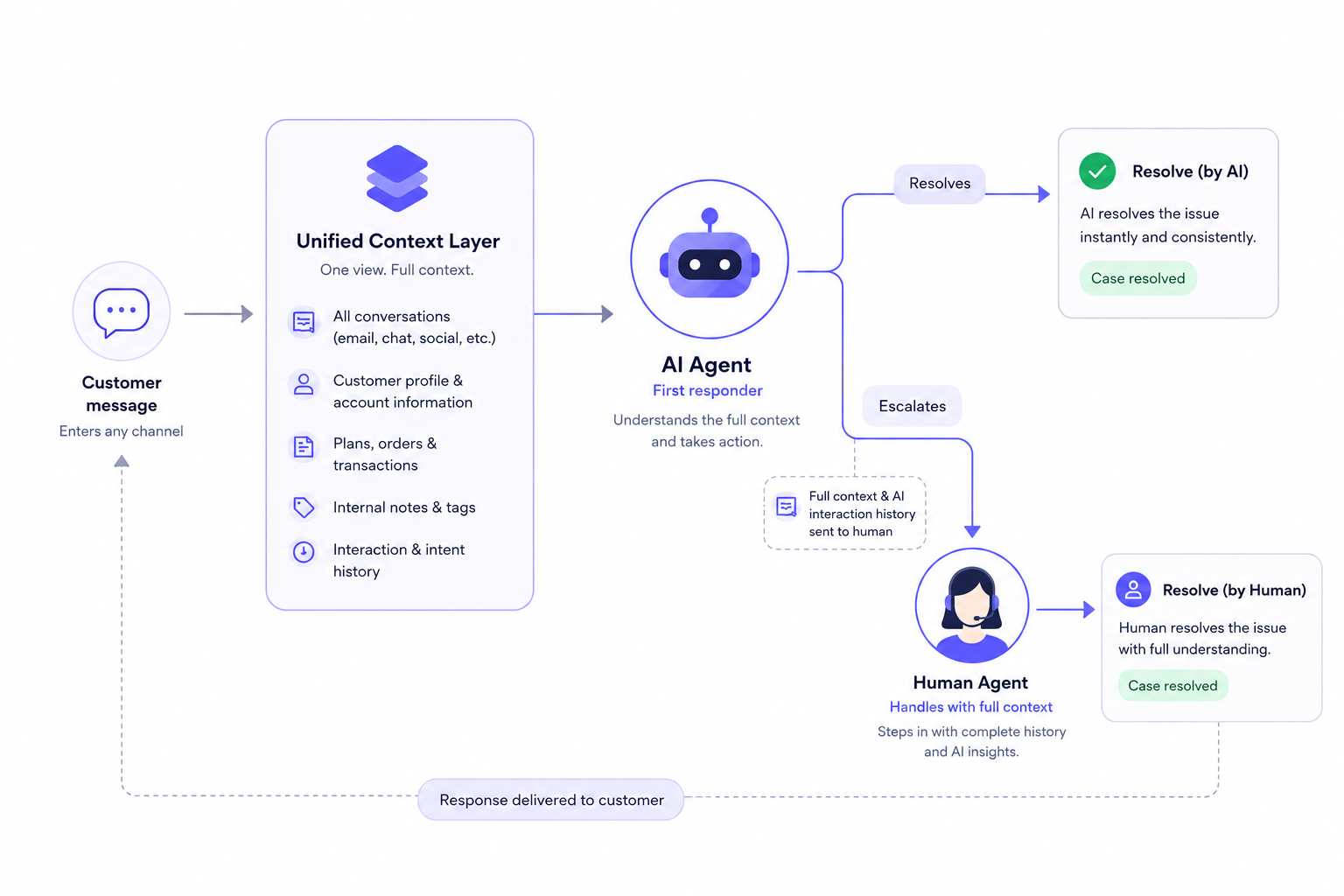
What is Unified customer view vs what it is not
The term gets conflated with adjacent concepts that sound similar but solve different jobs. The distinction matters, because buying the wrong category leaves the agent-context problem unsolved.
| What it's NOT | What it IS |
|---|---|
| A customer data platform (CDP) — built for marketers to segment audiences | An operational view built for the person responding to the customer right now |
| A CRM record — a static profile of contact fields and deal stages | A live feed of every interaction, updating as conversations happen |
| A 360-degree dashboard for analytics and reporting | Context surfaced at the point of reply, not in a separate reporting tool |
| Channel aggregation — all messages in one inbox, but still siloed per channel | One continuous customer history, regardless of which channel each message arrived on |
A CDP unifies data about customers for analysis. A unified customer view unifies context for the agent at the moment of work. They can share underlying data, but they serve different people doing different jobs.
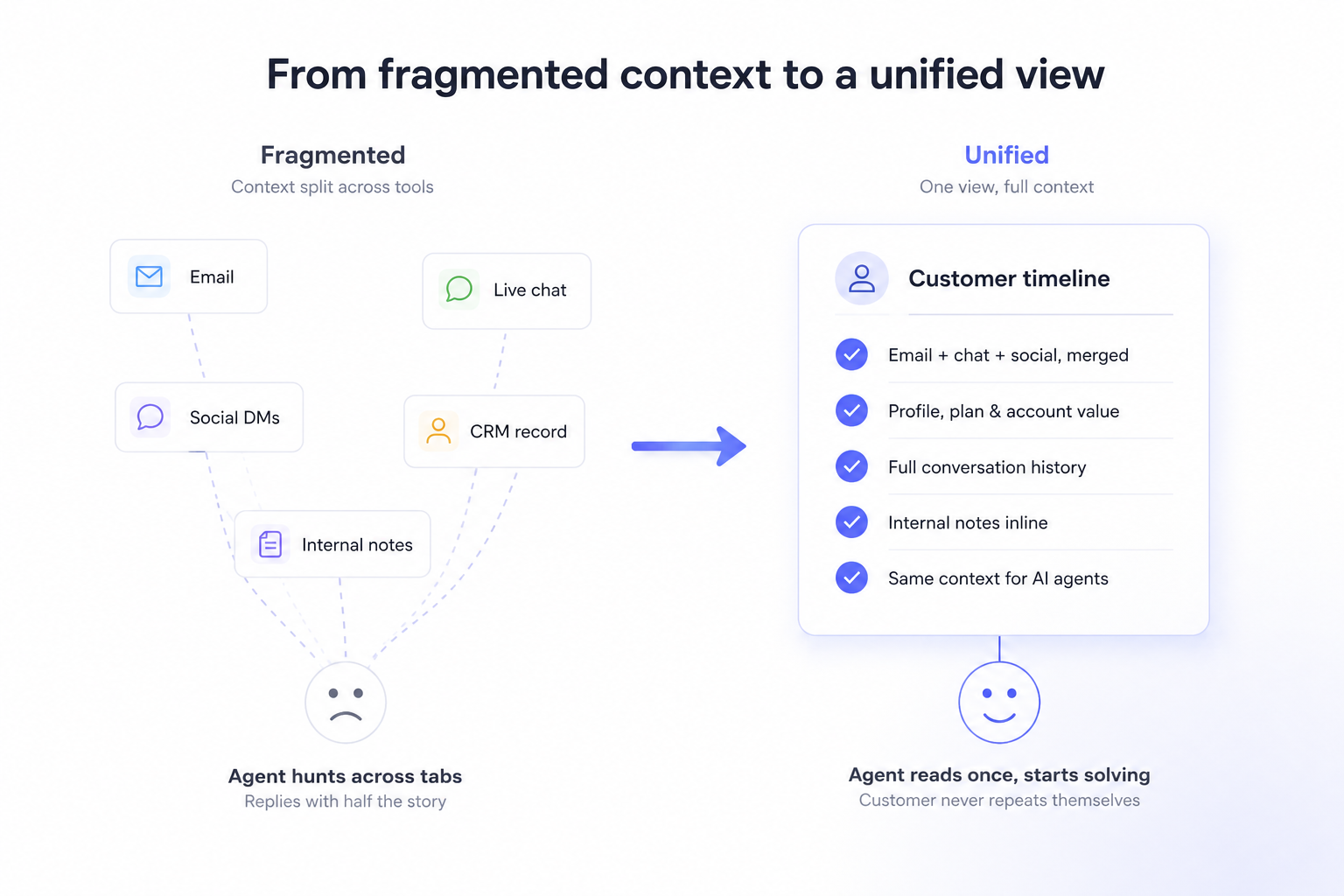
Who experiences fragmented context?
This becomes acute for any team handling customers across more than one channel, email plus chat, or chat plus social, or all of the above, where a single customer can appear in multiple places.
This problem shows up the moment AI is handling first-line replies across more than one channel, which for most teams now happens before headcount ever becomes the constraint.
The old version of this problem showed up around five to fifty agents, once no single person could hold every account in their head. In today's agentic era, it shows up earlier and scales faster, because an AI agent doesn't wait for a headcount threshold to start fragmenting context. It fragments it from message one, at whatever volume you give it, unless the view underneath it is already unified.
The team doing the remembering isn't human-plus-AI anymore. In the agentic default, AI is the first layer, and human agents are the escalation tier sitting on top of it.
If that first layer can't hand off what it knows, every escalation starts from zero, and it happens at machine speed and machine volume, not the occasional dropped ball a two-person team could absorb
Why fragmented context gets worse as you grow
The tipping point
With two agents and one channel, fragmented context is survivable. They sit near each other, they remember the big accounts, they ask across the room. Add a third channel and a fourth agent, and the informal memory breaks.
Now a customer who chatted on Monday emails on Wednesday, and whoever picks up the email, human or AI, has no thread back to the chat. Multiply that across hundreds of conversations a week and the gaps stop being occasional. They become the default state of every reply.
The compounding cost
The cost of fragmented context isn't abstract: it is one of the most direct routes to losing customer loyalty.
Gartner's research on customer effort found that 96% of customers who have a high-effort service interaction become more disloyal, compared with just 9% who have a low-effort experience.
The specific behaviours that define a high-effort experience are exactly what fragmented context produces: channel switching, repetition of information, generic service, and transfers.
Every time a customer is asked to repeat something the company already knew, whether the responder was a person or an AI agent, that interaction tips toward the 96%.
The internal cost compounds in parallel: when context is scattered across tools, agents spend their day toggling to reassemble it.
RingCentral's survey of 2,000 knowledge workers found that 69% waste up to an hour each day navigating between apps, adding up to 32 days a year per worker.
For a support agent, that hour isn't spent resolving tickets: it's spent hunting for context that should already have been on screen, and for an AI agent the equivalent cost shows up as bad escalations, token spend and wrong answers instead of wasted minutes.
The loyalty damage is also asymmetric. Gartner found that service interactions are nearly four times more likely to drive disloyalty than loyalty — so a support conversation is, by default, more of a retention risk than an opportunity. Fragmented context loads the dice toward the bad outcome.
The upside of closing the gap is just as measurable.
Gartner found that low-effort interactions cut repeat calls by up to 40%, escalations by 50%, and channel switching by 54% — and lower a company's cost to serve by 37% per interaction.
Removing the moments where an agent has to ask a customer to repeat themselves is not a soft quality win; it moves the operational numbers.
Self-audit to fragmented context
🧭 Self-audit
Is your customer context fragmented?
Check the boxes that are true for your team right now.
If more than one of these is familiar, the problem isn't your agents, human or AI. It's that the system is asking them to hold context it should be holding for them.
What solving this actually looks like
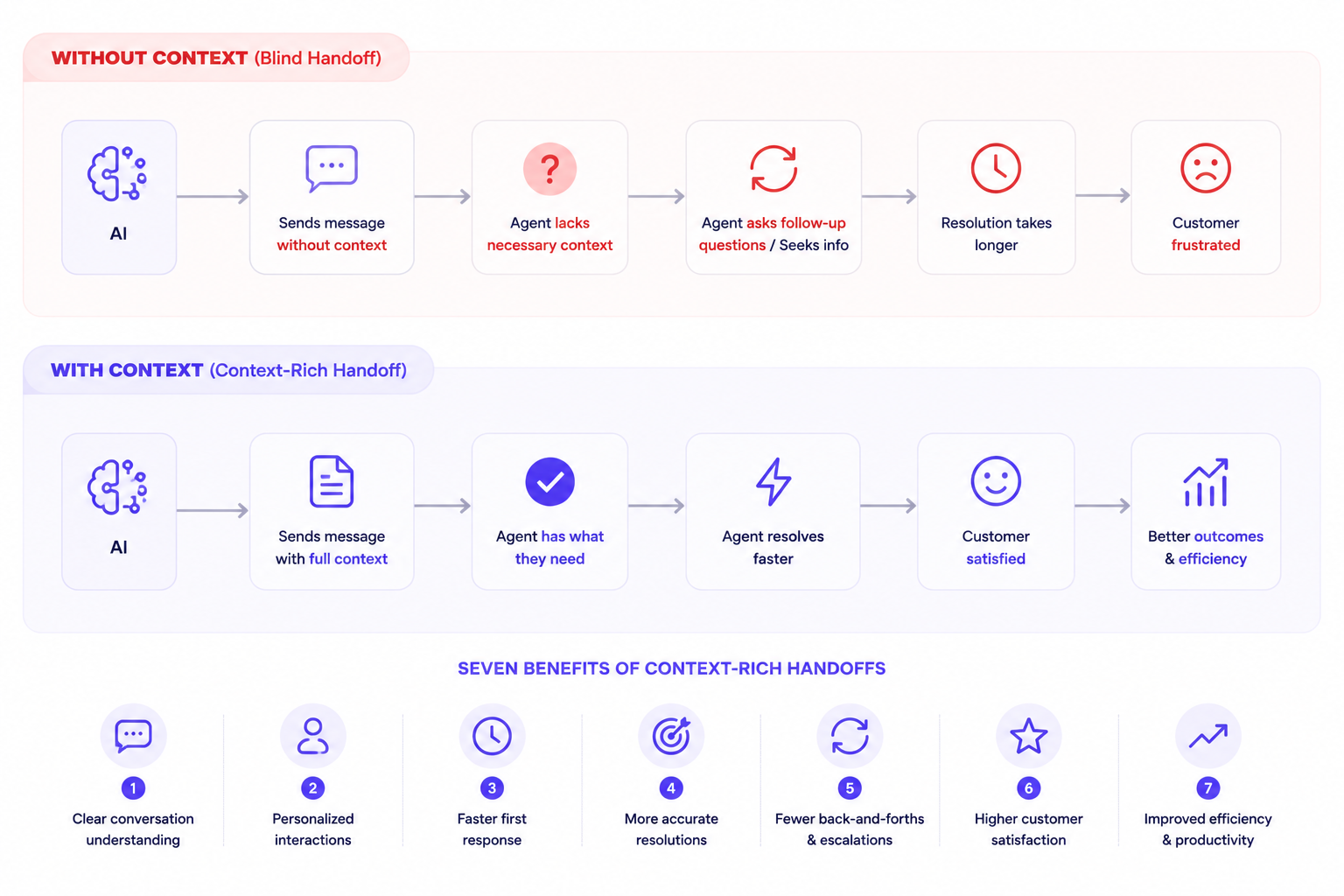
The solved state
When this job is handled, whoever opens a conversation finds the whole customer already there. Every past conversation, regardless of channel, reads as one continuous timeline. The profile, plan, lifetime value, language, company, recent activity, sits alongside it. A colleague's note from last week is visible inline, not buried in a separate chat tool. The agent reads for ten seconds and starts solving. The customer never gets asked to repeat themselves, because there is nothing the responder needs that isn't already on screen.
That same logic now extends to AI by default, not as an add-on. When an AI agent handles a conversation, it draws on that same unified context, which means it can resolve or escalate with the full picture rather than a fragment. An AI agent working from partial context produces the same disjointed, "please explain again" experience a blind human agent does. Working from a unified view, it can close the loop or hand off cleanly with everything the next responder, human or AI, needs.
What it requires
- All channels in one timeline. Email, chat, social, and messaging conversations for a single customer, merged into one continuous history rather than siloed per channel.
- Identity resolution. The system recognises that the person who chatted yesterday and emailed today is the same customer, and links the two automatically.
- Profile and account data inline. Plan, value, history, and custom attributes visible alongside the conversation — not in a separate tab.
- Shared internal context. Notes and prior internal discussion attached to the customer, visible to whoever picks up next.
- The same context available to AI. Whatever an automated agent sees should be the same unified view a human sees, so automation doesn't reintroduce the fragmentation you just removed.
What to look for when evaluating
- Does a single customer's history stay unified across every channel, or does each channel keep its own separate record?
- When a returning customer reaches out on a new channel, does the system link them automatically, or does an agent have to merge records by hand?
- Can an AI agent operating on the platform draw on the same full context a human agent sees?
This is the lens to evaluate any tool through. Crisp's Shared Inbox, for example, builds the unified timeline and the customer profile into the same screen the agent replies from, but the criteria above hold regardless of which platform you assess.
Data centralization: the backbone of the unified customer view
Everything this guide describes, the shared inbox, identity resolution, inline profiles, shared notes, depends on one underlying condition: a single source of truth.
Data centralization isn't one feature among several. It's the backbone that makes the rest of a unified customer view possible. Without it, you have several well-designed pieces sitting on top of the same old fragmentation.
For an AI agent handling a specific business, this matters more than it does for a human. A person can compensate for messy data by asking around or checking a second tab. An AI agent can't improvise that way. It responds based on what the data actually shows it, so the quality of that single source of truth becomes the ceiling on how well the AI can perform.
This is where the KPIs that define the agentic era actually get won or lost:
- Autonomous resolution rate — how much an AI agent can resolve without escalating. This climbs when the agent has the complete history to work from, not a fragment.
- First contact resolution — solving it on the first reply, not the third. Centralized data means the AI isn't missing the piece of context that would've made the first answer the right one.
- Escalation accuracy — when an AI agent does hand off to a human, a single source of truth means the handoff carries everything the AI already tried, so the human isn't starting over.
- Response accuracy — fewer wrong or generic answers, because the agent is working from the full picture instead of guessing around gaps.
- Human Time to resolution — every KPI above compounds into this one. Centralized data removes the lookup time and the back-and-forth that fragmented data forces into every conversation.
None of these move because you added more AI. They move because the AI is finally working from one source of truth instead of five partial ones.
How to build a unified customer view: step by step
Step 1: Consolidate every channel into one inbox
- What to do: Bring email, live chat, social messaging, and any other customer channel into a single inbox, so every incoming message lands in one place rather than in separate tools per channel.
How to do this in Crisp: https://help.crisp.chat/en/article/getting-started-with-crisp-for-customer-support-1ts8txn/#4-connect-email-and-social-channels
- Why this step matters for this job: As long as channels live in separate tools, no agent can have a unified view — the context is physically split across systems. Consolidation is the precondition for everything else.
- Watch out for: Connecting channels but leaving them visually siloed. Aggregation isn't unification — the channels need to merge into one customer timeline, not sit in separate folders.
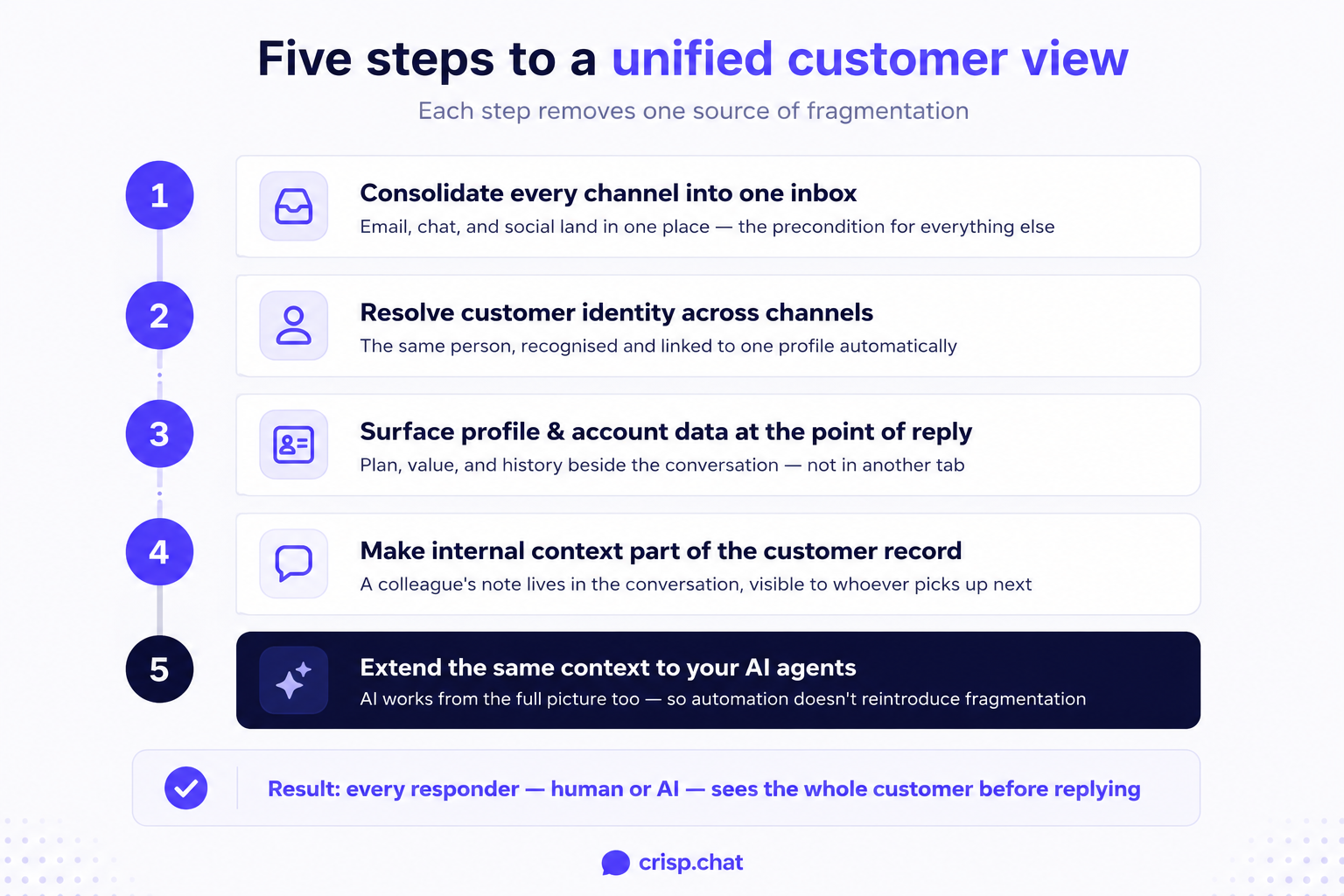
Step 2: Resolve customer identity across channels
- What to do: Make sure the system can recognise the same customer across different channels and contact points, and link those interactions to one profile automatically.
How to do this in Crisp: https://help.crisp.chat/en/article/how-to-automatically-set-users-email-addresses-udcs19/
- Why this step matters for this job: Without identity resolution, the same customer appears as three different people, and the unified view fragments again. This is what prevents the "we have no record of that" reply.
- Watch out for: Relying solely on email-address matching. Customers use different addresses and channels; identity resolution needs more than one signal to be reliable.
Step 3: Surface profile and account data at the point of reply
- What to do: Put the customer's profile — plan, value, company, language, custom attributes — directly alongside the conversation the agent is responding to.
How to do this with Crisp: https://help.crisp.chat/en/article/how-to-automatically-push-custom-data-from-the-chatbox-with-the-crisp-js-sdk-1xh7pqk/
- Why this step matters for this job: Knowing who you're talking to changes how you respond. An enterprise account and a free-trial user with the same question need different handling, and the agent should see that without leaving the reply screen.
- Watch out for: Overloading the screen. The goal is the relevant context surfaced, not every data point dumped on one panel. Surface what changes the reply; keep the rest one click away.
Step 4: Make internal context part of the customer record
- What to do: Attach internal notes and prior team discussion to the customer, visible inline to whoever handles the conversation next.
- Why this step matters for this job: Much of the most useful context isn't in the customer's messages — it's what a colleague learned last time. If that lives in a separate chat tool or someone's memory, it's lost to the next agent.
- Watch out for: Letting internal discussion happen outside the conversation. The moment context leaves the customer record, the view stops being unified.
Step 5: Extend the same context to your AI agents
- What to do: Make sure any AI agent or automation operating on your support has access to the same unified view your human agents do — the full history, profile, and notes.
- Why this step matters for this job: AI working from partial context recreates the exact problem you set out to solve. An AI agent that can't see the prior conversation will ask the customer to repeat themselves just as a blind human agent would.
- Watch out for: Treating AI as a bolt-on that sees only the current message. If your automation layer can't read the unified view, it will quietly reintroduce the fragmentation everywhere it touches.
Common mistakes that keep this job unsolved
- Mistaking channel aggregation for a unified view. Teams connect all their channels to one inbox, see every message in one list, and assume the job is done. But if each channel still keeps its own separate record of the customer, the agent replying to an email still can't see yesterday's chat. Aggregation puts the messages in one room; unification gives them one shared memory.
- Building the view for reporting instead of for replying. It's tempting to solve customer context by building a 360-degree dashboard, a polished analytics view for managers. But the responder doesn't need a dashboard in a separate tool. They need the context in the reply window, in the two seconds before they respond, whether that responder is typing the reply or generating it.
- Leaving AI out of the unified view. Teams invest in unifying context for human agents, then deploy an AI agent that only sees the current message. The automation now produces the disjointed, amnesiac experience the humans no longer do, and because AI handles volume, it scales that bad experience faster than a human ever could.
Unified customer view with Crisp
The agentic AI era doesn't wait for your stack to catch up. Customers already expect one continuous conversation, whether a human agent answers or an AI agent does, and every gap in context is a gap they feel immediately. Here's what that looks like built, feature by feature, with the outcome each one is built for.
Shared Inbox. Every channel, email, chat, social, and messaging, converges into one stream. The outcome: no agent, and no AI agent, ever starts a reply with half the conversation missing.
Contact profile and identity resolution. Crisp recognizes the same customer across channels and links their history automatically. The outcome: a customer never gets treated like a stranger just because they switched from chat to email.
Inline CRM data. Plan, value, language, and account details sit next to the conversation itself. The outcome: an agent, or an AI agent drafting a suggested reply, knows exactly who they're talking to before they type a word.
Internal notes. Context a teammate left last week lives inside the conversation, not in a separate tool. The outcome: whoever picks up next, human or AI, inherits the full story instead of starting cold.
Hugo AI. Crisp's AI agent operates on this same unified view, not a stripped-down version of it. The outcome: automated responses and escalations carry the complete picture, so AI scales your team's judgment instead of scaling repeated questions.
Put together, this is what a unified customer view actually requires: every channel, every identity, every profile detail, every internal note, and every AI agent, working off the same single screen. That's the standard the agentic AI era is setting, and it's the standard Crisp is built to meet.
Frequently asked questions
Are companies piloting AI in customer service right now?
Yes. 85% of service leaders said they planned to pilot or explore conversational generative AI solutions during 2025, per Gartner.
Does generative AI actually make agents faster?
Yes. Organizations using generative AI assistants saw issue resolution per hour rise by 14%, with handling time dropping, McKinsey found.
What happens when an AI agent lacks shared context?
It reproduces the human fragmentation problem at far higher volume, asking customers to re-explain themselves over and over again automatically.
Do customers actually want AI handling support?
It's mixed. 64% of surveyed customers said they'd prefer companies not use AI for service at all, per Gartner.
What does identity resolution mean in this context?
It means recognizing a customer who chatted yesterday and emailed today as one person, automatically, without an agent merging records.
Can AI agents see the same shared context as human agents?
They should. If an AI agent only sees the current message, it recreates the same fragmented, "please repeat that" experience.
What's the most common mistake when building a unified view?
Confusing channel aggregation, all messages in one inbox, with true unification, where each channel still keeps a separate record.
Sources
Gartner, "Gartner Predicts Agentic AI Will Autonomously Resolve 80% of Common Customer Service Issues Without Human Intervention by 2029," https://www.gartner.com/en/newsroom/press-releases/2025-03-05-gartner-predicts-agentic-ai-will-autonomously-resolve-80-percent-of-common-customer-service-issues-without-human-intervention-by-20290
Gartner, "Gartner Survey Reveals 85% of Customer Service Leaders Will Explore or Pilot Customer-Facing Conversational GenAI in 2025," https://www.gartner.com/en/newsroom/press-releases/2024-12-09-gartner-survey-reveals-85-percent-of-customer-service-leaders-will-explore-or-pilot-customer-facing-conversational-genai-in-2025
Call Centre Helper, "AI Is Supporting, Not Replacing, Customer Service Roles," https://www.callcentrehelper.com/gartner-survey-ai-customer-service-269041.htm
Veribl, "Gartner Says Agentic AI Will Resolve 80% of Customer Service Issues by 2029. The Reality Is Far More Complicated," https://www.veribl.com/blog/gartner-agentic-ai-customer-service-2026
Citrusbug, "AI Agents Statistics 2025: Adoption, Market Growth and More," https://citrusbug.com/blog/ai-agents-statistics/
Datagrid, "26 AI Agent Statistics (Adoption Trends and Business Impact)," https://datagrid.com/blog/ai-agent-statistics
Plivo, "AI Agent Statistics for 2025: Adoption, ROI, Performance & More," https://www.plivo.com/blog/ai-agents-top-statistics/
Tech Monitor, "Gartner Predicts Shift in Customer Service With Agentic AI by 2029," https://www.techmonitor.ai/ai-and-automation/gartner-80-percent-agentic-ai-2029/
📚 Related articles
Customer journey tracking in support: how to see the full picture before you reply · Single customer view: how to unify scattered data into one support-ready record

September 2026 - Product Update
Discover the new Knowledge Base editor, benchmark your AI support performance, track how often Hugo escalates conversations, and more. Discover the latest features and improvements released by the Crisp team in September 2026.


Summer 2026 - Product Update
Meet the refreshed Crisp experience, Understand how Artificial Intelligence handles every conversation, Build reusable teams across your workspace, and more. Discover the latest features and improvements released by the Crisp team in Summer 2026.

Best 9 helpdesk software and ticketing systems for 2026
Need help to choose your next helpdesk with a ticketing tool for 2026? We've gathered a guide that gives you everything you need to convince your C-levels.