How to stop losing leads who visit your website
Most website visitors with a question leave without asking it. Proactive chat experience starts the conversation first, on the right page at the right moment, so your AI agent answers and your team steps in only when it matters.


A visitor lands on your pricing page, scrolls twice, hesitates on a line item, and closes the tab. They had a question but they never asked it, because nothing on the page invited them to. That is not a missed message in your inbox. It is a request that never got made, and it is the hardest kind of missed request to notice, because there is no ticket, no unanswered thread, and nothing showing up in your metrics.
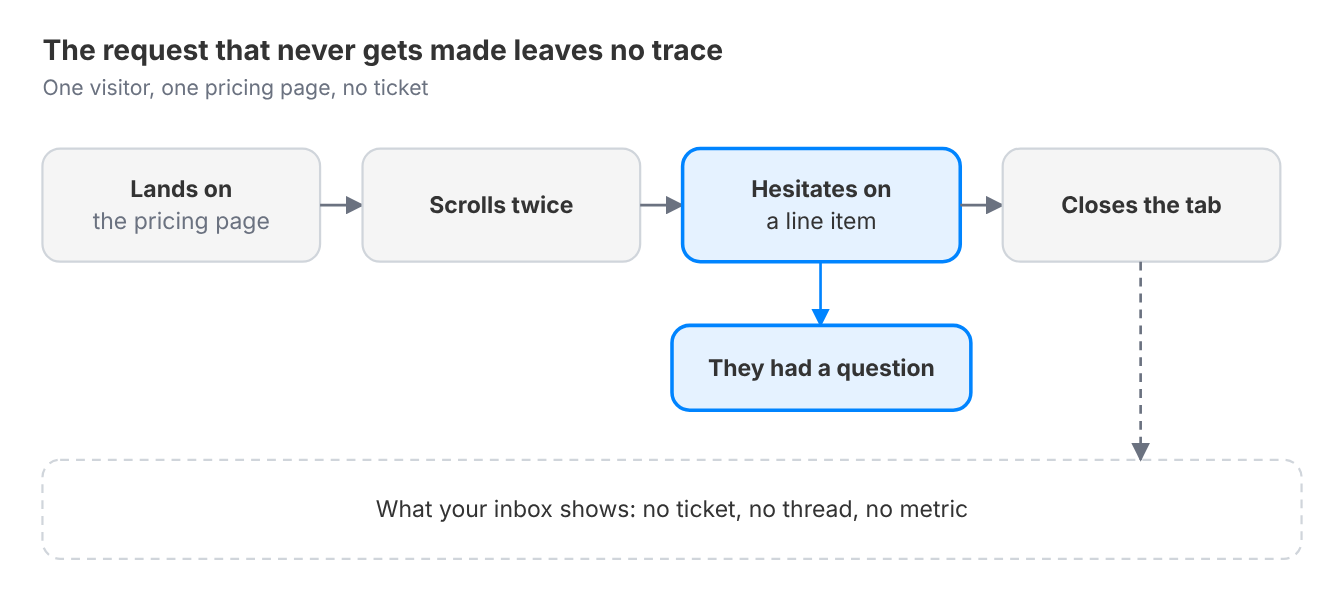
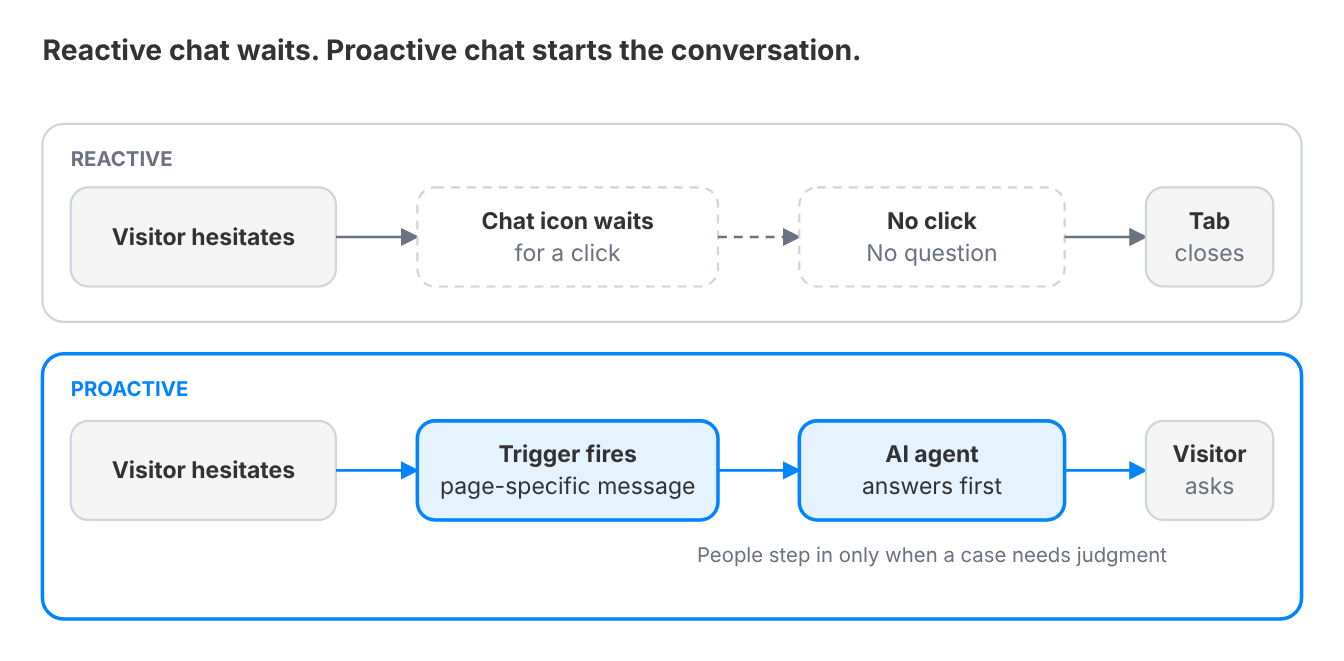
Most support setups are reactive by design: a chat icon sits in the corner and waits for someone to click it first. That is a reasonable default for visitors who already know what they want. It does nothing for the much larger group who are hesitating, confused, or one small nudge away from asking a question they would otherwise swallow. It also wastes the strongest asset a modern support stack has.
By the end of this guide, you will know:
- The 4 warning signs that your website is losing leads who never ask
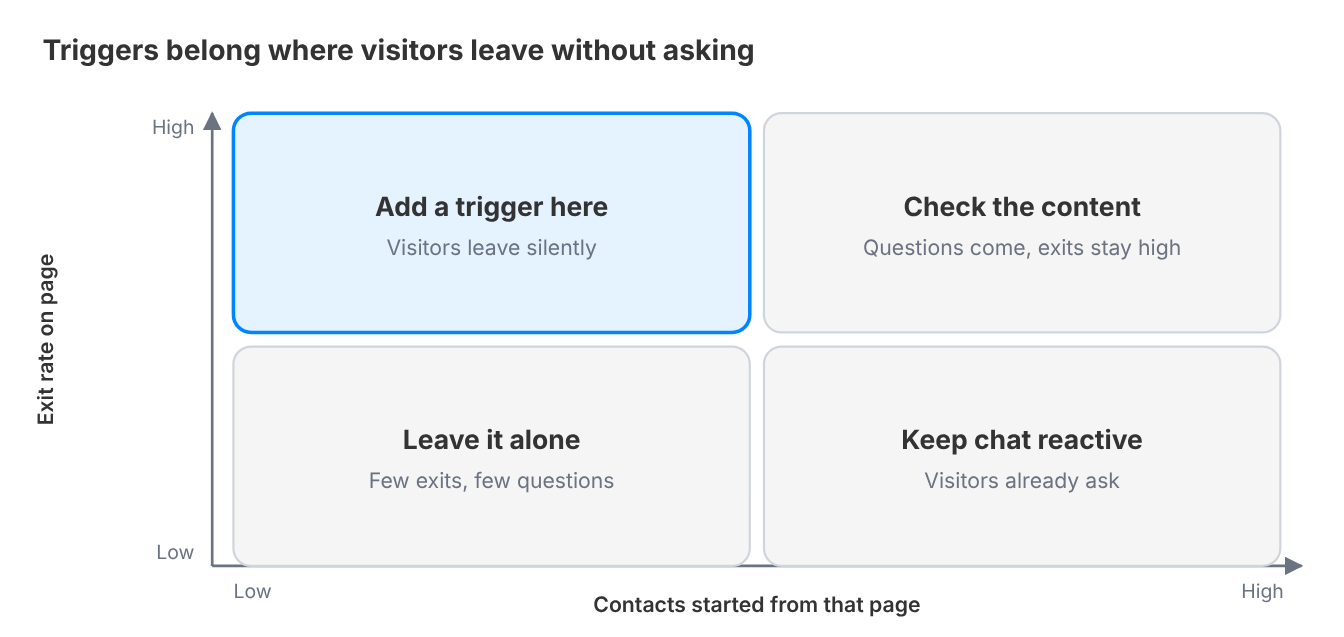
- Which pages deserve a chat trigger, picked from exit and contact data, not gut feeling
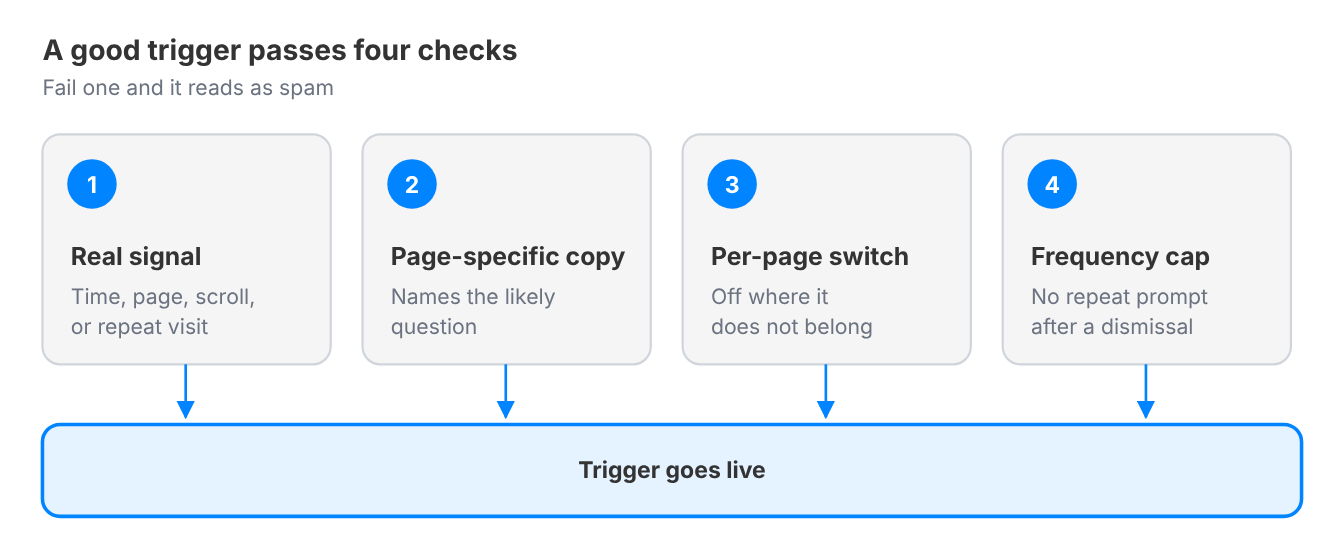
- The 4 checks that keep a proactive message helpful instead of spammy
- How to write, time, and cap a proactive chat message in four steps
- How to measure the impact on lead generation and website bounce rate
What is proactive chat support?
Proactive live chat is a pattern where the chat widget software starts the conversation based on visitor behavior, page context, or timing, instead of waiting for the visitor to click first on the chat window.
The trigger might be time spent on a page, a specific page visited, scroll depth, or a repeat visit, and the message is timed to intercept hesitation before the visitor decides to leave.
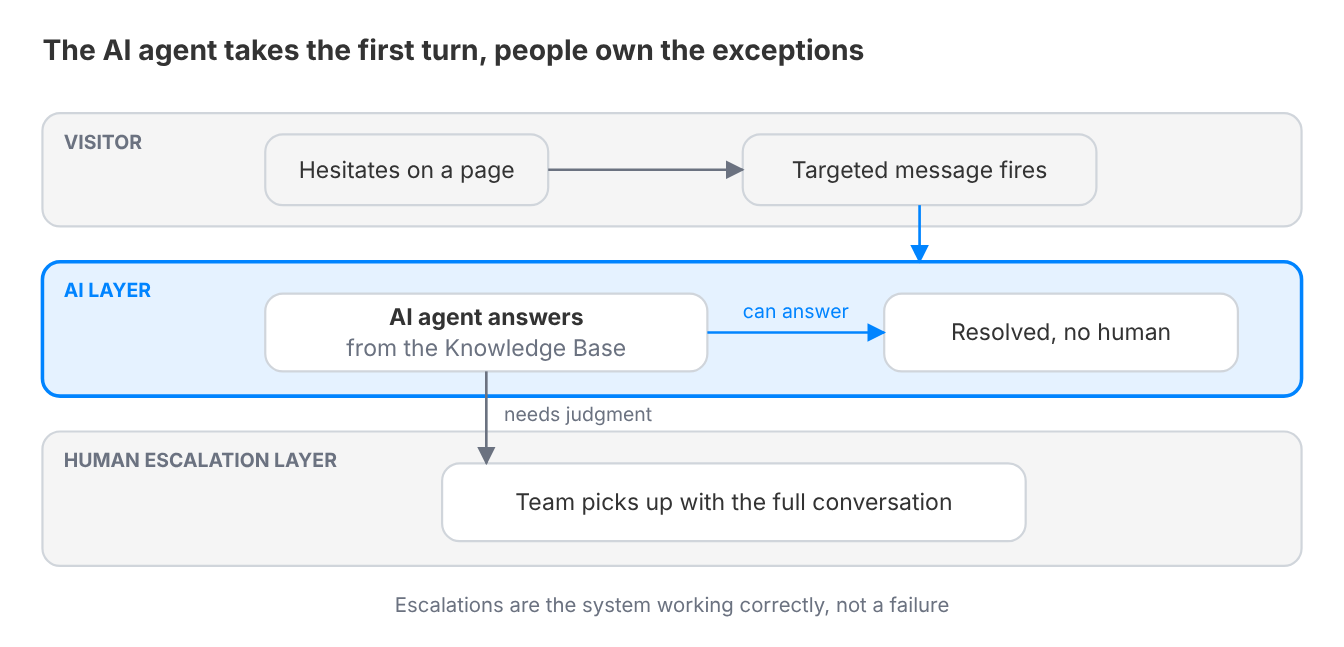
Once the visitor replies, the conversation is handled like any other: the AI agent answers what it can, and people take what needs judgment.
This is often confused with a few things it isn't:
Often confused with | What it actually is |
|---|---|
Pop-up promotions | A promo pop-up pushes an offer. Proactive chat opens a support conversation about the page the visitor is on |
Exit-intent overlays | An overlay interrupts on the way out. A proactive trigger fires on hesitation, before the visitor has decided to leave |
A greeting on every page | A blanket greeting fires on a timer. A proactive trigger fires on a specific behavior, with copy written for that page |
Reactive live chat | Reactive chat waits for a click. Proactive chat starts the conversation, then hands it to the same AI agent and team |
This becomes relevant for any site where visitors regularly leave at a specific, identifiable point: a pricing page, a signup form, a documentation page with a high bounce rate.
If your analytics show visitors dropping off in a predictable spot without contacting you first, that drop-off point is exactly where a proactive trigger earns its place.
The silent moment before a visitor closes the tab is where the experience is actually decided.
Why this gets worse as you grow
The tipping point is not traffic volume, it is page complexity. A single-page site with one clear call to action rarely needs this: visitors either convert or leave, and there is little ambiguity to intercept. Once your site grows to include pricing tiers, comparison pages, technical documentation, or multiple products, the number of places a visitor can get stuck without asking for help multiplies, and reactive chat alone starts missing most of them.
The compounding cost is that this failure is invisible by design: Forrester has reported that 55% of US online adults are likely to abandon an online purchase if they cannot find a quick answer to their question, which means your support metrics can look calm even as real demand walks out the door.
How to assess if you're missing leads from your website trafic:
- Your Web analytic shows a specific page or step with a consistently high exit rate, but your support inbox shows almost no contacts originating from that page
- You have had to explain the same objection or confusion repeatedly in sales or onboarding calls, something visitors would have asked about directly if prompted
- Your only chat trigger is the visitor clicking the widget icon themselves, with no behavior-based messages configured anywhere on the site
- A/B tests on a page's copy or layout have not moved the exit rate, suggesting the problem is not the content but the absence of a way to ask a question in the moment
What solving this actually looks like
The solved state looks like this: a visitor lingers on a pricing page a few seconds past the point most people move on, and a short, specific message appears, offering to answer a question about that exact page, not a generic "Hi, how can I help?"
The AI agent takes the first turn, answers from your dataset, and escalates to the right team when it cannot.
The visitor who would have left silently now has an easy, low-pressure way to ask what is actually on their mind.
Getting there requires a few things to be true regardless of which tool delivers it. McKinsey found that more than half of customers engage with three to five channels during each journey, so the page itself is often the last touchpoint a hesitant visitor has before deciding whether to reach out at all.
- Triggers scoped to real signals, not arbitrary timers. A message that fires after 5 seconds on every page regardless of content is closer to spam than to help. Triggers should map to a specific behavior that indicates hesitation: time on a high-exit page, repeat visits without conversion, scroll depth on a long page, visitors from a specific origin.
- Message content specific to the page, not generic. "Questions about pricing?" on the pricing page outperforms "Hi there! How can we help?" on every page, because it demonstrates the message is actually responsive to context.
- A clear way to turn it off per page or segment. Not every page benefits from a proactive nudge. A legal or privacy policy page rarely does, and a widget that cannot be scoped down will eventually annoy visitors who came for a document, not a conversation.
- Frequency control across sessions. A returning visitor who dismissed the message yesterday should not see the identical prompt fire again today.
When evaluating any option against this job, ask:
- Can triggers be scoped to specific pages, behaviors, or visitor segments, or is it one rule for the whole site?
- Can message copy be customized per trigger, or does everyone see the same generic greeting?
- Is there a frequency cap so the same visitor is not re-prompted every session?
- How is proactive chat's effect actually measured, and is there a way to compare pages with and without a trigger?
Crisp's targeted chat messages build proactive engagement around page-level and behavior-level triggers, so the message and its timing match the specific page a visitor is on.
The conversation that starts from a trigger lands in the same queue as every other channel, where Hugo answers first and escalates exceptions to your team with the full conversation attached.
How to build a proactive chat program: step by step
Four steps take you from a guess about where visitors get stuck to a trigger you can measure.
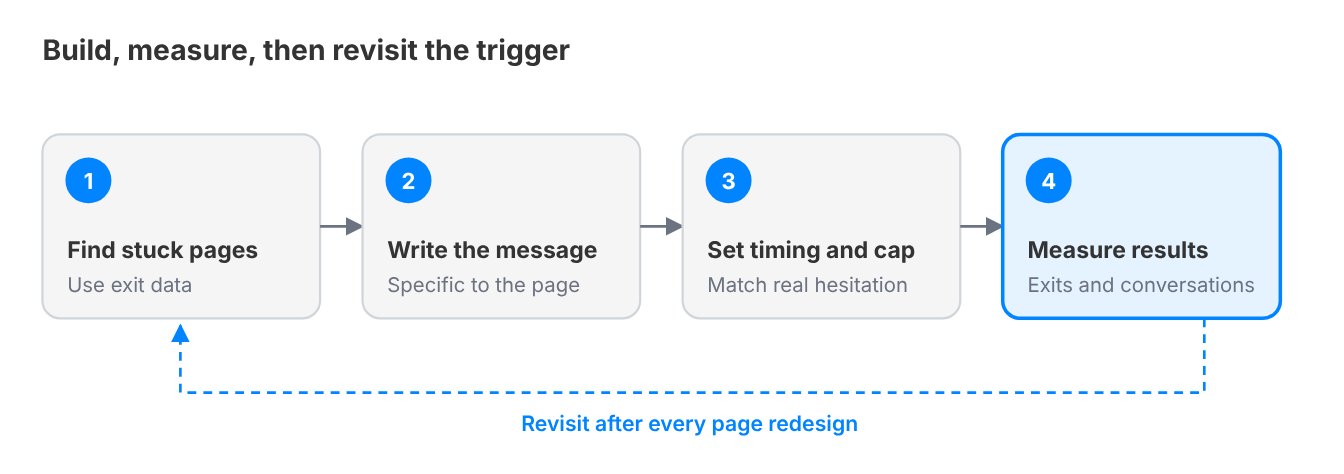
Step 1: Find where visitors actually get stuck
What to do: Pull your analytics for pages with high exit rates relative to their traffic and stage in the funnel: pricing, comparison pages, signup forms, technical docs. Cross-reference against where your support or sales team already fields repeat questions manually.
Why this step matters for this job: Triggers built on a guess about visitor confusion, rather than actual exit data, tend to fire in the wrong places and annoy visitors who did not need help.
How to do it in Crisp: Pair your analytics tool with Crisp's Chat widget software trigger rules, which can target by URL path, so the pages you have identified become the exact pages a trigger fires on.
Watch out for: Picking pages by instinct instead of data. A page that feels confusing to your team is not necessarily where real visitors get stuck, so check the numbers first.
Step 2: Write a message specific to that page's hesitation
What to do: Draft a short, specific message tied to the likely question at that exact point, not a generic greeting. For a pricing page, name the likely hesitation directly: a plan comparison question, a usage-based pricing concern.
Why this step matters for this job: A generic "Need help?" message performs like a wallpaper element visitors learn to ignore. A message that names the specific hesitation reads as genuinely useful, which is what gets it clicked.
How to do it in Crisp: Targeted messages support per-page copy, so the pricing page trigger and the docs page trigger can read completely differently.
Watch out for: Writing the message from a sales angle instead of a support angle. "Book a demo" reads as a pitch. "Questions about which plan fits your team size?" reads as help.
Step 3: Set the timing and frequency so it reads as attentive, not aggressive
What to do: Configure the trigger to fire after a delay that matches genuine hesitation for that page, a few seconds for a short page and longer for a page with more to read, and cap how often the same visitor sees it.
Why this step matters for this job: A message that fires the instant the page loads reads as an ambush. One that never fires again for a returning visitor who already dismissed it once reads as considerate rather than repetitive.
How to do it in Crisp: Trigger timing and per-visitor frequency caps are both configurable in Crisp's targeted message rules, so the same visitor is not re-prompted on every return visit.
Watch out for: Copying a competitor's timing settings wholesale. The right delay depends on your page's actual content and length, not a generic best practice number.
Step 4: Measure whether the trigger changes the outcome
What to do: Compare the exit rate and contact rate on the triggered page before and after launch, or run it against a control group of visitors who do not see the trigger. Then look at how many of the conversations it starts your AI agent resolves without a person.
Why this step matters for this job: A trigger that fires correctly but does not move the exit rate or generate real conversations is not solving this job, it is just adding motion to the page.
How to do it in Crisp: Crisp's conversation data shows which triggers generated replies, so you can compare a page's engagement before and after a proactive rule goes live.
Watch out for: Declaring success based on impressions or open rate alone. The metric that matters is whether visitors who would have left silently are now asking real questions.
Examples of chat triggers you can set
Each trigger below pairs a real signal of hesitation with a message written for that exact moment. Start with the one that matches your highest-exit page.
- Inactive visitor on the checkout page. Signal: time on the page with no activity. Message: "Stuck on payment? I can help with billing or payment methods."
- Failed payment. Signal: a payment error event. Message: "Your payment did not go through. Here are the other ways to pay, or ask me directly."
- Failed login. Signal: a failed sign-in event. Message: "Having trouble signing in? I can help you get back into your account."
- 404 page. Signal: a visit to a page that no longer exists. Message: "This page has moved or no longer exists. Tell me what you were looking for."
- Exit intent on the pricing page. Signal: the cursor heads for the close button. Message: "Not sure which plan fits your team? Ask before you go."
- Visitor browsing in another language. Signal: browser language or a localized URL. Message: a greeting in their language that confirms you offer support in it.
Need more? Browse 25 live chat trigger ideas, organized by signal, from URL parameters to combined rules.
Common mistakes that keep this job unsolved
Firing the same message on every page. A single generic trigger applied site-wide misses the entire point of proactive engagement, which is relevance to a specific moment of hesitation. It also trains visitors to dismiss the widget reflexively.
Treating every proactive message as a sales opportunity. A trigger that immediately pushes a demo booking or a discount code reads as an ambush, not help. The support-first framing is what makes visitors willing to engage in the first place.
Never revisiting trigger performance after launch. Teams often set up triggers once and never check whether they are still hitting the right pages as the site evolves. A trigger tuned for last year's pricing page layout can misfire badly once that page has been redesigned.
How this connects to never missing a customer request
A visitor who leaves without asking their question is a missed request just as much as an unanswered email. It is simply invisible in a way that makes it easy to ignore. Proactive triggers turn silent hesitation into an actual, trackable conversation, which is what makes this lever count toward the same goal as centralizing channels or automatic assignment. See the complete guide to never missing a customer request for how this fits with the other three levers.
Ready to stop losing visitors who never ask?
Crisp's Live Chat lets you trigger targeted messages by page, behavior, and timing, so visitors get a relevant nudge instead of a generic pop-up or silence. Hugo answers first, and your team picks up what needs a person.
Frequently Asked Questions
When should you use proactive chat triggers?
Use them where visitors leave at a predictable point without contacting you, such as a pricing page, a signup form, or a documentation page with a high exit rate. If your analytics show drop-off there but your inbox shows almost no contacts from that page, a trigger earns its place. A one-page site rarely needs one.
How is proactive live chat different from a pop-up?
A pop-up pushes an offer. Proactive chat opens a support conversation tied to the page and the behavior that triggered it. The message names the likely question, such as plan comparison on a pricing page. The goal is help, not a pitch, which is why it reads as attentive instead of aggressive.
How long should a proactive chat trigger wait before it fires?
Long enough to match real hesitation on that page: a few seconds for a short page, longer where there is more to read, since instant messages feel like ambushes. Set the delay from your own exit data rather than copying someone else's number, and cap how often the same visitor sees the message.
How do you measure whether proactive chat is working?
Compare exit rate and contact rate on the triggered page before and after launch, or against a control group that never sees the trigger. Impressions alone prove nothing. The test is whether visitors who would have left silently are now asking real questions, and how many of those conversations the AI agent resolves without a person.
Do proactive chat messages annoy visitors?
They do when they fire on every page, repeat every session, or sell instead of help. They work when each trigger is tied to a real signal of hesitation, written for that page, switched off where it does not belong, and capped so a visitor who dismissed it yesterday does not see it again today.
Sources
Crisp, The State of AI Customer Support 2026, https://crisp.chat/en/reports/state-of-ai-support/
Forrester, Consumer Expectations For Customer Service Don't Match What Companies Deliver, https://go.forrester.com/blogs/consumer-expectations-for-customer-service-dont-match-what-companies-deliver/
McKinsey & Company, Redefine the omnichannel approach: Focus on what truly matters, https://www.mckinsey.com/~/media/McKinsey/Business%20Functions/Operations/Our%20Insights/Redefine%20the%20omnichannel%20approach/Redefine-the-omnichannel-approach-Focus-on-what-truly-matters.pdf

The Real Cost of Managing Customer Emails With CC and Reply-All (With Data)
CC and reply-all feel free. They cost duplicate replies, lost ownership and hours of inbox triage. Here is what that adds up to for a support team, and what replaces it once AI takes the first reply.

Omnichannel customer support: how to never miss a customer request
Customer requests rarely get ignored on purpose. They slip between channels, sit unassigned or close without a fix. Here is how to centralize every channel, route automatically and track each request to resolution, with AI answering first.

Reduce Repetitive Support Tickets With a Self-Service Knowledge Base
A knowledge base only cuts tickets if customers find the answer before they write. Here is how to build one that does: answer-first articles, search that matches real phrasing, multilingual coverage and upkeep driven by data.