Automated ticket resolution: What It Is and how to measure success
Want to kick 2026 the right way for your support experience? Get familiar with automated ticket resolution and experience what it means for your business.


Support teams aren’t drowning because they’re bad at their job.
Support experience is breaking because teams are forced to operate in systems designed for a world that no longer exists.
People buy software faster, expect answers instantly, and contact brands through five channels at once. Yet most support operations still rely on workflows built a decade ago: queues, macros, and ticket triage that assumes every request deserves a human.
Automated ticket resolution fixes that thanks to artificial intelligence.
This shift is why modern support teams see automation not as a shortcut, but as a structural upgrade. It restores clarity and control. And it lets support operate at the same pace as product and growth, something traditional ticketing systems never managed to do.
What is automated ticket resolution and why it matters for scaling support
Beyond the hype: a simple definition for busy support leads
Most explanations of automated ticket resolution sound like feature lists written by vendors who never sat in a support inbox. “AI classifies tickets,” “AI drafts responses,” “AI saves time.”
True, but irrelevant.
The real definition is simpler:
Automated ticket resolution is the moment your support operation stops treating every support message as equal.
Some questions require product expertise, emotional intelligence, or access to internal systems. Some others, don't.
Support teams know this instinctively. Every company across all industries face the same problem: agents spend their day firefighting noise instead of solving problems. Refund policies repeated 20 times a day. Password resets that break concentration. Order updates that interrupt deeper work.
These aren’t “support tickets”: they’re interference.
Automation turns those low-context, low-stakes interactions into self-contained loops. AI handles them, not because it’s smart, but because humans shouldn’t have to.
I'll even go one step further and urge you to move to what I call "smart automated ticket resolution", because you can have an automated ticket resolution process that's pretty dumb.
Crucially, automation isn’t a bot pretending to be a person. It’s an operational workflow choice: Crafting the right workflows to differentiate between what deserves human judgment and what doesn’t.
And when the AI does answer, it doesn’t conjure generic replies. It draws from your past conversations, your website, your help articles, everything your team already created. In conversations with e-commerce owners, Romain, the head of sales at Crisp, tend to repeat the same line:
“Your past messages are one of the main data sources. That’s how AI gets your tone and accuracy right.”
but it's not entirely true,
Truth is, you gotta combine it with custom prompting to make the dream truely work.
That’s the real innovation. Not only artificial intelligence, but a combination of companies' knowledge and artificial intelligence, applied at scale.
Scaling customer support is impossible without smart automated ticket resolution
Scaling support isn’t hard because volume grows. Scaling is hard because volume grows incoherently. It never arrives in the shape your team is sized for. It comes in spikes, across channels you didn’t plan for, with expectations your workflows weren’t built to absorb.
Support doesn’t collapse because the team is too small. It collapses because humans are forced to respond linearly to problems that scale exponentially.
And that’s the point every support lead keeps repeating:
- “We don’t want to expand the team by 30% just to survive peak weeks.”
- “We have night shifts only because customers expect answers immediately.”
- “We can’t let support dictate headcount decisions anymore.”
The real issue isn’t capacity: it’s misallocation of capacity.
Without smart ticket automation, your most expensive people end up doing the least valuable work.
Automation doesn’t fix this by speeding things up. It fixes it by restructuring the work itself.
Once repetitive requests get dissolved before they reach your agents, scaling becomes a different equation. Suddenly you’re hiring for expertise, not an average number of conversation per day. Your backlog becomes predictable instead of chaotic and your team can absorb growth without burning out nor additional headcounts.
The uncomfortable truth? Most companies aren’t “understaffed”, they’re overexposed and not prepared to able to kill the noise.
Automation is how you filter that noise so your support team finally works at the same strategic altitude as your product and growth teams. Without it, scaling feels impossible because the system itself is mis-designed.
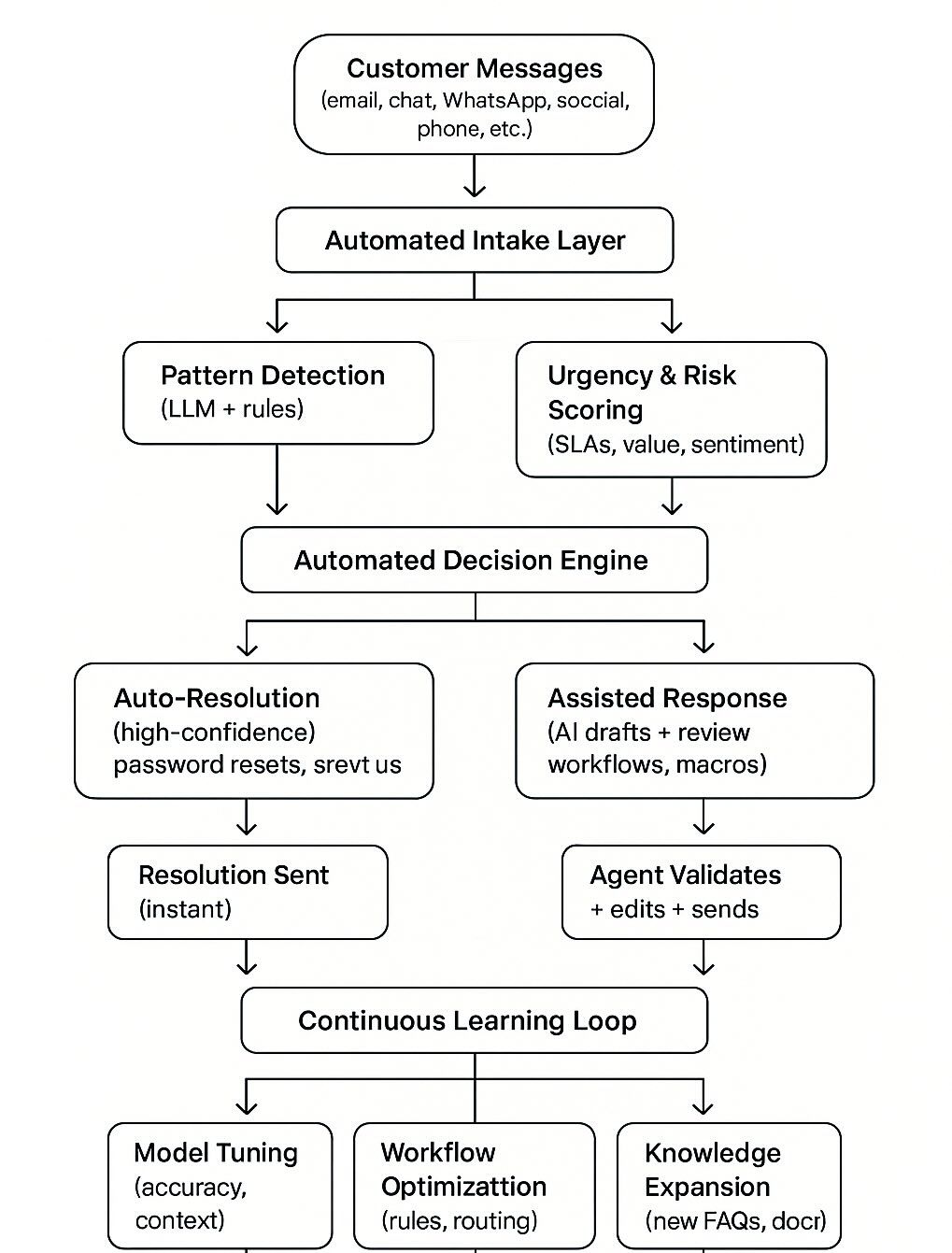
How automated ticket resolution actually works
The layers of an intelligent and human-friendly support system
Building an automated ticketing system that impacts resolution times is vital and from our experience, there are 4 layers that compose a modern support system.
Below are the 4 major steps:
- The intake layer, where conversations from various channels get organized.
- The decision engine, where conversations are automated or assigned to a team.
- The execution layer, where task automation really happen.

The intake layer: where chaos meets structure
This is where most organisations already lose the game. Raw messages pour in from chat, email, WhatsApp, Instagram, forms, with various topics.
The intake layer is not about “collecting” channels. It’s about standardising context so all messages arrive in the same internal language. Intent, sentiment, urgency, customer history: these are the grammar rules that transform support noise into recognisable patterns.
Message origin shouldn't be treated as a filtering option for your support inquiries.
From our perspective, we see a lot of companies that are still prioritizing support requests depending on the support origin.
This is 100% wrong support strategy
Without this layer, everything downstream collapses. With it, the rest becomes predictable.
The decision engine: separating the human-critical from the human-optional
This is the part everyone simplifies but no one should. Automated ticket resolution doesn’t start with “answering.” It starts with deciding who should answer, and that decision is the whole value.
High-context, high-risk issues should go straight to humans without friction.
Low-context, low-risk issues should be swallowed by automation without delay.
This classification works only when two realities are acknowledged:
- Machines are excellent at recognising patterns.
- Humans are excellent at recognising exceptions.
the execution layer: automation that behaves like a colleague, not a scripted chatbot
Once the support system knows whether an issue is human-optional, the execution layer takes over.
For simple, known problems, automation should respond instantly, but only when confidence is high enough to avoid backtracking.
This is where teams feel the first tangible relief: fewer clicks, fewer tabs, fewer cognitive resets.
The learning loop: the quiet superpower
The final layer isn’t glamorous, but it’s the one that compounds value. Most companies are afraid of AI's failure. A failure that would result in a bad experience, mostly when it comes to their reputation. Most of the modern AI chatbot software now embed solution to prevent any hallucinations.
This is a fear they should get rid of.
Failure is rather to be focused on gaps in AI data training. Fallbacks show your AI is lacking some knowledge and need a better data set to get better.
The learning loop happens here: you see the AI falling back to humans, you know there's a gap to be filled.
A smart support system uses that information to adapt automatically:
- update prompts
- refine routing
- spot failing workflows
- identify missing knowledge
- predict surges before they hit
This is the part that makes automation “smart” rather than “fast.” Speed without feedback is theatre. Speed with data-driven feedback is operational leverage.
The next level: from AI bots to agentic AI support workflows
Agentic AI leverages an innovative feature of generative AI to build advanced automation.
Most AI systems today can respond to text, but they can’t do anything. They don’t know how your product works, can’t access customer data, and can’t safely take actions without human intervention.
MCP (Model Context Protocol) is the missing bridge. It’s a standardized way for AI models to securely access your internal systems: APIs, databases, actions, workflows, so they can take context-aware actions instead of generating guesses.
Think of MCP as the “operating system” layer that turns an AI model into an agent.
Why MCP matters for agentic AI
To work autonomously, an AI Agent must be able to:
- fetch real data (customer profiles, order statuses, subscription info)
- execute tasks (reset a password, modify an account, create a ticket, issue a refund)
- run workflows with permissions and guardrails
- avoid hallucination by grounding its answers in real sources
MCP gives the your AI Agent a set of safe, explicit, permission-controlled tools it can use to perform actions, just like a human support agent uses your internal dashboards.
Without MCP, an AI Agent is just a chatbot. With MCP, it becomes a true worker.
Continuous data analysis refines AI models, ensuring support scales efficiently during business hours while keeping interactions human-centric and effective.
How to measure the success of your automation
Measuring automation success requires more than just speed. Tracking the right metrics reveals real impact. This guide explains how to measure the true value from automated ticket resolution while keeping human oversight intact.
The essential KPIs for automated support resolution
Time to Resolution (TTR): Measures average time to close a ticket. Faster resolution directly improves customer satisfaction. Automated systems slash TTR from days to minutes for simple issues, ensuring quick help around the clock.
First Contact Resolution (FCR): Tracks percentage of issues resolved during first interaction. High FCR reduces repeat contacts and enhances customer happiness. It's a strong sign of effective automation and agent readiness. FCR above 80% is world-class.
Customer Satisfaction (CSAT): Measured through post-resolution surveys. Automated systems boost CSAT with instant 24/7 support. Studies show up to 70% higher satisfaction with effective AI solutions. Happy customers stay loyal longer.
Hours Saved via Automation: Proves ROI by reducing manual workload. This metric shows efficiency gains while maintaining quality support. It validates AI’s role in freeing human agents.
Escalation Rate: Shows percentage needing human help. Low rates mean AI handles most issues effectively. High escalation signals training improvements. Keeping this below 20% ensures optimal resource use. Daily monitoring prevents bottlenecks.
Combining these metrics gives a complete picture of automation’s impact. Regular analysis ensures continuous improvement in support quality and efficiency.
Defining the "automated resolution" metric: what really counts as resolved?
Defining "automated resolution" correctly is essential. A ticket counts as resolved only if the customer confirms it or remains inactive after a bot's response. LLMs analyze conversations to verify closure. Miscounting, like assuming an abandoned chat is resolved, like Intercom does with Fin, is skewd. Clear definitions ensure accurate success tracking and prevent false metrics. Without precise measurement, ROI claims can be misleading.
| Metric | In a Traditional Support Model | With Automated Ticket Resolution |
|---|---|---|
| Time to Resolution (TTR) | Dependent on agent availability, channels. | scalable, and efficient 24/7. |
| First Contact Resolution (FCR) | Relies on agent knowledge and can be inconsistent. | High for automated queries, providing consistent and accurate answers. |
| Customer Satisfaction (CSAT) | Can suffer due to long wait times and inconsistent service. | Often increases thanks to 24/7 availability and instant responses. |
| Agent Utilization | Agents are often bogged down by repetitive, low-value tickets. | Agents focus on complex, high-impact problems, increasing job satisfaction and value. |
| Operational Costs | Scales linearly with ticket volume and team size. | Significantly reduced by handling a large volume of tickets without human intervention. |
Keeping your automation effective and human-centric
The feedback loop: using data for continuous improvement
The most important part of AI-powered support isn’t what the model gets right — it’s what it gets wrong. Every fallback, every escalation, every confused reply is a signal showing exactly where the system needs improvement.
This is why modern support teams need an AI Manager. Not someone answering tickets, but someone reviewing failed AI interactions, identifying the gaps, and turning those insights into better content, better workflows, or better MCP actions. AI doesn’t improve on its own; it improves because humans refine it.
When a model can’t resolve a query, that’s the moment to act: tighten a KB article, rewrite an unclear answer, or add missing product data. These small adjustments compound quickly. The more the AI learns, the fewer customers hit the same friction points.
Teams that embrace this rhythm catch issues early, prevent spikes in volume, and keep the system sharp. Instead of chasing vanity metrics, they focus on the only question that matters:
Where is the AI struggling, and what can we fix today so it doesn’t happen tomorrow?
Balancing AI efficiency with the indispensable human touch
AI can resolve a huge portion of routine questions, but the real transformation happens when it works alongside humans, not in place of them. Automation clears the noise, handles repetition, and absorbs the predictable work that used to overwhelm teams. But when a customer arrives frustrated, uncertain, or emotionally charged, the human touch becomes non-negotiable. That’s where trust is built, and where support defines the relationship.
Automated ticket resolution amplifies this model. AI clears the path; humans handle the moments that shape the experience. It’s not about replacing people, it’s about giving them the space to deliver the kind of support no machine can. Smarter support automation means less stress, more control, and customer interactions that still feel deeply human.
FAQ for automated ticket resolution
What exactly is an automated ticket in customer support?
An automated ticket is a support request handled by AI systems with minimal human intervention. For instance, when a customer asks, "Where's my order?", an AI can instantly check shipping status and reply, no human needed. This means your agents focus on complex issues requiring empathy and expertise, while the system handles routine queries. Less stress, faster replies, and happier customers, that’s the goal.
How do Zendesk's automated resolution features work?
Zendesk offers automation tools for ticket routing and basic responses, but many small teams find them overly complex and expensive. Setup often requires heavy customization, and the interface can feel bloated for 10–50-person teams. We’ve seen SaaS and e-commerce companies switch to simpler alternatives that work out-of-the-box—no developer needed. The key is choosing tools that solve your pain points, not add more complexity.
How do Crisp's automated ticket resolution feature work?
Crisp uses an AI Agent trained on your knowledge base, past conversations, and product data to detect and resolve repetitive support inquiries before they reach an agent. When a message arrives, Crisp identifies the intent, searches relevant data sources, and allows agents to drafts a resolution with AI-powered writting tools.
If enabled, the AI Agent can respond autonomously or execute tasks through MCP actions. If the system isn’t confident in an answer, it escalates the conversation to a human with full context attached.
Teams can also use Crisp’s AI Copilot mode, where AI drafts answers but agents approve them before sending. This gives support leaders complete control while benefiting from AI-driven speed. Over time, the AI learns from accepted corrections, improving accuracy and reducing future escalations.
Crisp’s approach prioritizes transparency: teams review interactions, refine knowledge, and decide exactly how much autonomy the AI has: making automation safe, predictable, and highly customizable.
How do Intercom's automated support ticket resolution work?
Intercom automates ticket resolution through Fin AI, its suite of generative AI features integrated into the help desk. Fin analyzes the customer’s question, pulls information from your help center, and generates a relevant answer. The bot aims to resolve the issue immediately through conversational replies.
Intercom’s automation relies heavily on the quality of the help articles it’s trained on. When Fin cannot find a confident match or the user requests a human, it escalates the conversation to an agent inside the Intercom inbox. Agents can also use AI to draft replies, summarize issues, and handle repetitive work more quickly.
Intercom provides workflow automation for routing, tagging, and classification, but task execution (such as modifying accounts or triggering actions inside a product) depends on custom integrations rather than native MCP-style capabilities. This means Fin is primarily focused on answering questions and deflecting inquiries rather than executing operational tasks directly.
What’s considered a good time to resolve a customer support ticket?
There’s no universal standard, it depends on your industry and customer expectations. For most SaaS companies, a first response under 1 hour and full resolution within 24 hours is solid. E-commerce teams during peak seasons might need faster replies.
What’s needed to implement effective automated ticket resolution?
Start by mapping your most common customer issues, things like password resets or order tracking. You’ll need a unified system that centralizes all channels (email, chat, WhatsApp) so agents see full context. Train AI on your knowledge base and past tickets, and customer data. But keep human oversight: your team should review and tweak AI responses on a weekly-basis. The best setups let you control what gets automated, ensuring you never lose the human touch where it matters most.
Who is Zendesk's biggest competitor?
Zendesk’s main competitors are Intercom, Freshdesk, and Salesforce Service Cloud. But for teams that find Zendesk too complex or pricey, alternatives like Crisp offer a more straightforward approach, easy setup, human-controlled AI, and transparent pricing. It’s not about "better" or "worse"; it’s about finding the right tool for your team’s size and goals.

September 2026 - Product Update
Discover the new Knowledge Base editor, benchmark your AI support performance, track how often Hugo escalates conversations, and more. Discover the latest features and improvements released by the Crisp team in September 2026.


Summer 2026 - Product Update
Meet the refreshed Crisp experience, Understand how Artificial Intelligence handles every conversation, Build reusable teams across your workspace, and more. Discover the latest features and improvements released by the Crisp team in Summer 2026.

Best 9 helpdesk software and ticketing systems for 2026
Need help to choose your next helpdesk with a ticketing tool for 2026? We've gathered a guide that gives you everything you need to convince your C-levels.