11 automated reply messages examples for your business
For any business, strong communication with customers and leads is a pillar of good relationship. Even more, reactivity has became a key asset when building a great brand identity.


For any business, strong communication with customers and leads is a pillar of good relationships. Even more, reactivity has become a key asset when building a great brand identity.
As 34% to 44% of companies already use AI to augment their customer service, it is believed that automation is becoming a key asset in the customer service field.
Email is still a channel that is highly used when contacting businesses. According to Kinsta, email is a top 3 distribution channel for both B2C and B2B marketers. Nevertheless, other channels such as messaging apps and live chat are growing fast. Not taking them into account could lead your company to poor customer service.
Autoresponders, also known as automated reply messages, are useful in multiple situations. It's not only an email thing anymore. People now want convenience and efficiency, so businesses must take advantage of digital communication channels.
In this article about automated reply messages, you'll get:
- An introduction to automated reply messages and multichannel auto responder 🧐
- Why automatic answers have evolved 🚀
- Specific autoresponder examples to handle multi-channel conversations 🏆
What is an automated reply message?
Historically, autoresponders have been set to empower businesses that wanted to build better relationships, automatically. Especially using bulk email sender.
To give you a quick definition, here is how it is defined on Wikipedia: "An autoresponder is a computer program that automatically answers e-mail sent to it"
Quite basic, isn't it? This definition may not have been modified for a while.
To give you a better definition, an autoresponder is a tool that lets you set predefined messages based on multiple criterions such as: message origin, team availability and message pattern. Thanks to the autoresponder, you can answer customers automatically based on their inquiries.
It lets you automate the 1st level of interaction that is genuinely know as repetitive and boring for customer support team.
As quickly mentioned, autoresponder used to be an email thing only. Nowadays, we see multichannel autoresponder rising to help companies scale their customer relationship on multiple channels.
What is a multi-channel automated replier?
A multichannel auto-responder is an autoresponder that has the ability to answer the same message on multiple channel.
Depending on the origin of your messages, companies can set specific answers to bring automated responses to their leads or customers.
Still looking for some advantages to set auto reply messages inside your company? Here are 4 definitive assets that will push you to set automated replies inside your company:
Set expectations automatically
One of the main point of auto reply messages is setting expectation. when can the other side ('aka' your customer) can expect an answer? It has been shown that a known wait feels shorter than an unknown wait.
This resonate especially in customer support as you may find lot of answers lacking a specification about the estimated time to response.
Now, some modern live chat display this information immediately to customers but not each of them.
A common mistake in out-of-office replies is stating that you might check your email now and then. That resolution is easily neglected when enjoying beaches and coconuts. Be honest, you'll get back to them when back from holidays.
Add transparency
Transparency is another important ingredient to bring into multichannel auto messages. This is mainly due to the power of the "Because". In a famous Harvard study, the researchers asked people queuing to use a print whether they could cut in line. Here are the three sentences they used:
"Hello, I have 5 pages, May I use the machine?"
"Hello, I have 5 pages. May I use the machine because I'm in a rush?"
"Hello, I have 5 pages. May I use the machine because I need to print?"
Option 2 (94% success rate) naturally beats option 1 (60%); you can empathize with someone in a rush. The real surprise came from the minimal difference between options 2 (94%) and 3 (93%).
What does it mean to our business? Well, instead of stating that you're on vacation, simply indicate that you're not able to check your email and explain why.
For support replies, it works the exact same way, we will review this a bit later in the article.
It offers alternative options
The advantage of multichannel auto messages is the ability to get in touch with you on various channels. Setting up a multichannel responder means you're able to support customers on multiple channels, which is great!
Live Chat, Facebook Messenger, Instagram, Whatsapp, Text messages, or any other channel can bring happiness to your customers.
For example, here is an example of how you can build a Facebook autoresponder using a third-party app:
Why autoresponders aren't related to email anymore?
67% of consumers expect to use messaging apps when interacting with a business.
According to Chatbots Magazine, just over two-thirds of people now expect to see or use messaging apps when talking to a business. Not only are messaging apps a quick, convenient way for consumers to reach out to customer support, but the use of chatbots makes customer service operations more efficient and cost-effective for businesses.
And it is that simple, emails aren't the only channel anymore. Nowadays, companies have to deal with multichannel messaging, that's why autoresponders have to adapt themselves to help their customers the best way.
Automatic reply messages examples for your business
In this part, we will cover some examples of automated messages to give you some ideas.
We will cover emails, live chat, WhatsApp, Instagram and also text messages.
Automated email responses examples
This is the most popular category as autoresponders have been created for emails. Here are a few examples of auto-response for emails that will let you automate some answers.
The well-known out-of-the-office automatic email
Hi there,
Sorry I missed you! I’m currently out of the office with limited access to email. If you have a question about billing, please contact our Billing Department at [Email]. If you’d like to book a service, please schedule your appointment online at [Link] or contact [Support Staff Contact Information] for more information.
I will follow up once I’m back home, but in the meantime, the team will take great care of you in my absence!
The working-hour automatic email
Hi,
Thank you for getting in touch. We’re working on your request—hang tight! We will get back to you within 8 business hours (Monday - Friday 9 am to 6 pm EST).
Here are some important links that might direct you to where you need to go:
Scheduling: [Web Page Address], [Phone Number]
Pay Your Invoice: [Web Page Address], [Phone Number]
Please note that this email can (and should be) combined with a chatbot that can answer customers' questions.
Live chat auto reply messages samples
Live chat is quite different from email as it requires much more instantaneity. Over these examples, you'll be able to
The weekend responder
Hi! Our support is closed on weekends (Saturday & Sunday). You may still ask all your questions right now.
We will follow up on Monday. Until then, have a great weekend! ;)
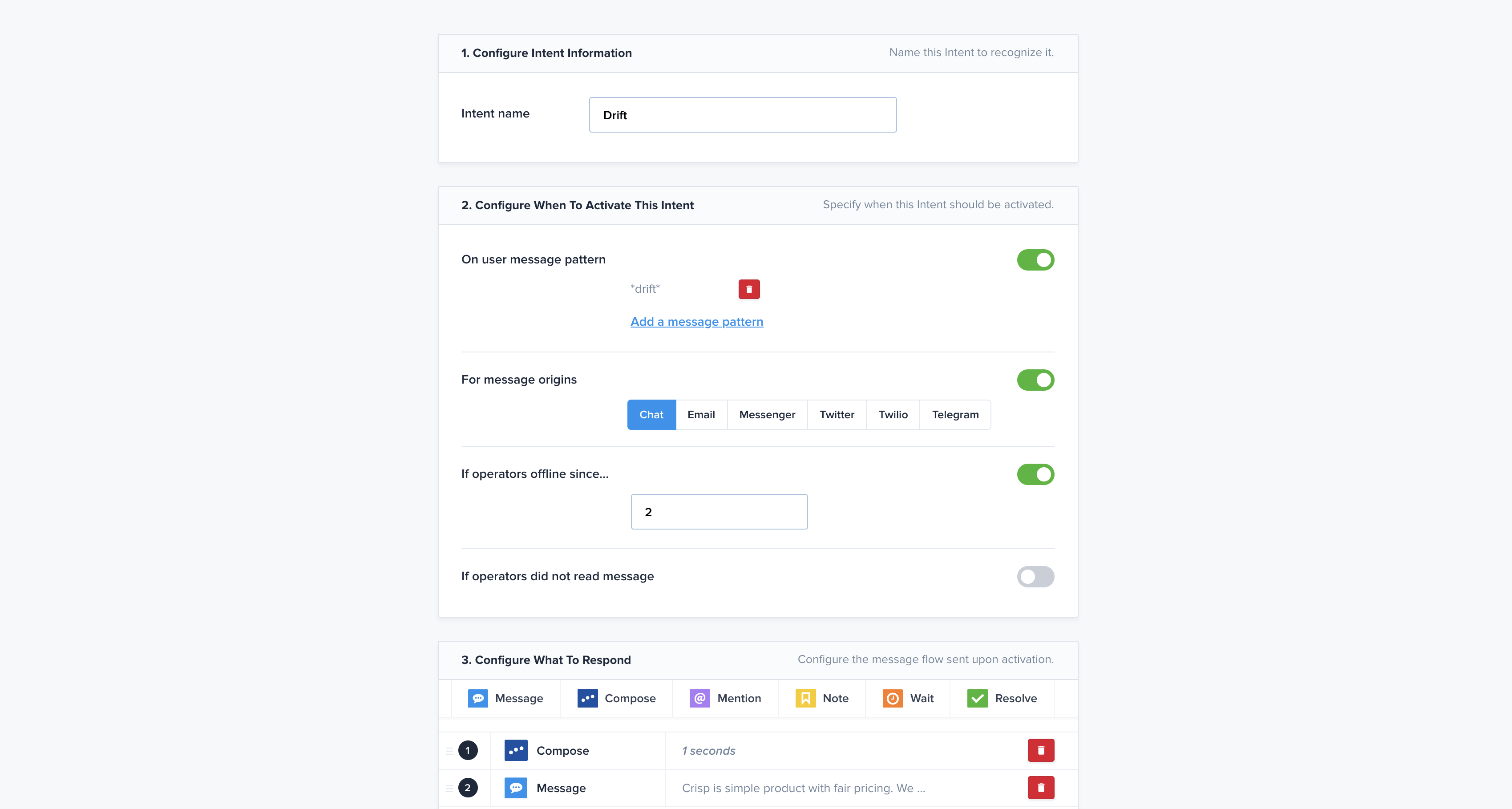
The competitor responder
Hey, regarding <your competitor> here is how we compare:
- Asset 1
- Asset 2
- Asset 3
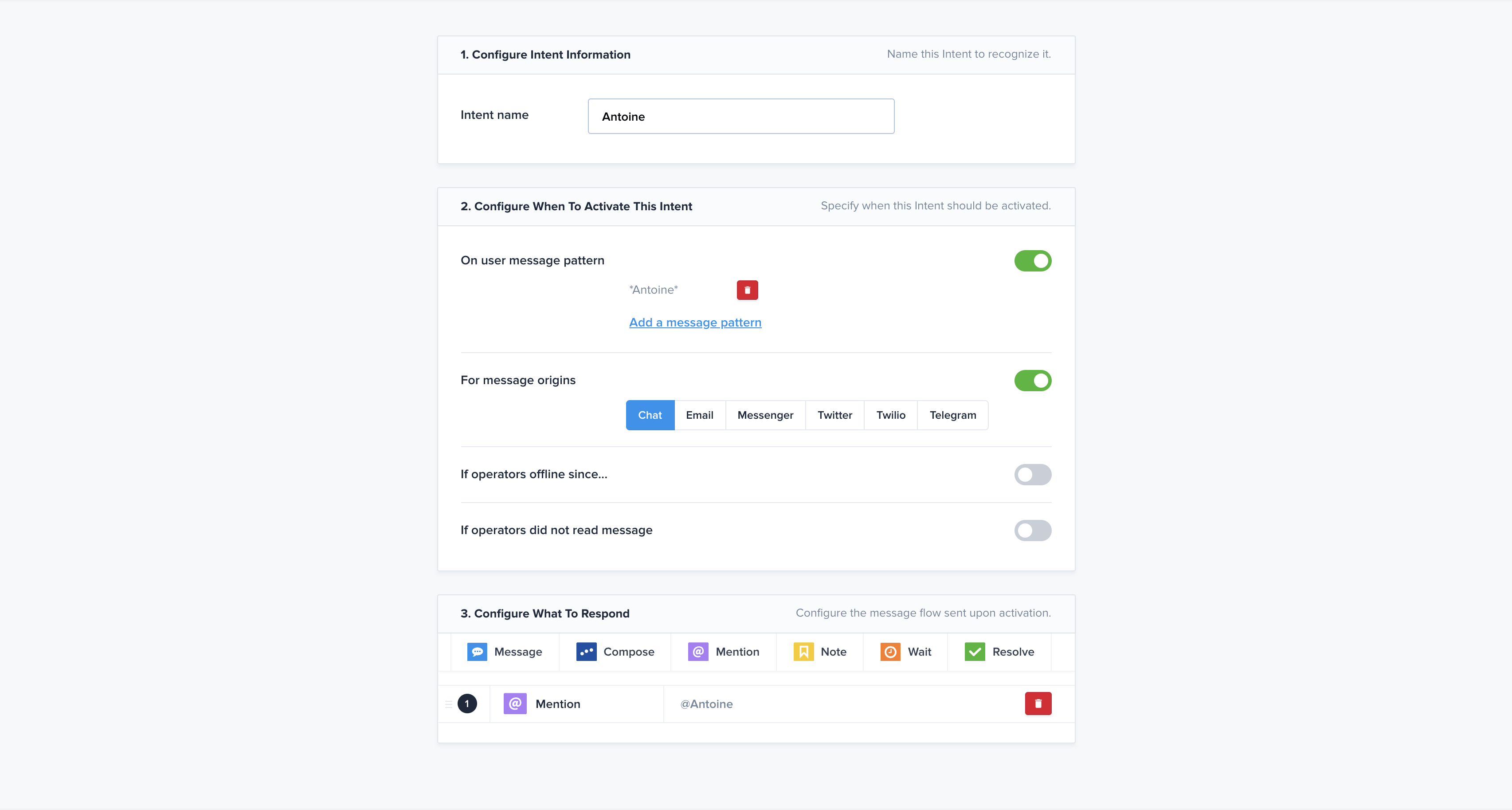
The internal responder
Hey <name of your employee>, I have a question for you
// @<your employee name>
This one uses a private note to mention automatically an employee that has been mentioned by a customer or a lead. It's the perfect way to bring in more contextualization and personalization.
The feature responder
Hey, thank you for requesting more information, here are some articles that should help you to better :
- <url 1>
- <url 2>
- <url 3>
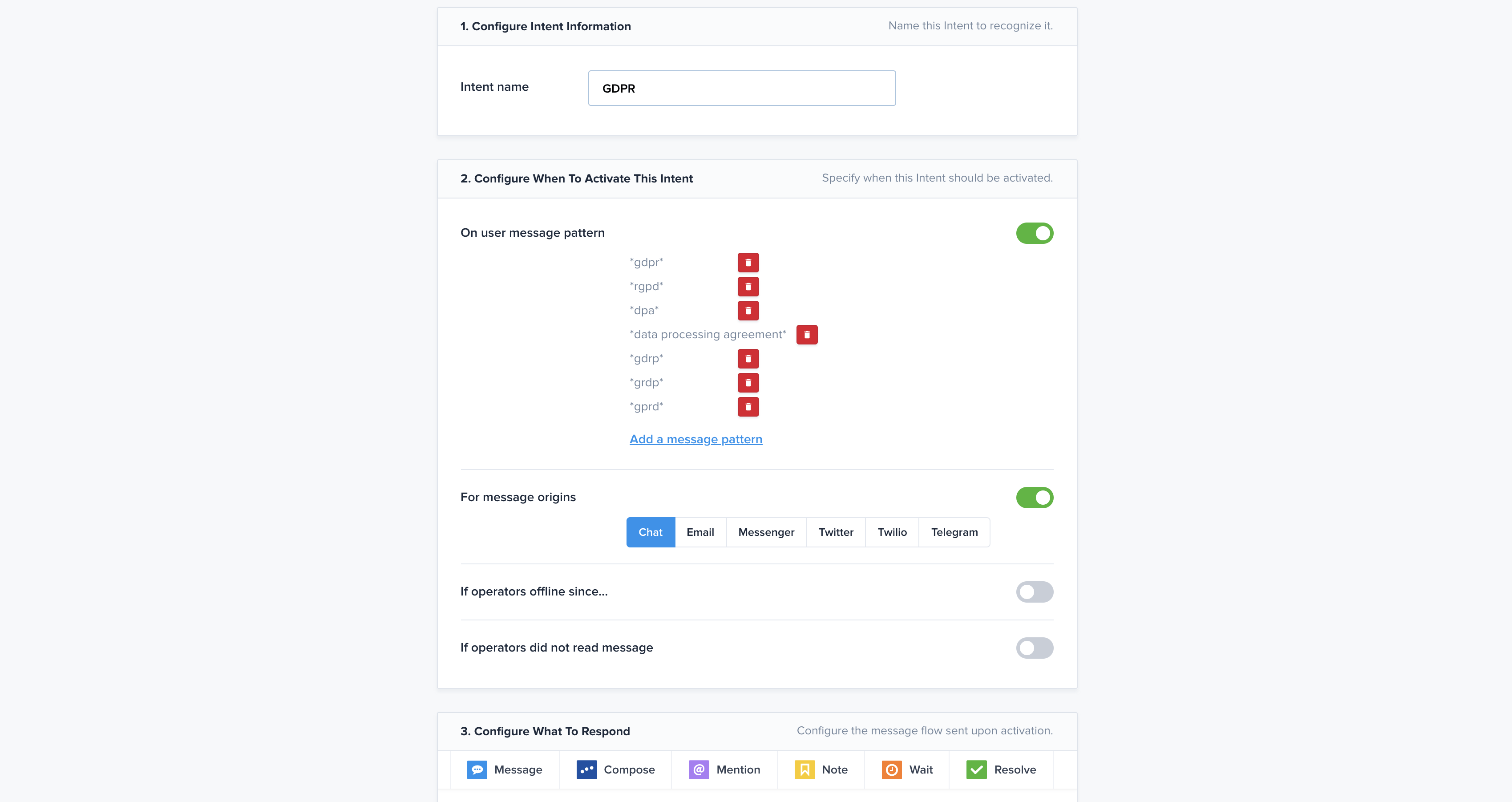
The GDPR responder
Hey, here is our policy regarding GDPR: <url>
The integration responder
Hey, we do have the <integration name> plugin, here is a way for you to add it to your account: <url>
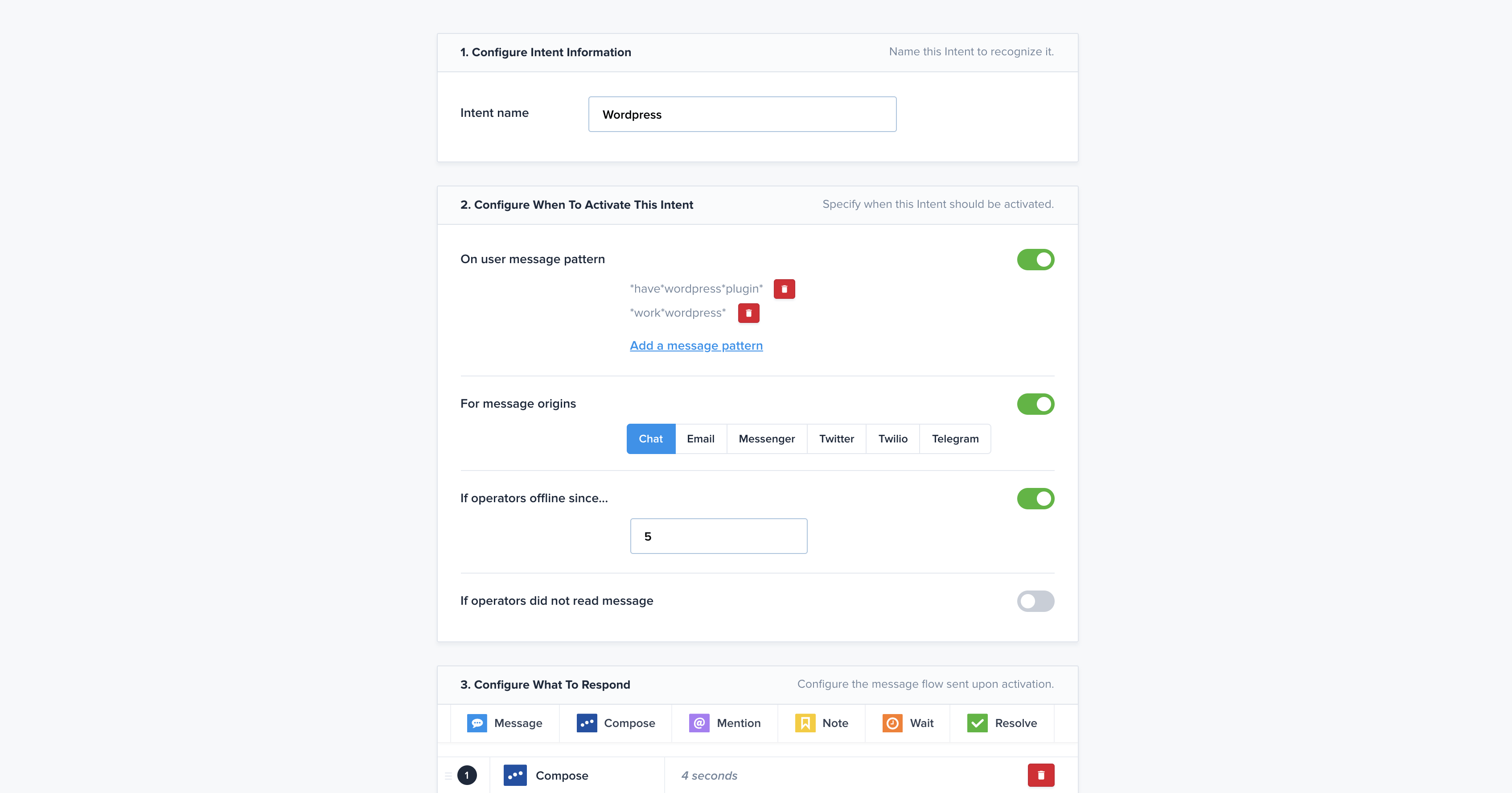
There are many more examples available. Please note that those are also available for social inboxes such as Twitter or Facebook and WhatsApp.
On a global scale, the team inbox will make companies' life easier.
Text message auto-reply message examples
Text messages are very personal and get very high deliverability and open rate. They are very powerful when trying to reach a customer or a lead.
The appointment reminder
Hey <customers' name>, quick reminder about your meeting tomorrow with <employee name> at <address>
The Opt-in responder
Hi <name>, thanks for opting in for SMS updates from <your company>! Please reply with Y to confirm. You can text STOP at any time to unsubscribe.
The SMS status alerts
Hello <name>, this is <employee name> from <your company>. We are still working on your order, but we expect that it will be complete by <date>. Please text back if you have any questions!
As you can see there are lots of different business examples where auto-reply messages are great for your company.
As long as it doesn't get too spammy or too impersonal, it can get your customers or leads very happy and give them the extra mile they're looking for.
More automated email examples for your business
Beyond out-of-office and working-hours replies, there are many other situations where automated email responses can save your team time and improve the customer experience. Here are some additional templates tailored to common business scenarios.
The order confirmation email
Hi [Customer Name],
Thank you for your order! We've received your purchase (#[Order ID]) and are getting it ready. You'll receive a shipping confirmation with tracking details once your package is on its way. Expected delivery: [Date Range]. If you have any questions, visit our Help Center at [Link] or reply to this email.
The support ticket acknowledgment
Hi [Customer Name],
We've received your support request regarding "[Subject]" (Ticket #[Number]). Our team is on it! You can expect a response within [X] business hours. For urgent issues, you can also reach us via live chat at [Link] or by phone at [Number].
The customer feedback request
Hi [Customer Name],
We hope your recent experience with our support team was a good one! We'd love to hear your feedback — it takes less than a minute: [Survey Link]. Your input helps us continuously improve our service. Thank you for being a valued customer!
The refund or cancellation confirmation
Hi [Customer Name],
Your cancellation for order #[Order ID] has been confirmed, and a refund of [Amount] has been processed to your original payment method. Please allow 3–5 business days for the funds to appear. If you have any further questions, don't hesitate to reach out at [Email] or [Phone].
The high-volume or delayed response notification
Hi [Customer Name],
We've received your message and we appreciate your patience. Due to an unusually high volume of requests, our response time is currently longer than normal. We'll get back to you within [X] business days instead of our usual [Y] hours. In the meantime, you may find an answer to your question in our FAQ: [Link].
Why personalization matters in automated replies
One of the biggest pitfalls of automated responses is making recipients feel like "just a number." Even when a message is triggered automatically, it should feel personal and relevant. Here's why personalization is critical — and how to achieve it.
Use the customer's name. A simple "Hi Sarah," goes a long way compared to a generic "Dear Customer." Most modern autoresponder tools allow you to dynamically insert the customer's first name using merge tags.
Reference the specific inquiry or order. Including the ticket number, order ID, or a brief reference to their question ("your inquiry about our refund policy") shows that their message was actually received and understood — not just logged into a void.
Offer alternative contact options for urgent needs. Automated messages set expectations, but sometimes a customer's issue truly can't wait. Always provide a direct line — a phone number, a live chat link, or an urgent email address — so customers with critical needs don't feel stuck waiting.
When NOT to use automated responses
Automation is a powerful tool, but it isn't always the right one. Over-relying on automated responses can damage customer trust and leave people feeling frustrated. Here are situations where human intervention is preferable.
Sensitive or emotional situations. Complaints about bereavement, health-related issues, or serious service failures deserve a human, empathetic response. An automated reply in these moments can feel cold and dismissive, and can make a difficult situation worse.
Complex or nuanced issues. When a problem requires investigation, judgment, or a customized solution, a templated reply can feel tone-deaf. If automation can't genuinely help, it's better to escalate to a human agent right away rather than buying time with a generic acknowledgment.
The risk of over-automation. Sending too many automated messages — or automating responses that customers expect to be personal — can erode trust. Customers who receive a stream of templated emails often disengage, unsubscribe, or take their frustration public. The goal is to use automation to support human communication, not replace it entirely.
Best practices for automated replies
Setting up autoresponders is only half the job. Making sure they consistently deliver value is an ongoing process. Here are the key best practices to keep in mind.
Set clear expectations about response times. Vague language like "we'll get back to you soon" doesn't reassure anyone. Be specific: "We'll reply within 24 hours" or "Here's what to expect next: a member of our team will contact you within 2 business days." Specific commitments build trust and reduce follow-up inquiries.
Link to self-service resources. Your automated reply is a great opportunity to deflect common questions before a human agent needs to step in. Include links to your FAQ, knowledge base, or help center. This empowers customers to solve their own issues faster and reduces the volume of follow-up messages your team receives.
Regularly review and update your templates. Automated messages can quickly become outdated — phone numbers change, policies evolve, and your tone of voice may shift as your brand grows. Schedule a quarterly review of all your active autoresponders to make sure they're accurate, on-brand, and still relevant.
Multi-channel autoresponder examples
Different channels have different expectations in terms of tone, length, and speed. Here's how to tailor your automated responses for some of the most popular messaging platforms.
WhatsApp autoresponder
WhatsApp is a conversational channel — keep your automated reply short and friendly. Example: "Hi [Name]! 👋 Thanks for reaching out to [Company]. Our team is available Mon–Fri, 9am–6pm. We'll get back to you shortly! For urgent help, call us at [Number]."
Facebook Messenger autoresponder
Messenger users expect instant interaction. Use an upbeat, branded voice. Example: "Hey [Name], thanks for messaging [Company]! We typically respond within a few hours. While you wait, check out our FAQ for quick answers: [Link]. We'll be with you soon!"
SMS/text autoresponder
SMS is ultra-concise — every character counts. Keep it under 160 characters when possible. Example: "[Company]: Got your message! We'll reply within 4 hrs. Need help now? Call [Number]. Reply STOP to unsubscribe."
Live chat autoresponder
Live chat users expect near-instant responses. When no agent is available, set a friendly offline message. Example: "Hi [Name]! Our team is currently offline but will be back at 9am (Mon–Fri). Leave your message here and we'll follow up by email. You can also browse our Help Center: [Link]."
Internal and team automated replies
Automated replies aren't just for customer-facing communication. They're equally valuable for managing internal workflows and team coordination. Here are two scenarios where internal autoresponders can save time.
The meeting request acknowledgment
Hi [Name],
Thanks for your meeting request! I've received your proposed time slot(s) and will confirm availability within [X] hours. In the meantime, feel free to check my calendar for available slots: [Calendar Link]. Looking forward to connecting!
The IT ticket confirmation
Hi [Employee Name],
Your IT support request (Ticket #[Number]: "[Issue Summary]") has been logged. Our IT team will assess the issue and get back to you within [X] business hours. For critical system outages, please call the IT helpdesk directly at [Extension/Number].
AI Copilot for customer service: personalizing automated replies at scale
Traditional automated replies are static — they send the same templated message regardless of who is on the receiving end. This is where AI Copilot for customer service changes the game entirely.
An AI Copilot acts as an intelligent assistant for your customer service team — and increasingly, it can handle the initial automated response layer with a level of personalization that was previously impossible without a human agent. Here's how it helps.
Context-aware responses. Unlike basic autoresponders that trigger on keywords or time-of-day rules, an AI Copilot can read and understand the content of each incoming message. It can detect the customer's intent, the urgency of their request, and the sentiment behind their words — and craft a response that directly addresses their specific situation. For example, rather than sending a generic "We've received your message," it might automatically generate: "Hi Sarah, I can see you're having trouble with your order #4521 that was placed on Monday — our team is already looking into this for you."
Drafting personalized replies for agents. An AI Copilot doesn't just fire off automated responses on its own — it can also suggest tailored draft replies to your human agents, pulling in relevant data from your CRM (purchase history, previous conversations, subscription plan) to pre-populate a message that feels hand-written. The agent reviews and sends, cutting their response time dramatically while keeping the human touch.
Smart escalation. A well-trained AI Copilot knows when not to automate. If it detects a frustrated customer, a complex billing dispute, or a message that doesn't match any known pattern, it can automatically flag the conversation for priority human review — rather than sending a response that might make things worse.
Consistent tone across channels. Whether a customer reaches out via email, live chat, WhatsApp, or Facebook Messenger, an AI Copilot can apply the same brand voice and personalization logic across all channels — ensuring a seamless, cohesive experience no matter how the conversation starts.
The bottom line: AI Copilot bridges the gap between the efficiency of automation and the warmth of human communication. It allows businesses to scale their customer service without sacrificing the personalized, attentive experience that builds long-term loyalty. As AI continues to improve, the line between "automated reply" and "personal response" will keep getting blurrier — in the best possible way.

Summer 2026 - Product Update
Meet the refreshed Crisp experience, Understand how Artificial Intelligence handles every conversation, Build reusable teams across your workspace, and more. Discover the latest features and improvements released by the Crisp team in Summer 2026.


Best 9 helpdesk software and ticketing systems for 2026
Need help to choose your next helpdesk with a ticketing tool for 2026? We've gathered a guide that gives you everything you need to convince your C-levels.

Team workload management for support: how to balance the queue without burning anyone out
Ticket count hides real workload. Here's how to measure effort instead of count, route with capacity in mind, and stop burning out your best agents.