11 AI chatbot best practices for always-on customer service
Want 24/7 support without hiring a night shift? this guide shows how AI + automation deliver always-on coverage: instant answers, overnight triage, and human handoffs that cut costs and improve CSAT, with the metrics that prove it.


Your support inbox doesn’t sleep, but your team has to.
Each morning, a flood of overnight chats, emails, and WhatsApp messages pile up, testing both patience and SLAs.
This guide reveals the AI chatbot best practices that help SaaS teams stay always-on without burning out.
Learn how small teams automate up to 80% of recurring questions, cut response times by 3×, and deliver human-grade answers, even after support hours.
⚠️ It’s not about replacing agents.
It’s about giving them superpowers, reclaiming hours each week, focusing on what truly matters, and keeping that personal touch that turns customers into loyal fans.
In this article, you’ll learn how to:
- Design AI chatbots for customer support that actually understand your customers, using real support data and knowledge bases as training sources.
- Balance automation and empathy, so routine questions are handled instantly while complex ones reach humans with full context.
- Measure what matters, from automation accuracy to CSAT impact, to prove real ROI from your 24/7 support strategy.
Why most AI chatbots fail (and how to build one that doesn't)
Support teams at growing companies face a daily struggle: too many tickets across multiple channels, too few agents to handle them, and good-old scripted chatbots that often create more frustration than relief.
The promise of 24/7 support sounds appealing, but many AI implementations end up disappointing.
Teams end up spending more time managing bots than focusing on complex customer issues like troubleshooting technical integrations or resolving payment disputes that require human judgment.
At Crisp, we have worked with hundreds of companies to implement customer service chatbots that actually improve round-the-clock support.
We've seen teams cut response times by 60% while freeing up 10+ hours weekly per agent.
The key? Understanding why and where most chatbots fail and following a structured approach to implementation.
Unlike traditional "chatbot-first" tools that frustrate users with generic responses, our approach focuses on AI that works - clear, context-aware, and easy to train using company's specific knowledge, and support history.
More than everything, this is a continuous process. You can't expect to have a powerful AI chatbot that you don't "manage".
Each week, you have to ask yourself:
- Where dit it fall down?
- What was the questions that triggered a human escalation?
We'll cover planning, building, and continuous improvement techniques that respect your team's bandwidth while delivering real results overnight.
You'll learn how to avoid common pitfalls like:
- poor data quality from outdated FAQs,
- lack of human oversight in automated responses,
- complex tools that require developer dependency,
No hype, just practical methods that work for teams like yours with 10-50 employees navigating global customer bases across Europe, Southeast Asia, and Latin America.
The illusion of 24/7 support
Customer expectations have changed forever. Your users don’t care where your team is based, they just expect instant answers, no matter the time zone.
If you’re running a business with customers in Europe, Asia, and the US, you already know the pattern:
- tickets pile up overnight,
- SLAs get missed, and
- your team starts the day chasing backlogs instead of helping customers move forward.
Hiring night-shift agents or outsourcing feels like the only option. But that comes with trade-offs: inconsistent quality, rising costs, and a disconnect between your brand voice and the people representing it.
The truth is simple, humans alone can’t be everywhere all the time. That’s where AI comes in. But not the shiny, chatbot-for-everything kind. The kind built on solid foundations: your real knowledge, your tone of voice, and seamless collaboration with your human team.
Because great 24/7 support isn’t about having bots that talk, it’s about building AI that understands, assists, resolve, and knows when to hand off.
Chatbot UX best practices that apply no matter the hours you run
Before getting into the always-on playbook, a few foundations apply to any AI chatbot, whether it runs 3 hours a day or 24. Skip these and the always-on strategies below won't save a chatbot that frustrates people in the first ten seconds.
Clear fallback and escalation language
When the AI doesn't understand or can't resolve something, say so plainly, don't make the customer guess. "I'm not confident I can solve this one, let me get you to a specialist" builds more trust than a bot that confidently gives a wrong answer or loops the same question back.
Consistent tone and personality
Customers notice when a bot sounds like three different products stitched together. Define a tone once (formal, casual, technical) and keep it consistent across every response, including error messages and handoffs.
Avoiding dead-end loops
The fastest way to lose a customer's patience is a bot that repeats the same clarifying question when it doesn't understand a reply. After two failed attempts to resolve something, escalate automatically rather than trying a third rephrasing.
Plain language and accessibility
Avoid internal jargon and acronyms the customer wouldn't use themselves. Short sentences, one question at a time, and clear next steps outperform dense, multi-part responses, especially for customers who aren't native speakers of your primary support language.
Phase 1: Strategic planning: building an AI chatbot that makes 24/7 support feel human
Before launching your chatbot, think like a strategist, not a technician.
The goal isn’t to automate everything. It’s to automate the right things so your team can focus where human touch really counts.
Defining clear goals and realistic expectations(what is not success)
Don’t start with a tool. Start with a target.
Maybe your priority is to cut first response times by 30% or automate 50% of login or password requests within the first month.
Those are measurable wins. But as said a great man, everything that get tracked gets improved. And speed won't help in here.
Monitor CSAT, NPS, and agent workload to make sure efficiency doesn’t come at the cost of quality.
Download our custom dashboard to see where you're starting from and measure the improvement brought by your customer service chatbot.
>>> Download the AI KPI Cheatsheet for tracking your AI ROI in your company
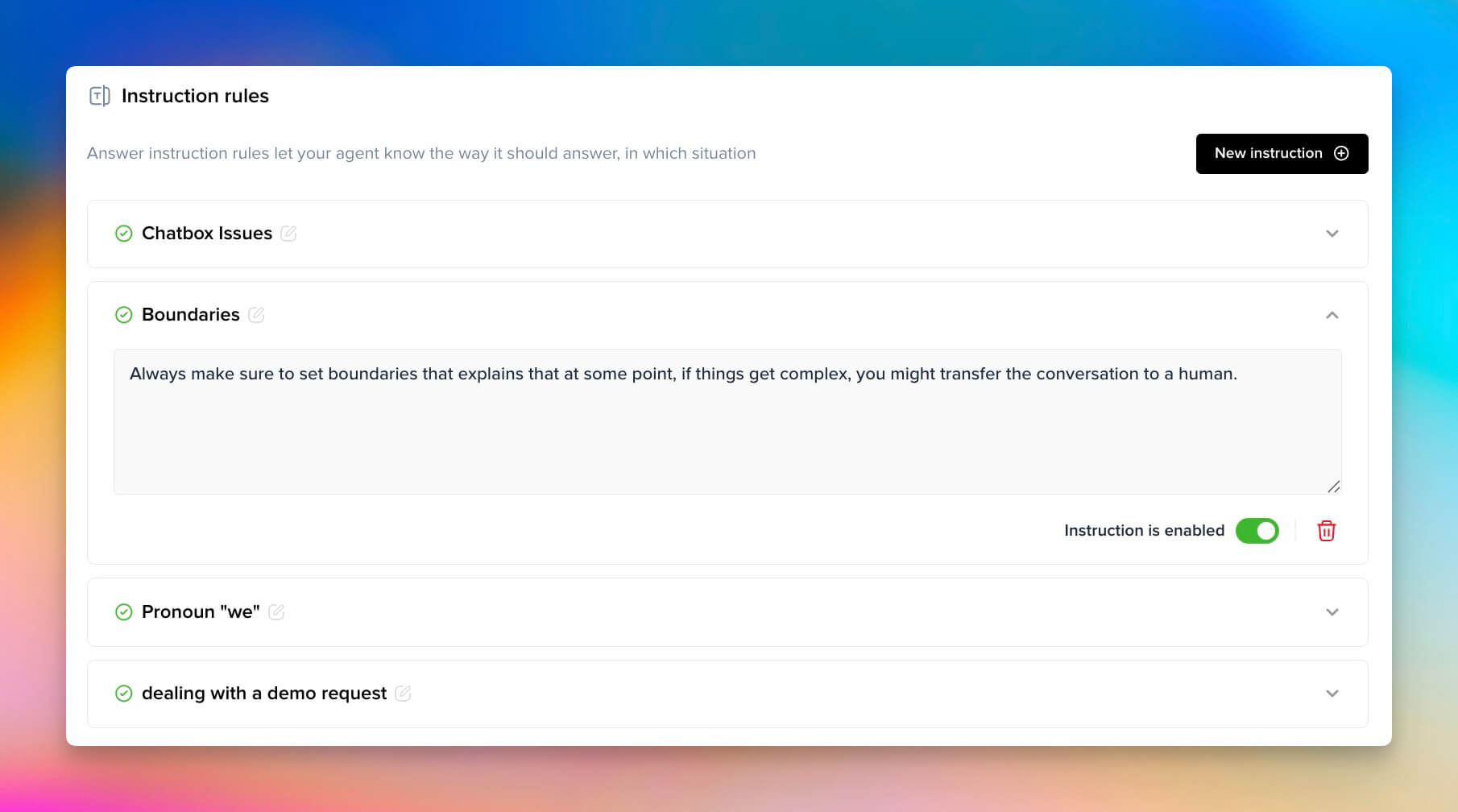
Set boundaries too, especially in the agent's settings.
Identify what's worth automating first
Don’t guess: use data. Go through your customer support platform and leverage the analytics to spot the patterns.
Those are low-risk, high-impact wins where AI shines.
Then scale gradually.
Automate one scenario, measure the outcome, and expand. This creates confidence for both customers and your team.
Starting small also helps your human agents grow into their new roles, solving complex bugs, crafting better help articles, or improving product feedback loops.
It’s not just about fewer tickets. It’s about smarter work.
Choosing the right channels and platform
Meet your customers where they actually are, not everywhere they could be.
If you’re strong in Southeast Asia or LATAM, WhatsApp might be your main channel.
If you run an online store, web chat probably converts best.
Focus on the 20% of channels that generate 80% of conversations.
Spreading AI across too many touchpoints too soon just fragments quality and training data.
Map your inbound traffic by conversation origin
From your analytics dashboard (or Crisp Analytics if you’re using it), export or query these fields for the last 30–90 days:
- channel(chat, email, WhatsApp, Messenger, etc.)
- conversation count
- first response time
- CSAT or internal quality score
- avg messages per conversation (a proxy for complexity)
- automation eligibility tag (if your team already flags auto-resolvable issues)
Then create a simple pivot or table (fake data below):
| Channel | Conversations | % of Total Volume | Avg First Response Time (min) | Avg Conversation Length (messages) | CSAT (%) | % Repetitive Topics | Example Top Topics | Automation Readiness Score (ARS)* |
|---|---|---|---|---|---|---|---|---|
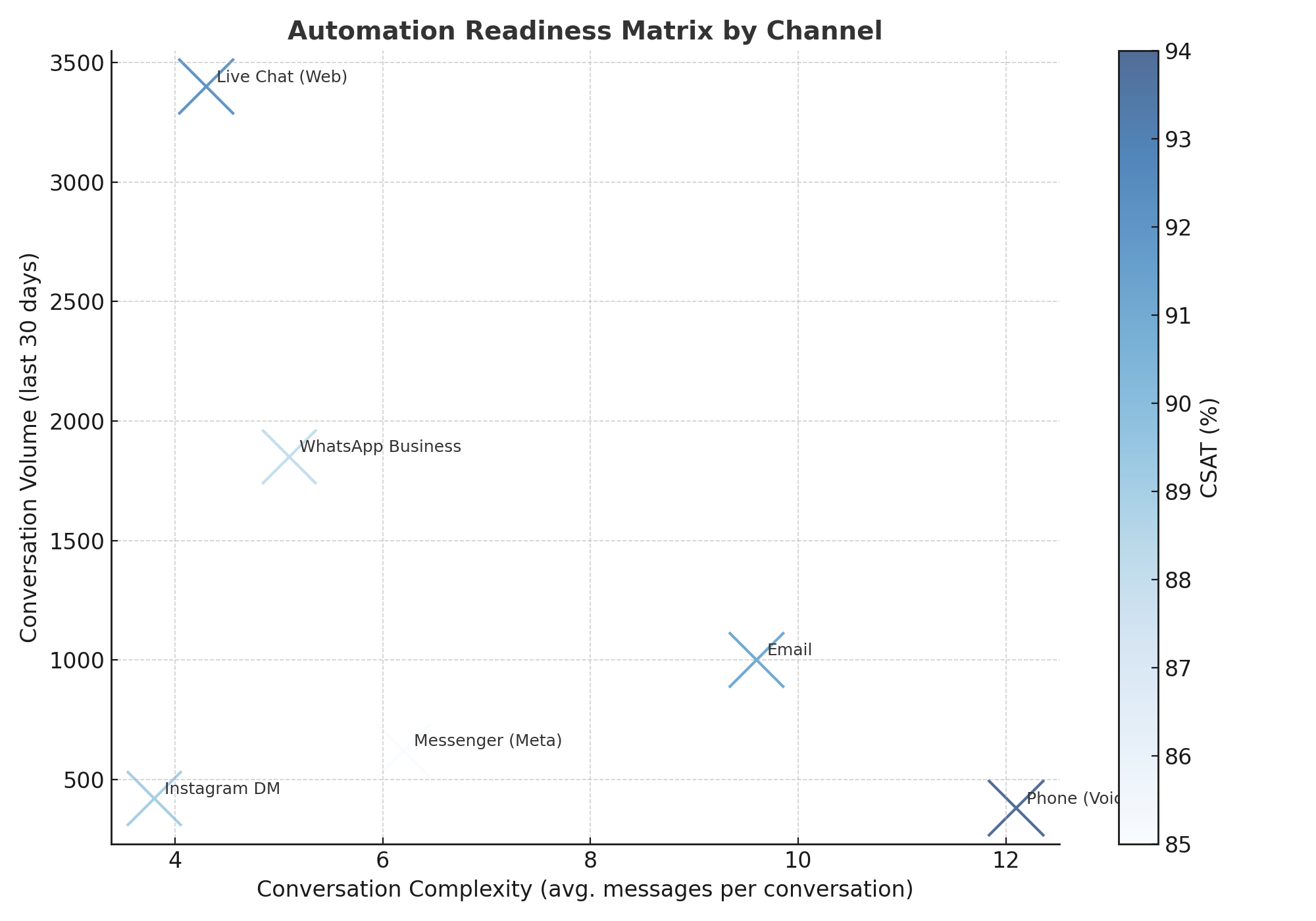
| Live Chat (Web) | 3,400 | 43% | 1.2 | 4.3 | 92 | 68% | “Order status”, “Password reset”, “Billing info” | 0.68 |
| WhatsApp Business | 1,850 | 24% | 3.7 | 5.1 | 88 | 55% | “Delivery ETA”, “Payment confirmation”, “Refund request” | 0.40 |
| 1,000 | 13% | 124 | 9.6 | 91 | 32% | “Refund dispute”, “Custom quotes”, “Account closure” | 0.11 | |
| Messenger (Meta) | 620 | 8% | 6.4 | 6.2 | 85 | 50% | “Promo code issue”, “Stock check”, “Shipping delay” | 0.32 |
| Instagram DM | 420 | 5% | 8.2 | 3.8 | 89 | 42% | “Product inquiry”, “Link broken”, “Store location” | 0.35 |
| Phone (Voice) | 380 | 4% | 0.7 | 12.1 | 94 | 18% | “Complex troubleshooting”, “Escalations”, “Cancellations” | 0.05 |
| Total | 7,670 | 100% | — | — | — | — | — | — |
Once you have your real table:
- Sort by ARS descending to pick your chatbot’s top candidate channel
- Filter by Top Topics within that channel to define your initial training intents
- Track CSAT evolution and handoff rate after deployment to validate impact
As a further step, you can even generate a matrice that helps you to take the right decisions on where your bot should be triggered first:
Phase 2: Deploying a chatbot that handles the night shift with confidence
After hours, your AI becomes the frontline.
It’s not just about talking, it’s about keeping your customers informed, calm, and supported when humans aren’t around.
Build trust through transparency
At night, honesty is everything.
Make it clear the user is speaking with an AI assistant — and set boundaries up front.
“Hi, I’m Lia, your 24/7 assistant. I can help track orders and reset accounts while our team’s offline.”
⚠ When expectations are clear, users stay calm, even if no one’s available.️
Designing guided conversations that solve problems fast
Forget witty banter — focus on speed and clarity.
Guided buttons like “Track order,” “Update billing,”, “Reset password” help users get answers in seconds without confusion.
Every second saved at night means fewer escalations when the team logs in.
Ensuring a seamless human handoff
If humans aren’t online, don’t fake availability. Let the bot acknowledge delay:
“Our team is back at 8 a.m. — but I’ve logged your request and shared your info, so you won’t have to repeat anything.”
That reassurance keeps CSAT stable and avoids “AI ghosting.” When the shift starts, agents see the full context: no backtracking.
A common solution would be to leverage customer support outsourcing solutions to be triggered only upon specific request that are to be defined in your workflows.
Building contextual memory for a smarter experience
Contextual memory prevents repetitive questions. If a customer asked about billing last week, the bot should ask: “Is this related to your previous billing issue?” This shows efficiency and care.
Implement memory through vector embeddings or summaries. A SaaS bot might recognize patterns: “Users asking about API limits often need scalability options.” Personalize interactions without overcomplicating workflows.
Refine continuously. Track metrics like satisfaction with chatbot personality, guided conversation completion rates, and human handoff quality. After resolving tickets, ask “Did the bot help or hinder your experience?” Then improve based on real feedback.
Review overnight performance daily
Measure what matters:
- Overnight FRT (first response time)
- % resolved by AI vs. human follow-up
- CSAT delta (day vs. night)
- “Human takeover rate” by hour or days each week
Phase 3: Monitoring and improving your AI chatbot for the night shift
Once your chatbot goes live, the real work begins. Performance tuning isn’t just about fixing bugs, it’s about making sure your AI stays sharp when your team is asleep.
Simulate global fatigue and linguistic chaos
Don’t just test clean inputs.
Feed your chatbot transcripts that mirror what real night-shift conversations look like:
- sentence fragments (“why my card no work”)
- time zone confusion (“yesterday I paid, it’s still not shipped??”)
- emoji-based intent (“😡💳❌”)
- multilingual blends (“pago failed pls help”)
Track the metrics that show overnight impact
Go beyond FRT and CSAT. Measure what defines night-shift reliability:
| Metric | Target | Why it matters |
|---|---|---|
| Overnight FRT | < 30 s | Keeps 24/7 promise even without agents |
| AI Resolution % | ≥ 70 % | Shows how much of the night workload is automated |
| Morning backlog Δ | –25 % | Quantifies time saved for agents |
| CSAT gap (day vs night) | < 5 pts | Ensures consistent experience |
Use continuous feedback loops to evolve
Your chatbot’s brain never sleeps — but it does need training data.
Every week, review failed night-time sessions where AI confidence was low or users clicked “Talk to a human.” Feed those into your next training cycle.
Post-chat ratings and “Did this help?” buttons make feedback automatic. Keep a Human-in-the-Loop layer: let agents review overnight transcripts over morning coffee and correct AI suggestions.
The future of "always-on" support isn't about being awake, it's about being efficient
The era of “office hours” is over. Customers expect help the moment they need it, across every time zone, on every channel. The next generation of support teams won’t win by adding more agents — they’ll win by designing systems that never sleep, yet still feel unmistakably human.
The best 24/7 AI chatbots don’t just reply — they resolve. They start with strategic focus, automating repetitive, low-value tasks so humans can handle nuanced issues. They operate with clarity and trust, setting expectations, escalating seamlessly, and maintaining brand tone even at 3 a.m. And they grow smarter through continuous feedback, learning from every interaction to become sharper, faster, and more contextual.
But the next leap goes beyond conversation. With Model Context Protocols (MCPs), AI will no longer just answer — it will act with awareness. MCPs let AI agents securely connect to live data and external systems, giving them the context to troubleshoot and complete real tasks: refunding an order, updating billing, checking service uptime, or even triggering internal workflows — all autonomously, with full traceability.
This is the shift from conversational bots to contextual operators — AI teammates that don’t just inform, but resolve.
They’ll handle the repetitive and reactive, freeing human agents to focus on creative problem-solving, retention, and empathy — the areas where humans truly shine.
The future of 24/7 customer service isn’t about replacing people. It’s about giving them intelligent systems that understand context, take action, and keep your business running — seamlessly, globally, and humanly — even while you sleep.
The companies that thrive won’t be the ones that answer fastest — they’ll be the ones that solve continuously. AI won’t replace the human touch; it’ll protect it, by taking care of the work that never sleeps.
FAQ for AI chatbots that never sleep (and still feel human)
How do I make sure my AI chatbot delivers consistent 24/7 support?
Think reliability, not replacement. Start by mapping when and where users contact you outside business hours. Automate predictable requests first: password resets, billing lookups, delivery updates.
Finally, monitor night-time CSAT separately from daytime to catch blind spots early. The goal isn’t perfect AI, it’s consistent coverage your users can trust.
What makes an overnight AI chatbot actually helpful?
Helpfulness comes from context and honesty. Your AI should set expectations right away:
“I can help right now with tracking and billing. If you need a human, I’ll queue your message for our morning team.”
This keeps users calm instead of ghosted. Choose an AI chatbot that uses structured replies (buttons, menus) as per it's messaging capabilities for clarity. That’s how overnight bots earn trust, by knowing their limits.
What KPIs matter most for 24/7 AI support?
Stop tracking vanity metrics, focus on what reflects after-hours performance:
- Overnight First Response Time (FRT): under 30s
- AI Resolution % (night): 70%+ of simple queries solved-
- Morning backlog Δ: fewer unresolved chats waiting for humans
- CSAT gap (day vs night): <5-point difference
These numbers show whether your “always-on” promise actually holds when the team’s asleep.
What’s the best AI chatbot for 24/7 customer service?
Not the flashiest, the most controllable. Generic bots like ChatGPT answer anything, but support needs precision and traceability.
Choose a platform that lets you:
- Train on your helpdesk and docs,
- Customize tones
- Work on multiple channels
- Route unresolved chats to humans instantly
How do I prevent burnout from “AI babysitting” overnight?
Stop manually reviewing every bot mistake. Automate flagging of failed intents, confidence drops, or unanswered sessions. Then, review only the outliers each morning, not the full log. The right dashboard turns oversight into a 15-minute ritual, not a second job.
What’s the 30/70 rule for sustainable 24/7 automation?
Let AI handle the 30% of tickets that are repetitive, structured, and predictable.
Keep humans for the 70% where judgment, empathy, or creativity matter.
This split keeps quality high, costs low, and your support team focused on strategic issues instead of sleep-depriving routines.
How do I know if my 24/7 chatbot strategy is working?
You’ll know your 24/7 chatbot strategy is working long before you look at the dashboard. The first sign is silence, fewer overnight pings to your on-call Slack, fewer emergency wake-ups for routine questions. Your team starts the day refreshed instead of firefighting a backlog, and customers begin to trust that help is always available, even when your office lights are off. You’ll see messages like “Didn’t expect an answer that fast” replacing complaints in your inbox. That’s when the metrics start to confirm what you already feel: CSAT climbing, backlog shrinking, and hours reclaimed every week.
At that point, your AI isn’t just a chatbot — it’s a reliable teammate quietly running the night shift, keeping your service consistent while your team gets the rest it deserves.
Do these best practices apply to chatbots that aren't running 24/7?
Yes. The fallback language, tone consistency, and dead-end-avoidance principles in the "Chatbot UX best practices" section above apply to any chatbot, whether it runs a few hours a day or around the clock. The always-on strategies in this guide build on top of those foundations rather than replacing them.

September 2026 - Product Update
Discover the new Knowledge Base editor, benchmark your AI support performance, track how often Hugo escalates conversations, and more. Discover the latest features and improvements released by the Crisp team in September 2026.

Summer 2026 - Product Update
Meet the refreshed Crisp experience, Understand how Artificial Intelligence handles every conversation, Build reusable teams across your workspace, and more. Discover the latest features and improvements released by the Crisp team in Summer 2026.

Best 9 helpdesk software and ticketing systems for 2026
Need help to choose your next helpdesk with a ticketing tool for 2026? We've gathered a guide that gives you everything you need to convince your C-levels.