Omnichannel vs Multichannel Support: What's the Difference
We help you understand why fastest growing companies choose omnichannel support instead of multichannel.


"Omnichannel". "Multichannel". You’ve probably heard both in the same conversation, maybe even used them interchangeably yourself. A lot of people do.
But as a support leader, you shouldn’t.
Because the difference between these two models isn’t just a vocabulary debate. It’s an operational decision with real consequences: on your team’s productivity, on your resolution times, on how your customers feel when they reach out, and yes, on how likely they are to stick around.
Understanding this distinction could genuinely make or break your support operation. Support isn’t just a cost center you manage. It’s one of the most direct signals your product sends to customers about whether you actually care. Get the model wrong, and no amount of hiring, training, or tooling will fully fix what’s broken underneath.
Here’s what this post is going to cover. We’ll walk through exactly what multichannel support is, including why it sounds like a complete solution but isn’t. Then we’ll break down omnichannel, how it works, and why it’s fundamentally different. We’ll follow one customer through both experiences so you can see the real operational gap in action. And then we’ll give you a concrete look at the metrics that matter, the comparison you can actually use, and a practical path forward if you’re ready to make the switch.
Let’s get into it.
What Is Multichannel Customer Support?
Multichannel customer service means your customers can reach you through more than one channel. Email. Live chat. Phone. WhatsApp. Messenger. Instagram DMs. They have options. And that feels like progress.
For a long time, it was progress. Being reachable on multiple channels used to be a differentiator. Most teams started out on a single inbox or a shared Gmail account, and adding channels genuinely improved accessibility.
Here’s how a typical multichannel setup works in practice.

Your customers have options. They can email you, chat on your site, DM you on Instagram, or reach out on WhatsApp. Each channel works. Each one has a team behind it.
That’s the good news.
The Problem With Multichannel Support
Here’s the part that doesn’t make it into the slide deck when someone’s selling you multichannel support software.
Every single channel in a multichannel setup has its own memory. Its own history. Its own team. And often, its own inbox.
So the customer who emailed you three days ago about a billing issue? The moment they open a chat, they’re a stranger. Your chat agent has zero visibility into that email thread. They’ll ask the same questions. Pull up a blank CRM record. Spend the first five minutes trying to catch up on context your email team already has.
And the customer? They notice. Every single time.
The specific problems this creates for support leaders are not abstract:
- Context gaps at every handoff: Escalations across channels lose everything. The agent who picks up the chat has to start from scratch.
- Duplicate tickets: Customer emails, gets no quick response, opens a chat. Two tickets. Two agents. Sometimes two different answers.
- Impossible unified reporting: Your CSAT by channel tells you what happened on that channel. It tells you nothing about the actual customer journey.
- Inflated handle times: Agents spend the first chunk of every conversation rebuilding context that already exists somewhere else in your stack.
- Dead-end routing: A complex issue that starts on WhatsApp needs to escalate to email or phone. That handoff is manual, lossy, and slow.
Multichannel support scales your reach. It does not scale your quality.
There’s just one fundamental problem with the multichannel model. And it comes down to three words:
Context doesn’t travel.
Your customer travels between channels. Their frustration travels. Their history travels. But in a multichannel setup, your support team’s awareness of all of that? It stays behind, stuck in whatever inbox received the last message.
That’s the problem omnichannel support was built to solve.
What Is Omnichannel Support?
Omnichannel support is not about offering more channels. You already have channels.
It’s about connecting those channels around a single, continuous customer conversation.
In an omnichannel model, every channel feeds into one unified inbox. Every agent who touches a conversation sees the full history: what happened on chat, what was said over email, what came in through WhatsApp. All of it, in one place, attached to one customer profile that follows the conversation wherever it goes.
Think of it like this. Multichannel support is five separate notebooks, one per channel. Omnichannel is one shared notebook that every channel writes into, and every agent reads from.

The operational difference is not subtle. Here’s what changes for your support team:
- One inbox for everything. Email, chat, WhatsApp, Messenger, Instagram.
- Persistent customer profiles. Every agent sees the full conversation history before they type a single word in response.
- Seamless escalations. Transfers carry full context. The next agent doesn’t need a five-minute briefing.
- AI with shared memory. Your omnichannel AI chatbot operates from the same context layer as your human agents. It knows what happened before this conversation started.
- Unified reporting. You measure CSAT, FCR, and resolution time across the full customer journey, not just per-channel snapshots.
Here is the complete side-by-side breakdown across the factors that matter most to support leaders.
Meet Chrysan: the same customer, two very different experiences
Let’s make this concrete. Abstract comparisons are useful; real scenarios are more useful.
Remi is a paying customer of a SaaS product. She's been having trouble accessing a feature that her plan is supposed to include. She first reached out three days ago. She's tried twice more since then. Here’s what her experience looks like depending on your support architecture.
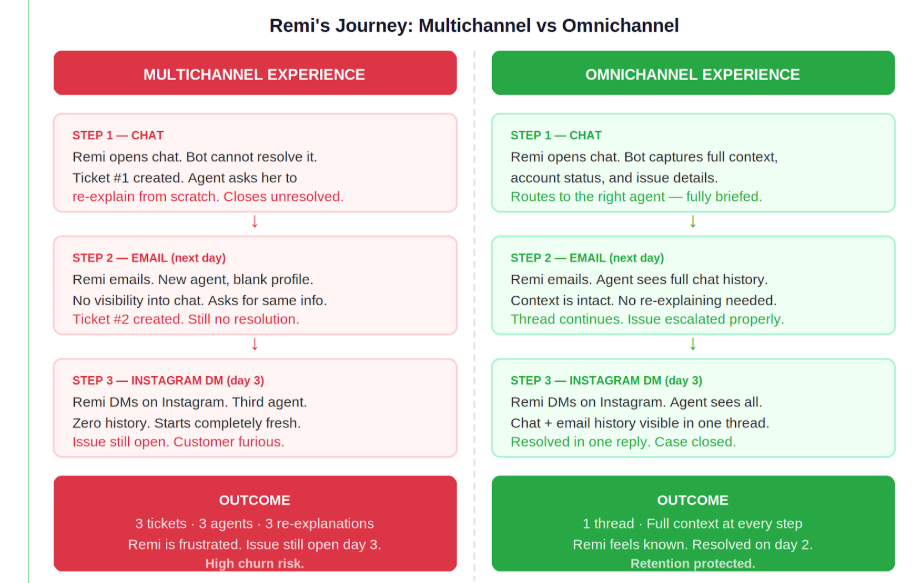
The support failure in the multichannel column isn’t agent error. It’s not a training problem. Your agents are doing exactly what the system allows them to do, which is answer what’s in front of them. The problem is the system, and the system doesn’t share.
Remi’s story plays out every day across thousands of support teams. Three tickets for one issue. Three re-explanations from the same frustrated customer. A support operation that looks responsive in per-channel dashboards but is failing the customer at the journey level.
Omnichannel support fixes the architecture, not the agent.
What support leaders should care about: the metrics
Let’s talk numbers. Because strategy without measurement is just opinion.
Here are the five metrics most support leaders run on, and how the choice between multichannel and omnichannel directly affects each of them.
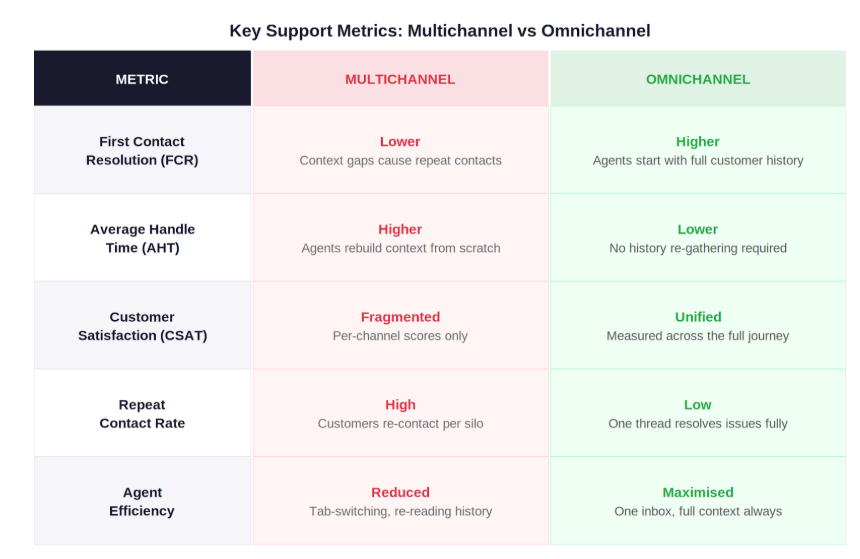
How multichannel vs omnichannel support architectures affect the five metrics support leaders live by.
Every single one of those metrics points the same direction. Omnichannel wins not because it sounds better, but because it removes the structural friction that inflates handle times, tanks FCR, and forces customers to repeat themselves.
It’s not a soft benefit. It shows up in your data.
Every single one of those metrics points the same direction. Omnichannel wins not because it sounds better, but because it removes the structural friction that inflates handle times, tanks FCR, and forces customers to repeat themselves.
It’s not a soft benefit. It shows up in your data.
Which model is right for your business?
Not every team needs to sprint toward omnichannel on day one.
Multichannel support still makes sense if you’re early stage, running low ticket volume, primarily supporting customers on one or two channels, and your customer journey is simple enough that context rarely needs to carry between touchpoints. If that’s you, multichannel is a perfectly reasonable place to start.
But here’s the signal that you’ve outgrown it:
- Your agents regularly ask customers to repeat information they’ve already shared on a different channel.
- You’re seeing duplicate tickets from the same customer on the same issue.
- Your CSAT scores look fine per channel but you’re still seeing churn you can’t explain.
- Escalations from chat to email regularly drop context and extend resolution time.
- You’ve onboarded an omnichannel support AI chatbot but its resolution rate is low because it has no memory of the customer’s history.
If you’re evaluating dedicated platforms for this, see our comparison of the best multichannel AI support platforms.
Migrating from multichannel to omnichannel
The problem isn’t your team. It’s not your processes. And it definitely isn’t the channels themselves.
The problem is that the tools you are currently using were never designed to talk to each other. And no amount of goodwill, process improvement, or agent training will fix an architecture problem.
Let’s get honest about what your stack actually looks like right now.
Step 1: Audit — Face What You Actually Have
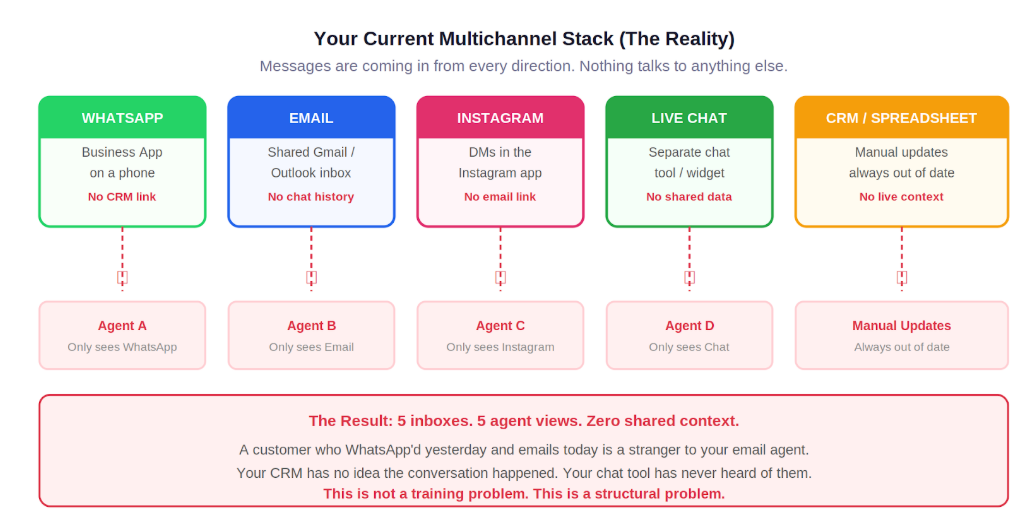
Your WhatsApp messages are sitting in a WhatsApp Business app, probably on one person’s phone or a shared device. There is no API connection to your CRM. There is no way to see who that customer is beyond their phone number. The conversation history lives in WhatsApp, and nowhere else. Or maybe you have a support tool that lets you have a shared WhatsApp inbox without any connection to other tools.
A dedicated shared inbox solves this handoff problem directly. Your email support is running out of a shared Gmail or Outlook inbox. Threads pile up. Agents claim tickets informally. When a customer emails for the third time about the same unresolved issue, the agent who picks it up has no idea it’s the third time. They start from scratch every single time. Or, just like the Whatsapp case, you have an email management tool that gives your team members a shared inbox for email access...alone!
Your Instagram DMs are being handled inside the Instagram app itself, likely by whoever manages the social account. Those conversations are not linked to any customer record. There is no way to know if the person DMing you on Instagram is the same person who submitted a support ticket last week.
Your live chat tool, if you have one, has its own database. Its own conversation history. Its own profile system. Separate from everything else.
And your CRM? No real way of linking conversations from each of the numerous channels you have set up.
This is the reality the audit will surface. And it is important to sit with it honestly, because this is not a fixable problem within your current stack. You cannot bridge these tools by deciding to.
Step 2: Understand why “just connecting them” doesn’t work
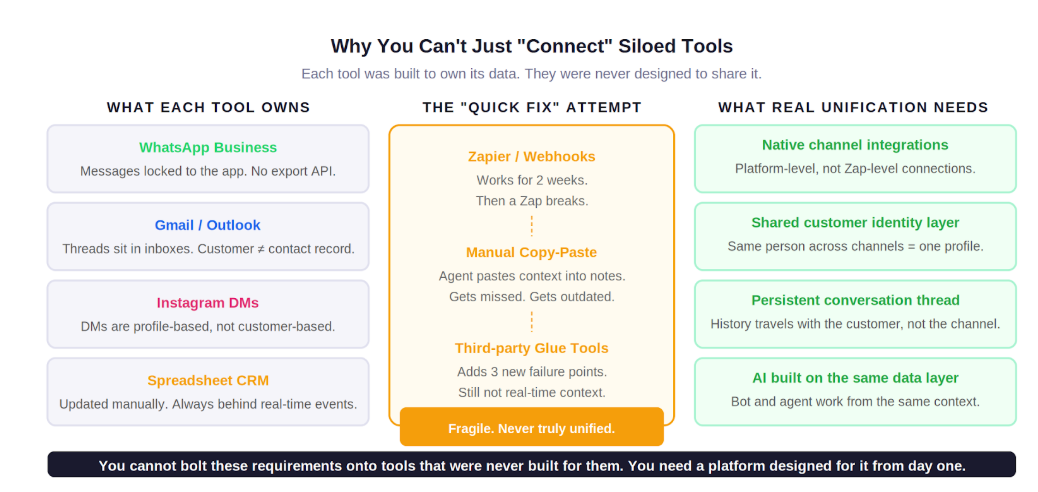
At this point, most support leaders reach for the obvious fix. They look at integration tools. Zapier. Webhooks. A custom script. They try to wire these platforms together and call it omnichannel.
It does not work. And here is exactly why.
WhatsApp Business was built to be a messaging app, not a support platform. It does not emit conversation data in real time to external systems. Its API is limited and was not designed for shared-inbox workflows.
Gmail and Outlook are email clients. They can receive, send, and organize emails. They were not built to hold a unified customer profile that merges data from five other channels. There is no “customer object” in a shared inbox. There is just a thread.
Instagram DMs are profile-based by design. The platform does not expose the kind of customer identity data you would need to link a DM to a support history sitting in another tool.
So when you try to stitch these together with Zapier or a webhook, you are not creating omnichannel support. You are creating a fragile patchwork that looks unified until it breaks. And it will break. The Zap fails. The webhook times out. Someone changes their phone number and the record goes stale. You end up with three different customer profiles for the same person across three tools, all of them incomplete.
Step 3: Accept that the solution is a platform, not a patch
Real omnichannel support requires one thing that no integration layer can provide: a shared customer identity model that all your channels write to and read from simultaneously.
That means every time a customer contacts you on any channel, the system knows who they are, what they have said before, what is still unresolved, and which agent last touched the conversation. Not because someone manually updated a spreadsheet. Because the architecture is built to capture it automatically.
You cannot bolt this on top of tools that were built to own their data independently. You need a platform that was built for this from the ground up.
That is what omnichannel tooling actually is. Not a reporting dashboard that aggregates channel metrics. A single workspace where every channel is a native feed, every conversation is part of one thread, and every agent and AI tool operates from the same live customer record.
How Crisp fixes this with a one-inbox omnichannel platform
Most platforms that call themselves omnichannel are multichannel tools with a shared reporting layer bolted on top. The channels look connected on the dashboard. Open a conversation and you will quickly realise the context stops at the channel boundary. The email agent still has no idea what happened on WhatsApp.
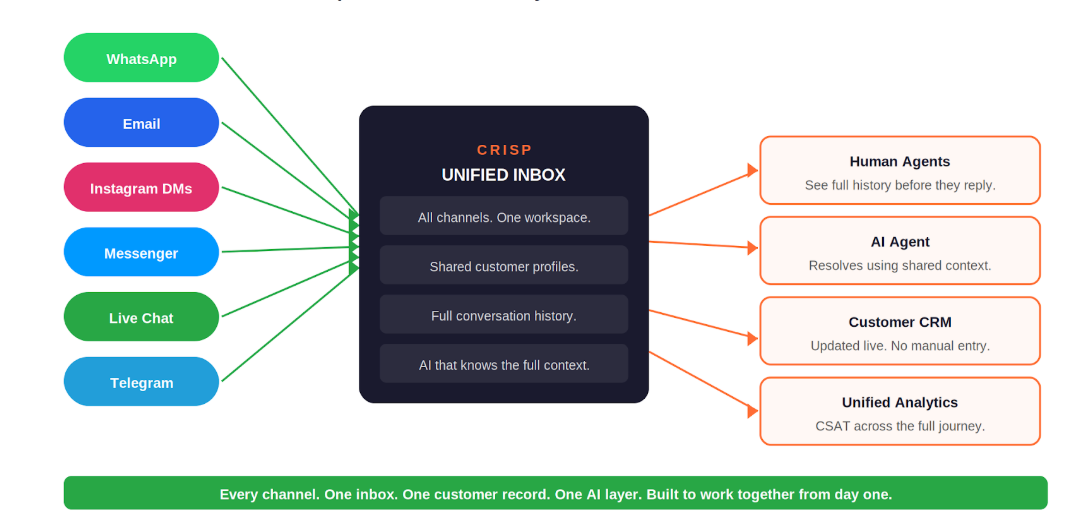
Crisp is built differently. The unified inbox is not a feature added on top of a chat tool. It is the architecture the entire platform was designed around. Every channel your team uses feeds into one shared workspace. One customer record. One conversation thread. Every agent and every AI tool on the platform reads from and writes to the same live context layer.
What this looks like in practice
- You connect your WhatsApp number to Crisp. From that point, every WhatsApp message from every customer arrives in the shared Crisp inbox, attached to a customer profile that shows their full history with your business.
- You connect your email. Those emails appear in the same workspace, under the same customer profile. An agent handling a WhatsApp message can see that this customer emailed three days ago. They can see what was said, what was promised, what is still open. Without switching tools. Without asking the customer to repeat themselves.
- You connect Instagram DMs, Messenger, Telegram, and live chat. Every one of those channels feeds the same inbox, the same customer profiles, the same conversation thread model. Your team stops managing five tools. They work from one.
The AI layer works the same way. Crisp’s AI Agent reads from the same customer context as your human agents. When a customer opens a WhatsApp chat and the AI responds, it already knows this customer emailed yesterday with an unresolved billing question. It does not ask them to re-explain. It picks up the conversation where it left off.
The Migration Path With Crisp
Because Crisp is built around the unified inbox model from day one, the migration path is significantly more straightforward than any stitched-together approach.
- Connect your highest-volume channel first. For most teams this is WhatsApp or email. Setup takes minutes, not weeks.
- Add your remaining channels one at a time. Each connection is native, not a webhook patch. The context model expands automatically as you add channels.
- Your agents do not need retraining on new workflows. The inbox interface is the same regardless of which channel a message came from. The learning curve is the inbox, not five separate tools.
- Turn on the AI Agent once your channels are unified. Because the AI reads from the same context layer as your human agents, it is effective from day one. You are not training it on a single channel. It operates across all of them.
- Track the data. Within two to four weeks you will have measurable before-and-after data on your FCR, AHT, and repeat contact rate. These are the numbers that make the business case undeniable.
How to create an AI Support chatbot with Crisp?
Getting your AI support chatbot live on Crisp does not require any coding skills or a ChatGPT API key. The following steps walk you through the full setup process. For additional detail on each step, refer to the official Crisp help article on creating an AI chatbot with ChatGPT.
Step 1: Create your Crisp account
Go to app.crisp.chat and sign up for a free account. You get a 14-day free trial, which can be extended up to 30 days. Once your account is active, you need to connect Crisp to a live environment. You can either install the Crisp chat widget directly on your website, or activate the Crisp Helpdesk, which surfaces the widget automatically on your help center. Either path gets the chat widget in front of your users and ready for your bot to respond.
Step 2: Train your AI Agent
AI-powered features in Crisp are available from the Essentials plan. Once you have access, head to the AI Agent settings to start feeding your bot with knowledge. Crisp supports five types of training sources:
- Answer Snippets: short Q&A pairs covering common topics your customers ask about
- Web Content: add your website domains and Crisp will crawl them to train the AI on your existing pages
- Knowledge Base Articles: your published help center articles are automatically ingested by the AI
- Inbox Messages: past conversations between your team and users feed the AI with real-world context
- Data Importer: upload files directly in PDF, CSV, or TXT format
From the same settings screen, you can also select which underlying AI model your agent uses. The default model is configurable and can be updated as newer options become available.
Step 3: Build your chatbot scenario
With your AI trained, open the AI Agent section.
Step 4: Test before you go live
Before making your bot visible to real users, test it thoroughly using the built-in testing interface called "Playground".
For more complex setups involving multiple connected scenarios or advanced conditions, you can test live without affecting users by temporarily editing the trigger to detect a secret keyword that only you know.
Start a conversation in the chat to activate the AI Agent, check how it responds to your key questions, and refine its knowledge as needed. Once the behavior is consistent and accurate, hit the publish button.
Frequently Asked Questions
Is omnichannel support always better than multichannel?
For most growing businesses, yes. Omnichannel reduces repeat contacts, improves first contact resolution, and creates a more consistent experience across your customers’ actual journey. Multichannel is a reasonable starting point for early-stage teams at low ticket volume, but it becomes a liability as you scale.
What is an omnichannel chatbot and how is it different from a regular chatbot?
A regular chatbot lives on one channel and starts fresh with every conversation. An omnichannel chatbot operates from a shared customer context layer across all channels. It knows the customer’s history, account status, and past interactions regardless of which channel they’re using right now. The result is a bot that can actually resolve issues rather than just deflect them.
What metrics improve most when you move from multichannel to omnichannel?
The biggest gains tend to appear in First Contact Resolution (FCR), Average Handle Time (AHT), and repeat contact rate. These three metrics are most directly affected by context gaps, and context gaps are precisely what omnichannel eliminates. CSAT improves as a downstream effect, particularly when measured at the journey level rather than per channel.
How long does it take to migrate from multichannel to omnichannel?
On a platform like Crisp, the initial consolidation of two or three channels into a unified inbox can happen within days. Full migration across all channels, including AI configuration and team training, typically takes two to four weeks depending on the number of channels and the complexity of existing workflows.
Is omnichannel support only for enterprise companies?
Not anymore. Modern platforms have made the unified inbox architecture accessible at the SMB and startup stage. You don’t need an enterprise contract or a six-month implementation to get cross-channel context sharing. The operational benefit scales down just as well as it scales up.

Summer 2026 - Product Update
Meet the refreshed Crisp experience, Understand how Artificial Intelligence handles every conversation, Build reusable teams across your workspace, and more. Discover the latest features and improvements released by the Crisp team in Summer 2026.


Best 9 helpdesk software and ticketing systems for 2026
Need help to choose your next helpdesk with a ticketing tool for 2026? We've gathered a guide that gives you everything you need to convince your C-levels.


Team workload management for support: how to balance the queue without burning anyone out
Ticket count hides real workload. Here's how to measure effort instead of count, route with capacity in mind, and stop burning out your best agents.