Task Automation in Customer Support: Complete 2026 Guide
Want to better understand task automations and how it can help your customer support experience when it is powered with AI? Here is a dedicated guide that can help you do such thing.


Most customers don’t wait around anymore. They land on your site, hit the chat bubble, send a WhatsApp message, try to call you and expect answers now. And honestly, support teams have been feeling the pressure for years. Tickets keep rising, expectations keep rising, but headcount? Not necessarily rising.
Somewhere in the middle of all that chaos, task automation has quietly become the backbone of modern support teams.
Password resets, refund checks, subscription updates, order lookups, triage, tagging… the whole laundry list of admin-heavy nonsense that eats up 70% of a support team’s day. All these are now captured and sorted out by modern automation routines.
Automation is now the layer customers pass through before they ever meet a human. It’s the gatekeeper, the traffic controller, the assistant, and sometimes the only thing keeping your support queue from collapsing.
We’ll be breaking down how task automation actually works in customer support today; what can be automated within a support department, what’s hype and overated, and how teams are using AI agents to finally operate without drowning in repetitive work.
What is customer service automation?
Customer service automation is basically your support team’s off-switch for busywork. It’s the tech layer that steps in to handle the repetitive, predictable tasks humans hate doing but customers expect instantly.
Think of it this way:
Every support team has the same 20–30 tasks hitting them on repeat. The order updates, password resets, subscription tweaks, refunds, basic troubleshooting, routing, tagging, “where is my order?”, the usual suspects. Automation takes those tasks and runs them end-to-end without needing a human to poke at every step.
Instead of an agent opening five tabs to check an order, update a CRM, trigger a refund, and send a confirmation message, an automated workflow handles the whole thing the moment the customer asks.
And no, this isn’t the old-school “bot replies with a pre-written script” era anymore. The new wave is AI support agents that understand the request, pull the right data, follow your rules, connect to your tools, take actions, and close the loop.
When done right, customer service automation becomes the invisible backbone of your support engine—quietly handling the bulk of your operational load so your actual humans can work on problems that require… well, an actual human.
How tasks automation in customer support differs from traditional support
| Key Aspect | Traditional Support | Automated Support |
|---|---|---|
| Knowledge Accessibility | Dependent on each agent’s memory and training | Instant access to all company knowledge and updates |
| Error Rate | Human mistakes, inconsistent answers, overlooked info | AI ensures precision but can hallucinate |
| Handling Volume | Struggles with spikes, long queues form easily | Seamlessly manages high traffic without stress |
| Proactive Problem Solving | Mostly reactive; waits for customer complaints | Predicts issues using data and intervenes before problems escalate |
| Knowledge Retention | New hires forget or misinterpret info, knowledge leaks | All interactions logged, constantly improving the knowledge base |
| Strategic Insights | Requires manual data compilation, slow to spot patterns | Automatic analytics reveal trends, pain points, and opportunities in real-time |
| Brand Perception | Varies with agent skill; mistakes impact reputation | Delivers a polished, consistent, and confident brand experience |
FAQ about the difference between traditional support and automated customer support
How accessible is company knowledge for support teams?
In traditional support, knowledge depends on each agent’s memory and training. On the contrary, automated support centralizes information and updates it continuously. Compared to individual recall, this shared source keeps answers aligned as products, policies, and teams evolve.
How often do errors happen in customer support?
Traditional support accepts a degree of human error and inconsistency. By contrast, automated support applies the same logic and data every time. While humans still matter for edge cases, automation reduces avoidable mistakes in routine and high-volume requests.
How well does support handle sudden spikes in demand?
Traditional teams scale linearly and often struggle during traffic spikes. On the contrary, automated support absorbs volume instantly. Compared to hiring or overtime, automation handles surges without degrading response times or overloading human agents.
Can support prevent issues before customers complain?
Traditional support is largely reactive, responding after frustration appears. Automated support, by comparison, detects patterns and triggers early actions. On the contrary to waiting for tickets, it can resolve issues before they escalate.
What happens to knowledge when teams change or grow?
In traditional support, knowledge can fade or fragment as teams rotate. Automated support, on the contrary, retains and compounds learning over time. Compared to manual handovers, every interaction strengthens the system instead of resetting it.
How easy is it to extract insights from support conversations?
Traditional support relies on manual analysis, which slows insight discovery. Automated support, by contrast, surfaces trends in real time. Compared to spreadsheets and reports, patterns emerge continuously without extra operational effort.
How does support impact brand perception?
With traditional support, brand experience varies by agent and situation. On the contrary, automated support enforces consistency by design. Compared to uneven human delivery alone, it creates a more predictable and trustworthy customer experience.
How Automated Support Works
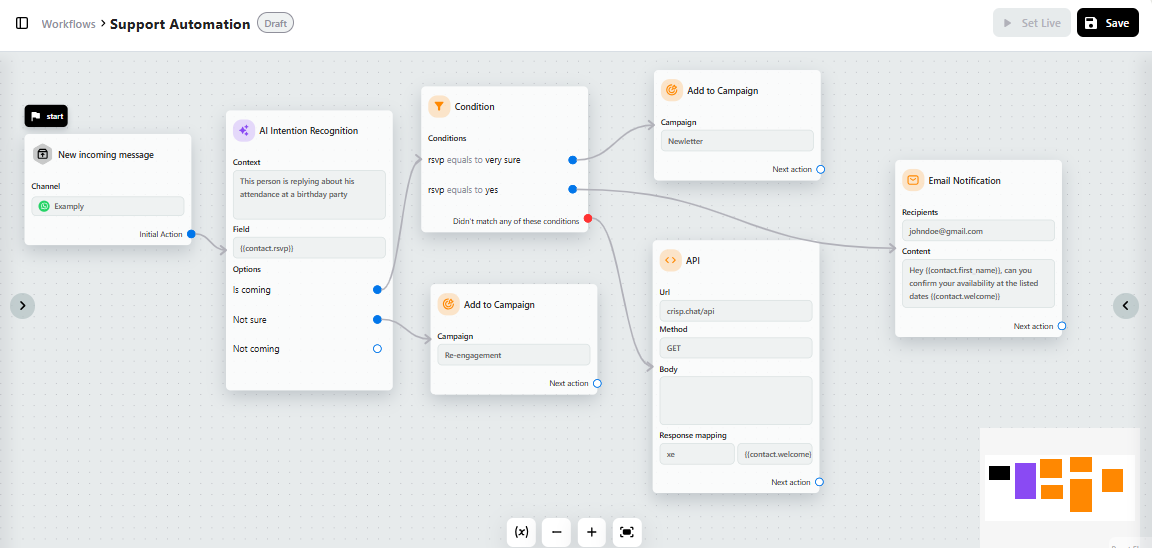
Automated support runs as a behind-the-scenes system that responds the moment a customer asks for help. Customers send a support inquiry, and boom, things start happening behind the scenes before a human ever gets involved.
A customer asks for something → the system understands what they mean → it grabs the data it needs → it runs a workflow → it closes the loop.
Let’s break it down without turning this into a robot engineering lecture.
1. It starts with intent detection.
The moment a customer types a message, the AI figures out what they actually mean. Not the literal words. The intention.
“Where’s my order?”
“Refund this.”
“I need to change my email.”
“Help, everything is broken.”
The system sorts each one into the right category instantly.
2. Then it grabs the info human agents usually chase manually.
Order numbers, past messages, plan type, shipping data, billing status, device info, all the usual bits agents normally hunt across multiple tools. Automation collects everything in seconds.
3. Next comes the workflow, the actual doing part.
This is where automated support stops being a toy and becomes a real worker. A workflow can:
- Check a database
- Update a record
- Process a refund
- Generate a return label
- Escalate a case
- Send proactive update
It is the equivalent of an agent opening a dozen tabs...just done more efficiently.
4. It resolves the task and responds.
The final step is closing the loop. The AI confirms what it did, explains the next steps, and logs everything. Humans are only brought in when something truly needs judgment or empathy.
5. And humans can tag in at any point.
Automation is not a fortress. It is a filter. When a situation gets weird or emotional, the bot hands over a fully prepped case so your human agent starts with context instead of starting from zero.
Put simply, automated support works by eliminating all the slow, repetitive, soul-draining steps your team currently handles manually. It is not magic. It is a more efficient workflow using a chat interface.
Practical automation in action: 10 Real-world support tasks to be automated in 2026
Here’s what automation looks like inside real companies in 2026.
Password resets. Order tracking updates. “Can you resend my invoice?” The endless parade of low-effort, high-volume tasks that quietly swallow entire workdays. These workflows are the backbone of boring customer support.
They keep the lights on and the queue moving. But the real shift in 2026 is that automation has moved far beyond these basics. Teams are now automating the messy, needle-moving workflows that actually impact churn, revenue, operational costs, and customer satisfaction at scale. That’s where things start getting interesting.
Ticket intent detection & auto-context building
AI reads the incoming message, detects intent (billing, bug, cancellation, usage), and attaches the right context automatically: customer plan, lifecycle stage, last actions, known incidents.
Result: The agent opens the conversation already oriented.
Smart ticket routing & prioritization
AI assigns the conversation to the right inbox, team, or agent based on intent, urgency, SLA risk, language, or account value.
Result: No manual triage. No “who should take this?” Slack messages.
First-draft reply generation for agents
AI proposes a ready-to-send answer grounded in internal knowledge, past replies, and tone guidelines.
Result: The agent edits, validates, and sends without losing control.
Knowledge gap detection
When AI cannot confidently answer or sees repeated agent edits, it flags missing or weak documentation and suggest improvements for an help article.
Result: Support pain becomes a roadmap for better help content.
Escalation decision support
AI evaluates whether a conversation should be escalated based on sentiment, legal keywords, refund risk, or churn signals.
Result: Junior agents get senior-level judgment scaffolding
Multilingual support assistance
AI translates incoming messages, proposes localized replies, and preserves intent and tone.
Result: One team supports global users without hiring per language.
Churn risk detection & save-playbook trigger
AI detects cancellation signals (“thinking of leaving”, “too expensive”, “doesn’t fit”) and suggests a save path: education, downgrade, pause, or human intervention.
Result: Expansion and retention stop being accidental.
After-resolution summarization
Once the ticket is closed, AI generates a clean internal summary: issue, root cause, resolution, workaround.
Result: Future agents learn automatically from past conversations.
Agent onboarding & continuous training
New agents ask questions in plain language through an AI Copilot. AI answers using internal knowledge, real past tickets, and best practices.
Result: Onboarding shifts from “shadow someone for 3 weeks” to “be productive from day 1”.
Benefits of automated customer support
Customers today expect fast, accurate answers without waiting around. Automated support meets that expectation while helping businesses scale smarter and operate more efficiently.
Automation didn’t replace support teams: it replaced waiting
Customers don’t expect humans anymore. They expect answers. When they don’t get them, they leave.
Automated support isn’t about doing more with less. It’s about removing the dead time that kills trust: unanswered chats, slow inboxes, repetitive back-and-forth.
Availability is no longer a differentiator. silence is a liability
When support goes offline, customers don’t “wait until tomorrow.” They open another tab.
Automation ensures every request gets acknowledged instantly — even when your team is asleep. Not with vague promises, but with real answers pulled from your actual knowledge.
Consistency beats hero agents
The fastest-growing support teams don’t rely on their best agents remembering everything. They encode knowledge once, then reuse it endlessly.
Automation removes randomness from support. Policies are applied the same way. Answers don’t drift. Brand voice doesn’t depend on who’s on shift.
Scaling manually is how support breaks
Volume never increases politely. It spikes. Promos, launches, outages: that’s when human-only support collapses.
Automation absorbs volatility. Not by replacing agents, but by removing the repetitive load that turns peaks into chaos.
Speed isn’t about typing faster
Most support time isn’t spent answering: it’s spent searching. Automation short-circuits that.
The right information appears instantly, based on intent and context, reducing resolution time without rushing the human judgment that still matters.
Cost savings are a side effect, not the goal
Yes, automation reduces operational cost. But the real win is reallocating human effort to problems that actually need humans: edge cases, emotions, retention moments.
That’s how support becomes leverage instead of overhead.
Data turns support from reactive to strategic
Every automated interaction leaves a trace. Patterns emerge. Gaps surface. Repeated questions expose product friction.
Automation doesn’t just answer customers. It teaches the company where it’s failing.
One experience, no matter the channel
Customers don’t think in channels. They think in problems. Automation ensures the answer doesn’t change depending on whether the question came from chat, email, or social.
That coherence is what makes support feel professional at scale.
How to Get Started with Support Automation
Let’s slow this down for a second.
If you’re a Head of Support, Support Ops lead, CX manager, or even a founder wearing the support hat, you’re probably staring at automation thinking:
“This all sounds powerful… but where the hell do I start?”
That feeling is normal. In fact, it’s the default state right now.
AI can touch ticketing, chat, email, voice, routing, QA, analytics, onboarding, billing, fraud, retention… which creates a weird paradox. Too many options. Too many tools. Too many promises. This section is for that moment.
Step 1: Start with roles, not tools
The fastest way to fail at support automation is to start with software demos. Instead, start with people. Sit down and list your core support roles:
- Frontline agents
- Tier 2 or escalation agents
- Support operations
- Billing or compliance support
- Customer success or onboarding
- Yourself, if you’re reviewing queues and reports at night
Now ask one uncomfortable question for each role:
What are they doing every day that clearly does not require human judgment?
Not “what feels automatable.” What is objectively repetitive?
If a task can be:
- Explained once
- Done the same way every time
- Verified with data
- Repeated dozens or hundreds of times a week
…it’s a candidate.
Step 2: Pull real data, not assumptions
Here’s where people mess up. They just think, “Password resets are annoying, let’s automate that.” Sure. That’s fine. But it’s surface-level thinking.
Instead, pull:
- Your top 50 ticket reasons
- Average handling time per issue
- First-response delays
- Reopen rates
- Escalation frequency
- Now rank tickets by two dimensions:
- Volume
- Cognitive effort
High-volume, low-effort tasks are your backbone automations.
High-volume, medium-effort tasks are your leverage points.
Low-volume, high-effort tasks are human territory.
This removes opinion from the room. The data tells you where automation earns its keep.
Step 3: Separate “AI-assisted” from “actually automated”
This distinction matters more than most teams realize. There’s a temptation to say, “We added AI summaries, we’re automated now.” You’re not.
If a human still has to:
- Read the summary
- Decide what to do
- Click through systems
- Execute the action
You improved efficiency. You did not automate the workflow.
True automation means the task completes end-to-end without human involvement unless something breaks or needs judgment.
If this ran at 3 a.m. when there is no human for oversight, would the customer still get a resolution?
If yes, it’s an automation candidate...
If not, it’s assistance.
Both are useful. Only one reduces operational load.
Step 4: Look for handoff pain, not just speed
Veteran support leaders know this one. The biggest bottlenecks are not slow agents. They are handoffs.
- From billing to support.
- Support to engineering.
- Chat to email.
- Bot to human.
Any workflow where context is lost, repeated, or manually re-entered is automation candidate.
Ask:
- Where do customers have to repeat themselves?
- Where do agents copy-paste between tools?
- Where do tickets stall waiting for “the other team”?
Those gaps are not obvious at first glance, but they quietly destroy CSAT and morale. Automating context collection, validation, and routing often delivers more impact than automating answers.
Step 5: Build a simple qualification checklist
Before automating anything, run it through this checklist:
- Does this task follow predictable rules?
- Does it rely on existing data sources?
- Does it happen frequently enough to matter?
- Is the outcome clearly measurable?
- Would failure be recoverable or catastrophic?
If you can answer yes to the first four and no to the last one, you’ve found a strong automation candidate.
Step 6: Start narrow, then expand sideways
The biggest mistake is going wide too fast.
Automate one workflow completely, watch it run, measure the impact, and fix the edges.
Then expand sideways into adjacent workflows that share the same data, logic, or systems. That’s how automation compounds without chaos.
The Real Point: Task Automation Is No Longer Optional
At this point, this shouldn’t feel theoretical anymore.
Task automation in customer support is not a future trend, not an experiment, and not something only massive companies can pull off. It’s already happening. Quietly. Systematically.
The advantage is not subtle. Automated support gives you speed where customers demand it, consistency where humans struggle, and end-to-end ownership where manual processes usually break. Fewer errors. Faster resolutions. Cleaner handoffs. Support teams that are not constantly in recovery mode. Businesses that can grow without support becoming a bottleneck.
And the impact is real. Cutting resolution times by 30–50%. Eliminating entire categories of tickets. Freeing senior agents to handle work that actually matters. Preventing churn before it shows up in a dashboard.
If you are still relying on humans to manually check data, explain the same rules, and execute the same workflows dozens of times a day, you are giving up leverage. Every day.
That’s the opportunity here.
Not “add AI.”
Not “install a chatbot.”
Redesign support so the work that shouldn’t exist… simply doesn’t.
Once you do that, everything else gets easier.
FAQ about support automation
1. What customer support tasks should be automated first?
High-volume, low-judgment tasks should be automated first. This includes account lookups, credit or usage checks, order tracking, password resets, billing changes, and workflow-based actions that follow clear rules.
2. How do I identify workflows that can be automated in customer support?
Start by analyzing ticket volume, average handling time, and repeated agent actions. If a task follows predictable rules, relies on existing data, and occurs frequently, it is a strong candidate for automation.
3. Can support automation replace human support agents?
No. And that shouldn't be the goal. Automation removes repetitive operational work so human agents can focus on complex issues, edge cases, and situations that require judgment, empathy, or problem-solving.
4. How does AI improve customer support operations in SaaS companies?
AI helps SaaS companies automate account management, usage tracking, plan changes, billing workflows, and proactive support actions, reducing resolution time and improving customer satisfaction at scale.
Sources
“Why Agentic AI Projects Fail—and How to Set Yours Up for Success”
Date: October 2025
Source: Harvard Business Review
Link: https://hbr.org/2025/10/why-agentic-ai-projects-fail-and-how-to-set-yours-up-for-success
“Generative AI Will Enhance — Not Erase — Customer Service Jobs”
Date: March 2023
Source: Harvard Business Review
Link: https://hbr.org/2023/03/generative-ai-will-enhance-not-erase-customer-service-jobs

Best AI Chatbot Platform for Reducing Ticket Backlogs in 2026
Want to get ahead of competition and choose the best AI Chatbot to reduce support backlogs? Here are our top picks for 2026.

Spring 2026 - Product Update
Want to know what we've done the past months at Crisp? Make sure to check out our product update for Spring 2026!


24/7 Support Benchmarks: What customers expect in 2026
The 9-to-5 support model is dying, and your customers already know it. If your checkout page runs around the clock, they assume your support does too. But knowing you should offer 24/7 support and actually delivering it are two very different things.