Automating Email Responses With AI: From Inbox Chaos to Smart Replies
Email is still the backbone of customer support. See how AI helps to reduce the email ticket backlog thanks to automated workflows.


Despite the rise of chat, WhatsApp Business, and social DMs, email is still the backbone of B2B customer support.
It's where customers go when something actually matters to them: a billing issue that didn't get resolved in chat, a product failure that needs a paper trail, an escalation that live chat couldn't hold. Email carries weight. It always has.
And yet, it's also the channel where support teams bleed the most time. Not on the replies themselves. On everything that happens before a reply gets written.
Reading a 14-message thread from scratch. Deciding whether an email is a bug or a billing issue. Figuring out which team member should own it. Starting from a blank reply box, again, for the hundredth time that week.
AI automation doesn't fix email by replacing it. It fixes email by removing the mechanical layer your agents were never supposed to be doing in the first place. Done right, AI email automation gives your inbox an operating system. Incoming emails get classified, routed, summarised, and drafted even before an agent writes a single word.
The email triage problem
Ask any support lead to describe the most time-consuming part of their team's day. The answer is rarely "we spend too long actually solving customer problems." More often, it's the overhead that wraps around every single email: the reading, the sorting, the deciding, the drafting.
For a ten-person team handling a few hundred emails a day, that overhead is annoying. For teams scaling past that threshold, or any team where volume has outpaced headcount, the overhead becomes the job. Agents turn into triage clerks. Resolution quality drops because there's no mental space left to actually think. Backlogs compound overnight.
The pattern repeats across every industry. High-volume inboxes without an intelligence layer become bottlenecks regardless of how capable the team is. This isn't a people problem. It's a systems problem. And it's exactly what AI was built to solve.
The metric that actually measures this: first response time
Support leaders track a lot of numbers. FRT is the one that tells the whole story before a word is even typed.
First Response Time (FRT) is the time between a customer's first message and your team's first reply. It's the digital version of eye contact when someone walks into your store. Miss it, and customers assume you're not there. Nail it, and you've won half the battle.
 Antoine Goret
The benchmark data is uncomfortable reading for most teams. Email's industry average sits at 8–12 hours, while customers expect a reply within 4 hours. Best-in-class teams respond in under an hour. That gap, between what customers expect and what teams actually deliver, is where backlogs are born and where customers start quietly looking elsewhere.

What AI does to email FRT is not incremental — it's structural. Pre-classification means emails land in the right queue before a human sees them. Pre-summarisation means agents read fast instead of scrolling from the top. Pre-drafted replies mean they edit instead of typing. Each layer shaves minutes. Across a hundred daily tickets, that compounds into hours recovered per day, and an FRT number that finally reflects how good your team actually is.
FRT during business hours is one challenge. FRT during the other fifteen hours of the day is a different problem entirely, and for most teams, it's the one they're not looking at.
Antoine Goret
The 24/7 problem email teams never talk about
Most discussions about email automation focus on the daytime inbox — the Tuesday morning chaos, the 97-ticket queue. But email's real killer is the overnight gap.
A ticket that arrives at 11PM in a business without AI sits for 8 to 12 hours by default. The customer who sent a billing question before bed wakes up to silence. By the time your team opens their laptops, their frustration has been compounding for eight hours. The reply they receive, however good, lands into a conversation that has already soured.

The overnight gap — 15 hours of silence before AI, zero dead zones after
What AI does to the overnight inbox is different in kind, not just degree. It doesn't just acknowledge — it classifies incoming email, routes conversations to the correct queue, summarises thread for the morning agent, and where configured, resolves routine queries completely before the team arrives at 9AM.
The morning agent opens a sorted, summarised queue. The first hour of the day is execution, not triage.
IBM research shows AI can reduce average response times by up to 99% in scenarios where customers previously waited hours for a reply. Similarly, companies deploying AI across all channels reduced off-hours ticket abandonment by over 50%.
Now that we have the metrics, let's see this inside an actual workflow. Not as a number on a dashboard, but as a sequence of daily decisions, and what a Monday morning looks like when no AI processed the overnight inbox.`


Before AI: what a broken email workflow looks like
The pre-AI email workflow isn't broken in an obvious, dramatic way. It's broken in the slow, invisible way that accumulates until it breaks something else, response SLAs, team morale, or the high-value account that didn't hear back fast enough and churned quietly.
Here's the workflow in plain terms. An email arrives. An agent reads it, the full thread, even if it's twelve messages long, to understand the context. They mentally classify it: billing? Bug report? Feature request? Refund? Then manually decide which team member or queue it belongs to. If unsure, they send an internal note asking. Then they draft a reply from scratch.
At scale, this generates four compounding problems that never go away on their own:
- No prioritisation signal: a refund dispute and a newsletter unsubscribe look identical at arrival. Urgency is invisible until someone reads the email.
- Duplicate replies: two agents see the same thread, and both respond, or both assume the other will handle it.
- Inconsistent reply quality: what your best agent writes and what your newest hire writes are noticeably different. There is no quality floor without a system.
- Zero backlog visibility: managers have no real-time picture of what's sitting unresolved, why, or for how long.

Email workflow without AI — every step is manual, every email starts from zero
How AI actually works inside an email workflow
Understanding what AI email automation for customer service does requires separating it from what people assume it does. It doesn't read an email and fire a reply autonomously. Modern implementations, the ones actually working in production, operate across three distinct layers. Each layer solves a different piece of the problem.

The three layers of AI email automation — triage, briefing, and draft generation
Layer 1: classification and routing (triage layer)
The first layer is where the biggest upstream impact happens. The moment an email arrives, AI reads the full content and intent, tags it with a category — billing, bug, refund, escalation, general inquiry — and routes it to the appropriate sub-inbox or team queue. Automatically. Before a human sees it.
Think of it like a hospital triage nurse. The nurse doesn't perform surgery. But without them, every surgeon would spend half their shift in the waiting room taking intake notes. AI does exactly this for your inbox. It reads every email, assigns urgency and category, routes it to the right specialist, and hands the agent a pre-labelled case — not a pile of undifferentiated mail.
The classification is trained on your own data. Your categories, your language, your historical conversations. A developer tools company and a hospitality brand have completely different support taxonomies. AI learns yours, not a generic model's idea of what "billing" means.
Layer 2: Contextual Summarisation (briefing layer)
Once the conversation reaches an agent, the second layer activates. Instead of reading an eight-email thread from the top, the agent gets a one-paragraph AI-generated brief in the sidebar: what happened, what the customer tried, where things stand. They don't start from confusion. They start from context.
This matters most for escalated tickets, where a full conversation history can span multiple agents and days. Reading the thread from scratch is how agent time gets quietly destroyed. The AI summary eliminates that entirely.
Layer 3: Draft reply generation
The third layer is the most visible and the most misunderstood. AI generates a draft reply based on three inputs: the conversation thread, the customer's detected intent, and your company's own knowledge base; help articles, internal documentation, and past high-quality responses. The agent opens a pre-populated reply box. They review it, personalise it if needed, and send.
The critical design principle: the human approves before anything goes out. This is not autopilot. It is autocomplete that actually knows your product. The draft removes the blank-page problem; the five-minute staring-at-the-screen phase that multiplies across a hundred daily tickets into hours of lost time per week.
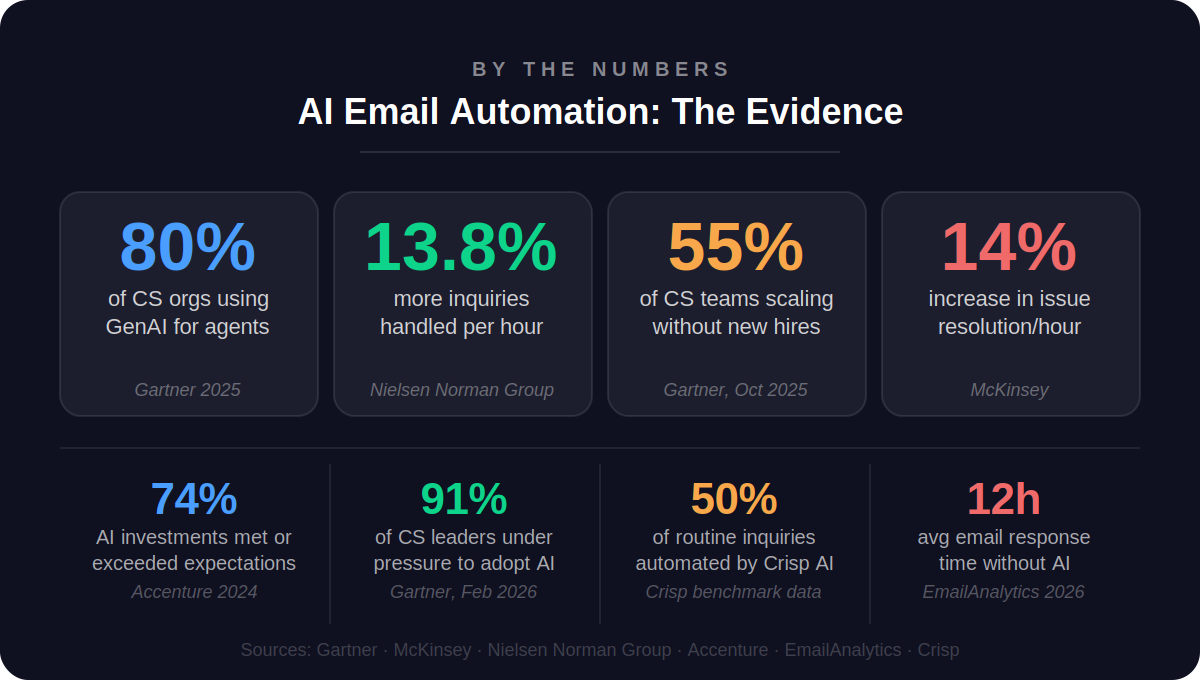
The productivity gains here are well-documented. Nielsen Norman Group found that agents using AI assistance handle 13.8% more customer inquiries per hour — not because the AI is doing their job, but because it's eliminating the overhead between conversations. McKinsey's data on Gen AI-enabled service teams shows a 14% increase in issue resolution per hour across comparable implementations. The gains compound at the team level in ways individual metrics don't fully capture.
Understanding the mechanics is one thing. Implementing them is another. Before your first AI-generated draft suggestion appears in an agent's inbox, a few things need to be in place.
How to get started with email automation: a practical guide
Most teams underestimate how much of their AI email tool's quality comes not from the tool itself, but from what they bring to it. This section breaks down four steps to set up email automation that actually works:
Step 1: Audit your current email workflow first
Before deploying any AI, spend a week tagging incoming emails by category: billing, bug, general inquiry, refund, escalation, and other. You're building the map AI will use to route. If you can't name your top five email categories, the AI might fail to categorize your emails as well.
Also, measure your current FRT by email type. You'll need this baseline to demonstrate ROI within the first 30 days.
Step 2: Build your knowledge foundation
This is one of the biggest reasons AI draft quality disappoints in early deployments. The chef analogy applies here precisely: a Michelin-starred kitchen and a fast food kitchen can have the same equipment. What determines the quality of the food is the quality of the ingredients going in.
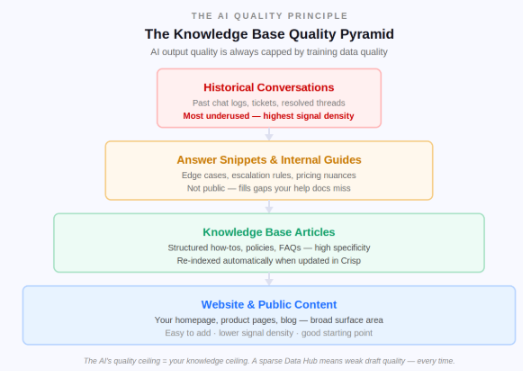
Feed the AI these four layers, in order of priority:
- Website and public content: your homepage, product pages, and blog. Easy to connect, but lower signal density because it's written for marketing, not for resolving support issues.
- Knowledge base articles: structured, searchable, automatically re-indexed when updated. The primary source for factual answers about features, pricing, and policies.
- Answer snippets and internal guides: edge cases, escalation rules, pricing nuances that aren't public. This is where you fill the gaps your public content doesn't cover.
- Historical conversations: your most underused and most powerful source. Past chat logs and resolved tickets show the AI how your customers actually phrase questions and what solutions worked. Most teams skip this entirely.
Step 3: Apply the five non-negotiable tool criteria
When evaluating which tool to deploy, these five criteria are important:
- Trained on your own content: generic AI drafts are only marginally better than templates. The tool must ingest your knowledge base, website, and past conversations.
- Email as a first-class channel: email should live alongside chat, WhatsApp, and social DMs in a unified inbox. Siloed email modules break context when customers switch channels.
- Human-in-the-loop by design: every outbound reply needs agent approval. Draft suggestions should never auto-send.
- Full conversation context, not just the last message: the AI must read the full thread to avoid contradicting what was said three messages earlier.
- No-code routing and sub-inbox configuration: if building escalation paths requires an engineer, most teams will never configure it correctly.
G2's 2026 AI in Customer Support Report confirms that the dominant operating model across vendors is hybrid, AI assists with triage, routing, summarisation, and suggested replies, while human agents stay responsible for resolution. Tools that enforce that model clearly are the ones that actually improve output quality without creating new compliance risk.
Step 4: Start with one queue, measure, then expand
Start with your highest-volume, lowest-complexity email category; usually a billing FAQ or order status queue. Run it for a while. Measure FRT, reply edit rate, and CSAT. Then expand to the next queue.
This is also where the AI gets smarter. Every resolved conversation it handles becomes potential training data. Every question that it can't answer confidently surfaces a knowledge base gap. The longer it runs on a queue, the sharper its suggestions become for that queue. The system is self-improving, but only if you give it structured feedback loops.
Once the setup is in place, the next question is the one that determines whether any of this gets approved: what does it actually cost to keep doing email support manually, and what happens to that number when AI takes over?
The real cost of not automating your email support
The business case for AI email automation isn't really about the technology. It's about a lot more, one of which is where your support budget is quietly disappearing right now.
If an agent earns £35,000 per year and handles 8,000 tickets annually, each ticket costs roughly £4.40 in direct salary alone — before management overhead, training, tooling, and benefits. Industry estimates put the real loaded cost at 1.25x to 2x the base salary figure. Multiply across a ten-person team, across a full year of volume, and the number becomes the kind of line item that gets noticed in a board presentation.
What automation does to that number: Forrester data puts AI-assisted support cost reduction at 30–40% for teams that implement it properly. That's a meaningful budget that can be redirected toward the agents doing the complex, high-value work they were actually hired for.
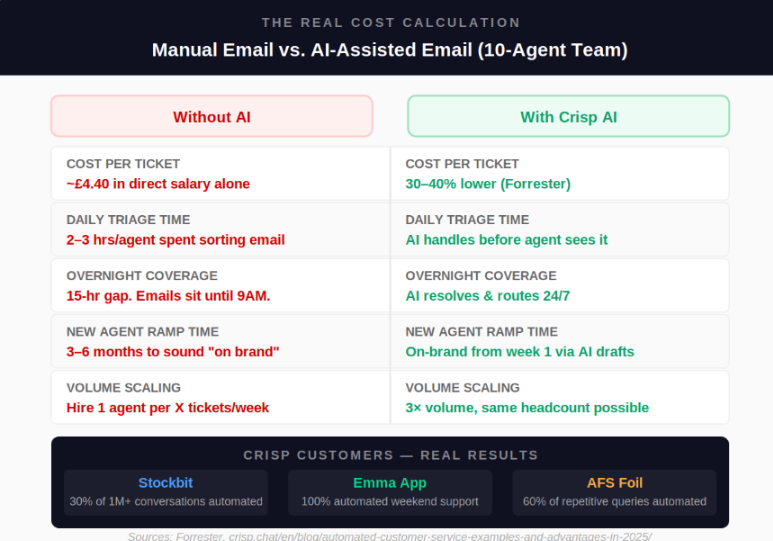
Five cost levers that change immediately when AI is active:
- Cost per ticket drops 30–40% through time-to-first-draft reduction and triage elimination
- Agent ramp time collapses: new hires sending AI-suggested drafts sound on-brand from week one instead of month three
- Overnight coverage at near-zero marginal cost because AI processes the overnight queue without shift pay, night differential, or burnout
- Backlog doesn't compound because emails are classified and queued before the morning team arrives, so Monday mornings stop being triage marathons.
- Scaling is no longer headcount-linear: 3x volume growth does not require 3x hiring when AI absorbs the triage and drafting overhead
After AI: the same workflow, rebuilt
The same email that previously took an agent four-plus minutes to read, classify, assign, and draft a reply for — in an AI-assisted workflow, it arrives pre-classified, pre-routed, and pre-summarised. The draft reply is waiting. The agent's job is review, judgment, and personalisation.

The downstream effects are consistent across real teams. First response times drop significantly. Reply consistency improves across the whole team. And agents report a measurable reduction in the mental fatigue that makes high-volume inbox work unsustainable at scale.
There's a subtler benefit too, one that shows up in quality reviews over time: when agents aren't burning cognitive energy on triage, the replies they actually write are better. They have mental space to think about the customer's specific situation, not just process it. The support gets more human, not less.
How Crisp Makes Email Automation Easy
Crisp brings every email, chat, WhatsApp message, and social DM into one shared inbox with one AI layer running across all of it. No separate email module. No disconnected tools. Everything in one place.
For email specifically: incoming messages get classified by intent, routed to the right team, summarised for the agent, and drafted for review before anyone has typed a word. The manual overhead disappears.
MagicReply suggests contextually accurate replies drawn from your knowledge base. AI Copilot assists agents mid-conversation without ever contacting the customer directly.
Across Crisp's most active customers, the median automation rate sits at 42%. Some teams reach 80%.
Setup takes a day. No engineers required. No credit card to start.
The inbox isn't the problem. The manual overhead is.
Email isn't going anywhere. Its staying power comes from the same quality that makes it frustrating to manage at scale: it's asynchronous, it's thorough, and customers use it when they mean business. That won't change.
What is changing (for teams that act) is the manual overhead between an email arriving and a great reply going out. The reading. The classification. The routing. The blank-page drafting. That entire mechanical layer is now automated. And the agent gets to do the part that actually requires a human: understanding the customer's situation and deciding the best way to help them.
The data makes this clear. Gartner's 2025 survey of 321 customer service leaders found that 55% are already handling higher volumes with the same headcount. Not reducing teams — scaling them. That's the actual story of AI email automation. Not replacement, but multiplication of efficiency.
According to Gartner, 80% of customer service and support organisations are already using or planning to use generative AI to improve agent productivity by 2025. The teams moving now are building the operational advantage that will be very difficult for late movers to catch up to.
The before-and-after isn't dramatic. It's operational. The emails still arrive. The customers still need answers. The difference is everything that happens in between.
Frequently asked questions on email automation using AI
How is AI email automation different from the autoresponder we already have set up?
An autoresponder fires a pre-written template when a trigger is hit — "Thanks for contacting us, we'll be in touch shortly." AI email automation reads the actual content of each email, understands what the customer is asking, and generates a reply that is specific to that conversation, drawing from your knowledge base, your past resolved tickets, and the thread history. The output is personalised to the message, not a template applied to a mailbox.
How does the AI know what tone to use when drafting a reply — formal, friendly, technical?
It learns from two sources: the training content you give it, and the conversation it's responding to. If your knowledge base and past replies are written in a warm, conversational tone, the AI drafts in that tone. If your product is technical and your documentation uses precise language, the output reflects that.
Does AI email automation mean emails could go out to customers without anyone on our team reviewing them first?
Not in a well-designed implementation, and not in how Crisp is built. The AI surfaces a draft reply inside the message composer. The agent reads it, edits it if needed, and hits send. Nothing goes to the customer automatically unless a team explicitly configures fully autonomous handling for a specific low-risk email.
How long does it realistically take to go from signing up to having AI actually helping with our email queue?
Basic setup: connecting your email channels to the inbox, linking a knowledge base, and enabling reply suggestions — takes about a day. Most teams see a noticeable drop in First Response Time within the first week, because routing and summarisation kick in immediately.
Our company is in a specialist industry with complex products. Will AI email automation actually work for us, or is it built for simpler use cases?
AI output quality scales directly with the quality and specificity of your training data, not with industry type. Almost any company with detailed compliance documentation and a well-maintained knowledge base will get highly accurate draft suggestions. The tool is industry-agnostic.
Sources
Gartner, "80% of Customer Service Orgs Will Use GenAI to Improve Agent Productivity in 2025" & "Agentic AI Will Resolve 80% of Issues by 2029" https://www.gartner.com/en/newsroom/press-releases/2025-03-05-gartner-predicts-agentic-ai-will-autonomously-resolve-80-percent-of-common-customer-service-issues-without-human-intervention-by-20290
Accenture Technology Vision 2024 — 74% of organisations report AI and automation investments met or exceeded expectations https://www.accenture.com/us-en/insights/technology/technology-trends-2024
Forrester Research — AI-powered support cost reduction of 30–40% for organisations that implement it properly https://www.forrester.com/blogs/5-key-takeaways-from-the-forrester-b2b-conversation-automation-solutions-wave/
Gartner, "85% of CS Leaders Will Explore or Pilot Customer-Facing Conversational GenAI in 2025" (December 2024) https://www.gartner.com/en/newsroom/press-releases/2024-12-09-gartner-survey-reveals-85-percent-of-customer-service-leaders-will-explore-or-pilot-customer-facing-conversational-genai-in-2025
McKinsey & Company — "The State of AI in Early 2024" — 14% increase in issue resolution per hour in Gen AI-enabled customer service teams https://www.mckinsey.com/capabilities/quantumblack/our-insights/the-state-of-ai
G2 — "AI in Customer Support Report: 2026 Adoption Insights" — AI cuts first response times by 37%, resolves tickets 52% faster, based on verified buyer reviews https://learn.g2.com/ai-in-customer-support-report

Automating Instagram DMs and Social Media Support With AI
Companies should connect as many channels as possible to their omnichannel Chatbot. This articles explains how to automate social media support with AI for your business.

Reduce Subscription Churn: Why Support Speed Is Your Highest-Leverage Retention Tool
Churn is a nightmare for SaaS companies. This article explains how support can help solve a part of the equation and improve retention.


AI Churn Prediction: How to Spot At-Risk Customers Before They Cancel
Want to understand how you can spot churn signals thanks to artificial intelligence? Here is a dedicated article that can guide you through!