24/7 Support Benchmarks: What customers expect in 2026
The 9-to-5 support model is dying, and your customers already know it. If your checkout page runs around the clock, they assume your support does too. But knowing you should offer 24/7 support and actually delivering it are two very different things.


There is an important truth every CX leader needs to accept — the 9-to-5 support model is dying.
A shipping error that occurs on Sunday when your team is off duty triggers the same frustration as one that occurs on a Tuesday. A billing glitch at midnight hits just as hard as one at noon. The urgency doesn't care about your support team’s schedule.
Customers don't care that your team clocked out. They care that their problem is still unsolved at midnight.
And honestly? They're not being unreasonable.
If your checkout page can work 24/7, they assume your support does too. Time zones are your problem, not theirs. And in that gap…between when they need help and when you're available…frustration and churn can sneak in.
So we're breaking down what modern support benchmarks actually look like — and why traditional channels keep failing to clear the bar.
What does 24/7 support mean in 2026?
Walk into a room full of support leaders. Ask one question.
"What does 24/7 coverage really mean?"
The answers are almost predictable. Staffing. Shifts. Overlap. On-call rotations. You'll hear some version of those words every single time. And technically? They're not wrong. But that's the operational answer.
..that's not the answer that matters.
The answer that matters is the one forming in your customer's head at 3 AM, when they've got a critical problem with their product and nowhere to turn but your support team.
Maybe they're typing out their problems in a live chat box. Maybe it's an email. Maybe it's a DM on Instagram or a message on Messenger. Doesn't really matter. What matters is that right there, in that exact moment (fingers on the keyboard, problem on their mind), your customer is deciding what 24/7 support actually means for your company.
Not your marketing copy. Not your SLA doc. That moment.
Here's where most support leaders get things a bit off: they think 24/7 is about presence. About availability. About being there. And sure, that's part of it — but if you really zoom in, it's not only about presence at all.
It's about speed as well. A lot of emphasis on the speed.
The thing is, your customer doesn't know if you've got a skeleton crew or a full team on deck. That's invisible to them. What's not invisible? How long they wait. And if that wait is 4 hours. 6 hours. 12 hours. 24 hours. You don't actually have 24/7 support. You have a calendar that says you do.
Real 24/7 is benchmarked by response time.
Customers think in terms of a single question: "If I reach out right now, how long until I hear back?" Everything else, your team size, your tooling, your internal SLAs, is invisible to them. The wait time is the product.
That framing matters because it changes where the problem lives. The question isn’t “are we staffed?” It’s “are we fast — at every hour, on every channel?” And when you look at the data, most teams are not.
Response time benchmarks by channel — customer expectations vs. reality
Source: Zendesk CX Trends Report 2025
The pattern across every channel is the same: the gap between what customers expect and what teams actually deliver is significant. Email averages 8–12 hours when customers expect a reply within an hour. Live chat takes nearly three minutes on average — three times slower than what customers consider acceptable. These are the industry averages.
So what's the fix?
The first instinct is obvious. Hire more people.
And honestly? It makes sense on the surface. More hands means more coverage. More coverage means someone's always there. You staff a morning shift, an afternoon shift, a night shift — and boom, the clock is covered. 24/7, no gaps, no dead zones. Simple math, right?
Right. Until you actually do the math.
Let's walk through a real scenario. Say you're running a SaaS business, maybe a video and image generation platform. Users are generating content constantly, across time zones, around the clock. And when things go wrong, maybe a failed render, a broken export, a billing charge that shouldn't have gone through, they don't wait until Monday to tell you about it. That means your support queue doesn't sleep, because your product doesn't sleep.
You're currently running a 10-person support team. But 10 people covering business hours means you've got a giant hole in your coverage from roughly 6 PM to 9 AM. Plus weekends. Plus holidays.
So you decide to fix it the 'obvious' way: hire for full 24/7 coverage. Here's where it falls apart.
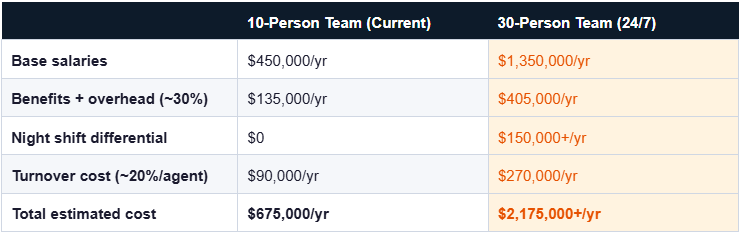
Estimated costs based on $45,000 base salary per agent. Night differential and turnover figures from industry averages.
And even if you somehow made it work financially, you'd still be fighting a losing battle, because humans aren't built for constant alertness. Night shifts erode focus. Rotating schedules burn people out. The best people? They quit first.
Using AI chatbots for 24/7 customer support
So if you can't hire your way there, what actually works?
The answer the data consistently points to, across industries and company sizes, is AI chatbots. Not as a cost-cutting shortcut. But as the infrastructure layer that makes round-the-clock support operationally possible for teams that aren't built like Amazon.
And the numbers make a pretty compelling case before we even get into the how.
According to Tidio, 62% of consumers would rather interact with a chatbot than wait for a human agent, especially when their question is straightforward and their time is short.
Zendesk's CX Trends Report found that AI-powered agents now achieve resolution rates of around 72% — meaning nearly three-quarters of incoming support conversations can be handled start-to-finish without a human ever getting involved. Gartner goes further, predicting that by 2029, AI will autonomously resolve 80% of common customer service issues without human intervention.
On speed, the metric we've established is everything. IBM research shows AI chatbots can reduce average response times by up to 99% in scenarios where customers previously waited hours for a reply. Ninety-nine percent!
And the cost math finally starts to work. Forrester data shows that companies deploying AI in customer support see 30–40% reductions in support operating costs. Mind you, not by firing people, but by redirecting human effort to where it actually creates value.
The new benchmark for 24/7 customer support using AI chatbots
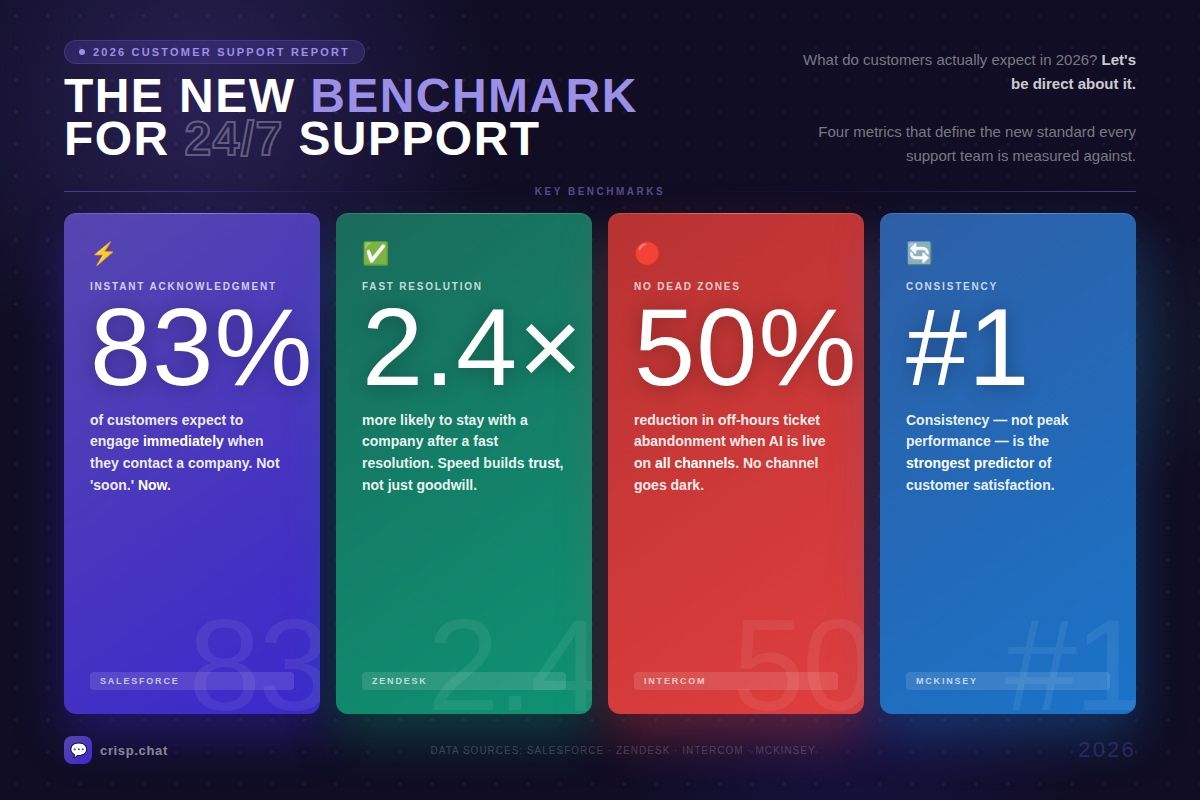
So what do customers actually expect from support in 2026? Let's be direct about it.
1 . Instant acknowledgment on every channel, at every hour
The expectation isn't "soon." It's now. Salesforce research found that 83% of customers expect to engage with someone immediately when they contact a company, and "immediately" in a digital context means seconds, not minutes. When a customer sends a message and gets silence, they don't assume you're busy. They assume you're not there. AI chatbots eliminate that silence entirely. Every message gets a response, at 2 AM on a bank holiday just the same as 10 AM on a Tuesday. That first acknowledgment, the signal that someone received their message and is working on it, is often enough to stop frustration from escalating into churn.
2. Fast resolution or, at a minimum, a clear path to one
Acknowledgment buys goodwill. Resolution builds trust. Customers aren't just looking to be heard; they want their problem moved forward. Zendesk data shows customers who receive fast resolutions are 2.4 times more likely to continue doing business with a company than those who don't. AI chatbots handle the high-volume, low-complexity end of the queue (the billing questions, the how-tos, the account lookups) and resolve them end-to-end. For the cases that need a human, the AI hands off a fully summarised, already-triaged conversation so your agent can skip the intake and go straight to solving. Speed doesn't drop. It compounds.
3. No dead zones, no channel that goes dark
Dead zones are where customer trust goes to die. A live chat widget with no one at the other end at 6 PM. An Instagram DM that sits for 16 hours. An email that gets an auto-reply promising a response "within 2–3 business days." Each one of those is a signal to your customer that you're only available when it's convenient for you. Intercom found that companies using AI chatbots across all channels reduced off-hours ticket abandonment by over 50%, because customers who get a real response, even from an AI, are far less likely to give up and go looking for an alternative. AI chatbots don't have dead zones. They're live on every channel, all the time, by design.
4. Consistency, the same quality at 3 AM as at 3 PM
This one's underrated. Customers don't just want fast. They want it reliably fast. A support experience that's excellent on Tuesday and nonexistent on Sunday trains customers to distrust you even on the days you're performing well. McKinsey research shows that consistency in customer experience is a stronger predictor of customer satisfaction than peak performance. This means a team that's solidly good every hour beats a team that's great sometimes and gone the rest of the time. AI doesn't have off days. It doesn't have bad shifts. It doesn't respond differently at hour one versus hour eight. The quality your customer gets at 9 AM is the same quality they get at midnight, and that consistency is itself a form of brand trust.
The companies closing the gap on all four of these aren't necessarily the biggest or the best-funded. They're the ones who stopped treating AI as a novelty and started treating it as infrastructure. Brands like Klarna reported their AI assistant handled two-thirds of all customer service chats within its first month of deployment — doing the work of 700 full-time agents, with customer satisfaction scores matching their human team.
That's the benchmark. And it's achievable without a team of 700.
But remember: a lot of customers are never going to scroll through a 67-article help center at midnight. They want to ask a question and get an answer. That's what AI chatbots do; they meet customers where they are, in the channel they're already using, at the moment they're already frustrated. The heavy lifting belongs there.
The hybrid model: three layers for 24/7 customer support experience
How to set up an AI chatbot for 24/7 support
Getting from "we should do this" to "this is live and working" doesn't have to take six months. Here's a practical four-step path.
Step 1: Audit your queue and identify what to automate first
Before you configure anything, pull your last 30 days of ticket data. Sort by volume. Find the top five inquiry types — the questions your team answers on autopilot because they've seen them a thousand times. Those are your first automation targets. For most teams, this will be some combination of billing questions, password resets, account status checks, basic how-tos, and error troubleshooting. Whatever's at the top of that list is where your AI chatbot needs to start. Don't try to automate everything. Automate the 20% of question types that represent 80% of your volume.
Step 2: Train your AI on your actual knowledge
The difference between a chatbot that frustrates customers and one that actually resolves things comes down to one thing: what it's trained on. A chatbot running on generic decision trees is a dead end dressed up as help. A chatbot trained on your knowledge base, your past conversations, your product documentation, and your actual support policies? That's a different tool entirely. Connect it to your help centre. Feed it your most common resolutions. Let it learn from real interactions over time. This is where platforms like Crisp and their AI agent Hugo are worth looking at. It's a great solution designed to sync directly with your existing knowledge and CRM, so it's not guessing at answers. It's pulling from what your best agents already know.
Step 3: Deploy across every channel, not just your website chat
Your customers aren't just on your website. They're on Instagram, WhatsApp, Messenger, email, and wherever else your brand has a presence. A chatbot that only lives in one widget isn't a 24/7 solution; it's a partial fix. The goal is unified coverage: one AI layer that manages conversations across every channel, with the same training, the same tone, and the same escalation logic everywhere. Crisp's inbox does exactly this, pulling in messages from every channel into one place, with AI working across all of them simultaneously.
Step 4: Build your escalation path before you go live
This is the step that determines whether your AI builds trust or destroys it. Every conversation your AI can't resolve needs a clear, seamless path to a human.
That means: AI detects it's out of its depth → summarises the conversation → routes to the right inbox → sets a clear expectation with the customer about when they'll hear back. No dead ends. No "I'm sorry, I can't help with that." Just a clean handoff that keeps the customer informed and keeps your team ready to pick up where the AI left off.
Done right, this isn't a months-long transformation project. Teams using tools like Crisp and Hugo report getting their core automation live within a matter of days, because the infrastructure is already built. You're just teaching it to sound like you.
FAQs for support leaders
How quickly can we go from partial to 24/7 coverage?
Days, not months. Connect your knowledge base, train on your top ticket types, set your escalation logic, and switch it on. Tools like Crisp's Hugo are built to get you there fast.
Will 24/7 AI support replace our human team?
No, it protects them. AI handles the overnight volume so your agents aren't burning out on night shifts. When they clock in, the queue is triaged, context is attached, and they focus on the conversations that actually need them.
Do customers actually prefer talking to a chatbot over a human?
62% say yes — as long as it's fast and doesn't dead-end them.
What happens when the AI can't resolve something?
It escalates. Summarises the conversation, routes it to the right person, and tells the customer when to expect a reply.
What kinds of issues can an AI chatbot actually resolve on its own?
Billing, password resets, order status, how-tos, account lookups, roughly 70–80% of daily ticket volume. The complex stuff gets routed to a human automatically.
How quickly can a business get AI-powered 24/7 support running?
Days. Connect your knowledge base, set your escalation logic, and start with your top five ticket types. Platforms like Crisp make this straightforward.
Sources
Zendesk, "CX Trends 2026 Report — 74% of consumers now expect customer service available 24/7, 88% expect faster response times than a year ago", https://cxtrends.zendesk.com/
Zendesk, "2025 CX Trends Report — human-centric AI drives loyalty", https://www.zendesk.com/newsroom/articles/2025-cx-trends-report/
Salesforce, "State of Service Report, 6th Edition — AI adoption, revenue generation, and rising customer expectations", https://www.salesforce.com/resources/research-reports/state-of-service/
Salesforce, "Customer service statistics 2024 — key findings from the State of Service report", https://www.salesforce.com/news/stories/customer-service-statistics-2024/
Klarna, "Klarna AI assistant handles two-thirds of customer service chats in its first month", https://www.klarna.com/international/press/klarna-ai-assistant-handles-two-thirds-of-customer-service-chats-in-its-first-month/
SuperOffice, "25 live chat statistics — average wait time is 2 minutes and 40 seconds", https://www.superoffice.com/blog/live-chat-statistics/
PwC, "Experience is everything: 60% of customers will leave after one bad experience", https://www.pwc.com/us/en/advisory-services/publications/consumer-intelligence-series/future-of-customer-experience.html

Inside Hugo: How Crisp Built an AI Customer Support Agent
Discover how Crisp built Hugo, an AI customer support agent designed to automate support conversations. A behind-the-scenes look at how a 10-year-old SaaS rebuilt parts of its platform to adapt to the AI era.

Scaling Multilingual Support to New Countries with AI Chatbots in 2026
Supporting customers in 5 languages through human agents costs hundreds of thousands a year. An AI chatbot covers 85+ languages for a fraction of that — with faster responses and consistent quality. Here's the full breakdown.

Automated Customer Service: Examples and Advantages in 2026
Hiring more agents isn't the answer. Discover how AI-powered automation helps support teams handle more conversations, cut costs, and keep customers happy — without growing headcount.